
There are lots of little things you can just adjust. Check under Configurations | Advanced | Playback, Recovery, and Streaming. What you might need is so local host system specific that offering what anyone else has set wouldn't be useful.
v1.11.1 is out - should address the issue for docker folks…apologies. 
And for Windows users
Updated Linux Docker and all appears to be working. Thanks!!!
That helped a bit. Do you have recommended values to get it working more consistently?
Thanks!
1 Like
PrismCast v1.12.0 is here. Two headline features in this release:
Every quality preset on every display. Every capture page now renders at the quality preset you've chosen, whatever the size of the display or browser window behind it. A headless Mac mini, a Docker container, or a machine with a small monitor now captures at full preset resolution. The 4K preset works on any hardware, streaming sites serve their best rendition because their players see a full-size viewport, and the settings dropdown offers every preset without caveats. No more SCREEN_WIDTH juggling in Docker, no more borrowing a 4K monitor to get set up, and no more multi-step resolution guides...thanks to @chDVRuser and @JWIII for walking so many people through the old workarounds. One caveat: Chrome still needs a display to render into. macOS works without a monitor, and Windows and Linux servers still need a dummy plug or virtual display adapter, but the resolution of that display no longer matters. If your display is smaller than the preset, PrismCast notes it once at startup and captures at the preset anyway. Login mode is the one exception: it uses the browser window's own size, so signing in to your TV provider looks and works exactly as before.
Chrome 149 and later work out of the box. Chrome tightened how it loads unpacked extensions, and a Chrome auto-update could stop PrismCast with "Capture system verification failed." PrismCast now marks its own Chrome profile as trusted at every launch, so the capture extension loads the way it always has. No Developer Mode toggle, no patched files, and no need to keep Chrome pinned at 148. Thanks to @daldana7296 for the community patch that kept a lot of people running in the meantime, and to @KineticMan and @chDVRuser for asking to have it automated. If you froze Chrome's updater, it's safe to let Chrome update again.
Beyond the headlines:
- In-app upgrades on Windows - clicking Upgrade in the web interface now hands the install to the same detached helper the command-line upgrade uses. The helper waits for PrismCast to exit before installing, so Windows file locks stay out of the way, and the upgrade toast tells you what actually happened, including where to find the helper's log.
- Instant stream startup with a system FFmpeg - if the bundled FFmpeg download didn't complete during installation, preroll generation now uses the FFmpeg already on your PATH, so you still get video within seconds of tuning.
As always, I really appreciate the feedback, enthusiasm, and passion around PrismCast. Almost every feature added since 1.0.0 has come from thoughtful, respectful discussion with this community.
My only ask is simple: please be kind, not demanding. PrismCast started as a project for my own needs, and I share it because I enjoy this community and wanted to give something back. Respectful feedback is always welcome; entitlement is not.
Thank you to everyone who's shared encouragement or joy in using PrismCast — it genuinely keeps this project fun to work on.
One more note for everyone's benefit: please don't repost the same questions in this thread. Many of them have already been asked and answered, and the forum's topic-only search works well. Keeping discussions focused helps everyone. Please treat the thread and each other with the same consideration you'd expect in return.
1.12.0 (2026-08-24)
- New feature: every quality preset on every display - each capture page now renders at the quality preset you've chosen, whatever the size of the display or browser window behind it. A headless Mac, a Docker container, or a machine with a modest monitor captures at full preset resolution, with no dummy plug, no screen-size environment variables, and no borrowing a 4K monitor to get things going. The 4K preset works on any hardware, streaming sites serve their best rendition because their players see a full-size viewport, and the settings dropdown lists every preset without caveats. Login mode keeps using the browser window's own size, so signing in to your TV provider looks and works exactly as before. If your display happens to be smaller than the preset, a one-line note at startup lets you know and confirms that capture is unaffected.
- Fix: capture keeps working on Chrome 149 and later - Chrome has tightened how it loads unpacked extensions, so PrismCast now marks its own Chrome profile as trusted at every launch and the capture extension loads just as it always has. No Developer Mode toggle, patched files, or pinned Chrome version required.
- Fix: in-app upgrades complete cleanly on Windows - the web interface now hands the install to the same detached helper the command-line upgrade uses, which waits for PrismCast to exit before installing so Windows file locks stay out of the way. The upgrade toast also tells you what actually happened, including where to find the helper's log.
- Fix: instant stream startup works with a system FFmpeg - if the bundled FFmpeg download didn't complete during installation, preroll generation now uses the FFmpeg already on your PATH, so machines that bring their own FFmpeg keep instant startup.
- Housekeeping.
5 Likes
Just upgraded to v1.12.0 and I've got Quality preset: 1080p-high (1920×1080), but the viewport being captured is smaller than that.
Here's YTTV BBC News as it's being captured
notice the right side and bottom are being cut off.
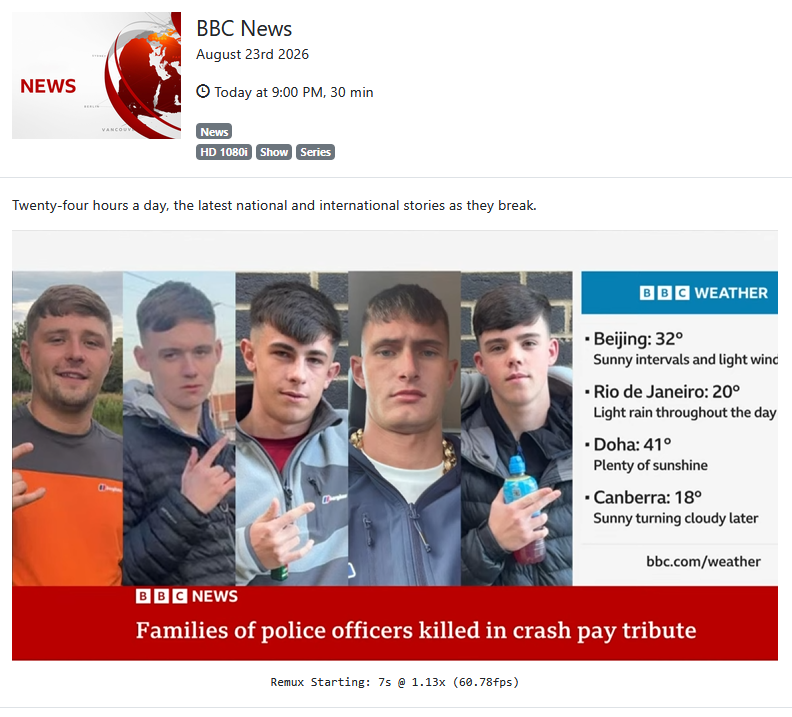
Here I adjusted the chrome window being captured to show where the edges are
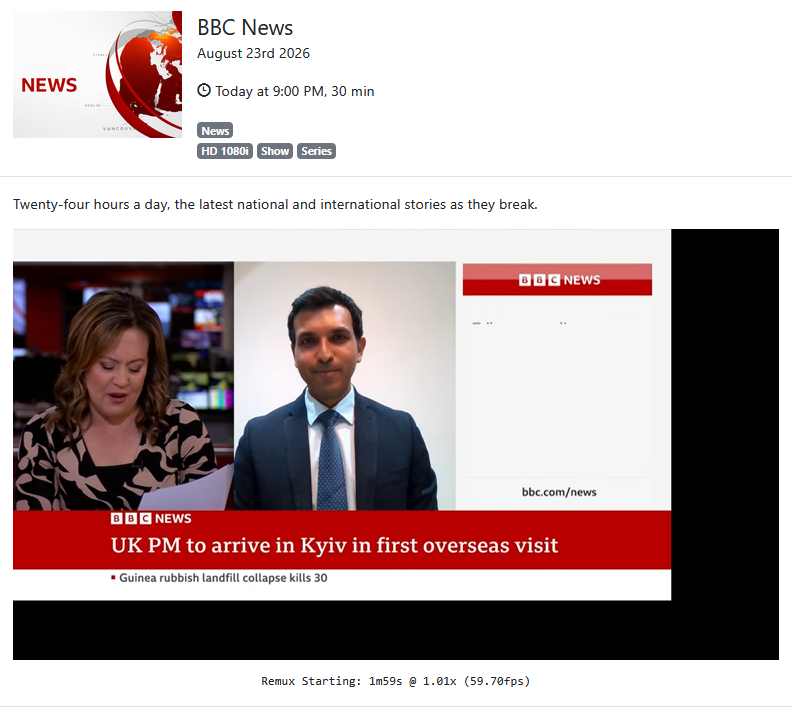
Did a couple prismcast service restarts and still seeing the same issue.
I'm seeing the same exact cutoff videos on the 1080p preset. Using a Mac Mini connected to a 1440p virtual display and did not see this issue until the latest update.
1 Like
I guess we're the only two that upgraded and noticed this.
It's happening to all channels that capture, not HLS direct channels.
I'm also running it on a Mac Mini, installed via brew and connected to a 4k display.
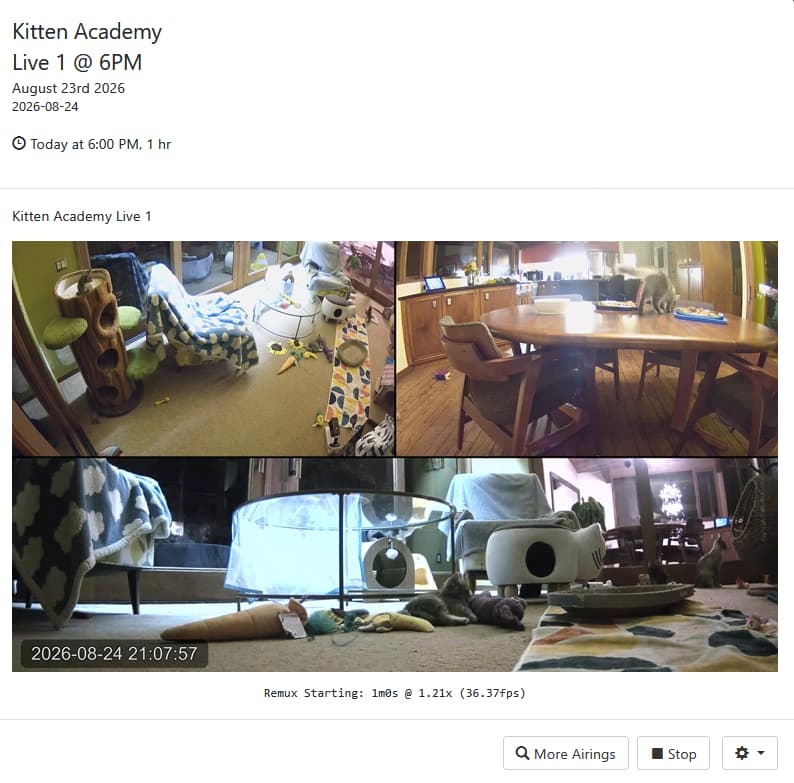
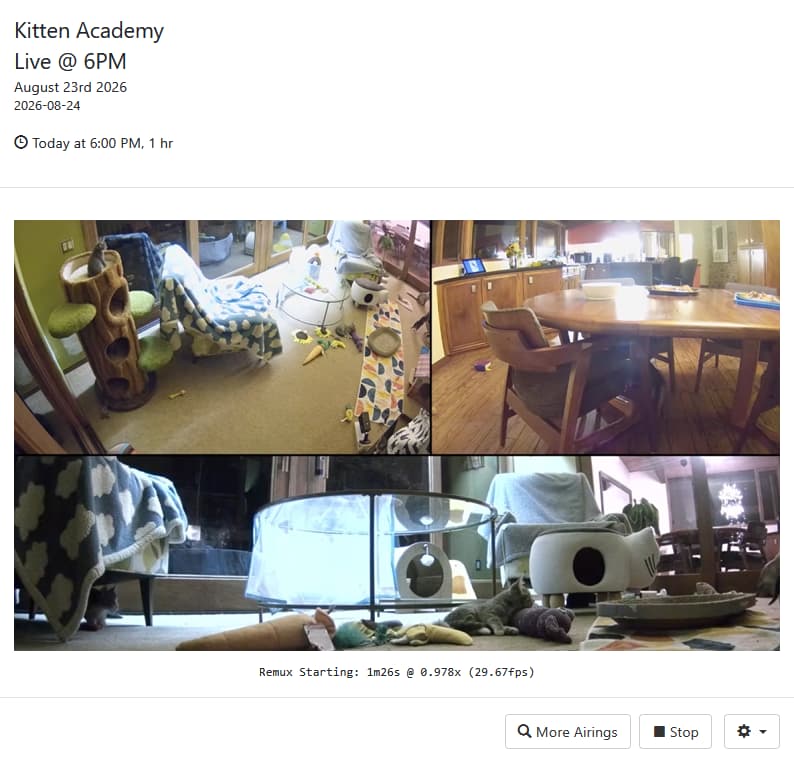
Here's the same Live YouTube channel (Kitten Academy)
Playing from SLM as source
Playing from PrismCast as source
1 Like
Does anyone have this working with Directv Stream? When I try to view a channel, Directv opens in Chrome but only shows the last channel watched. It doesn't change to the selected channel. Is there some special configuration for this to work with Directv? I'm running PrismCast on a mac mini M4.
Directv Stream
Mac Mini M4Pro
Just checked Hallmark using DTS on PrismCast - Tuned with no issues.
Correct. The issue only applies to screen-captured recordings, and if you’re recording multiple streams simultaneously, only the foregrounded one is actually impacted. Don’t need anymore references…I’m working through the issue and an update will be forthcoming. Ultimately the issue is quirks in Chrome…but stay tuned. I want to get the right fix out to everyone.
Thanks for reporting it.
Update: issue fixed and I'm finishing some additional testing and refinement before releasing an update at the end of the week/weekend. Sorry about the regression folks...I'm doing my best to ensure it doesn't recur.
Still not sure if some configuration needs to happen to get Prismcast to switch to selected channel. It just keeps closing and opening Chrome to keep trying then fails. I get this error in the logs. [2026/08/24 10:01:24.101 PM] e[31m[ERROR] [usa-72cv27] Stream setup failed for https://stream.directv.com: Channel selection failed: DirecTV guide grid did not load (no channel logos found).e[39m
[2026/08/24 10:01:24.125 PM] [usa-72cv27] Stream ended after 25s (setup failed).
[2026/08/24 10:01:24.125 PM] e[33m[WARN] Stream setup failed for usa: Failed to start stream.e[39m. Not sure what to check. Chrome does open when I click on a channel to view but doesn't tune to channel.
Thanks for the recent fixes. I haven't tried 1.12 yet and will probably wait for the next one. Definitely appreciate the in-app update feature so look forward to using it.
I have a couple of feature requests related to my recent posts (which were moved to another topic by someone) regarding persistent problems (if you can take a look, I'd greatly appreciate it, since I'm at my wits' end). Link to the thread: Need Help with PrismCast Crashes, Lock-Ups and Being Unable to Run It with the Latest Chrome in Windows 11
My requests:
- To warning and error messages that appear in logs, add concrete trouble-shooting suggestions (like change this or that configuration value or setting)
- Add a way in-app to stop/restart Prismcast. Since this is necessary to test different configurations, it would be a big help to be able to do the restart in-app instead of the more laborious process.
Thanks
I think I figured it out. The default URL is https://stream.directv.com. It needed to be https://stream.directv.com/guide. Also, the default channel names didn't match the channel names in the guide. Example the default channel name was AMC but in the directv stream guide is shows AMC HD. So, I can now tune to selected channels by fixing the url nd channel names for each channel. A little tedious to update all the channels but it works now.
Fox One is throwing errors despite it streaming normally. Here is the error:
Blockquote
[2026/08/24 09:13:01.924 AM] [WARN] [fox-6s8kpy] The channel for Fox could not be re-established: Channel selection failed: Station code WOFL not found in Fox.com guide grid.
[2026/08/24 09:13:01.924 AM] [WARN] [fox-6s8kpy] The token refresh for fox did not complete. Retrying in 300 seconds.
Blockquote
I have reauthenticated but stopped short of deleting Prismcast. Anyone else seeing this?
Are you a DTV customer, or DTV Stream?
PrismCast 1.12.0
Fox One authenticated successfully.
Custom channel:
URL: https://www.fox.com/live/channels
Channel Selector: FNC
Channel tunes successfully:
Streaming Fox News Test: Fox One, foxLive, native HLS,
H264 12.1Mbps 1080p.
~71 seconds later token refresh fails:
Channel "FNC" not found in Fox guide.
Available channels include FNC.
Station code FNC not found in Fox.com guide grid.
DTV but using DTV Stream.
That explains the differences you experienced. I just went through this with someone using one of the encoder-based projects. DTV and DTV Stream subscribers continue to have different guides and channel lists. I'll check with @hjd to see if he wants to add the DTV version of things to the standard offerings.
Given that DTV and DTV Stream limit the number of concurrent browser sessions to one, there has been somewhat limited interest in PrismCast from the DTV crowd. Since a DTV variant may not be in the cards, perhaps you could put together one of the custom "provider packs" to help out the next guy?
1 Like