
I recently had a change to the IP address assigned to my HDHR on my LAN. Channels DVR then spent the next day or two missing recordings as it seemed to be locked into the old IP address. I ended up having to assign the HDHR to the old IP address. Is this the expected activity for the Channels DVR Server?
The documents state “For best results, ensure that your HDHomeRun has a static DHCP reservation on your router.”
You know, I asked AI to look it up and it found the same answer that you did. On the other hand, my 20 year old SageTV server on the same computer seemed to adjust just fine.
Channels DVR supports multiple tuners and models. Knowing which one is witch is critical in multi tuner environments thus the requirement for a static IP.
The tuners are discovered only once, during the CDVR start apparently(?). You should have restarted the CDVR.
Most current routers will allow setting up an IP reservation (static) address.
Unfortunately, HDHRs don't allow setting a static IP in the device itself, so it needs to be done from a DHCP server (which most routers have).
I did that, multiple times, but didn't seem to have any affect. I did set up the reservation on the router once I realized that it had missed a bunch of NFL games on Sunday.
How many different brands of OTA tuners does Channels DVR support?
One in beta and one officially. Silicon Dust is the supported brand and they make A nice selection of tuners:
https://shop.silicondust.com/shop/product-category/atsc/
Wow, that is a LOT of one brand of tuners, right!
You can manually remove the HDHR using this:
Just make sure you are using your real server IP address and port.
To accomplish what you are looking for, I'd say to first disconnect your HDHR from network, After you do so, do the XDELETE and then immediately shut down the Channels server. After that, you can then get your HDHR back on network with the change in IP address. Finally, start Channels again. If all goes well, it should no longer remember the old HDHR and only discover the new one.
Just a heads up that you cannot use this method to permanently delete a discovered HDHR (believe me, I tried). If you remove a HDHR using this method and the server stays up, it will "re-discover" it again no matter what. The only thing you can do is disable the discovered HDHR, although it will still show up as an available source in clients and has to be disabled there. The request to change this behavior has been around forever:
This is what I do because I run everything, including my HDHR, through PLM:
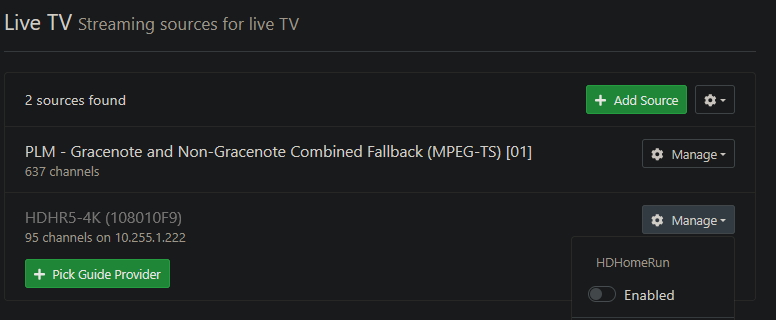
While in the past having multiple HDHRs would be an issue, that isn't the case anymore with Fallback Feeds. If all tuners are full on one HDHR, it will just move on to the next, based upon user priority and settings. I currently have five layers of backup for a local OTA station...
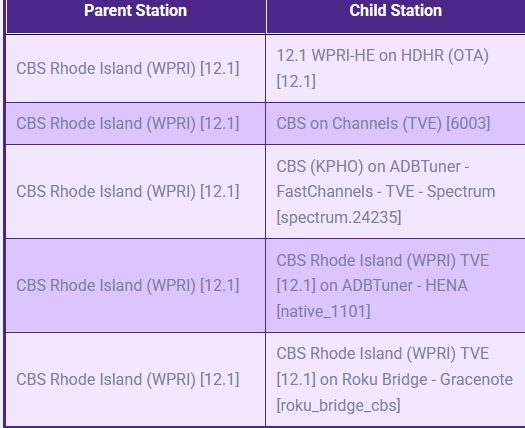
... but there's no reason I couldn't have more or different ones like another HDHR, PrismCast, and/or whatever else!