
Hey guys.
I need a little help, if it's been talked about please point me to it?
I added my iptv playlist. Got it all working with m3u4u to shorten the playlist. I love it. Now i have just a list of me favs.
But the one thing i couldn't get right is the logos. I am getting guide data from the iptv playlist, but the logo won't show the show playing but rather the channel logo, so like in the Now tab i have no way of knowing what's playing till i tune to the channel.
I tried changing the settings of the source to prefer logos from guide data, but that only changed some channel logos, but still not showing the show playing.
Any ideas how to fix this would be greatly appreciated.
Sounds like your IPTV provider isn't providing metadata that's adequately formatted for use in Channels DVR
I would suggest using Stream link manager along with Channels to handle logos etc.
Most of the iptv guide stuff is just trash. Nor worth my time.
Use iptv to get just the stream and map it in Stream Link manager.
If you have the playlist already created in an m3u, the playlist can be pushed in to SLM and you can use the tool to get your logos setup for channels.
I consier this a Channels users best friend.
Yes use SLM or one of the many other tools to manage your IPTV playlist.
Clone this repo for matching your TV logos
That would allow customization of the channel LOGOS, as well as replacing the functionality of m3u4u-
However to get better guide data, with accurate thumbnails for each show/movie listed, OP would need to use Channels as the XMLTV source, and not the IPTV provider, when setting up these "Custom Channels."
1 Like
Thanks for all the help guys. Ok this was the first time i ever heard of this SLM thing. So i finally figured out the installing part and got it running on my mini pc, same that's running the channels server.
But that's where i completely got stuck.
Couldnt figure out anything, i guess I'd have to import me m3u url. But i could not for the life of me figure out how to do that.
And i thought after figuring out the installing process that I'm home free. Lol little did i know......
But anyway, from the last response I'm thinking maybe there isn't even any point to me learning it. Cause if i can just map it to channels data I'm good.
My question about that though is, these iptv channels are mostly cable type channels, can i just select cable as the source to map to? Don't i need a cable login etc etc?
There is massive amounts of documentation/screen shots and videos on the Wiki that go through everything in detail. Just follow along there and you'll be fine!
1 Like
Yes, and your zip code, so the time zones line up.
No. This guide data is included in the cost of your Channels DVR subscription.
1 Like
Oh wow!! This is awesome! Finally got it working perfectly!! So i guess i have zero need for SLM thing, so I'll skip learning all that for now. I just mapped them all from the Channels Server settings page, and it works!
I was indeed able to use a cable or satellite provider, but problem was that they offered the local lineup of Channels. I have many from Canada, west coast, UK, etc etc. So it left too many holes.
But i was glad to see it can work this way. So i ended up finding a recommendation on reddit for a site that has all epg data, and let's you select a link for either a specific country or one for all sources. So i selected the all sources one, and was able to map almost every channel in my list. It's a little slow working with because how big the all sources file is. But was worth it.
I actually went to bed last night a little discouraged by it all, cause after working on this literally all day yesterday, and after finally mapping almost every single channel, it was working, but the data was full of holes, meaning every other half hour was empty, then data, then empty. But i could confirm at least that the data it was getting was correct (after editing many times to get em all right). So i had to leave it as is and call it a success, i figured its as good as it will get. I knew it isn't because of a bad source, cause earlier in the day when i started it all i was testing different providers offered by channels, cable, etc, and it was the same.
But today in the morning when i woke up, everything was loaded perfectly! No holes. My "On Now" page looks beautiful now.
Thanks for all the help guys. Really appreciate pointing me in the right direction
Yeah, when you switch things around like that, especially XMLTV sources, and have a large collection of channels integrated, it can take awhile for the database to fully update, and in the meantime you'll often see glitches like gaps and overlaps in the guide. At least that's been my experience, too.
If things get really wonky when you're doing that type of CDVR management, I've found the best bet is to just "Delete and Recreate Database" and then try to not think about it for a half hour or two while the whole thing gets set up fresh. I've just given it time, done/watched something else, and when I return later to the guide to check it, everything's looking good.
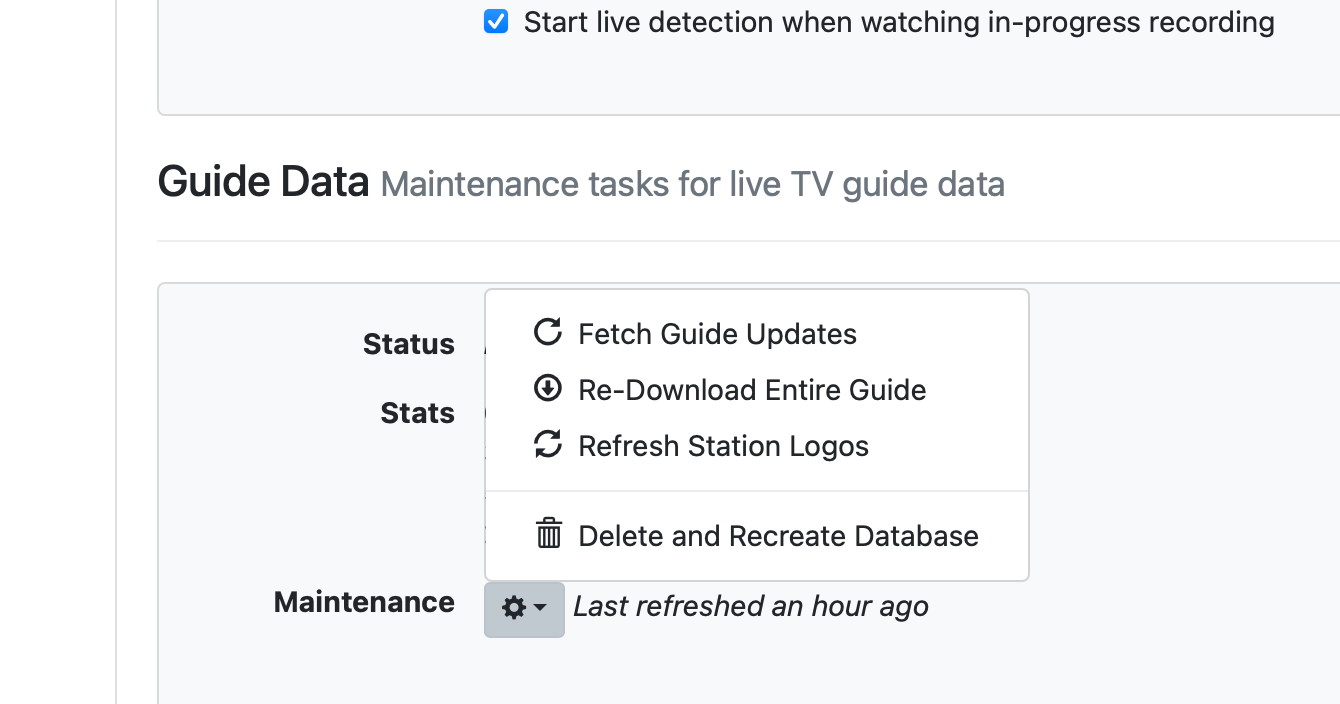
Enjoy!
Ye exactly what was happening to me. I guess letting it populate overnight did the trick for me.
I didn't use the delete option yet, if i do need to use it. Will i have to remap all channels again? Or it keeps that? Cause no way am i doing all this again. Lord help me please i don't have to
No, it just redownloads all guide data into a new database and discards the old one.
All your mappings, settings, etc. are preserved.
As with everything in Streaming Library Manager, you can just turn off anything you aren't using.
Otherwise, glad you were able to get everything set up to meet your needs!
There can be problems having multiple guides against one source where the channels forget what they are supposed to be. I find using m3u4u to separate out different territories and mapping the channel no to the guide channel no works better. Then I can have just one guide per source.
This topic was automatically closed 30 days after the last reply. New replies are no longer allowed.