Issues with splitters

I amped it after the first split, because otherwise it was a little too strong for the modem. (Also, my modem and rack holding the Primes were on different sides of the office.)

I had to spend a weekend playing with the setup, moving the splits and amp to different locations in the chain in order to find what worked best. I am not a network engineer by any stretch, so I just had past experience and trial & error to guide my setup.

(Of course, now that I'm transitioning from cable to OTA, all of that work was for naught, but oh well ...)
I have one of these things that my FIOS installer gave me once at my old house. I wonder if it would help.

It's not a splitter, it's more just a line amplifier. I wonder if I should put this on the line that's running down to my basement.

That might work. I can't honestly say, because I haven't really used MoCA, so I'm not certain what effect the network transmission places on the lines.

Sorry, mistyped, meant to say move the HDHR's to the garage, where your feed is to avoid the splits between MoCA

Yes because you are amping a cleaner signal.

1 Like

I agree, I would move the Primes and Quartro to the garage and eliminate one split with a larger splitter maybe even powered such as this: https://www.amazon.com/dp/B002M1EPL0/ref=twister_B00C9UJLOU?_encoding=UTF8&psc=1

I may be missing something here but the OTA UHF TV spectrum is 470 mhz to 700 mhz
at least one of the moca bands uses 500-850 MHz
since they are on the same coaxial cable, there may be some interference.

I don't use an antenna.

I just saw the Quatro and assumed

The Quattro can also decode ClearQAM signals ... the problem is that very few cable providers offer unencrypted channels any longer.

Any updates?

That amp I had seemed to be what it said, a filter. When running the line through it, moca seemed to be lost.

I plugged the line in at the rack into the moca adapter and used the out to go to the splitter. It looks like the HDHomeRuns are behaving the same though.

1 Like

Maybe try moving the HDHRs to the garage?

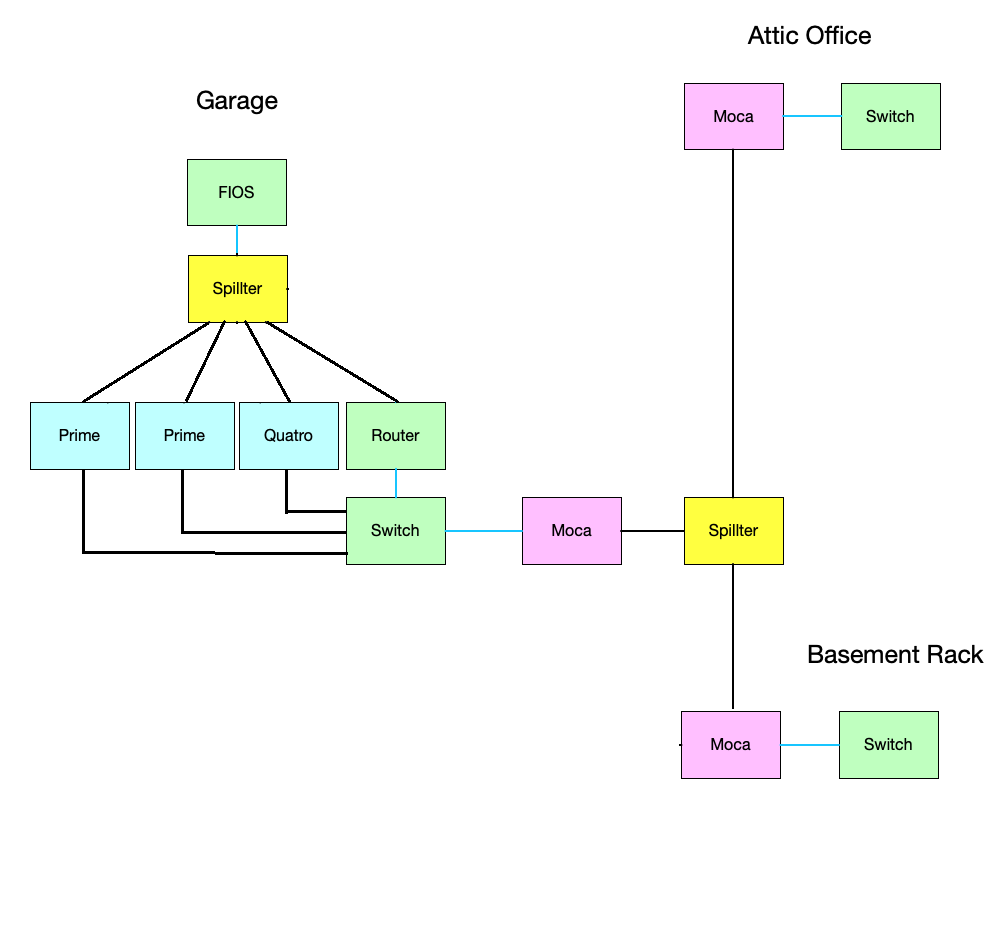
Don't you think this layout makes more sense?

1 Like

It's bad enough I have to have my router in my garage, I was trying to not have 3 tv tuners mounted up there too, and have them live in this monster rack I built :upside_down_face: I'd also rather them over a single hop of ethernet to my server, vs the Moca hop.

Then, is there any way you can put everything in the basement and just use the Moca to bridge from the basement switch to the attic switch? Drill a small hole from garage to basement if you need to run a second coax cable from the FIOS box to the splitter in front of the router/HDHR tuners?

It's funny how different people make different decisions of how to do things. I'd rather spend a couple hours drilling a few holes and running a few tens of dollars of Cat5 cable than plunk down $200 on a bunch of moca adapters to use the existing wiring. :slight_smile: Then again, maybe you don't own the property and you don't have that luxury.

1 Like

I'm the same way, ran wire everywhere I could in my house, through many difficult areas. My wife is keenly familiar with "fishing" now, having helped me pull lots of the wire.

1 Like

The moca has nothing to do with catv. It’s the network backhaul of my house. As I said in the OP, I use it to get my network to the basement and attic, as I can’t run Ethernet to them easily.

This looks good to me. I have all my HDHomerun units in the basement attached to a switch and the moca on the same switch going to a 3 way splitter outside ... Then I have a moca upstairs attached to a switch which also has my synology router attached to the switch for Wireless..... along with a Comcast Modem. My Storage is also all in the basement where my Servers reside.

I also have a Filter, MoCA POE Filter for Cable TV Coaxial ... where the Cable is coming to my house.