
Running server on Mac desktop. Updated to latest software. Rebooted computer. Unplugged and replugged Hard Drive. Get daily errors for interrupted recordings on almost all programs on both antenna and TVE channels. Redownloaded guide and updated TVE by removing and readding. Have 6 tuners. Extend and Quattro. Have a WD My Passport reformatted hard drive. Thinking of replacing Drive. Any other ideas?
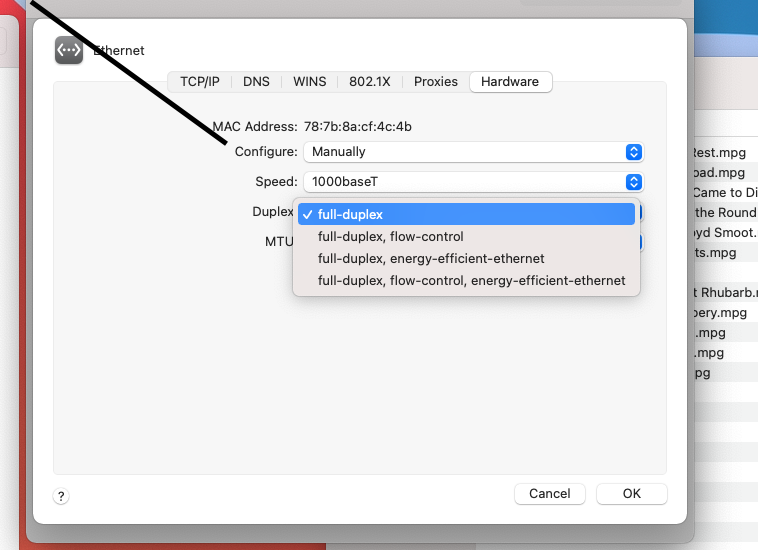
Be sure that flow control is turned off under Ethernet settings.
You’ll likely want to review the log on the DVR web ui at the times these recordings are happening. Any issues encountered are logged there, and will give you a clue as to what the problem is. If it’s not apparent you can submit diagnostics from the DVR to have the Devs take a look or copy and paste the errors here and the community may be able to help you diagnose the problem.
Ok I’ll do that. Currently I’m attempting to transfer the dvr files to the new hard drive but it’s taking forever. I’m really hoping it’s not my Mac. It’s a 2015 model I think so I hope that’s not too old.
I don’t see any option for Ethernet settings. I’m on Google chime on a Mac. Any idea where I can find it?
Flow control, i thought i read here is a Windows only issue.
I found a couple of old threads where the devs had mentioned it for a mac fix. I had the same issue with 'interrupted' recordings on my mac mini and seems to be fixed.
Actually it's a Mac setting, not a Channels setting. I have a Mac Mini running Big Sur and it's under "System Preferences..." --> "Network" --> "Ethernet" --> "Advanced..." --> "Hardware" --> "Duplex" and mine is set to "full-duplex". No guarantees but I used to get those interrupted errors and now I don't. I also moved my HDHomeRuns and Mac to be on the same switch.
Flow control is not duplex. The flow control setting that was referenced was Windows specific.
Ah, thanks for the clarification.
Thanks for your help thusfar. Looks like there is an issue with the MyPassport drive. Not surprisingly I am trying to run Carbon Copy Cloner but it keeps failing because the drive is faulty. I’m not sure what else to do. I already lost my drive recordings once. I really don’t want to keep that bad drive attached to my usb hub if it’s just going to sit there. I can try to put some files on dvd but I know that could take a while. Any other options?
If the drive is confirmed bad, you have found the issue. Replace it.
What’s the best way to transfer files to the new drive in this case. I tried copy and paste and CCC. I don’t want to lose these files.