I imagine you have to SSH into it and swap a file out?
I believe the root password is linkpi.cn.
This GitHub page has a ton of info.

I imagine you have to SSH into it and swap a file out?
I believe the root password is linkpi.cn.
This GitHub page has a ton of info.
Is there a POE model for the 5 HDMI port version?
20251130 is out
Updating to firmware version 20250228 or earlier will disable the FRP service.
For system versions older than 20250630, updating this firmware will overwrite the configuration information on the [Live Streaming] page. Please back up your streaming information beforehand.
Updating this firmware will disable the remote control function. Please manually access the remote control configuration page to enable the remote control function.
Added support for a second remote control. You need to switch the remote control used on the [Infrared Remote Control] page. The remote control function is disabled by default.
On the [Interface Input] page, the interaction logic for the USB camera section has been adjusted to be more consistent with other pages.
Under Extended Functions, a new [Serial Port Control] page has been added, allowing you to operate device functions via the serial port.
The original [Serial Port, Buttons] page under Extended Functions has been renamed to [Serial Port Passthrough] to better reflect its function.
The [Automatic Carousel] page has been moved under Extended Functions.
Optimized the issue where frequent plugging and unplugging of the device input interface might lead to increased memory usage.
Optimized Line input noise reduction effect.
Optimized the stability of the device receiving SRT streams.
Fixed the issue where AAC audio encoding with extensions could not be decoded correctly.
Fixed the issue where decoding NDI streams using buffer mode was ineffective.
Fixed the issue of abnormal loading of the WeChat Mini Program.
All models now support IPv6 addresses.
No POE model. Just purchase this splitter to convert. If memory serves me, it’s the 2.1mm.
Does 20251130 have the same problem reported in 20250831 with black levels?
Hmmmm - my LinkPi web UI won't work after this upgrade - may want to hold off for a bit
I updated and can get to my web UI. Granted I have barely changed any settings since I only recently got my LinkPi device. Using an ENC5-v2. Version installed is:
Sys version 4.4.0 build 20251130
I updated two units today and get to the WebUI on both.
Odd issue I am having
http://192.168.1.250/hls/stream0.m3u8
is the only link that works for the LinkPi in my setup
http://192.168.1.250/live/stream0 and http://192.168.1.250:8090/stream0 both fail to play
This is affecting the ability of ABTuner to work in my setup
All 3 links work just fine in vlc and all are set to play via MPEGTS in channels
I've seen this before. Try updating your firmware and then doing a factory reset and see if that helps.
http://192.168.1.250:8090/stream0 is the link you're going to want to use.
I feel like I am losing my mind.
It was already on the latest 4.4.0
Then I tried again. Works again in the ADBTuner preview button but doesnt work in channels again
Can you show a screenshot from what you have in Channels?
It seems like it just started working.
Not sure what changed.
If I have one tuner for a channel in channels with ADB, will it share that channel across end points?
And also, what are considered the highest quality settings that we can use for LinkPi encoding?
I've been fine with 10000 kbps VBR. H.264 High Profile. And the min QP and max QP set to default. My audio is set to AAC-256.
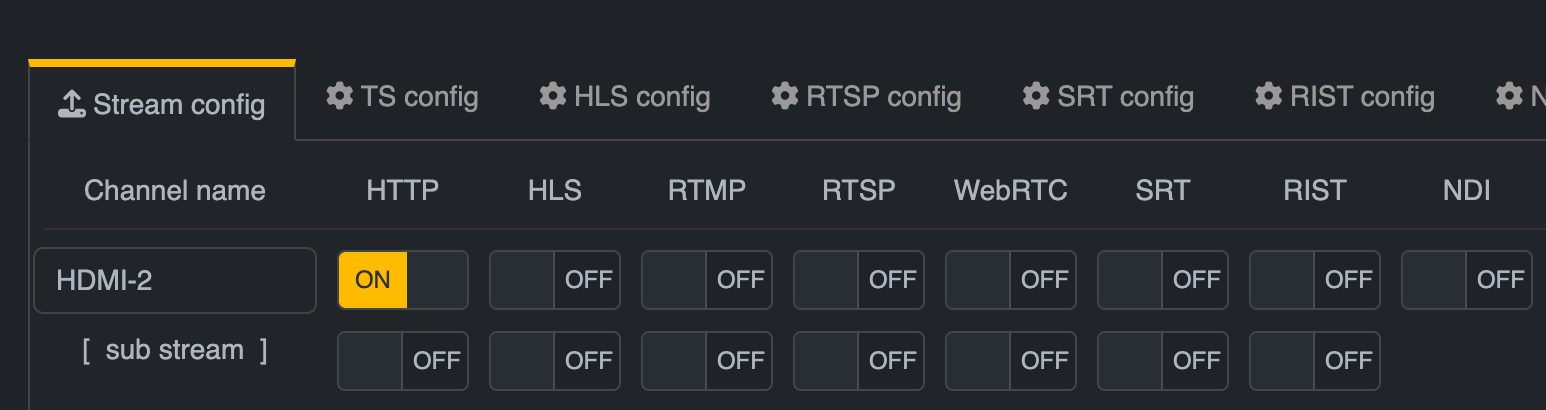
Do you have HTTP enabled for all of the HDMI inputs in the "Stream" tab in the LinkPi web interface? If only HLS works that might be the only enabled protocol.
If you could share a screenshot of the "Play URL" on this screen it might help us further troubleshoot your issue.
Yea I had this enabled, the factory reset seems to have fixed the issue for me
This exact thing happened to me where it wouldn't work and a factory reset fixed it.
Hi everyone! As I am not currently on my home network, I am not able to use the local network ip address to access my LinkPi GUI. Is there a way to access the LinkPi remotely?
You can use a VPN.
The easiest thing to do is set up Tailscale. You can install it on whatever server you're using for Channels DVR. Designate that server as a subnet router, then install Tailscale on your phone/laptop and you can access your LAN.
I was wondering about that. I have been using Tailscale for most of my devices for years. I never was sure about how to use it for devices which don't accept a client software installation. I'll try setting up a subnet on my Tailscale server, which happens to be the Synology NAS which hosts my DVR.
Up to now, the only way I have been able to get to the LinkPi when I am a way from home is to remote into my desktop PC and connect to the LinkPi from there. Tailscale will be a more direct way to connect.
Thanks for the tip!