
I am about to embark on using the LinkPi with ONN boxes and I have a question about picture quality. i.e. has anyone done a careful comparison of the picture quality between the output direct from the streaming box to the TV and the output from the stream as captured and encoded by the LinkPi. Do you see any picture degradation after going through the HDMI capture/encode then redisplay of the captured stream?
I haven't made that direct comparison. To me, I don't see much (any?) difference between my TVE and LinkPi recordings. However, I will say that I had video stuttering issues when I tried to push too much at once through my LinkPi. I'm running three onn 4k boxes and three Roku 4k streaming sticks into a LinkPi ENC5-V2. After making some minor adjustments to framerate for all my tuners, I'm quite happy with the picture quality.
1 Like
I guess I'm happy I got separate, smaller LinkPi encoders.
It costs way more money, but I have no issues running 1080p 60 frames per second through 6 tuners.
It wasn't intentional, I just kind of scaled over time.
1 Like
Yeah, on the ENC5 with six 1080p tuners, I'm maxed out around 45 fps. It handled 5 tuners at 60 fps with no problems.
As an old retired fella on fixed income, I have to carefully stretch my dollar as far as it will go.

3 Likes
I mean, if I went with cheaper USB Capture cards it would have been about the same cost for an extra tuner.
Edit:
Actually no, still a little bit more.
My USB capture card was a whopping $13 at our local Walmart.
Does it output 60fps? If so can you share which one it is?
I doubt that it will output 60 fps. The description does not mention frame rate at all
https://www.walmart.com/ip/Vivitar-HDMI-to-USB-Video-Converter-with-Real-Time-HDMI-Video-and-Audio-for-Live-Streaming-Includes-USB-C-Adapter-Cable-Black/936344280
I have been meaning to switch to a better capture card but haven't chosen one yet. I tried one from Amazon which I had to return as it wouldn't work. I settled for the one from Walmart because it was cheap and available same day.
I think that I may have bookmarked some recommendations made through this forum. I'll dig around to see if I can find the links...
EDIT: I found this comment about USB capture made by @spammedeeper :
If you get a LinkPi and one of those USB capture devices keep in mind the chipset for the USB device should be MS2130/2131, not the older 2109. Also the quality of the USB capture will not be great, especially if you plug into a USB 2.0 port.
This is the one from Amazon I purchased and returned. It has the recommended MS2130 chipset and is USB 3.0. So, it should have worked. Maybe I just got a bum unit...
https://www.amazon.com/dp/B0DDC4VP67
Your in luck! I know a great DVR software that lets you start recordings 10s early 
I'm still on AH4C, but even shows without padding are right on time with my osprey's
GTV lets you control it via the home app or GTV app over IP. it says both have to be connected to the same wifi, but my streamer4k and ospreys are ethernet and never connected to the wifi. (wifi and scanning are off)
I think it'd be possible over tailscale, but my limited attempts so far haven't gotten anywhere.
I also haven't had time to learn what i'm doing with ts.
I use an Elgato Cam Link 4K and get great results.
2 Likes
It's a bit out of my "bargain basement" price range. But, I know that's a good one. I may simply scale my setup back down to 5 tuners and do without the USB capture input. Or, put a price watch on the Elgato device. Sooner or later, something new comes out to drive the price of older stuff down to where I can reach it.
Welcome to the club. I have tested multiple devices and providers around both ADBTuner and AH4C. I hope to help clarify some of your questions and support your listed goals.
Ethernet Connection - No doubt Ethernet makes for more reliable tuning. All of my Osprey Boxes are wired in and work flawlessly. You're spot on about the cost of adapters for an Onn 4K Plus boxes being more than a Pro. Where I have not experienced this issue, Android 14 had (has) quirks where it would drop ADB if you are using USB Ethernet. If Onn boxes are your choice, go with the Pro and save the headache of adapters for Ethernet.
Onn 4K Plus - Absolutely amazing for around $30. Though less RAM than the Onn 4K Pro, they are faster to tune. I have two setup as backup my main Osprey stack. To save on wires, they are connected via WiFi and have been stable. This allows just two wires, USB power and HDMI.
Tuning Speed - The tuning speed depends on a number of factors: the streaming app, whether you allow your streaming boxes to sleep and the latency of the network connection. YouTube TV is fast to tune on standard Google TV Boxes as the experience (deep linking) is baked into Google TV. For DirecTV, the Osprey boxes are quick as they are, again, ready to tune channels from the home screen. For these two examples, the best case is maybe five seconds to tune. Automating a link to open any other streaming app to display channels may be longer, possibly 10-15 seconds.
Channel Flipping - Being able to channel flip up and down is, sadly, not pleasant with any of the HDMI capture setups. This is what I miss most about TVE. If you do want faster tuning to flip, you can modify ADBTuner configs to not dump app/sleep after tuning is complete, leaving the tuner "ready" for next channel. We can help with this setup if you want to test.
Splitting Tuners in ADBTuner - I run two containers for ADBTuner, one for Onn 4K Plus boxes and one for Ospreys. This gives me two unique tuners in Channels. Since the Ospreys tune faster, they are higher priority tuners for my Apple TV live TV viewing. On the server side, where I don't care if recording tuning speed is slower, I let the Onn 4K Plus boxes have higher priority. This could technically be done in a single docker as ADBTuner can separate my two different apps (DirecTV App on Onn, Native Launcher on Osprey) into unique tuners via the Playlist feature. I just prefer the control of dissimilar hardware.
FIOS TV App - I don't remember anyone using FIOS app for deep linking in the ADBTuner thread, but Google says it's possible (AI is never wrong /s). We would have to test some deep linking to see how well it works with the FIOS App.
TLDR: Generally recommend Ethernet, but the Onn 4K Plus is a great value and has been fine on Wireless for me. Grab an Onn 4K Plus or Pro to manually test deep links schema for FIOS App via ADB. Share results in the ADBTuner thread. We are all happy to help.
Happy Streaming!
2 Likes
Oh, ADBTuner doesn't handle tuner count on its own? I assumed it would map N encoders to N tuners?
1 Like
@maddox get yourself a brick 5v power supply with enough amps to power all of your ONN boxes. The get a 1 to 4 (or greater) DC power splitter cable in 5.5 x 2.1mm (pretty sure that is the right size if memory serves). Easier than POE.
ADBTuner gives you ability to have multiple devices with priority in a single Container, and tracks when they are in use. Presented as a single source in CDVR, ADBTuner will manage selecting available streaming devices for each channel. I just separate into two containers as I run dissimilar hardware which have different tuning speeds. Apologies for any confusion.
Want to confirm before I go down a massive rabbit hole but does plugging in a Elgato Cam Link into the LinkPI ENC1-V3 4K work in creating a second input for a stream?
I currently have the broken picture below and when trying to stream to VLC it is also not working as well
1 Like
That happens sometimes. Either do a factory reset or update to the latest firmware version
20260130 is out
Fixed the SLS service memory usage issue.
Added support for TRTC streaming on SS524V100 series devices.
Optimized USB camera audio and video capture and reconnection functions.
Optimized SRT stream decoding for HI3520DV400, HI3521DV100, and HI3531DV100 series devices.
Optimized RPC service.
A brand new development mode is available, supporting the development of device audio and video applications using JavaScript, compatible with SS524, SS528, and SS928 series devices.
Note: The new development mode requires flashing the device and is not included in the upgrade package.
1 Like
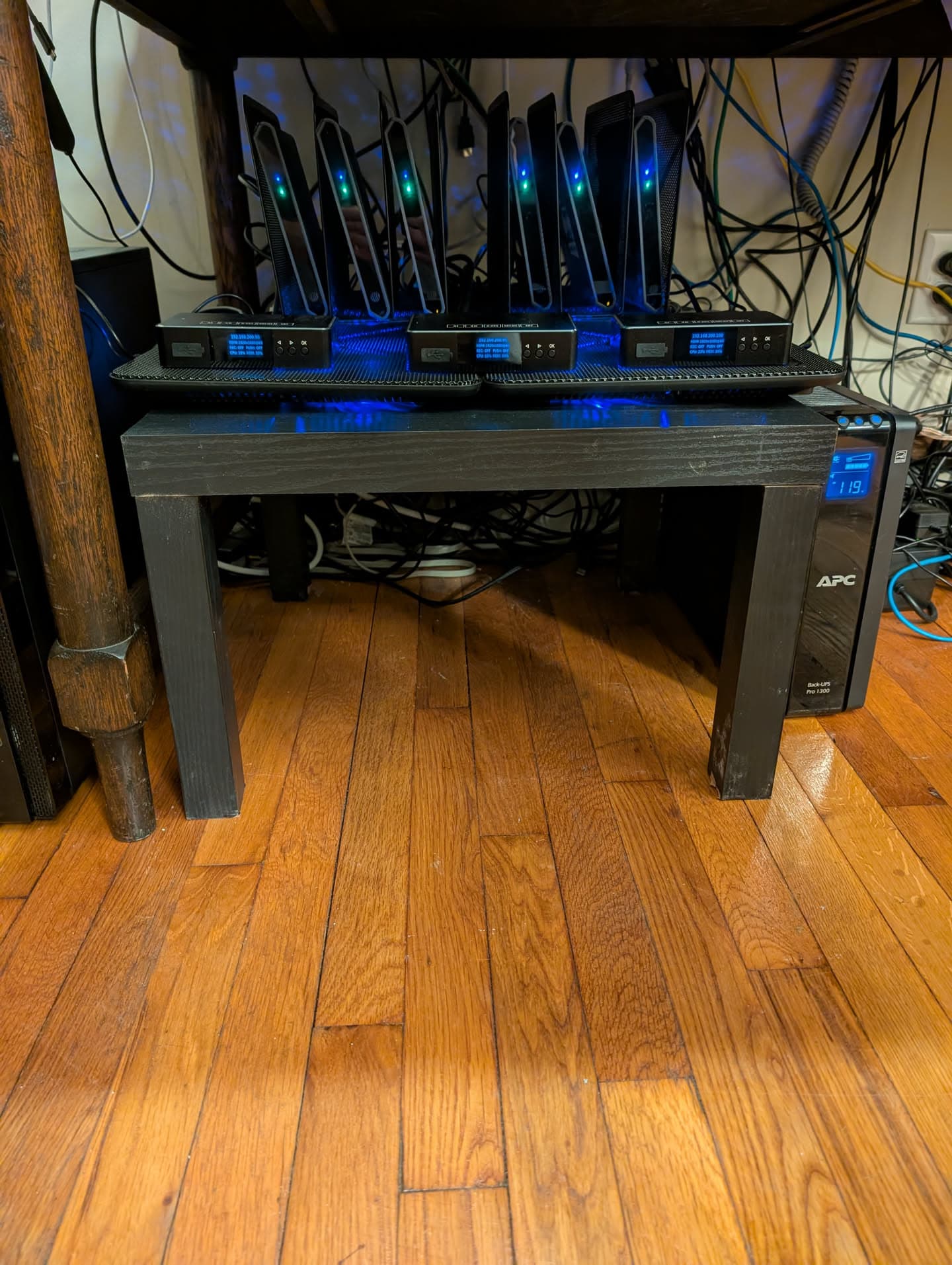
https://www.walmart.com/ip/Mainstays-Parsons-End-Table-Black-Oak/364717223
I picked up one of these tables from Walmart, hacked the legs off, and shoved it under my desk and it's working great to store my now much more important encoder stack!
Ha I'm using that for my coffee table and have an articulating laptop arm attached. 
I'll wait for pic til my 2nd linkpi comes this weekend and I get my 'rack' setup. thanks disney 