Mac Mini DVR Server Restart after Crash Reboot

Hi All – I have set up my ChannelsDVR server on a nice new Mac Mini, and have tried to bulletproof the install as much as my feeble server admin skills will allow. I have my machine set to not sleep, have no other unneccesary services or apps running, etc. I also have the machine plugged into a small UPS unit that'll keep it running in the case of a 5-15 minute power blip. My biggest outstanding concern is a graceful and unattended reboot after a power failure (I envision being away from home on a trip for a few days and still wanting to access the server remotely). I have enabled that "reboot after power failure" option in Mac OS System Settings, and have configured the machine to automatically log in as me and so forth.

My question is: does the install of ChannelsDVR also set or configure something at a deeper level, that automatically re-starts the ChannelsDVR service? Or, is there some command line or utility I should know about to handle this on an unattended restart? Admit, I have not tried yanking the plug to see what happens, thought I would ask first.

Thanks for any help in advance.
best time to find out is right after you set it up, so that way if there is a problem, your more likely to figure out how to fix.

1 Like

Exactly.
While you're there in front of it to see what happens, rather than wait until you're out of town to find out.

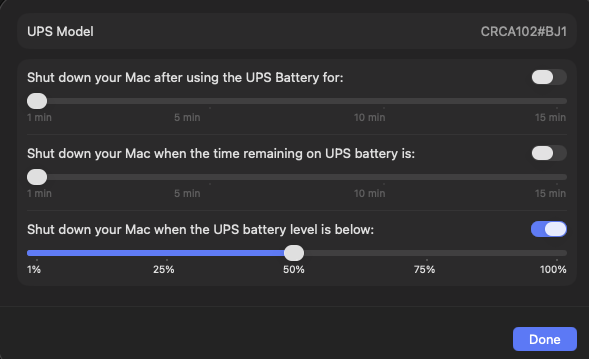
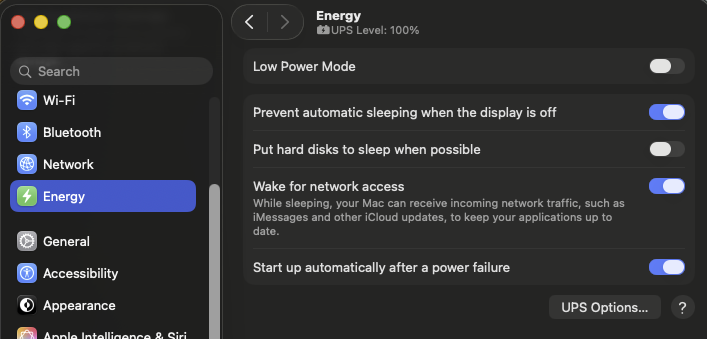
Pull the plug on the UPS to emulate a power outage. If the Mac Mini can interface with the UPS (usually via USB) and see when it's on battery, you can set it to safely shutdown until power is restored.


Screenshot 2026-01-24 at 20.39.01

If you choose more than one option, the Mac desktop computer shuts down when the first condition is met.

Just like testing a backup and restore. You're never sure what will happen until you try to restore from your backup.

You can also reinstall Channels DVR Server as a system service so it runs in the background and restarts on boot up.

Thanks! Can you elaborate on this?

1 Like

See the Install Notes https://getchannels.com/dvr-server/#macos

If you would like to run the DVR as a background service, open Terminal.app and paste:

~/Library/Application\ Support/ChannelsDVR/uninstall.sh && ~/Library/Application\ Support/ChannelsDVR/install.sh --system

Thank you. Will this overwrite or replace my current setup and config, or rather mean the server is always instated when the machine has booted?

No. It just starts the DVR Server service when your Mac boots up, instead of when your user logs in.

I'm new to Mac's, never used one until a couple weeks ago.
I don't like the idea of setting a user auto login on startup. There are things you can't use if you set that.

Yes, it disables stuff like password vaults, fingerprint ID and payments and such, but heck, it's a server.

Might be true for you, but I don't need to run Channels DVR on mine. I want to use it for other things. Maybe when it's old enough to not get OS updates anymore I'll consider it.

Thanks for your help today. I was fortunate enough to be able to use a well-endowed Mac mini as a dedicated server. I had been using an older, "busier" machine for a few months. I was getting weird glitches and incomplete errors for non-network (I think) conditions, and figured I'd do whatever I could to restrict this server to the business of being a DVR server only. So far, so good, but I feel like a filthy rich boy for being able to dedicate a fine machine like this to recording The X-Files lol.

1 Like