Manual Port Forward on UniFi with limited External IPs

UniFi has the capability to port forward a port (8089) but limiting the external IPs that can access the server. I have mapped 2 of my friend's IPs to access my ChannelsDVR.

I don't want to make the setting as "Any" IP since that opens the port to everyone.

With the limited IPs for this port forward I keep getting:
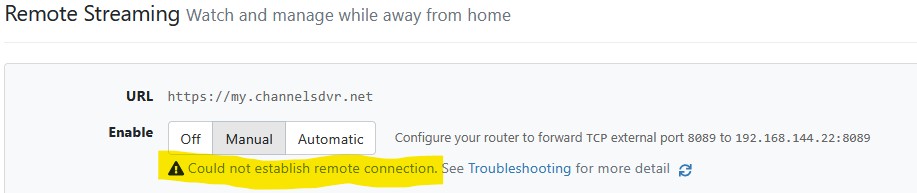
"Could not connect to 655ac57xxxxx.u.channelsdvr.net. Check if the port is mapped" since the ChannelsDVR system does not get through to my server.

What is the IP/IPs that ChannelsDVR uses for the above so I can set it/them in my limited IP list?
It’s your IP.

Channels doesn’t use middleware. It’s a direct secure connection from your client device to your server.

Yes, but what happens when setting up a client device for remote access? Is there not a verification from your servers to my ChannelsDVR server via the port forward for the verification process?
When my port forward is set to Any it works, when it is set to limited it does not since the IP is not white listed.

There is no middleware involved.

When you initially connect to your Channels DVR Server, authentication happens then, and it receives authentication information that it uses on subsequent requests to your server.

The network traffic happens from your client directly to your server. There is no cloud servers involved, so therefore the IP that the requests come from, is the IP address of the client device.

So no, your allow list strategy will not work, unless the IP from the client is the same every time. This might work for someone at home, but for someone on a cellular network, it would not work.

Agreed, the source IP can't change for external clients, and that works for my friends who access my ChannelsDVR server from a home network where the public IP remains constant. So having a port forward list with just those IPs enables access and provides better security than having port 8089 wide open to everyone.
It's the "Could not establish remote connection. See Troubleshooting for more detail" under the http://192.168.144.22:8089/admin/settings/general in my browser that I'm trying to establish a successful connection without having to open the port forward to the world.

Oh, that's from our health checks, and the IP it comes from isn't guaranteed to stay the same. You should just ignore the error. It's just fallout from your choice to limit IPS.

1 Like

Is that the same health check when I take a brand new device and set it up for remote access and I have to use my account credentials to authorize the new client setup? It also requires a fully open port.

Would be sweet to have the IP or even the subnet to keep access limited.

Thanks for your quick response. I love the system. Best DVR experience I've had.

When authentication happens, it happens from client to server. The only thing the server does is provide the dynamic host name to properly make requests to the server.

Again, there is no middleware in our Remote Streaming functionality.

1 Like

There is a health check that comes from our servers during initial auth. But its not any specific IP because it runs on a cloud service. But when you see that screen, there should be a link at the bottom to bypass and continue anyway.

While what you are doing functions, it requires adjusting firewall holes when an external client changes. Setting up a VPN which Unifi supports will be much easier and you will not have make changes except to add accounts.

This is the way.

I have a Wireguard VPN server set up for my iPhone and that works very well to access the ChannelsDVR as a local user. For a fixed device I really don't want a 24 hour VPN connection running from the Apple TVs.

UniFi in their last EA Network 9.2.79 has fixed the Port Forwarding to use a Network Object to list the limited IPs and that works very well. It used to be that a separate Port Forwarding entry had to be made for each IP. Now all I have to do is edit the Network Object to add an IP or to change it when the ISP makes a change. It's also very easy now to switch from Network Object list to "Any" IP for the period when health check needs to happen.

I appreciate the explanation for the health check for both scenarios discussed above. Now that I understand what is going on I can work with what we have. Appreciate tmm1's explanation on the use of health check and work around for setup authentication.

Thanks again for all of your responses and I hope this discussion will help others.

I finally used Packet Capture on my UniFi Network and refreshed 8089/admin/settings/general page 10 times. Then used Wireshark (first time user) to parse the resulting file to find 4 IPs that respond to the health check.

I added them to my Network Object for the limited IPs, and now the health check comes back 10 out of 10 times.

I won't publish them here to honor the company's policy.

Turns out that Channels changes the IPs for the health check every day, so not helpful.

Let me get this straight, you don’t want to port forward 8089 for channels(which is entirely safe as long as the server machine OS is kept updated) but you’re just fine with port forwarding for a WireGuard server?

You should check out Tailscale which has no port forwarding at all. Then you’ll be safe from the boogie man.

I do want to port forward 8089, but only for a specified list of IPs. Don't like having 8089 open to the world even though the end server might keep things safe.

As for WireGuard it is available for only a handful of clients, so also pretty safe. Also have firewall rules for WireGuard server to access only the few devices specified.

The Channels Developers do a great job yet to assume that they have not missed something that would allow the web interface to be exploited is a risk many are not willing to take. I don't believe they have third party code review and also penetration test the web interface, both important steps that should be taken if web site is to be left open to the internet. While the hacker probably would not gain system privileges, they could easily delete your recordings and/or insert a recording with a known or unknown exploit that would compromise the playback device.

This topic was automatically closed 30 days after the last reply. New replies are no longer allowed.