A picture pretty much says it all:
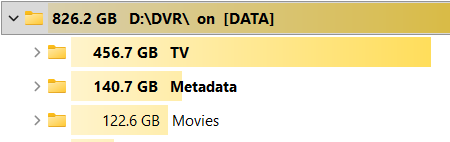
Obviously, I don't want to delete anything but just wondering if the data is compressed in any way.
I'm guessing the data is a mix of text and pictures so could the text be compressed to reduce disk space?

A picture pretty much says it all:
Obviously, I don't want to delete anything but just wondering if the data is compressed in any way.
I'm guessing the data is a mix of text and pictures so could the text be compressed to reduce disk space?
The Metadata directory contains the video indexes of recordings/imports.
There should be a couple .m3u8 files in each file# directory under Metadata/
You can view them in a text editor since they're just m3u8 files.
The folder may also contain additional metadata if you enabled Deep Video Processing under Library Database Settings.
What file browser are you using which gives you the size of each sub-directory like that? That feature could be pretty handy.
I'm using the free version of a Windows program called TreeSize. It's made by JAM Software.
Thanks! I'll give "TreeSize" a try! 
so the app its-self hasn't been updated for 10 years, but i've been using it for almost 20 and it does update the apps inside as available. lots of goodies for windows that I don't have to hunt down everytime on a new install.
This topic was automatically closed 30 days after the last reply. New replies are no longer allowed.