MeTV Toons + Philo + ADBTuner = Error

So my local market doesn't have MeTV OTA, but I have a Philo subscription for Food/HGTV channels (supplements Fubo at this point).

In trying to get MeTV Toons pulls in through ADBTuner (I have a dual tuner setup right now), I use the following to try and pull in:
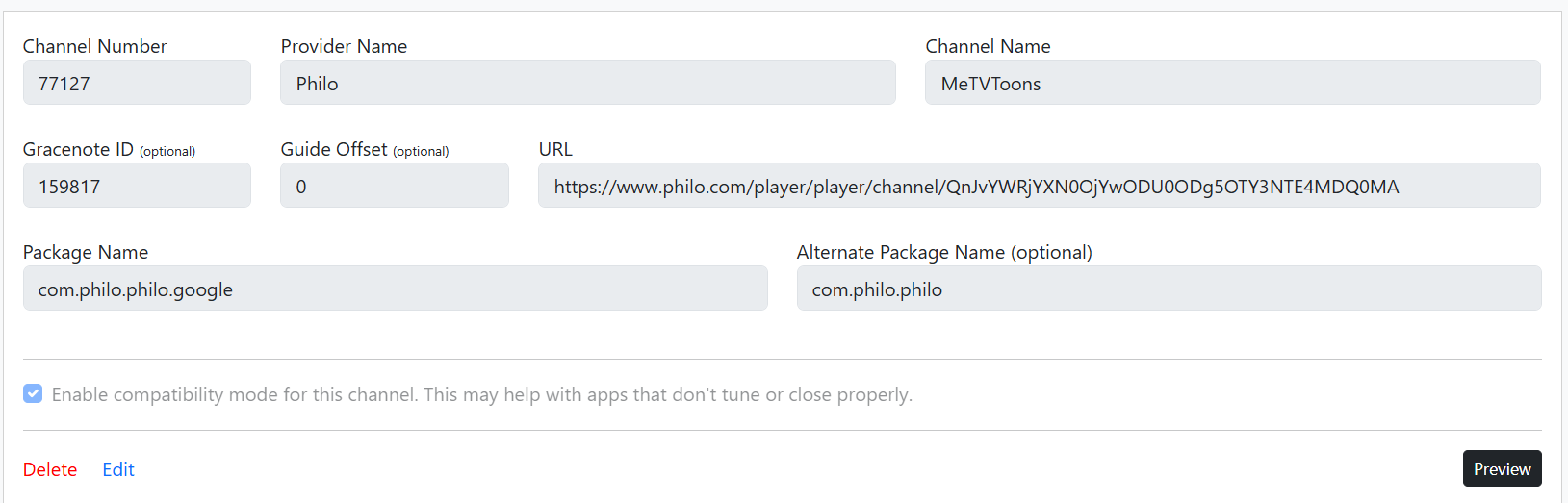
I pulled the URL from watching on the web and swapped out "broadcast" with "channel" in the link. I've also tried using with "broadcast". What happens is that when I tune in while watching concurrently (via Channels through ADBTuner along with watching on the web), it will work. If I close the Philo web stream and try again, usually if I try within 2-3 minutes of closing the Philo web stream, it still works. But after that, when I try and tune in again, I see the below:

I don't have this issue with MeTV or MeTV+, but just toons. I did pull the MeTV and MeTV+ from @wjcarpenter helpful json file download, but when I manually enter MeTV Toons as an additional channel, I get the above problem. It's almost as if MeTV is creating a dynamic link to access the channels as I've seen the web address change when I "retune" after a while.

Anyone have any suggestions on solutions or able to point out user error?

TIA.....Jay

I don't have a direct solution to your problem, sorry.

What I wanted to say is that you could avoid a lot of headaches if you simply subscribed to Frndly TV and used the docker in Channels. It's been working great and is all integrated in Channels.

Yes, that means paying a little bit more but what price do you put on a solution that just works and you don't have extra hardware to maintain?

Just my 2 cents. :wink:

IIjust tried using theADBTuner with my Onn box and the channel does work.
I looked at your link and all seems good but just in case, here ishthe URL i use for my setup.

1 Like

@jator

I believe you are accidently pulling the current show's code not the Channel code...
Here is the Channel Code for MeTV Toons...Q2hhbm5lbDo2MDg1NDg4OTk2NDg0Mzk4MTQ
In a web browser if you click the link that @rpaulmerrell links to above it uses the above code but right after opening it will change "broadcast" instead of "channel" and also change to the code for the currently running show...
You should get the channel code from clicking on the channel icon on the left of the guide instead of the current show.

Here is my url...
https://www.philo.com/player/player/channel/Q2hhbm5lbDo2MDg1NDg4OTk2NDg0Mzk4MTQ

Thanks ChannelSam, that appeared to be the issue.

This topic was automatically closed 30 days after the last reply. New replies are no longer allowed.