Missing Movies in content list

Good afternoon,

I have ChannelsDVR on my Windows Server 2022 machine. My media content is on my NAS device which is accessed via a network file share. I have both a Movies share and a TV shows share. I have pointed ChannelDVR to the respective shares and it has discovered my media. However, some of it is missing. I have rescanned the share and it still will not show up. For example, I'm missing Star Wars episode 4, 5 and 6. But all of the other Star Wars episodes appear. Everything uses a standard naming convention via FileBot scripting (example - Star Wars Episode V - The Empire Strikes Back (1980)). I also utilize Plex on my mobile devices and those missing titles show up just fine. How can I troubleshoot the issue? I'm sure there are other titles missing but these are the ones I've discovered so far.

Thanks,
Ryan
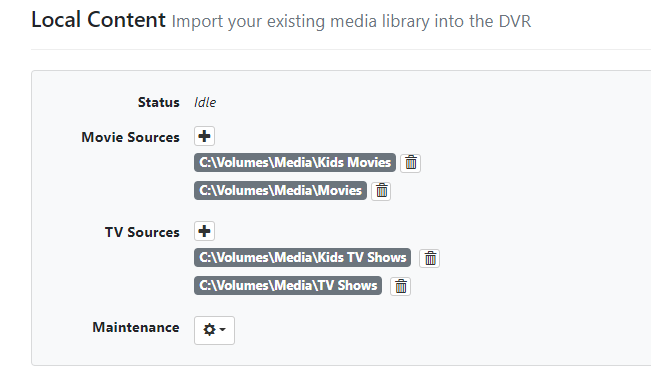
  1. post a screenshot of your local content settings

  2. paste the full path and filename of the movie that didn't scan in

http://my.channelsdvr.net/admin/recordings/imports/unmatched

1 Like

local content screen shot

Uploaded screen shots as requested.

AeroR1 - Thanks for sharing. This unmatched folder reviewed that I have 9 unmatched movies. However, none of the ones that were in question were listed. IE - Star Wars V was not listed. However, was able to resolve the ones listed so thanks for sharing this file path.

1 Like

Please submit diagnostics from your DVR

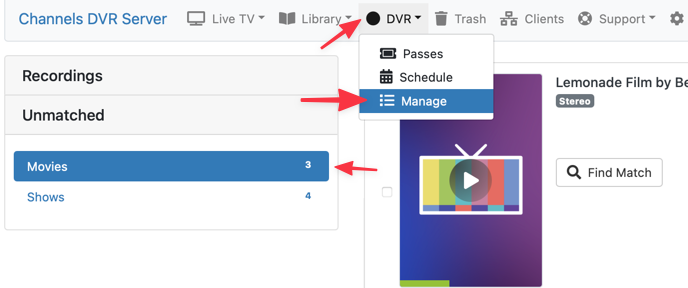
FYI this section is also available via the DVR > Manage menu:

CleanShot 2022-02-02 at 14.00.09

Submitted.

It's showing as scanned into your library already.

http://x.x.x.x:8089/admin/movies/690

Weird - So Channels is dropping the Star Wars and saying the title is The Empire Strikes Back. Typing Star Wars in the search bar doesn't bring it up. Its doing the same thing for Return of the Jedi.

I just did a screen shot from plex where it groups all the movies together. I'm assuming there is some different database Channels uses over plex. OK. At least I know they are all there and nothing is broken. Thx.

I guess that's how it is listed in TMDB