Mount an external SMB share at macOS bootup?

Is anyone able to get macOS to reliably mount an SMB share at bootup (not at user login)?

If it matters, I'm running Tahoe 26.2 on a Mac-mini M4.

Right now I have one SMB share being mounted at user login and using that users keychain to store and provide the SMB share credentials.
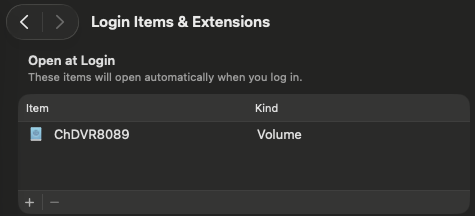
Screenshot 2026-01-15 at 16.04.19

I'm trying to avoid automatic user login (can't enable file vault, use wallet, etc.) on my Mac-mini M4 and make it act more like a server for Channels DVR, but I would still login as a user to do other things.

I would have to find a way to provide the credentials for the SMB share to mount at macOS bootup before any user logs in and before Channels DVR Server running as a background system daemon starts.

I'm starting to think it would be easier to migrate to a new Synology NAS instead of trying to migrate my Channels DVR Servers and supporting docker containers from my current Synology NAS (6 yrs old) to my Mac-mini M4.

I’ve paid for this and it’s been solid for me for years:

I don’t think you’re going to have success hoping the OS keeps a remote volume mounted in the face of any network stability issues.

I realize if you’re trying to avoid credentials, you may want to investigate just using NFS instead of SMB.

Thanks,
I had already looked at the AutoMounter app website (limited tech info there), and appears it can't mount SMB shares at system bootup, only when a user logs in?

I want Channels DVR Server to run and use my Synology NAS SMB shared folders when the Mac-mini boots up. Don't want user autologin at boot and don't want to have to be there to login as a user if it reboots for any reason.

Beginning to sound like this isn't possible with a Mac.
No great loss. I'm still going to use the Mac-mini for other things. I will probably just get a newer Synology NAS to replace my current one for Channels Server and supporting Docker Containers.

I shouldn't be having any network stability issues :crossed_fingers:

  • Mac-mini connects via Cat6A to my unmanaged Gigabit switch.
  • Synology NAS connects via Cat6A to my unmanaged Gigabit switch.
  • HDHR Prime connects via Cat6A to my unmanaged Gigabit switch.
  • Windows 11 laptop connects via Cat6A to my unmanaged Gigabit switch.
  • Router connects via Cat6A to my unmanaged Gigabit switch.

Unless you mean the macOS has network instability issues?

I have my Mac setup to work unattended, headless, and able to recover both soft resets and power failure cases. I leave my mini on all the time.

Look into applescript.

On thing that made my system much more stable (Im mounting some SMB shares on another Mac) is to create an app that mounts the drives reliably upon login. I dont use a login password.

Here is a sample AppleScript to mount drives.

delay 10
mount volume "smb://192.168.1.2/drive1"
mount volume "smb://192.168.1.2/drive2"
mount volume "smb://192.168.1.2/drive3"
mount volume "smb://192.168.1.2/drive4"

Use the above as a simple starting point, for your synology. As a sanity check,
unmount your Synology drive manually, then test your script using the script editor to confirm.

Then save the script as an application and give it a name. I keep all these utility apps in my user application folder.

Now go into system settings "open at login" and add this new app you created

I have found this approach much much more reliable than adding individual drives as login items. Im not on MACOS26 yet, but once I did this my drives have always mounted predictably.

My remote SMB share mounts at user login. That's not what I'm looking for though.