Multichannel view, an alternative approach

I doubt anything special is being done with h264 in the special version of ffmpeg. CDVR is probably maintaining a list of parameters for each gen of CPU. Just start an encoding session from the client and see how ffmpeg is invoked. I used to drop a script in place to log all the parameters it gets called with and then call the real ffmpeg.

#!/bin/bash
LOGFILE="/tmp/ffmpeg_wrapper.log"
REAL_FFMPEG="$0.org"

echo "[$(date)] $0 $@" >> "$LOGFILE"

exec "$REAL_FFMPEG" "$@"

I made a list of what I tried and why I think I failed. Hopefully this will help.

Attempt 1: Enable Hardware Encoding
My first attempt was to simply tell ffmpeg to use the VA-API hardware encoder for the final output.

The idea was that ffmpeg would perform all the software filtering (scaling, stacking) on the CPU and then hand off the final, composited video to the GPU for encoding.

Why It Failed: This failed with the error A hardware device reference is required to upload frames to. This meant that just selecting the h264_vaapi encoder wasn't enough, the hwupload filter needed to know which specific hardware device to use.

Attempt 2: Initialize the Hardware Device
To fix the "missing hardware device" error, I added global flags to the beginning of the ffmpeg command to initialize the VA-API device.

I added -hwaccel vaapi, -hwaccel_device /dev/dri/renderD128, and -hwaccel_output_format vaapi to the start of the ffmpeg command. I was trying to tell ffmpeg to use the GPU for hardware acceleration from the very beginning.

Why It Failed: This created the opposite problem, with the error Impossible to convert between the formats supported by the filter 'Parsed_fps_0' and the filter 'auto_scale_0'. By initializing the hardware at the start, ffmpeg decoded the incoming streams on the GPU. The video frames were now "stuck" on the GPU in a hardware-specific format that the software-based fps filter couldn't understand.

Attempt 3: The Full CPU-to-GPU Pipeline
To resolve the format conflict, I tried to create a full, explicit pipeline to manage the data flow between the CPU and GPU.

I kept the initial -hwaccel flags to decode on the GPU, and then in the complex filter, I added a hwdownload filter for each input stream. This was supposed to move the decoded video from the GPU back to the CPU's memory before the software filters were applied.

Why It Failed: This is where I hit the core of the problem. The process of decoding on the GPU, downloading to the CPU for filtering, and then uploading back to the GPU for encoding is complex. This failed with the error Impossible to convert between the formats supported by the filter 'graph 0 input from stream 1:1' and the filter 'auto_scale_0', indicating that the hand-off between the hardware decoder and the hwdownload filter was failing due to an incompatible pixel format.

I'm gonna try oneVPL tomorrow and see if it works better.

I've pushed an update, bnhf/olivetin:latest (aka bnhf/olivetin:2025.07.03), primarily aimed at improving the initial Custom Channel setup for this project in CDVR-Sources -- when spun-up through Project One-Click.

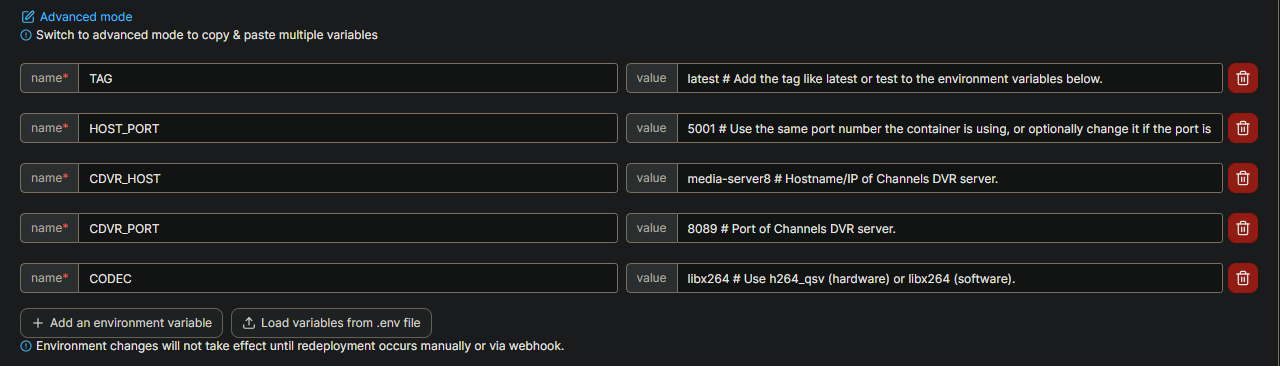
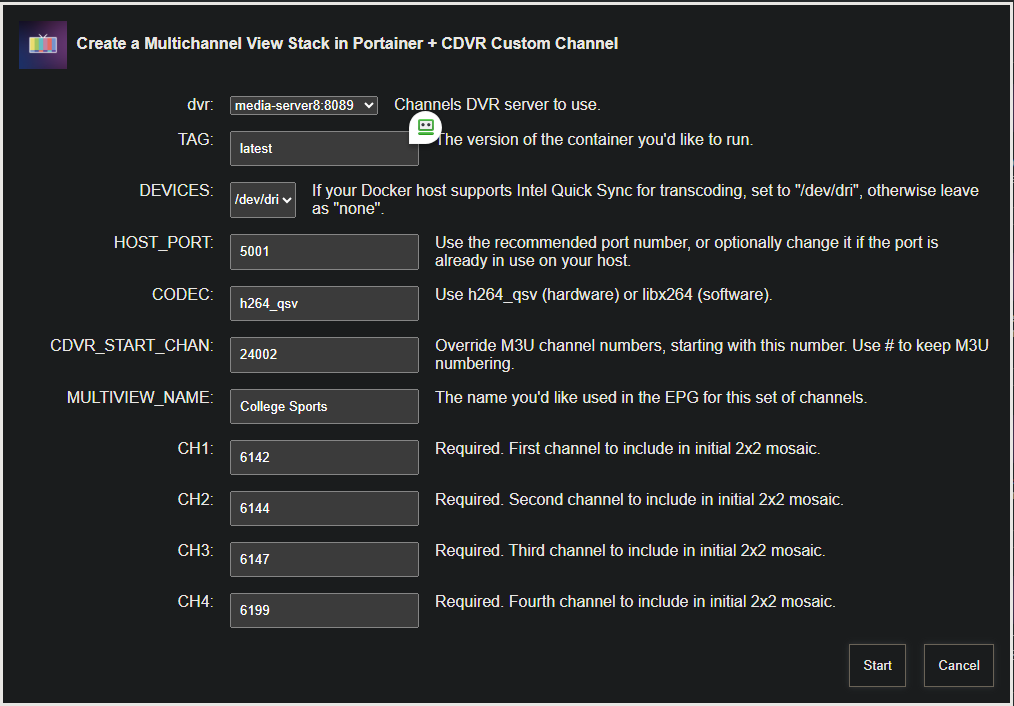
For example, this set of values:

adds a Multichannel View stack to Portainer, and creates and initial Custom Channel Source M3U:

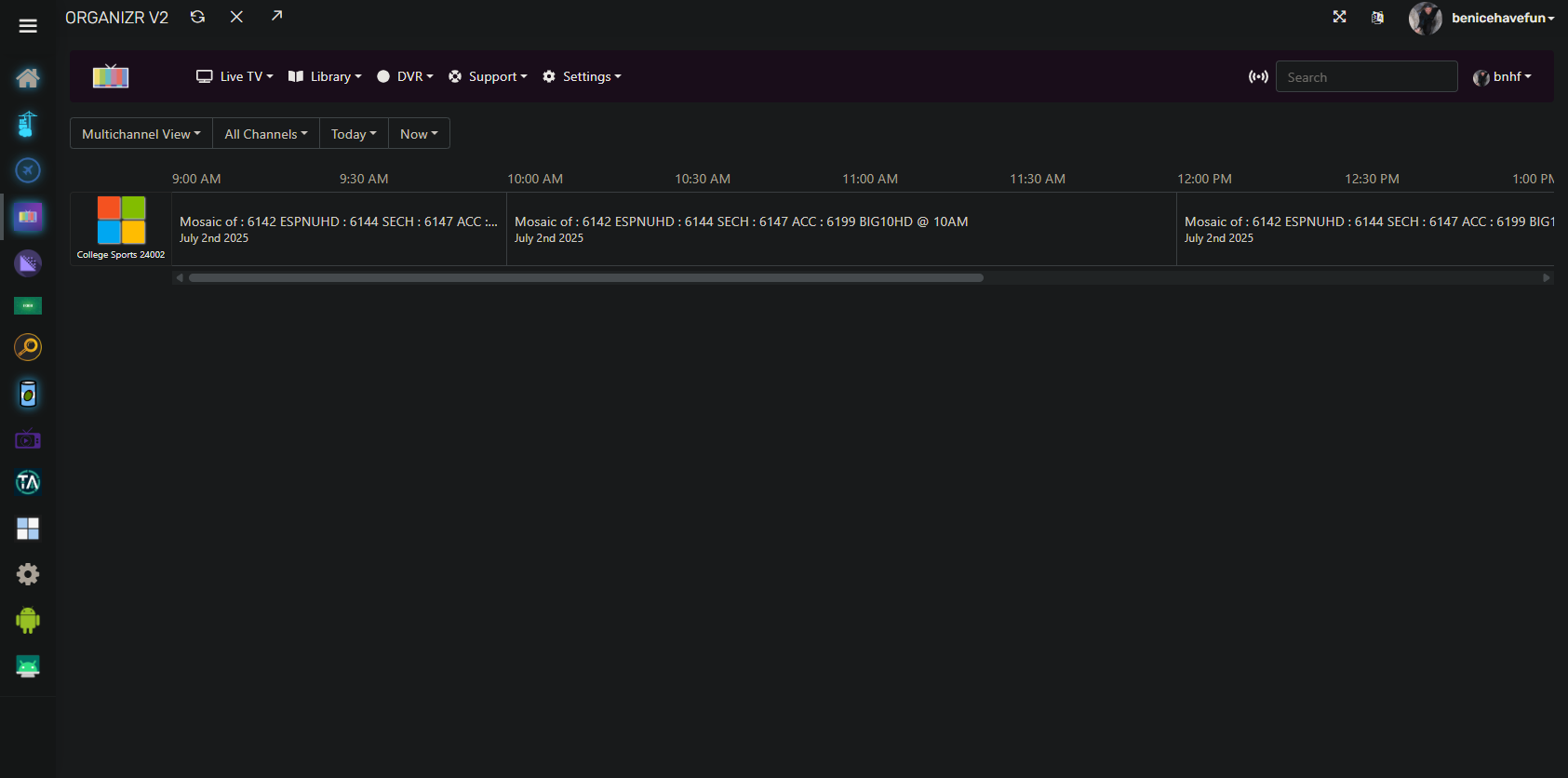
with EPG data that looks like this:

Also, for @chDVRuser, this is the first test of having comments duplicated with the env vars in Portainer. If you're willing, give it a try, and let me know what you think back in the Project One-Click thread:

This is what I was able to capture when running Transcoder Probe from Advanced settings and choosing hardware transcoder and hardware deinterlacer on J4125


[Thu Jul  3 08:34:08 PM PDT 2025] /home/channels/channels-dvr/2025.07.03.0419/ffmpeg -hide_banner -nostats -color_primaries bt2020 -color_trc smpte2084 -colorspace bt2020nc -progress pipe:3 -loglevel verbose -f lavfi -t 1 -i testsrc=size=1280x720:rate=60,format=nv12,colorspace=all=bt2020:iall=bt2020:fast=0 -c:v h264_vaapi -profile:v high -level 42 -b:v 4000k -maxrate:v 6000k -init_hw_device vaapi=intel:/dev/dri/renderD128 -filter_hw_device intel -vf format=nv12,hwupload -f null -y /dev/null
[Thu Jul  3 08:34:08 PM PDT 2025] /home/channels/channels-dvr/2025.07.03.0419/ffmpeg -hide_banner -nostats -color_primaries bt2020 -color_trc smpte2084 -colorspace bt2020nc -progress pipe:3 -loglevel verbose -f lavfi -t 1 -i testsrc=size=1280x720:rate=60,format=nv12,colorspace=all=bt2020:iall=bt2020:fast=0 -c:v h264_vaapi -profile:v high -level 42 -b:v 4000k -maxrate:v 6000k -init_hw_device vaapi=intel:/dev/dri/renderD128 -filter_hw_device intel -vf format=nv12,hwupload,deinterlace_vaapi -f null -y /dev/null
[Thu Jul  3 08:34:09 PM PDT 2025] /home/channels/channels-dvr/2025.07.03.0419/ffmpeg -hide_banner -nostats -color_primaries bt2020 -color_trc smpte2084 -colorspace bt2020nc -progress pipe:3 -loglevel verbose -f lavfi -t 1 -i testsrc=size=1280x720:rate=60,format=nv12,colorspace=all=bt2020:iall=bt2020:fast=0 -c:v h264_vaapi -profile:v high -level 42 -b:v 4000k -maxrate:v 6000k -init_hw_device vaapi=intel:/dev/dri/card0 -filter_hw_device intel -vf format=nv12,hwupload -f null -y /dev/null
[Thu Jul  3 08:34:10 PM PDT 2025] /home/channels/channels-dvr/2025.07.03.0419/ffmpeg -hide_banner -nostats -color_primaries bt2020 -color_trc smpte2084 -colorspace bt2020nc -progress pipe:3 -loglevel verbose -f lavfi -t 1 -i testsrc=size=1280x720:rate=60,format=nv12,colorspace=all=bt2020:iall=bt2020:fast=0 -c:v h264_vaapi -profile:v high -level 42 -b:v 4000k -maxrate:v 6000k -init_hw_device vaapi=intel:/dev/dri/card0 -filter_hw_device intel -vf format=nv12,hwupload,deinterlace_vaapi -f null -y /dev/null

The first run can be simplified as

ffmpeg \
  -vaapi_device /dev/dri/renderD128 \
  -f lavfi -t 1 -i "testsrc=size=1280x720:rate=60,format=nv12,colorspace=all=bt2020:iall=bt2020:fast=0" \
  -vf format=nv12,hwupload \
  -c:v h264_vaapi -profile:v high -level 4.2 -b:v 4000k -maxrate 6000k \
  -color_primaries bt2020 -color_trc smpte2084 -colorspace bt2020nc \
  -f null -y /dev/null

Would something like this work in ffmpeg? Or does it just not show up in Channels?

-metadata:s:a:0 title="Channel 6608"

I tried -metadata:s:a:0 title="Audio CH 101" but even VLC wouldn't show it.

I believe audio labels are based on 3-letter language codes

Just futzing around, I tried having the app rename the audio tracks to match the channel they came from, but it seems that required transcoding, so I backed out from trying further.

Feeling quite inspired, and empowered by ChatGPT, I'm still futzing around. But this time, I feel a bit more successful! I liked the addition of the label overlays with channel numbers, but wanted them to display channel names instead. So I added an editable legend that allows for automatic translation. I also didn't want the labels to display persistently, so I added a customizable "fade in and fade out" duration. And since 36 works better for my eyes, I made the font SIZE configurable too. I also tinkered with some startup delays to decrease any errors or timeouts.

I'm completely new to this sort of thing but am learning quickly. I can't assure these additions will work for everybody nor am I a programmer to fix any of it, but I'm sharing in case anyone else might appreciate these ideas:

I'm playing with other label text effects and animations (slide in/out, slide down/up, grow/shrink, bounce, pulse etc.) and will share any notable successes as I achieve them. I'm also thinking that it might be nice to change up the placement, perhaps rotate or randomize from corner to corner? All in good time. I find all of this to be wildly exciting.

A post was merged into an existing topic: Project One-Click: All-in-One Installations of Docker Extensions and CDVR Custom Channels

Got this working great. Thank you for all of your help! Can I set up multiple of these on different channel numbers? If so, how do I do that? I'm trying to have at least college football, MLB and college basketball.

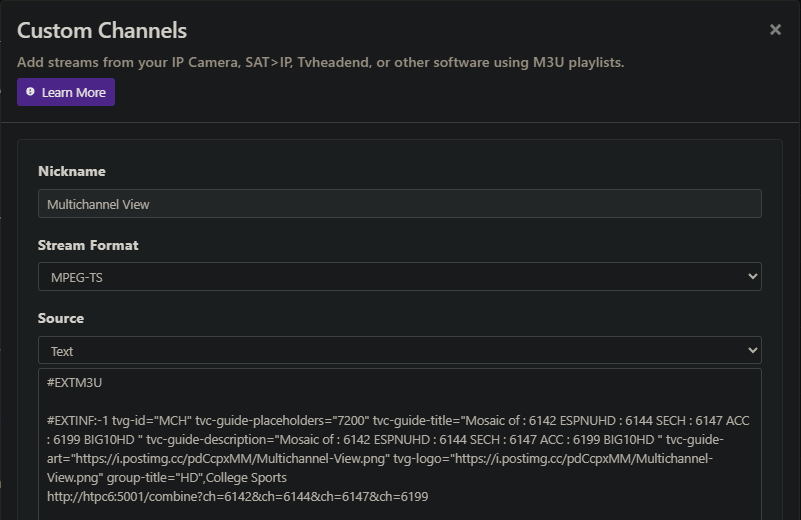
You can. Edit Multichannel View under CDVR-Sources, and follow the structure shown there for the M3U.

Copy and paste the first entry to create a second, then change the tvg-id (add a 2, 3, etc after the MCH), modify the tvc-guide-title and tvc-guide-description to reflect the new mosaic of channels, change the name from College Sports to whatever, and modify the values in the URL with the new values you want for the 4 channels to combine.

Here's and example of what the first entry looks like on my system.

#EXTM3U

#EXTINF:-1 tvg-id="MCH" tvc-guide-placeholders="7200" tvc-guide-title="Mosaic of : 6142 ESPNUHD : 6144 SECH : 6147 ACC : 6199 BIG10HD " tvc-guide-description="Mosaic of : 6142 ESPNUHD : 6144 SECH : 6147 ACC : 6199 BIG10HD " tvc-guide-art="https://i.postimg.cc/pdCcpxMM/Multichannel-View.png" tvg-logo="https://i.postimg.cc/pdCcpxMM/Multichannel-View.png" group-title="HD",College Sports
http://htpc6:5001/combine?ch=6142&ch=6144&ch=6147&ch=6199

After you've added your new entry, save and then use the dropdown in the list of sources to reload the M3U.

Works perfectly! Thank you.

1 Like

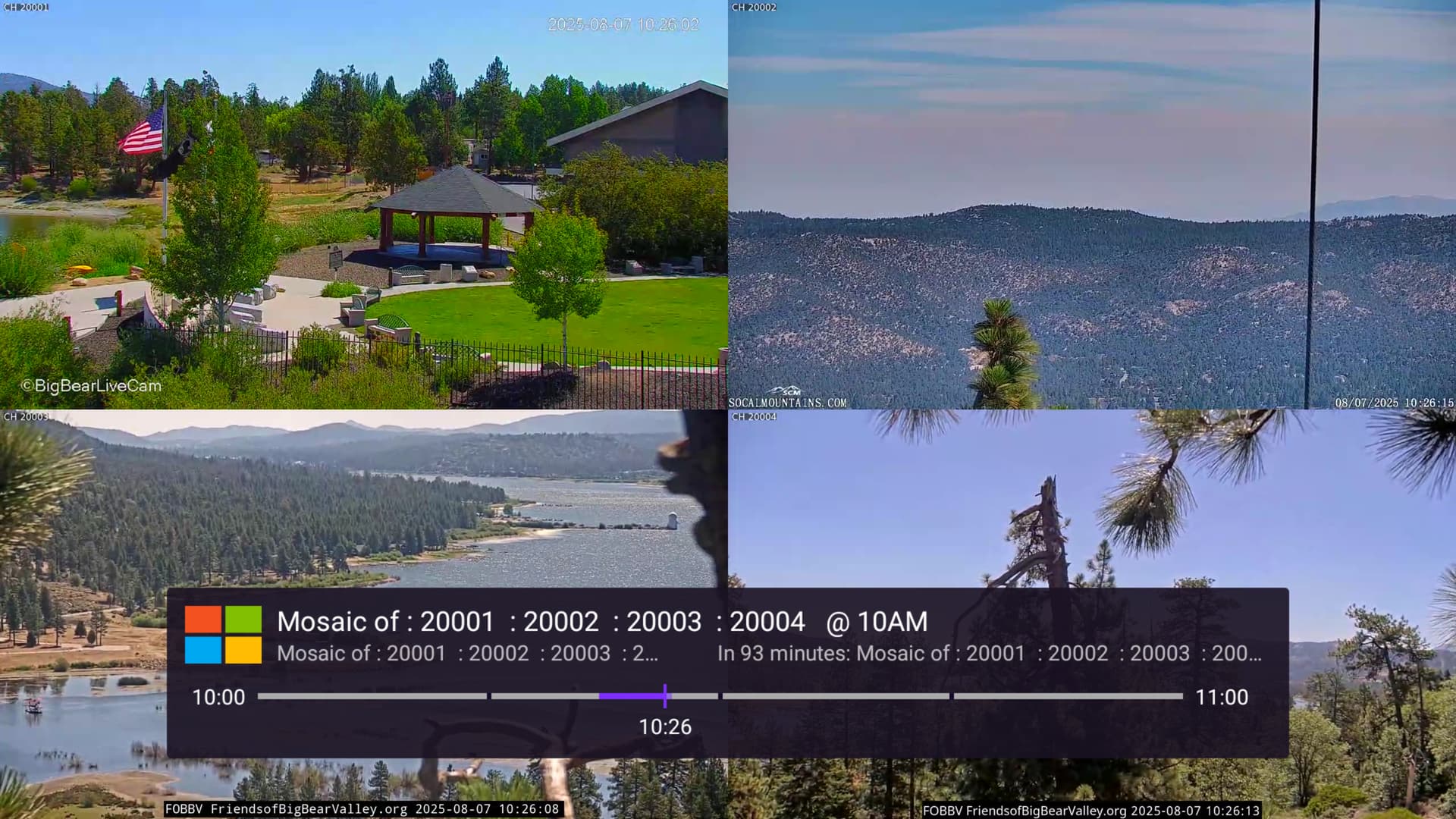
I have installed Multichannel view through One-click. It is nearly working. The container is running on a Synology DS920+ which has a Intel Celeron J4125 quad-core processor which is capable of Intel Quicksync.
I have enabled the hardware acceleration lines in the stack/container, and am using h26_qsv for the codec.
I am getting some buffering where the pictures pause and the timeline pops up across the bottom of the screen, showing the spinning icon. It eventually catches up. But, buffers every few seconds.
The four channels are live webcams on YouTube, imported to Channels DVR using "Streaming Library Manager for Channels".

Channels DVR Logs:

2025/08/07 10:21:36.689051 [TNR] Opened connection to M3U-PLMStreamingStationsHLS01 for ch20001 Big Bear Lake Live 4K
2025/08/07 10:21:40.678745 [M3U] stream timestamps: plmss_0002: start_at=2025-08-07T10:20:55-07:00 end_at=2025-08-07T10:21:23-07:00 live_delay=15.085743735s
2025/08/07 10:21:40.678840 [TNR] Opened connection to M3U-PLMStreamingStationsHLS01 for ch20002 SCM Goldmine Cam
2025/08/07 10:21:43.335155 [M3U] stream timestamps: plmss_0003: start_at=2025-08-07T10:21:10-07:00 end_at=2025-08-07T10:21:35-07:00 live_delay=3.332154769s
2025/08/07 10:21:43.335248 [TNR] Opened connection to M3U-PLMStreamingStationsHLS01 for ch20003 Big Bear Eagle Nest Cam
2025/08/07 10:21:50.089247 [M3U] stream timestamps: plmss_0004: start_at=2025-08-07T10:21:14-07:00 end_at=2025-08-07T10:21:39-07:00 live_delay=5.501246298s
2025/08/07 10:21:50.089338 [TNR] Opened connection to M3U-PLMStreamingStationsHLS01 for ch20004 Big Bear Eagle Wide Cam
2025/08/07 10:21:52.093355 [ERR] Could not start stream for M3U-multichannelview ch19999 Big Bear Web Cams: M3U: 901 Tuner Unreachable: Timeout after 20s connecting to: http://192.168.1.100:9798/combine?ch=20001&ch=20002&ch=20003&ch=20004 
2025/08/07 10:21:52.700043 [SNR] Rewriter statistics for 192.168.112.2 (192.168.112.2) for ch20001 Big Bear Lake Live 4K: discontinuity_detected=0 transport_errors=0 saw_pcr=false saw_pmt=true highest_pts=15.941033
2025/08/07 10:21:52.700055 [SNR] Rewriter statistics for 192.168.112.2 (192.168.112.2) for ch20002 SCM Goldmine Cam: discontinuity_detected=0 transport_errors=0 saw_pcr=false saw_pmt=true highest_pts=16.000000
2025/08/07 10:21:52.700088 [SNR] Rewriter statistics for 192.168.112.2 (192.168.112.2) for ch20003 Big Bear Eagle Nest Cam: discontinuity_detected=0 transport_errors=0 saw_pcr=false saw_pmt=true highest_pts=16.900000
2025/08/07 10:21:52.700328 [SNR] Buffer statistics for 192.168.112.2 (192.168.112.2) for ch20001 Big Bear Lake Live 4K: buf=0% drop=0%
2025/08/07 10:21:52.700452 [SNR] Buffer statistics for 192.168.112.2 (192.168.112.2) for ch20002 SCM Goldmine Cam: buf=0% drop=0%
2025/08/07 10:21:52.700544 [SNR] Streaming statistics for 192.168.112.2 (192.168.112.2) for ch20001 Big Bear Lake Live 4K: timeouts=0 segment_timeouts=0 playlist_timeouts=0
2025/08/07 10:21:52.700577 [SNR] Buffer statistics for 192.168.112.2 (192.168.112.2) for ch20003 Big Bear Eagle Nest Cam: buf=0% drop=0%
2025/08/07 10:21:52.700669 [SNR] Streaming statistics for 192.168.112.2 (192.168.112.2) for ch20002 SCM Goldmine Cam: timeouts=0 segment_timeouts=0 playlist_timeouts=0
2025/08/07 10:21:52.700779 [SNR] Streaming statistics for 192.168.112.2 (192.168.112.2) for ch20003 Big Bear Eagle Nest Cam: timeouts=0 segment_timeouts=0 playlist_timeouts=0
2025/08/07 10:21:52.702879 [TNR] Closed connection to M3U-PLMStreamingStationsHLS01 for ch20003 Big Bear Eagle Nest Cam
2025/08/07 10:21:52.704196 [TNR] Closed connection to M3U-PLMStreamingStationsHLS01 for ch20001 Big Bear Lake Live 4K
2025/08/07 10:21:52.704595 [TNR] Closed connection to M3U-PLMStreamingStationsHLS01 for ch20002 SCM Goldmine Cam
2025/08/07 10:21:55.492953 [SNR] Rewriter statistics for 192.168.112.2 (192.168.112.2) for ch20004 Big Bear Eagle Wide Cam: discontinuity_detected=0 transport_errors=0 saw_pcr=false saw_pmt=true highest_pts=15.000000
2025/08/07 10:21:55.493202 [SNR] Buffer statistics for 192.168.112.2 (192.168.112.2) for ch20004 Big Bear Eagle Wide Cam: buf=0% drop=0%
2025/08/07 10:21:55.493414 [SNR] Streaming statistics for 192.168.112.2 (192.168.112.2) for ch20004 Big Bear Eagle Wide Cam: timeouts=0 segment_timeouts=0 playlist_timeouts=0
2025/08/07 10:21:55.494221 [TNR] Closed connection to M3U-PLMStreamingStationsHLS01 for ch20004 Big Bear Eagle Wide Cam
2025/08/07 10:21:56.369463 [M3U] stream timestamps: plmss_0001: start_at=2025-08-07T10:10:05-07:00 end_at=2025-08-07T10:10:30-07:00 live_delay=15s
2025/08/07 10:21:56.369555 [TNR] Opened connection to M3U-PLMStreamingStationsHLS01 for ch20001 Big Bear Lake Live 4K
2025/08/07 10:21:59.296093 [M3U] stream timestamps: plmss_0002: start_at=2025-08-07T10:21:15-07:00 end_at=2025-08-07T10:21:43-07:00 live_delay=13.703091854s
2025/08/07 10:21:59.296187 [TNR] Opened connection to M3U-PLMStreamingStationsHLS01 for ch20002 SCM Goldmine Cam
2025/08/07 10:22:04.173148 [DVR] Fetched guide data for XMLTV-TubiTV-NoEPG in 101ms
2025/08/07 10:22:05.044184 [M3U] stream timestamps: plmss_0003: start_at=2025-08-07T10:21:30-07:00 end_at=2025-08-07T10:21:55-07:00 live_delay=5.040183426s
2025/08/07 10:22:05.044286 [TNR] Opened connection to M3U-PLMStreamingStationsHLS01 for ch20003 Big Bear Eagle Nest Cam
2025/08/07 10:22:05.840187 [DVR] Indexed 52 airings into XMLTV-TubiTV-NoEPG (2 channels over 32h28m36s) + 6 skipped [1s index]
2025/08/07 10:22:06.498825 [DVR]   pruned 2 replaced airings in 658ms.
2025/08/07 10:22:07.436098 [DVR] Fetched guide data for XMLTV-PlexNoEPG in 413ms
2025/08/07 10:22:07.861850 [M3U] stream timestamps: plmss_0004: start_at=2025-08-07T10:21:34-07:00 end_at=2025-08-07T10:21:59-07:00 live_delay=3.273848812s
2025/08/07 10:22:07.861974 [TNR] Opened connection to M3U-PLMStreamingStationsHLS01 for ch20004 Big Bear Eagle Wide Cam
2025/08/07 10:22:09.808683 [TNR] Opened connection to M3U-multichannelview for ch19999 Big Bear Web Cams
2025/08/07 10:22:24.292326 [DVR] Indexed 3621 airings into XMLTV-PlexNoEPG (35 channels over 156h10m0s) + 437 skipped [16s index]
2025/08/07 10:22:24.661859 [DVR]   pruned 89 replaced airings in 369ms.
2025/08/07 10:22:34.251239 [DVR] Indexed 237 airings into XMLTV-PlexAll (11 channels over 154h30m11s) + 91 skipped [9s index]
2025/08/07 10:22:34.989167 [DVR]   pruned 17 replaced airings in 737ms.
2025/08/07 10:22:35.735701 [DVR] Fetched guide data for XMLTV-PlutoTV in 339ms
2025/08/07 10:22:41.635421 [DVR] Indexed 1793 airings into XMLTV-PlutoTV (63 channels over 36h45m0s) + 160 skipped [5s index]
2025/08/07 10:22:42.996034 [DVR]   pruned 227 replaced airings in 1s.
2025/08/07 10:27:04.016672 [SNR] Buffer statistics for 192.168.1.210 (Shield TV Home) for ch19999 Big Bear Web Cams: buf=0% drop=0%
2025/08/07 10:27:04.017006 [TNR] Closed connection to M3U-multichannelview for ch19999 Big Bear Web Cams
2025/08/07 10:27:04.051555 [SNR] Rewriter statistics for 192.168.112.2 (192.168.112.2) for ch20003 Big Bear Eagle Nest Cam: discontinuity_detected=0 transport_errors=0 saw_pcr=false saw_pmt=true highest_pts=286.441589
2025/08/07 10:27:04.051761 [SNR] Rewriter statistics for 192.168.112.2 (192.168.112.2) for ch20002 SCM Goldmine Cam: discontinuity_detected=0 transport_errors=0 saw_pcr=false saw_pmt=true highest_pts=288.900000
2025/08/07 10:27:04.051818 [SNR] Buffer statistics for 192.168.112.2 (192.168.112.2) for ch20003 Big Bear Eagle Nest Cam: buf=2%,0%-100% drop=3%
2025/08/07 10:27:04.052003 [SNR] Buffer statistics for 192.168.112.2 (192.168.112.2) for ch20002 SCM Goldmine Cam: buf=0% drop=0%
2025/08/07 10:27:04.052051 [SNR] Streaming statistics for 192.168.112.2 (192.168.112.2) for ch20003 Big Bear Eagle Nest Cam: timeouts=0 segment_timeouts=0 playlist_timeouts=0
2025/08/07 10:27:04.052210 [SNR] Streaming statistics for 192.168.112.2 (192.168.112.2) for ch20002 SCM Goldmine Cam: timeouts=0 segment_timeouts=0 playlist_timeouts=0
2025/08/07 10:27:04.052836 [SNR] Rewriter statistics for 192.168.112.2 (192.168.112.2) for ch20001 Big Bear Lake Live 4K: discontinuity_detected=1 transport_errors=0 saw_pcr=false saw_pmt=true highest_pts=291.600000
2025/08/07 10:27:04.053050 [SNR] Buffer statistics for 192.168.112.2 (192.168.112.2) for ch20001 Big Bear Lake Live 4K: buf=24%,0%-100% drop=25%
2025/08/07 10:27:04.053260 [SNR] Streaming statistics for 192.168.112.2 (192.168.112.2) for ch20001 Big Bear Lake Live 4K: timeouts=0 segment_timeouts=0 playlist_timeouts=0
2025/08/07 10:27:04.053907 [TNR] Closed connection to M3U-PLMStreamingStationsHLS01 for ch20003 Big Bear Eagle Nest Cam
2025/08/07 10:27:04.055248 [TNR] Closed connection to M3U-PLMStreamingStationsHLS01 for ch20001 Big Bear Lake Live 4K
2025/08/07 10:27:04.057743 [TNR] Closed connection to M3U-PLMStreamingStationsHLS01 for ch20002 SCM Goldmine Cam
2025/08/07 10:27:07.716442 [SNR] Rewriter statistics for 192.168.112.2 (192.168.112.2) for ch20004 Big Bear Eagle Wide Cam: discontinuity_detected=0 transport_errors=0 saw_pcr=false saw_pmt=true highest_pts=310.000000
2025/08/07 10:27:07.716693 [SNR] Buffer statistics for 192.168.112.2 (192.168.112.2) for ch20004 Big Bear Eagle Wide Cam: buf=0% drop=0%
2025/08/07 10:27:07.716920 [SNR] Streaming statistics for 192.168.112.2 (192.168.112.2) for ch20004 Big Bear Eagle Wide Cam: timeouts=0 segment_timeouts=0 playlist_timeouts=0
2025/08/07 10:27:07.717845 [TNR] Closed connection to M3U-PLMStreamingStationsHLS01 for ch20004 Big Bear Eagle Wide Cam
2025/08/07 10:30:31.257873 [DVR] Rule 'The Virginian' (283) found 4 new airings (42 matching)
2025/08/07 10:30:31.865847 [DVR]   queued recording job for 'The Virginian' EP000044060026 @ Sun Aug 10 7:44:30AM on ch=[14076] (1754837070-283)
2025/08/07 10:30:32.557324 [DVR]   queued recording job for 'The Virginian' EP000044060030 @ Sun Aug 10 9:29:30AM on ch=[14076] (1754843370-283)
2025/08/07 10:30:33.098697 [DVR]   queued recording job for 'The Virginian' EP000044060025 @ Sun Aug 10 11:14:30AM on ch=[14076] (1754849670-283)
2025/08/07 10:30:33.623557 [DVR]   queued recording job for 'The Virginian' EP000044060024 @ Sun Aug 10 12:59:30PM on ch=[14076] (1754855970-283)
2025/08/07 10:30:48.810133 [DVR] Waiting 1h18m41.189868276s until next job 1754592570-281 Gunsmoke
2025/08/07 10:31:36.084157 [M3U] stream timestamps: plmss_0001: start_at=2025-08-07T10:19:45-07:00 end_at=2025-08-07T10:20:10-07:00 live_delay=15s
2025/08/07 10:31:36.084262 [TNR] Opened connection to M3U-PLMStreamingStationsHLS01 for ch20001 Big Bear Lake Live 4K
2025/08/07 10:31:38.741097 [M3U] stream timestamps: plmss_0002: start_at=2025-08-07T10:30:53-07:00 end_at=2025-08-07T10:31:21-07:00 live_delay=15.148095769s
2025/08/07 10:31:38.741231 [TNR] Opened connection to M3U-PLMStreamingStationsHLS01 for ch20002 SCM Goldmine Cam
2025/08/07 10:31:41.533957 [M3U] stream timestamps: plmss_0003: start_at=2025-08-07T10:31:10-07:00 end_at=2025-08-07T10:31:35-07:00 live_delay=1.530956044s
2025/08/07 10:31:41.534051 [TNR] Opened connection to M3U-PLMStreamingStationsHLS01 for ch20003 Big Bear Eagle Nest Cam
2025/08/07 10:31:44.573576 [M3U] stream timestamps: plmss_0004: start_at=2025-08-07T10:31:10-07:00 end_at=2025-08-07T10:31:35-07:00 live_delay=4.521574981s
2025/08/07 10:31:44.573674 [TNR] Opened connection to M3U-PLMStreamingStationsHLS01 for ch20004 Big Bear Eagle Wide Cam
2025/08/07 10:31:46.307407 [TNR] Opened connection to M3U-multichannelview for ch19999 Big Bear Web Cams
2025/08/07 10:36:26.447455 [SNR] Buffer statistics for 192.168.1.210 (Shield TV Home) for ch19999 Big Bear Web Cams: buf=0% drop=0%
2025/08/07 10:36:26.447709 [TNR] Closed connection to M3U-multichannelview for ch19999 Big Bear Web Cams
2025/08/07 10:36:26.511311 [SNR] Rewriter statistics for 192.168.112.2 (192.168.112.2) for ch20004 Big Bear Eagle Wide Cam: discontinuity_detected=0 transport_errors=0 saw_pcr=false saw_pmt=true highest_pts=283.794289
2025/08/07 10:36:26.511577 [SNR] Buffer statistics for 192.168.112.2 (192.168.112.2) for ch20004 Big Bear Eagle Wide Cam: buf=0% drop=0%
2025/08/07 10:36:26.511796 [SNR] Streaming statistics for 192.168.112.2 (192.168.112.2) for ch20004 Big Bear Eagle Wide Cam: timeouts=0 segment_timeouts=0 playlist_timeouts=0
2025/08/07 10:36:26.511975 [SNR] Rewriter statistics for 192.168.112.2 (192.168.112.2) for ch20002 SCM Goldmine Cam: discontinuity_detected=0 transport_errors=0 saw_pcr=false saw_pmt=true highest_pts=290.134056
2025/08/07 10:36:26.512041 [SNR] Rewriter statistics for 192.168.112.2 (192.168.112.2) for ch20001 Big Bear Lake Live 4K: discontinuity_detected=1 transport_errors=0 saw_pcr=false saw_pmt=true highest_pts=290.011144
2025/08/07 10:36:26.512196 [SNR] Buffer statistics for 192.168.112.2 (192.168.112.2) for ch20002 SCM Goldmine Cam: buf=0% drop=0%
2025/08/07 10:36:26.512263 [SNR] Buffer statistics for 192.168.112.2 (192.168.112.2) for ch20001 Big Bear Lake Live 4K: buf=0% drop=0%
2025/08/07 10:36:26.512415 [SNR] Streaming statistics for 192.168.112.2 (192.168.112.2) for ch20002 SCM Goldmine Cam: timeouts=0 segment_timeouts=0 playlist_timeouts=0
2025/08/07 10:36:26.512478 [SNR] Streaming statistics for 192.168.112.2 (192.168.112.2) for ch20001 Big Bear Lake Live 4K: timeouts=0 segment_timeouts=0 playlist_timeouts=0
2025/08/07 10:36:26.512645 [TNR] Closed connection to M3U-PLMStreamingStationsHLS01 for ch20004 Big Bear Eagle Wide Cam
2025/08/07 10:36:26.514685 [TNR] Closed connection to M3U-PLMStreamingStationsHLS01 for ch20001 Big Bear Lake Live 4K
2025/08/07 10:36:26.514871 [TNR] Closed connection to M3U-PLMStreamingStationsHLS01 for ch20002 SCM Goldmine Cam
2025/08/07 10:36:27.148421 [SNR] Rewriter statistics for 192.168.112.2 (192.168.112.2) for ch20003 Big Bear Eagle Nest Cam: discontinuity_detected=0 transport_errors=0 saw_pcr=false saw_pmt=true highest_pts=295.009522
2025/08/07 10:36:27.148674 [SNR] Buffer statistics for 192.168.112.2 (192.168.112.2) for ch20003 Big Bear Eagle Nest Cam: buf=0% drop=0%
2025/08/07 10:36:27.148881 [SNR] Streaming statistics for 192.168.112.2 (192.168.112.2) for ch20003 Big Bear Eagle Nest Cam: timeouts=0 segment_timeouts=0 playlist_timeouts=0
2025/08/07 10:36:27.149642 [TNR] Closed connection to M3U-PLMStreamingStationsHLS01 for ch20003 Big Bear Eagle Nest Cam
2025/08/07 10:37:14.528743 [M3U] stream timestamps: plmss_0001: start_at=2025-08-07T10:36:40-07:00 end_at=2025-08-07T10:37:05-07:00 live_delay=4.484742487s
2025/08/07 10:37:14.528856 [TNR] Opened connection to M3U-PLMStreamingStationsHLS01 for ch20001 Big Bear Lake Live 4K
2025/08/07 10:37:17.336802 [M3U] stream timestamps: plmss_0002: start_at=2025-08-07T10:36:33-07:00 end_at=2025-08-07T10:37:01-07:00 live_delay=13.743801087s
2025/08/07 10:37:17.336902 [TNR] Opened connection to M3U-PLMStreamingStationsHLS01 for ch20002 SCM Goldmine Cam
2025/08/07 10:37:20.013083 [M3U] stream timestamps: plmss_0003: start_at=2025-08-07T10:36:45-07:00 end_at=2025-08-07T10:37:10-07:00 live_delay=5.009082549s
2025/08/07 10:37:20.013180 [TNR] Opened connection to M3U-PLMStreamingStationsHLS01 for ch20003 Big Bear Eagle Nest Cam
2025/08/07 10:37:22.873275 [M3U] stream timestamps: plmss_0004: start_at=2025-08-07T10:36:50-07:00 end_at=2025-08-07T10:37:15-07:00 live_delay=2.821274507s
2025/08/07 10:37:22.873373 [TNR] Opened connection to M3U-PLMStreamingStationsHLS01 for ch20004 Big Bear Eagle Wide Cam
2025/08/07 10:37:24.790482 [TNR] Opened connection to M3U-multichannelview for ch19999 Big Bear Web Cams

I would suggest installing intel-gpu-tools, and then running intel_gpu_top from the command line. Do this while using Multichannel View, and you'll be able to confirm if your GPU is being utilized.

Is this something I install on the Synology NAS which hosts my DVR server?

Since I know your Docker/Portainer installation is there too (which in this case is what would be utilizing the GPU), the answer is yes...

Hmmm... This doesn't seem to be a simple thing to install on Synology at all. Is there a "for dummies" method? Or, perhaps, I should abandon the idea of using hardware acceleration.

I can say this... the Mosaic seems to be playing much better since I enabled hardware acceleration. Using libx264 software codec, it would scarcely load or play the channel. With h264_qsv codec, it will play for a few minutes at a time without problem. Then, it begins "buffering" and falls behind on the timeline. It will pause several times, over and over. Then, will play fine for a while. Though, never quite catching up on the timeline.

Right now, it has been playing for an hour or so, and is about 2-3 minutes behind...

It sounds like it's working, but being able to confirm would be nice. Maybe @chDVRuser knows something about install regular Linux packages from the command line on Synology?

Something tells me these webcam streams might be a tricky test. Have you tried choosing 4x TVE streams? It'd be interesting to know how those appear to work. Also, you can try the h264_vaapi codec to see if that makes any difference.

This won't play at all... Connection Lost. The h264_qsv codec seems to work the best.

I'm happy to try 4x TVE streams. I'll try to set up a new mosaic using your instructions from back a few posts earlier today.