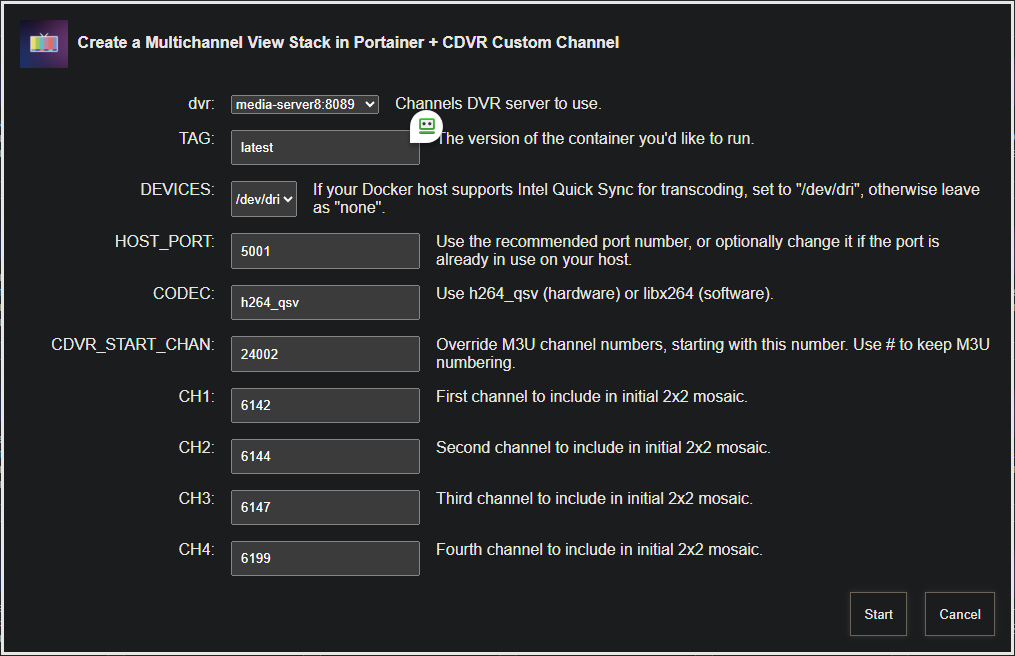
I tried the one-click but got the following error:
exit status 1
+ dvr=192.168.150.242:8089
++ basename /config/multichannelview.sh
+ extension=multichannelview.sh
+ extension=multichannelview
+ cp /config/multichannelview.env /tmp
+ envFile=/tmp/multichannelview.env
+ [[ -n 192.168.150.242 ]]
+ extensionURL=192.168.150.242:5002
+ [[ #1 == \# ]]
+ cdvrStartingChannel='#1'
+ [[ -n #1 ]]
+ cdvrIgnoreM3UNumbers=ignore
+ ch1=6001
+ ch2=18423
+ ch3=18424
+ ch4=18421
+ curl -s -o /dev/null http://192.168.150.242:5002
+ envVars=("TAG=$2" "DEVICES=$3" "HOST_PORT=$4" "CDVR_HOST=${dvr%%:*}" "CDVR_PORT=${dvr##*:}" "CODEC=$5")
+ printf '%s\n' TAG=latest DEVICES=# HOST_PORT=5002 CDVR_HOST=192.168.150.242 CDVR_PORT=8089 CODEC=libx264
+ sed -i /=#/d /tmp/multichannelview.env
+ /config/portainerstack.sh multichannelview
+ stackName=multichannelview
+ portainerHost=192.168.150.242
+ portainerToken=ptr_TP3q1aaHghJfhw94AMoa6ulP04EI93wfbogZlsKSb3c=
+ [[ -n 9443 ]]
+ portainerPort=9443
+ yamlCopied=
++ curl -s -k -H 'X-API-Key: ptr_TP3q1aaHghJfhw94AMoa6ulP04EI93wfbogZlsKSb3c=' http://192.168.150.242:9000/api/endpoints
++ jq '.[] | select(.Name=="local") | .Id'
jq: error (at <stdin>:1): Cannot index string with string "Name"
+ portainerEnv=
+ curl -s -o /dev/null http://192.168.150.242:9000
+ portainerURL='http://192.168.150.242:9000/api/stacks/create/standalone/string?endpointId='
+ [[ '' != \t\r\u\e ]]
+ cp /config/multichannelview.yaml /tmp
+ stackFile=/tmp/multichannelview.yaml
+ envFile=/tmp/multichannelview.env
+ dirsFile=/tmp/multichannelview.dirs
++ grep DVR_SHARE= /tmp/multichannelview.env
++ grep -v /
++ awk -F= '{print $2}'
+ dockerVolume=
++ grep VOL_EXTERNAL= /tmp/multichannelview.env
++ grep -v '#'
++ awk -F= '{print $2}'
+ volumeExternal=
++ grep VOL_NAME= /tmp/multichannelview.env
++ grep -v '#'
++ awk -F= '{print $2}'
+ volumeName=
++ grep NETWORK_MODE= /tmp/multichannelview.env
++ grep -v '#'
++ awk -F= '{print $2}'
+ networkMode=
++ grep DEVICES= /tmp/multichannelview.env
++ grep -v '#'
++ awk -F= '{print $2}'
+ transcoderDevice=
++ grep CDVR_CONTAINER= /tmp/multichannelview.env
++ grep -v '#'
++ awk -F= '{print $2}'
+ stackNumber=
+ [[ -n '' ]]
+ [[ -n '' ]]
+ [[ -n '' ]]
+ [[ -n '' ]]
++ sed 's/\\/\\\\/g' /tmp/multichannelview.yaml
++ sed 's/"/\\"/g'
++ awk '{printf "%s\\n", $0}'
+ stackContent='version: '\''3.9'\''\nservices:\n  multichannelview:\n    # 2025.07.01\n    # Github home for this project: https://github.com/bnhf/multichannelview.\n    # Docker container home for this project: https://hub.docker.com/r/bnhf/multichannelview.\n    image: bnhf/multichannelview:${TAG} # Add the tag like latest or test to the environment variables below.\n    container_name: multichannelview\n    #devices:\n      #- /dev/dri:/dev/dri # Uncomment this and the line above to use Intel Quicksync hardware acceleration. Plus use h26_qsv as the codec.\n    ports:\n      - ${HOST_PORT}:5001 # Use the same port number the container is using, or optionally change it if the port is already in use on your host.\n    environment:\n      - CDVR_HOST=${CDVR_HOST} # Hostname/IP of Channels DVR server.\n      - CDVR_PORT=${CDVR_PORT} # Port of Channels DVR server.\n      - CODEC=${CODEC} # Use h264_qsv (hardware) or libx264 (software).\n    restart: unless-stopped\n'
+ stackEnvVars='['
+ IFS=
+ read -r line
+ key=TAG
+ value=latest
+ stackEnvVars='[{"name": "TAG", "value": "latest"},'
+ IFS=
+ read -r line
+ key=HOST_PORT
+ value=5002
+ stackEnvVars='[{"name": "TAG", "value": "latest"},{"name": "HOST_PORT", "value": "5002"},'
+ IFS=
+ read -r line
+ key=CDVR_HOST
+ value=192.168.150.242
+ stackEnvVars='[{"name": "TAG", "value": "latest"},{"name": "HOST_PORT", "value": "5002"},{"name": "CDVR_HOST", "value": "192.168.150.242"},'
+ IFS=
+ read -r line
+ key=CDVR_PORT
+ value=8089
+ stackEnvVars='[{"name": "TAG", "value": "latest"},{"name": "HOST_PORT", "value": "5002"},{"name": "CDVR_HOST", "value": "192.168.150.242"},{"name": "CDVR_PORT", "value": "8089"},'
+ IFS=
+ read -r line
+ key=CODEC
+ value=libx264
+ stackEnvVars='[{"name": "TAG", "value": "latest"},{"name": "HOST_PORT", "value": "5002"},{"name": "CDVR_HOST", "value": "192.168.150.242"},{"name": "CDVR_PORT", "value": "8089"},{"name": "CODEC", "value": "libx264"},'
+ IFS=
+ read -r line
+ stackEnvVars='[{"name": "TAG", "value": "latest"},{"name": "HOST_PORT", "value": "5002"},{"name": "CDVR_HOST", "value": "192.168.150.242"},{"name": "CDVR_PORT", "value": "8089"},{"name": "CODEC", "value": "libx264"}]'
++ cat
+ stackJSON='{
  "Name": "multichannelview",
  "SwarmID": "",
  "StackFileContent": "version: '\''3.9'\''\nservices:\n  multichannelview:\n    # 2025.07.01\n    # Github home for this project: https://github.com/bnhf/multichannelview.\n    # Docker container home for this project: https://hub.docker.com/r/bnhf/multichannelview.\n    image: bnhf/multichannelview:${TAG} # Add the tag like latest or test to the environment variables below.\n    container_name: multichannelview\n    #devices:\n      #- /dev/dri:/dev/dri # Uncomment this and the line above to use Intel Quicksync hardware acceleration. Plus use h26_qsv as the codec.\n    ports:\n      - ${HOST_PORT}:5001 # Use the same port number the container is using, or optionally change it if the port is already in use on your host.\n    environment:\n      - CDVR_HOST=${CDVR_HOST} # Hostname/IP of Channels DVR server.\n      - CDVR_PORT=${CDVR_PORT} # Port of Channels DVR server.\n      - CODEC=${CODEC} # Use h264_qsv (hardware) or libx264 (software).\n    restart: unless-stopped\n",
  "Env": [{"name": "TAG", "value": "latest"},{"name": "HOST_PORT", "value": "5002"},{"name": "CDVR_HOST", "value": "192.168.150.242"},{"name": "CDVR_PORT", "value": "8089"},{"name": "CODEC", "value": "libx264"}]
}'
+ echo 'JSON response from http://192.168.150.242:9000/api/stacks/create/standalone/string?endpointId=:'
++ curl -k -X POST -H 'Content-Type: application/json' -H 'X-API-Key: ptr_TP3q1aaHghJfhw94AMoa6ulP04EI93wfbogZlsKSb3c=' -d '{
  "Name": "multichannelview",
  "SwarmID": "",
  "StackFileContent": "version: '\''3.9'\''\nservices:\n  multichannelview:\n    # 2025.07.01\n    # Github home for this project: https://github.com/bnhf/multichannelview.\n    # Docker container home for this project: https://hub.docker.com/r/bnhf/multichannelview.\n    image: bnhf/multichannelview:${TAG} # Add the tag like latest or test to the environment variables below.\n    container_name: multichannelview\n    #devices:\n      #- /dev/dri:/dev/dri # Uncomment this and the line above to use Intel Quicksync hardware acceleration. Plus use h26_qsv as the codec.\n    ports:\n      - ${HOST_PORT}:5001 # Use the same port number the container is using, or optionally change it if the port is already in use on your host.\n    environment:\n      - CDVR_HOST=${CDVR_HOST} # Hostname/IP of Channels DVR server.\n      - CDVR_PORT=${CDVR_PORT} # Port of Channels DVR server.\n      - CODEC=${CODEC} # Use h264_qsv (hardware) or libx264 (software).\n    restart: unless-stopped\n",
  "Env": [{"name": "TAG", "value": "latest"},{"name": "HOST_PORT", "value": "5002"},{"name": "CDVR_HOST", "value": "192.168.150.242"},{"name": "CDVR_PORT", "value": "8089"},{"name": "CODEC", "value": "libx264"}]
}' 'http://192.168.150.242:9000/api/stacks/create/standalone/string?endpointId='
  % Total    % Received % Xferd  Average Speed   Time    Time     Time  Current
                                 Dload  Upload   Total   Spent    Left  Speed

  0     0    0     0    0     0      0      0 --:--:-- --:--:-- --:--:--     0
100  1263  100    19  100  1244  19000  1214k --:--:-- --:--:-- --:--:-- 1233k
+ portainerResponse='404 page not found'
+ [[ -z 404 page not found ]]
+ echo 404 page not found
+ echo '404 page not found'
+ jq -e '.Id != null'
jq: error (at <stdin>:1): Cannot index number with string "Id"
parse error: Invalid numeric literal at line 1, column 9
+ exit 1
+ [[ 1 == 1 ]]
+ exit 1