My Tubi/Docker got screwed up

Tubi/Docker has been working for me for over a year. Somehow it stopped working, and I made things worse by trying to fix it. I deleted and tried to reinstall Tubi under Channels.

I got the content to work by using:
https://raw.githubusercontent.com/BuddyChewChew/tubi-scraper/refs/heads/main/tubi_playlist.m3u
as source.

Is there a better way?

However, I can't get the guide to fill in, no matter what I try to put into "XMLTV Guide Data".

What is the correct value here?
shameless self promotion-- check out FastChannels. it has Tubi built-in.

1 Like

I just spent 2 hours trying to configure FastChannels. No matter what I do, I can't get past "Could not connect to Channels DVR at http://localhost:8089".

I tries the real IP of the channels server, and the suggested alternate.

Also, the only channel that has more than zero channels is Hallmark.

The "Guide" shows a lot of channels and I can play them.

Any suggestions?

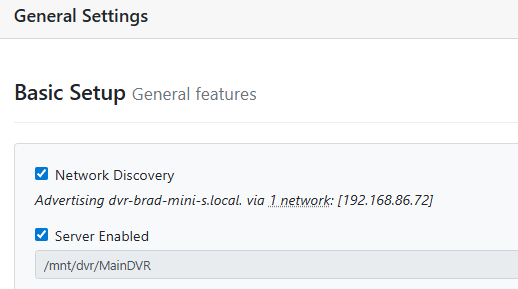
Go to your ChannelsDVR admin page on Chrome... Then, Settings/General. You can get your IP from there.

image

1 Like

Thanks for the info. I got some channels working, and some not. I'll let you know if I can isolate any specific problems.

I got some things working, but scrapes and audits say they are queued, but they never execute.

if you can provide some logs, that'd be helpful. i've never seen that happen before.

I upgraded to the latest Docker version. Then I rebooted my machine. Things started working, but docker hung again when I tried to rescan Fubo Rate Limited. I restarted Docker again, and everything has been working since.

It has taken me many hours to configure all the sources and channels, but it looks like it will all be worth it in the end. Thank you for such a great product.

Same here. Make sure and do a Database Backup from the settings tab.

I'm super glad you said this. I did not think of it, and loosing hours and hours of work would have been really depressing.