Need help adding movies/tv folders into channels portainer stack

Ok, I have been at this all day trying to figure out what is probably a simple thing. For info, I am running on an Unraid machine.

I played around and installed olivetin and decided to use its quick action function to install channels into Portainer. All is overall fine, except I can't figure out how to add my moves and tv shows folder into that stack so that I can select them in the channels webui.

When I had channels installed in docker on Unraid directly there is a dropdown where I can add additional volumes and that is how I added the movies and tv shows folders so I could add them into channels, so I understand how to do it that way.

The Portainer interface doesn't seem so simple to me and I don't know where to put the file paths and such. I have tried several different things but so far none seem to work for me and now I am just frustrated and ready to quit. So, I figured maybe someone could show me how to do this.
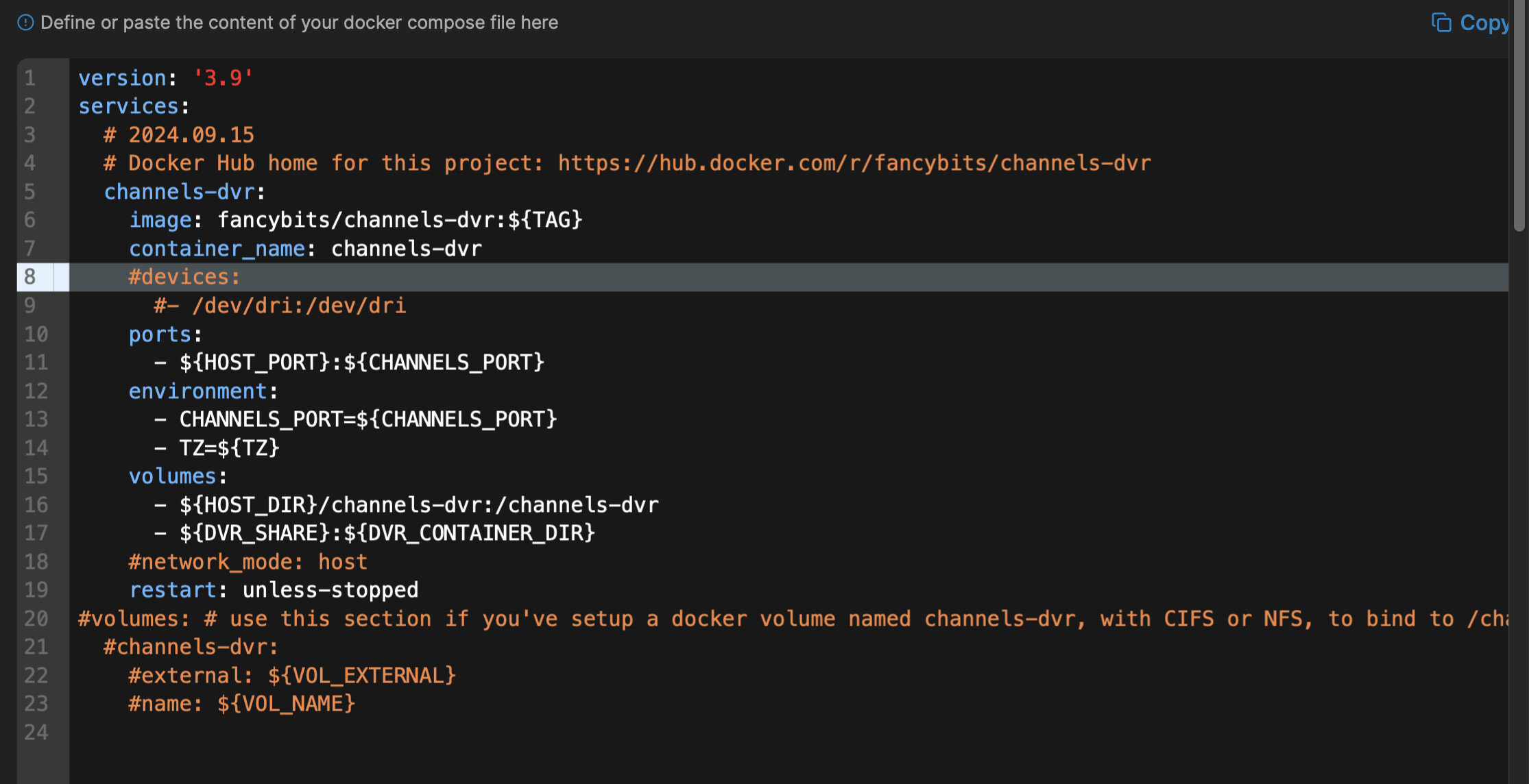
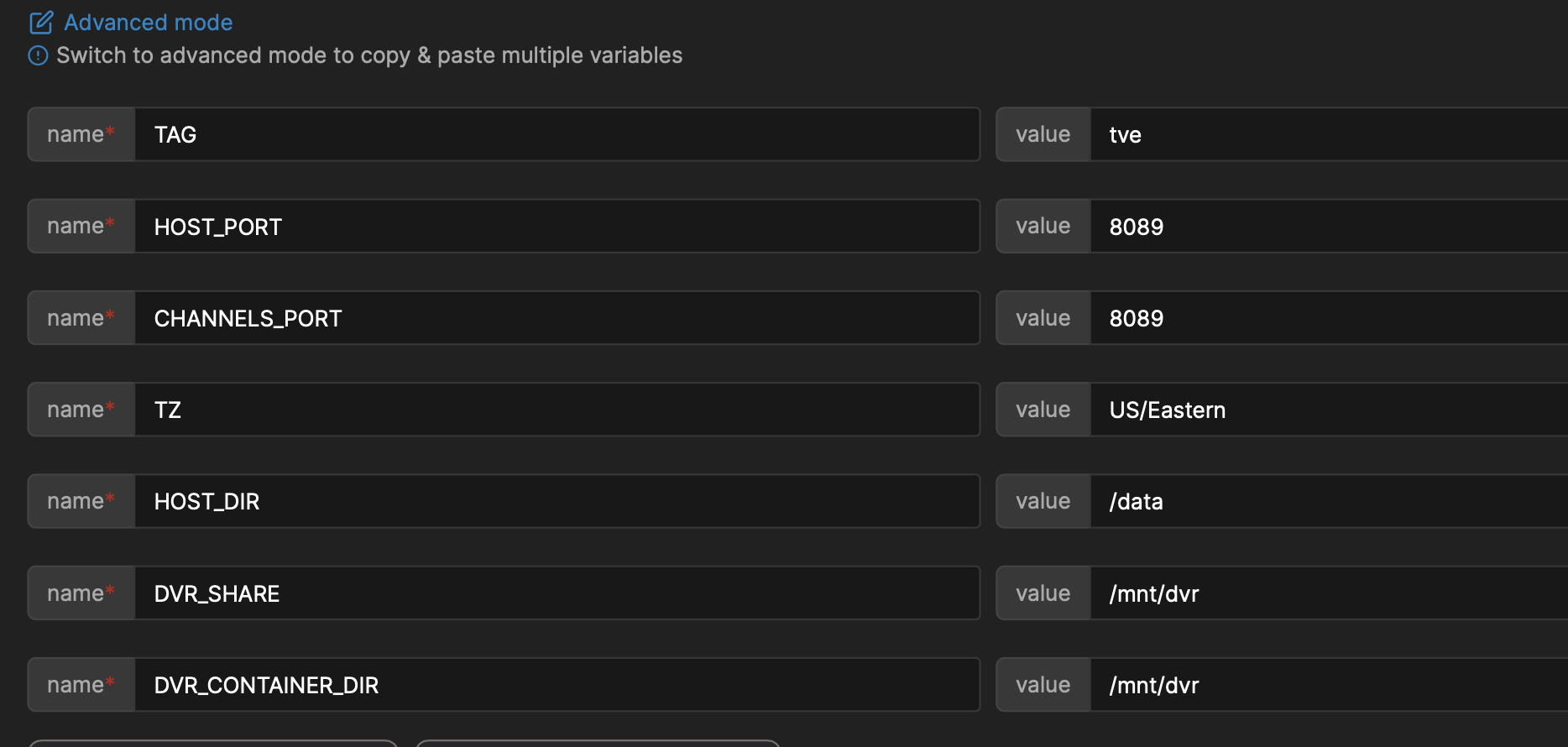
Would you mind posting the Portainer Stack and the environment variables created by Project One-Click, so we can see what values you used? If you haven't been there already, go to Portainer-Stacks and then into the Editor, and copy-and-paste the complete Docker Compose here.

Also in the editor, is a section for Environment variables, where when you go into Advanced mode you can copy and paste everything from there. With that info, we should be able to point you in the right direction.

Are you talking about pointing to local imports for TV and Movies, or something else?
Channels DVR has a built in Imports directory with Movies, TV and Videos subdirectories you can put your imports in. Otherwise you need to define the paths that you want to import from using docker volume mappings.

@chDVRuser - I am talking about my pre-existing directories on the Unraid machine that holds all of my ripped movies and tv shows. Yes, I know I need define the paths in the docker so that channels can see them. That is the step I can't figure out in Portainer, but I was able to figure out in the docker interface in Unraid itself.

@bnhf - Ok, I can do that. I know I just need to add the paths as stated above somewhere in Portainer stack, I just don't know where to do that using the Portainer interface. It is easier to see how to do it in the docker interface that Unraid uses.

1 Like

I think this is what you're looking for:

That's the compose part, but please add the Environment section which contains most of your installation specific values.

Also, please put 3 backticks before and after sections of code, logs, variables and the like to make them more readable. You can edit your post to fix the above.

I'm guessing that /mnt/dvr is not where your Channels recordings are stored? The value DVR_SHARE is where you define the location in your Unraid filesystem, and DVR_CONTAINER_DIR defines what the directory will be called inside the container (in this case you can name them the same for convenience).

I changed the compose post to a screenshot.

Anyway, what you're referring to is confusing me. My knowledge of docker is very fragile. :grinning:
I am not currently doing any recording with Channels, just using it to view my own media and using it with the streamlinks add-on.

I really just need to know where to input the paths to my movies and tv shows folder that already exists on my Unraid setup.

/mnt/dvr was pre-filled out in the DVR share section when I was installing channels. I changed it to match in the DVR_CONTAINER_DIR field. It is also the only way I could get Channels to see the streamlink files created by that add-on.

What's the path to where those files are stored? And, what's the basic hierarchy below that path for movies, tv shows, etc?

/mnt/user/movies and /mnt/user/tv_shows

There are several ways we could approach this, but I think if you changed the value of DVR_SHARE to /mnt/user and DVR_CONTAINER_DIR to the same, we could cover all the bases. That way everything in /mnt/user will be visible to you inside the container.

Create a directory under /mnt/user called channels_data or dvr, and set that in the CDVR WebUI as the location for your Channels data. And then, import your personal media as /mnt/user/movies and /mnt/user/tv_shows. How's that sound?

2 Likes

Holy smokes! That simplified everything! Thank you so much! I can now navigate to all of my media folders from the channels interface and the streamlinks are working!

Thank you again! Now, I also better understand the directory structure in general.

1 Like

I had a hard time grasping docker ports and volumes when I learned what docker was and tried to create a Channels DVR docker container.

I was using docker run commands at the time.

If someone could come up with a good simile, or point to a video explaining it, many new docker users would probably be enlightened. Everything I have found assumes you are a developer and quickly gets into the weeds that make most new users heads spin.

I'm no good at illustrations, but I do understand it.

Since a docker container uses an OS as its base, you could picture the view from inside the docker container as being a view of the directories and ports available to that OS running inside the docker container.

Since it's isolated from its host environment and can't see outside its own world (container) , in order for it to interface to the outside world (the host OS devices, ports, directories, etc.) you have to create mappings from the container environment to the host environment it's running on.

If only there were a picture that was worth a thousand words.
Or a high-level (40,000 foot view, executive overview, etc.) view from a docker user's perspective.

1 Like

Yeah, I have tried using docker in the past and totally gave up at the time. My biggest issues were related to understanding how to get outside information inside the container itself. It took me a while just to wrap my head around and understand that you have provide paths to allow that information into the docker so that it could be read. Once I understood that, it was then the issue of HOW to get those paths into the docker container.

The docker GUI in Unraid itself was a bit easier to see how to add the volumes than it was in Portainer's GUI. I feel like there is a bit of a simplicity to the complication once you really understand it.

1 Like

This topic was automatically closed 365 days after the last reply. New replies are no longer allowed.