New Docker Install - Cannot find old library

Hi!
I have and older install of Channels-DVR that I had deployed on a debian server.
I just recently moved to a Docker container install using the fancybits dockerhub image.
Everything has deployed fine (great documentation!) but the new install cannot seem to find my old library of recorded items. Is there a way to have to old config brought over to the new install?
And have the library of older items show up?

Thanks!

Got the new docker container deployed, but when I go in to start setting up the server @ http://9.9.9.90:8089/admin/settings, I get to the point of setting the storage location (which already exists from a previous install), I can only pick one top level directory:


I thought this would already be set up in my "Volumes" section of the container?
I could brows to the location where I have my old recording set, but I can only pick the top level directory.
I also noticed that in the instructions on Dockerhub, when you deploy, it creates a new volume called 'channels-dvr' in the top level directory tree. Do I pick this?

Two things:

  1. Have you brought the existing library into Docker with a proper volume mapping?
    -v /path/to/recordings:/dvr or similar?
  2. You really ought to use proper private addresses in your home network. Instead of 9.9.9.90, maybe something in 10.0.0.0/8 instead.

I actually changed the IP (paranoia) when I posted this thread, so I should be good there.
Yes, I did bring the proper volume mapping.
Here's my volume config:

Does this look correct?
If so, then how should this screen look?:

Should it mimic the /mnt/disk/dvr/recordings (but with the /src/dev-disk-by-uuid....) setting?

Your "config" should be mapping to /channels-dvr. As for your recordings, if that is indeed where you're mapping them into on the container, then you shouldn't be looking in /srv, but rather /mnt/disk/dvr/recordings.

(Of course, I have no idea why you're putting everything under /mnt/disk, but you're entitled to your choices. Also, having your recordings as a subdirectory of your main config mount probably isn't the smartest choice, either. You would be better served by keeping them at the same level at the least.)

I think you're misunderstanding (and it's probably my fault).
If I'm setting the directory where my recordings are when I set up my container, why am I getting prompted to set it up again when I log into channels-dvr via a web browser?
Shouldn't the container already know where I want my recordings kept?
Here's the page that I used to direct me on how to set the container up:
https://hub.docker.com/r/fancybits/channels-dvr

There's two directories:
/srv/dev-disk-by-uuid-c3811bd2-1ce1-44ea-b1e4-55f036ffeca1/MyDocuments/MyVideos/dvr - the config?
/srv/dev-disk-by-uuid-c3811bd2-1ce1-44ea-b1e4-55f036ffeca1/MyDocuments/MyVideos/dvr/TV - the recordings

I set these up in the docker config.
When I log into my newly created channels-dvr server, I get asked to pick a storage location. It does not let you pick a directory more than one level deep. And why do I need to set this again if I've already set it via the docker setup?

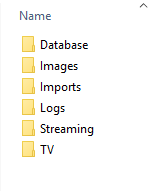
This is what the 'config' directory should look like for my installation correct?
image

And the recordings are here:
image

Those should be all I need right?
See the docs: https://getchannels.com/dvr-server/#docker

  --volume /mnt/disk/dvr/config:/channels-dvr \
  --volume /mnt/disk/dvr/recordings:/shares/DVR \

The container paths should be /channels-dvr and /shares/DVR. That doesn't match what you're using.

(first time docker user, sorry for the dumb questions)

I super appreciate the help guys!
Should it be like this? Or does the /shares/DVR path need to end at TV?

No. The config directory is completely separate from where your recordings are stored. It's where the software itself is installed.

The /shares/DVR is correct. The other one should be pointing somewhere else at a blank folder where the software can be setup.

Ahhh, thank you! Where does one normally put the config files on a linux system?
I see some other documentation for channels-dvr it says to install here: /usr/local
What I don't understand is that when it's all set up, the server still can't find my previously recorded shows or my current old dvr settings.

Sure you could use /usr/local/channels-dvr

You have to do a restore for that: https://getchannels.com/docs/articles/how-to/migrate-dvr-to-new-computer/

Ah, bummer. I lost the HDD that the old install was on.
No worries. I can just start over. I do have my old backups tho.
Thanks again for the help! We love the product!

You can restore from the Database folder in your earlier screenshot.

Dang. I've tried this in Chrome and Firefox and it's the same on both.
If I go to the restore link, and try to search for the directory path, the box is grayed out.
It will only pick the top level directory that you select.
I need the path to go to:
/srv/dev-disk-by-uuid-c3811bd2-1ce1-44ea-b1e4-55f036ffeca1/MyDocuments/MyVideos/dvr

But it will only select the /srv directory.

Any way to get around this?
Everything is grayed out. I would happily copy/paste my path into the box, but it's grayed out.

That's the path on the host not the container

I just mean for the backup location.
I cannot browse to the backup location that is on the host. the browser lets you pick one directory but not walk the directory to the correct location. I've tried on both Chrome and Firefox.

Was finally able to paste in a path.
The backups are definitely in this directory, but:

That's still not the correct location. That's the path on your host. The container cannot see paths in your host.

What is your volume mapping now? Whatever you mapped your dvr folder as is where the backups will appear on the container.

Okay, I got it. Dang, I'm sorry to waste your time.

Docker has been a bit of a learning curve. Ha!
Thanks again!

2 Likes