New Mac Mini M6 / macOS 27 no joy

I cannot get the Channels server to respond on localhost:8089. The install says all good but it's not.

Starting Installer...
Fetching latest version number...
Downloading Channels DVR v2026.08.07.0346 into /Users/modell/Library/Application Support/ChannelsDVR...
darwin-arm64.sha256
channels-dvr
comskip
ffmpeg
ffprobe
Checking file integrity...
Preparing directories...
Enabling automatic wake from sleep support...
Installing DVR service...
Installation complete!

Safari pops up after and says it can't open the page at 127.0.0.1:8089. No channels-dvr process shows up in ps aux output.

Anyone have success with this yet?

2 Likes

Try your ip instead of local host

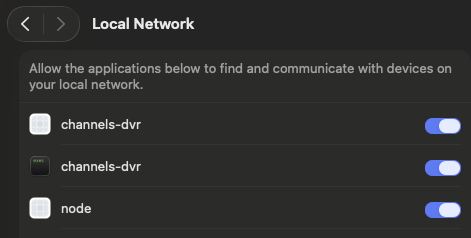
Make sure channels-dvr is allowed Local Network access under Privacy & Security > Local Network

I'm running into the exact same issue with the same hw and OS. I have tried:

  • 127.0.0.1:8089
  • <local.IP>:8089
  • localhost:8089

Of note, the first time I ran the Channels DVR sw installer, it appeared to hang (got stuck for a very long time). I cancelled this out and tried again. The second time, the installer reported that it installed successfully, but I couldn't access it. I rebooted and tried the installer again. This time it asked if I wanted to remove the sw, which I did. I then proceeded with the install one more time and this time it presented me with a security verification popup that I had not previously seen. I entered my system password and completed the installation. But still unable to access the web interface to configure the server. :confused:

1 Like

There is no automatic entry for Channels in this list. Can this be added via the command-line?

Not that I know of. macOS should prompt you to Allow when you run the installer.
Screenshot 2026-09-22 194630
Check your Notifications

yep, nothing like that here. Will give it another go...

Update: another install attempt, and another reported successful process by the installer. But local access is not possible, and there's no prompt for any local network access currently open to review. I even have tried running the DVR as a system service to no avail. I do see an entry for Fancy Bits in the Background Activity pane under Login Items, and this is set to allow, bu the service itself is stating that it is not currently running, and there appears to be no way to force it to.

BTW, I've been running Channels DVR for years now, so it's not like I'm some noob. This is the first time I've tried running it on this hw and OS however. Unfortunately, I currently only have other Intel Macs to run the sw on, so am unable to test on any other ARM Mac / macOS 27

Does the channels-dvr.log file exist?
~/Library/Application Support/ChannelsDVR/data/channels-dvr.log
If so, see if any errors in it.

1 Like

There seems to be an issue with Channels DVR Server running on M5/M6 that is relevant to a golang issue overall.

We're looking into it!

2 Likes

Fix likely coming up...

2 Likes

Please try the latest pre-release:

1 Like

Delete the macOS installer and download the latest one from our website. It should let you install on a fresh M5/M6 machine

The latest installer seems to be working. Thanks for the fast fix!

1 Like

This build indeed seems to have resolved my issue

FYI, looks like the Migration guide support page could use an update. The 'restore' option doesn't get presented until you've selected the database path. Not a major issue, but took me a second to realize I should just proceed even though I wasn't seeing exactly what was presented on that page

1 Like

Trying to migrate my previous server, which was a Mac Pro 6,1 running on Monterrey (12.7.6). The Channels DVR database is stored on a local NAS, which I've mapped to macOS via an auto mount into /Volumes/mnt/.

All database backups are found, but when I try to restore any of them, I am receiving the following error:

open recorder.db: no such file or directory

*** PLEASE DISREGARD THE ABOVE – a reboot of the host machine allowed configuration from a restored database to successfully process ***