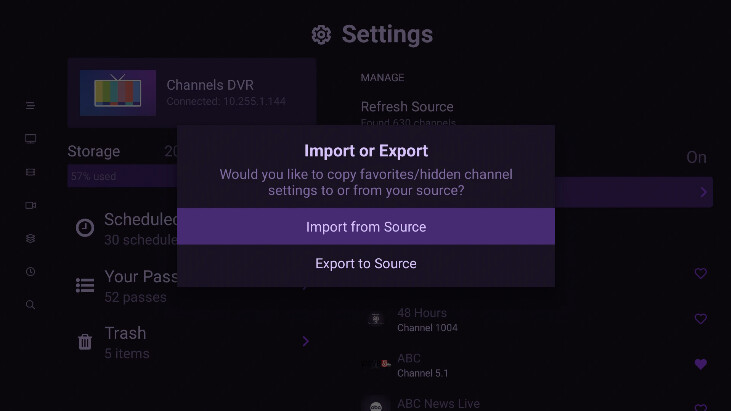
Dear Community,
Per the Topic, I am new to Channels (a former, frustrated Tablo user) and I am attempting to setup the channel lineup (at the server) that would be used by all the TV streaming devices around the home.
First my environment:
OTA Tuner: HDHomeRun Flex 4K ATSC 3.0 NextGen TV: 2/4 Tuners HDFX-4K
Channels server: New, Beelink Mini PC, SER5 Pro 5800H AMD Ryzen 7; 16GB DDR4 500GB M.2 SSD Mini Desktop Computer; External 2TB HDD
Streaming devices: All 4kMax Firesticks (except one new Sony TV running running GoogleTV-Android?)
Network: AT&T fiber-optic modem/router
WiFi: Tp-Link Deco 7 Pro Tri-Band WiFi 7 BE10000 Whole Home Mesh System 6-Stream 10 Gbps
Environment(?): Did I miss anything?
As introduced, I would like setup the channels lineup at the server that would: 1) Provide all found channels (56) to each streaming device and 2) Allow us to create "favorites" at each streaming device.
I downloaded the Channels App at the Sony TV yesterday and noted that if I did not "heart" the stations at the server, I would not get the channel to appear in the downloaded Sony TV Channels App. Thereby, I put a "Heart" next to almost every one of the 56 channels. (And that worked at the Sony TV.)
Then last night I downloaded the Channels App at the first 4kMax Firestick and it had "reverted" back to the few channels I had first put a "heart" next to. So I know I must be doing something wrong. Based on my goals of: 1) Providing all found channels (56) to each streaming device and 2) Allow us to create "favorites" at each streaming device, can anyone discern what I am doing wrong? I would very much appreciate your assistance.
This morning, I received a Channels "Getting Started" e-mail concerning "Managing Your Channels" and thought, "Ah-Ha... Here it is"... But here is what I found that appears to be more about the client level instructions versus server level. (Am I wrong?)
"Manage Your Channels
Channels can customize your experience by managing your channel lineup. You can hide, favorite, and sort your channels.
Favorites
You can manage your channels while browsing them in On Now. Press and hold Select while on a channel to bring up the options menu. Choose Manage Channel. From here you can mark the channel as a favorite.
Once you’ve picked all of your favorite channels, you can change their order. While filtered to Favorites in On Now, press and hold the Select button on your remote and choose Rearrange Channels to enter rearrange mode. Your channels will start to wiggle and you can select the channel you would like to move.
Press the Select button on your remote to accept the new position. Press the Back or Menu button to exit rearrange mode.
Hide Channels..."
I thank you, again!
"DW" or "Grumps"