Non-Docker source for PlutoTV m3u playlists and EPG

Yea. Figured out I want to use LOCAL to get the equivalent to what nocords was giving me i guess.

I am trying the Window exe you made. Seems to work so far. Thank You so much for that!
Will it auto start with Windows, or do you need to add that option into it?

I had to re-do my Favs and Channels collections as the numbers did not match up, but i gather that is due to me using custom set channel numbering.

Would be cool to also have a Widows based app for Plex and Samsung.

1 Like

Many thanks, it works perfectly :+1: For now don’t need login for France, but as all other, old links didn’t work anymore because old links use the V1 Pluto API, as your software use V2 Pluto API links now it’s ok again, and don’t need any login.
Perhaps @maddox and @HankLloydRight can use the V2 API links?

For France as it doesn’t require Login, if JM2P server can return to V2 Pluto api link for all channels and not only DAZN channels, it will work, same for all countries without account required.

1 Like

@Bobby_Vaughn I am getting alot of "The connection to the tuner was lost" when i try to play any channel for more than a couple minutes. 10 secs active channels stream then it fails.

The logs in Channels show for example
[TNR] Error during live stream for ch2142 Top Gear: Playlist had no segments: https ://cfd-v4-service-channel-stitcher-use1-1.prd.pluto.tv/v2......super long url.

I have two servers using the generated playlist from the windows program.
Is that the issue? Does this only support one device now?
I was able to use multiple devices with past methods fine.

EDIT:
Looks like the Windows.exe solution only supports one device/one stream at a time.
I get Connection to tuner lost if it try to tune another channel on same server or use it on another server.
Can't record one channel/watch another etc.

@maddox Same issue with your Docker. I can only have one channel playing globally, if i try to open another one, on another client for example, it says tuner lost connection on the active stream. Even using the "multiple feeds" playlist options.

Ok. I do not see any posts on this. (as of yet)

You can only have ONE active stream globally.

Per account/ per source you use.
Meaning only ONE client can be playing any Pluto channel at a time.
If you are recording a channel, tuning a new channel live will cause the recording stream to stop.
The newest client to tune a channel gets priority.

The only thing i have been able to accomplish, with my setup of 2 separate servers, one for me to use, one for my mother...

Is to use two different sources and different Pluto accounts (emails).
I use the Windows.exe for mothers account, the Maddox Docker for mine.

This results in each server being able to stream one Pluto channel each, without canceling each other out.

However, again, each server can only have ONE active Pluto TV channel in use at any time.

I hazard a guess that this is a new limitation by the new Pluto API / this new requirement of Account login?

1 Like

Hi. Just got the Windows.exe going. I'm looking to a similar setup and run the Maddox Docker as well. Other than the simple copy paste method I used previously, I have little/no detailed experience running Docker. Very much still learning. I'm trying to run the Maddox startup code

docker run -d --restart unless-stopped --name pluto-for-channels -p 8080:80 \
 -e PLUTO_USERNAME='[email protected]' \
 -e PLUTO_PASSWORD='yourpassword' \
 jonmaddox/pluto-for-channels

but keep getting -e PLUTO_USERNAME & -e PLUTO_PASSWORD error messages. Do I remove or keep the single quotation marks around my username & password?

Also, before I paste the code, I get a warning about running multiple commands - is it ok to run the entire code at once?

@MisterMustang Try running it like this if you are using the Windows Terminal or Powershell:

docker run -d --restart unless-stopped --name pluto-for-channels -p 8080:80 -e PLUTO_USERNAME="[email protected]" -e PLUTO_PASSWORD="yourpassword" jonmaddox/pluto-for-channels

Once the stitcher builds the proper url and hands it to Channels, it is handled by Pluto from that point on. I will look into it during testing but I have not seen that behavior during use.

Pluto could be limiting it by device ID. I will test a work around today and see if we can fix this.

I'll give that a go & let you know how it goes. My thanks for the assist. It's appreciated

I have confirmed this behavior is present in all 3 working Pluto sources. Your two (windows and docker) and Maddox docker.

1 Like

So I'll look into implementing jmaddox's latest commits into nocords.xyz.

Although that means I'd have to create separate site logins, retrieve/store the tokens, and serve custom individual .mp3u and .epg files for each person, so that's going to boost the bandwidth on the server -- I'm serving about 40GB per day, but all of that is cached at the CDN so it's free, more or less. With separate feeds for everyone, I can't really cache anything.

I'm not sure if or what people would pay monthly for customized nocords.xyz link access to cover the new bandwidth costs. $4/month?

1 Like

Discussion of taking money for this stuff is not appropriate for this forum.

I understand why it makes your solution more complicated, and honestly, you should just stop offering this functionality in my opinion. It's way too complicated for your solution, as you described in what you would have to change.

Solutions already exist via self hosted community projects. People just need to learn how to use those.

Accepting money in exchange for this stuff is always bad idea. and if you do it, you'll have to discuss it off of this community forum.

1 Like

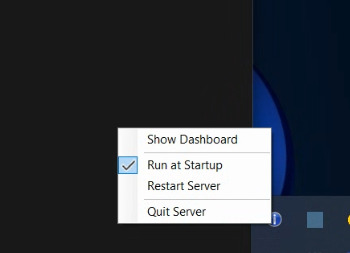
This was a bug and thank you for finding it. I have a fix for it on the next version. The next release of the Windows Pluto app will have a few more options in the System Tray icon.
screenshot
It will also have an attempt at allowing you to watch multiple streams from Pluto. I am remoting into my home PC and can not really test the streams from here.

It also makes the Skydance IP lawyers raise an eyebrow. That will not end the way we would prefer.

1 Like

It seems to be portable?
Could we have 2 logins and 2 instances of your Win exe version, and they would not conflict? I'd hate to have the double listings, however.

It's possible, just a lot of changes to build a load balancer into it and rotate between two different accounts. I will look into it this evening and may do this as a seperate test release. It will probably be a few days before I get it up.

You can't seem to run multiple instances of it. I surmise due to the fact it tries to run the same server on the same port.

Not sure, if things needs to be changed so that the program can store multiple Pluto account info, and keep track of when a client requests a stream, and use a different account to open that stream.
Or, if there is a way to just use one Pluto account, and support multiple streams.
(I recall this was an issue some time ago with certain Pluto TV m3u sources)

Either way, I hope that a solution for multi stream can be found both for the Windows exe, as well as the Dockers solutions.

Not sure what the new restrictions are for Login only Pluto TV.
So far, it seems that one can just spin up as many email accounts as you want, and create multiple Pluto accounts. Unless they start tracking and block by IP address or something....if they detect excessive use.

Worked! Again - my thanks