Not keeping up up with schedule changes

I have a season pass set up for Jeopardy! (WPBF, 25.1).

Tonight's episode was preempted for Zelenskiy's address to the American people. A crawl at the bottom of the screen said Jeopardy! would air at 1 a.m.

This is not showing up in the DVR schedule, nor is it in the guide (after repeated updates). How do I make sure tonight's episode gets recorded correctly?

Why isn't Channels DVR keeping up with schedule changes?
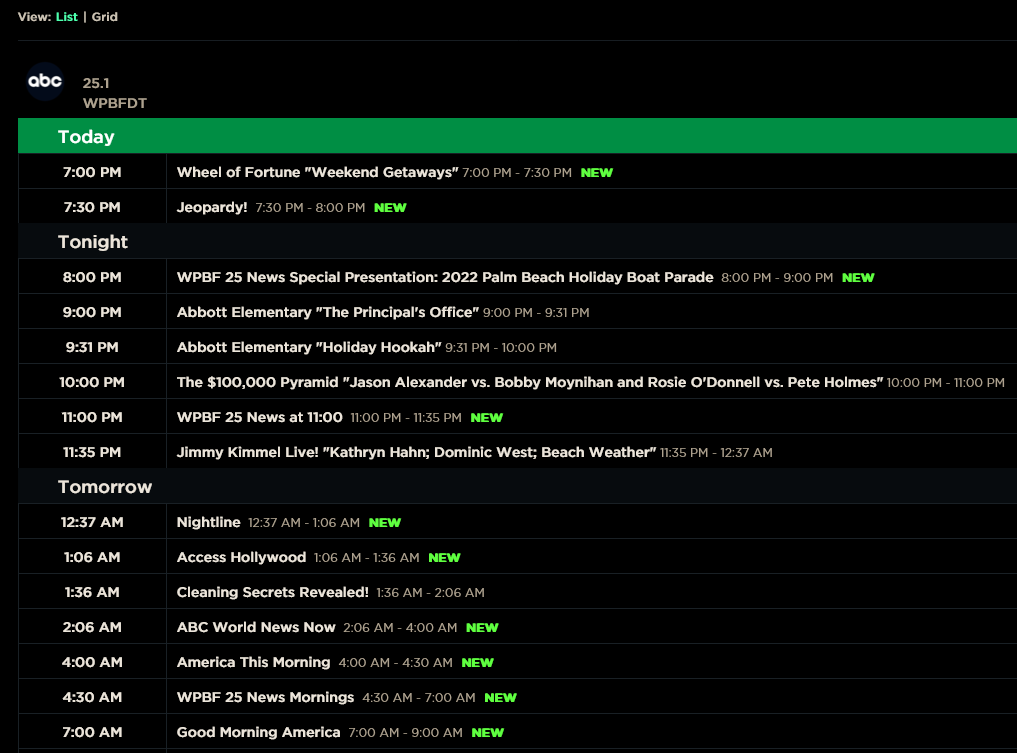
If it is not updated in the guide data channels dvr has no idea when it airs quite simply ... no guide data no recording.

Set a manual recording from the guide for Access Hollywood at 1:06am and pad it to start 6 minutes early.

Per zap2it.com

1 Like

To add to what @Edwin_Perez said, the guide data is provided by a third party, which is Gracenote, if I'm not mistaken. So Channels DVR doesn't control it, Channels is as good as the information provided in the guide.

The problem is that these sudden schedule changes are quite common whether it is a natural, or political disaster. If a season pass is going to work properly then these changes need to percolate through the system quickly.

If the bottleneck is not with Channels DVR but with their guide supplier the problem still needs to be addressed. Not may people are going to stay up until 1 a.m. to watch the program but rather rely on their DVRs to do the right thing.

I'm sure that most stations across the nation had schedule changes last night but the keepers of the program guides appear to have been asleep at the wheel.

Fancy bits needs to let their supplier know that their paying customers are not happy with the status quo!

I have the problem with Channels DVR and its EPG provider, Gracenote.
I had the problem with Plex and its EPG providers.
I had the problem with my TiVo's and its numerous EPG providers.
I've had the problem with pretty much any DVR hardware/software I used because of the EPG provider.

It seems the EPG providers are just overwhelmed and can't keep up. They have to rely on the networks to update them. I quit bugging all of them and just deal with the situation, less stress 4me.

2 Likes

I’ve never seen a guide with any cable provide update for that kind of preemption. I’m not saying it couldn’t happen, but I’ve had several cable providers in my life, and none of them have ever done that as far as I know.

2 Likes

This topic was automatically closed 365 days after the last reply. New replies are no longer allowed.