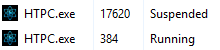
V 1.1.9 and 1.2.0 will not launch. When I try and launch it there is a spinning wheel for a moment and then nothing. I get the following envents in Event log:
Event 1000, Application Error
Faulting application name: HTPC.exe, version: 1.2.0.0, time stamp: 0x6a0e0000
Faulting module name: KERNELBASE.dll, version: 10.0.26100.8737, time stamp: 0x82bf07fa
Exception code: 0xe0434352
Fault offset: 0x00000000000c1c0a
Faulting process id: 0x223C
Faulting application start time: 0x1DD130E97DC4A48
Faulting application path: C:\Users\Morris\AppData\Local\Programs\NucleusHTPC\HTPC.exe
Faulting module path: C:\WINDOWS\System32\KERNELBASE.dll
Report Id: b7529440-52b8-4ce4-bbcf-4794118e4d1b
Faulting package full name:
Faulting package-relative application ID:

=======================================================================

1000 .NET Runtime

Category: Microsoft.Extensions.Hosting.Internal.Host
EventId: 11

Hosting failed to start

Exception:
System.IO.IOException: Failed to bind to address http://localhost:55001.
 ---> System.AggregateException: One or more errors occurred. (An attempt was made to access a socket in a way forbidden by its access permissions.) (An attempt was made to access a socket in a way forbidden by its access permissions.)
 ---> System.Net.Sockets.SocketException (10013): An attempt was made to access a socket in a way forbidden by its access permissions.
   at System.Net.Sockets.Socket.UpdateStatusAfterSocketErrorAndThrowException(SocketError error, Boolean disconnectOnFailure, String callerName)
   at System.Net.Sockets.Socket.DoBind(EndPoint endPointSnapshot, SocketAddress socketAddress)
   at System.Net.Sockets.Socket.Bind(EndPoint localEP)
   at Microsoft.AspNetCore.Server.Kestrel.Transport.Sockets.SocketTransportOptions.CreateDefaultBoundListenSocket(EndPoint endpoint)
   at Microsoft.AspNetCore.Server.Kestrel.Transport.Sockets.SocketConnectionListener.Bind()
   at Microsoft.AspNetCore.Server.Kestrel.Transport.Sockets.SocketTransportFactory.BindAsync(EndPoint endpoint, CancellationToken cancellationToken)
   at Microsoft.AspNetCore.Server.Kestrel.Core.Internal.Infrastructure.TransportManager.BindAsync(EndPoint endPoint, ConnectionDelegate connectionDelegate, EndpointConfig endpointConfig, CancellationToken cancellationToken)
   at Microsoft.AspNetCore.Server.Kestrel.Core.KestrelServerImpl.<>c__DisplayClass28_0`1.<<StartAsync>g__OnBind|0>d.MoveNext()
--- End of stack trace from previous location ---
   at Microsoft.AspNetCore.Server.Kestrel.Core.Internal.AddressBinder.BindEndpointAsync(ListenOptions endpoint, AddressBindContext context, CancellationToken cancellationToken)
   at Microsoft.AspNetCore.Server.Kestrel.Core.LocalhostListenOptions.BindAsync(AddressBindContext context, CancellationToken cancellationToken)
   --- End of inner exception stack trace ---
 ---> (Inner Exception #1) System.Net.Sockets.SocketException (10013): An attempt was made to access a socket in a way forbidden by its access permissions.
   at System.Net.Sockets.Socket.UpdateStatusAfterSocketErrorAndThrowException(SocketError error, Boolean disconnectOnFailure, String callerName)
   at System.Net.Sockets.Socket.DoBind(EndPoint endPointSnapshot, SocketAddress socketAddress)
   at System.Net.Sockets.Socket.Bind(EndPoint localEP)
   at Microsoft.AspNetCore.Server.Kestrel.Transport.Sockets.SocketTransportOptions.CreateDefaultBoundListenSocket(EndPoint endpoint)
   at Microsoft.AspNetCore.Server.Kestrel.Transport.Sockets.SocketConnectionListener.Bind()
   at Microsoft.AspNetCore.Server.Kestrel.Transport.Sockets.SocketTransportFactory.BindAsync(EndPoint endpoint, CancellationToken cancellationToken)
   at Microsoft.AspNetCore.Server.Kestrel.Core.Internal.Infrastructure.TransportManager.BindAsync(EndPoint endPoint, ConnectionDelegate connectionDelegate, EndpointConfig endpointConfig, CancellationToken cancellationToken)
   at Microsoft.AspNetCore.Server.Kestrel.Core.KestrelServerImpl.<>c__DisplayClass28_0`1.<<StartAsync>g__OnBind|0>d.MoveNext()
--- End of stack trace from previous location ---
   at Microsoft.AspNetCore.Server.Kestrel.Core.Internal.AddressBinder.BindEndpointAsync(ListenOptions endpoint, AddressBindContext context, CancellationToken cancellationToken)
   at Microsoft.AspNetCore.Server.Kestrel.Core.LocalhostListenOptions.BindAsync(AddressBindContext context, CancellationToken cancellationToken)<---

   --- End of inner exception stack trace ---
   at Microsoft.AspNetCore.Server.Kestrel.Core.LocalhostListenOptions.BindAsync(AddressBindContext context, CancellationToken cancellationToken)
   at Microsoft.AspNetCore.Server.Kestrel.Core.Internal.AddressBinder.AddressesStrategy.BindAsync(AddressBindContext context, CancellationToken cancellationToken)
   at Microsoft.AspNetCore.Server.Kestrel.Core.KestrelServerImpl.BindAsync(CancellationToken cancellationToken)
   at Microsoft.AspNetCore.Server.Kestrel.Core.KestrelServerImpl.StartAsync[TContext](IHttpApplication`1 application, CancellationToken cancellationToken)
   at Microsoft.AspNetCore.Hosting.GenericWebHostService.StartAsync(CancellationToken cancellationToken)
   at Microsoft.Extensions.Hosting.Internal.Host.<StartAsync>b__14_1(IHostedService service, CancellationToken token)
   at Microsoft.Extensions.Hosting.Internal.Host.ForeachService[T](IEnumerable`1 services, CancellationToken token, Boolean concurrent, Boolean abortOnFirstException, List`1 exceptions, Func`3 operation)

===========================================================

1026 .NET Runtime

Application: HTPC.exe
CoreCLR Version: 10.0.926.27113
.NET Version: 10.0.9
Description: The process was terminated due to an unhandled exception.
Exception Info: System.IO.IOException: Failed to bind to address http://localhost:55001.
 ---> System.AggregateException: One or more errors occurred. (An attempt was made to access a socket in a way forbidden by its access permissions.) (An attempt was made to access a socket in a way forbidden by its access permissions.)
 ---> System.Net.Sockets.SocketException (10013): An attempt was made to access a socket in a way forbidden by its access permissions.
   at System.Net.Sockets.Socket.UpdateStatusAfterSocketErrorAndThrowException(SocketError error, Boolean disconnectOnFailure, String callerName)
   at System.Net.Sockets.Socket.DoBind(EndPoint endPointSnapshot, SocketAddress socketAddress)
   at System.Net.Sockets.Socket.Bind(EndPoint localEP)
   at Microsoft.AspNetCore.Server.Kestrel.Transport.Sockets.SocketTransportOptions.CreateDefaultBoundListenSocket(EndPoint endpoint)
   at Microsoft.AspNetCore.Server.Kestrel.Transport.Sockets.SocketConnectionListener.Bind()
   at Microsoft.AspNetCore.Server.Kestrel.Transport.Sockets.SocketTransportFactory.BindAsync(EndPoint endpoint, CancellationToken cancellationToken)
   at Microsoft.AspNetCore.Server.Kestrel.Core.Internal.Infrastructure.TransportManager.BindAsync(EndPoint endPoint, ConnectionDelegate connectionDelegate, EndpointConfig endpointConfig, CancellationToken cancellationToken)
   at Microsoft.AspNetCore.Server.Kestrel.Core.KestrelServerImpl.<>c__DisplayClass28_0`1.<<StartAsync>g__OnBind|0>d.MoveNext()
--- End of stack trace from previous location ---
   at Microsoft.AspNetCore.Server.Kestrel.Core.Internal.AddressBinder.BindEndpointAsync(ListenOptions endpoint, AddressBindContext context, CancellationToken cancellationToken)
   at Microsoft.AspNetCore.Server.Kestrel.Core.LocalhostListenOptions.BindAsync(AddressBindContext context, CancellationToken cancellationToken)
   --- End of inner exception stack trace ---
 ---> (Inner Exception #1) System.Net.Sockets.SocketException (10013): An attempt was made to access a socket in a way forbidden by its access permissions.
   at System.Net.Sockets.Socket.UpdateStatusAfterSocketErrorAndThrowException(SocketError error, Boolean disconnectOnFailure, String callerName)
   at System.Net.Sockets.Socket.DoBind(EndPoint endPointSnapshot, SocketAddress socketAddress)
   at System.Net.Sockets.Socket.Bind(EndPoint localEP)
   at Microsoft.AspNetCore.Server.Kestrel.Transport.Sockets.SocketTransportOptions.CreateDefaultBoundListenSocket(EndPoint endpoint)
   at Microsoft.AspNetCore.Server.Kestrel.Transport.Sockets.SocketConnectionListener.Bind()
   at Microsoft.AspNetCore.Server.Kestrel.Transport.Sockets.SocketTransportFactory.BindAsync(EndPoint endpoint, CancellationToken cancellationToken)
   at Microsoft.AspNetCore.Server.Kestrel.Core.Internal.Infrastructure.TransportManager.BindAsync(EndPoint endPoint, ConnectionDelegate connectionDelegate, EndpointConfig endpointConfig, CancellationToken cancellationToken)
   at Microsoft.AspNetCore.Server.Kestrel.Core.KestrelServerImpl.<>c__DisplayClass28_0`1.<<StartAsync>g__OnBind|0>d.MoveNext()
--- End of stack trace from previous location ---
   at Microsoft.AspNetCore.Server.Kestrel.Core.Internal.AddressBinder.BindEndpointAsync(ListenOptions endpoint, AddressBindContext context, CancellationToken cancellationToken)
   at Microsoft.AspNetCore.Server.Kestrel.Core.LocalhostListenOptions.BindAsync(AddressBindContext context, CancellationToken cancellationToken)<---

   --- End of inner exception stack trace ---
   at Microsoft.AspNetCore.Server.Kestrel.Core.LocalhostListenOptions.BindAsync(AddressBindContext context, CancellationToken cancellationToken)
   at Microsoft.AspNetCore.Server.Kestrel.Core.Internal.AddressBinder.AddressesStrategy.BindAsync(AddressBindContext context, CancellationToken cancellationToken)
   at Microsoft.AspNetCore.Server.Kestrel.Core.KestrelServerImpl.BindAsync(CancellationToken cancellationToken)
   at Microsoft.AspNetCore.Server.Kestrel.Core.KestrelServerImpl.StartAsync[TContext](IHttpApplication`1 application, CancellationToken cancellationToken)
   at Microsoft.AspNetCore.Hosting.GenericWebHostService.StartAsync(CancellationToken cancellationToken)
   at Microsoft.Extensions.Hosting.Internal.Host.<StartAsync>b__14_1(IHostedService service, CancellationToken token)
   at Microsoft.Extensions.Hosting.Internal.Host.ForeachService[T](IEnumerable`1 services, CancellationToken token, Boolean concurrent, Boolean abortOnFirstException, List`1 exceptions, Func`3 operation)
   at Microsoft.Extensions.Hosting.Internal.Host.StartAsync(CancellationToken cancellationToken)
   at Microsoft.Extensions.Hosting.HostingAbstractionsHostExtensions.Start(IHost host)
   at HTPC.Program.Main(String[] args) in D:\a\HTPC\HTPC\Program.cs:line 88