OliveTin EZ-Start: The Next Generation. Deploy OliveTin-for-Channels from the Command Line without the Need for Portainer to be Installed in Advance!

EDIT: About an hour after the posting below, I went to the container area of Docker and clicked on the Portainer Port 9000 link and the Portainer web page opened. Onward through the fog....

===========

Got the following after the Portainer install:

Portainer container created successfully

Portainer token creation and environment initialization failed

Olive Tin and Project 1 Click seems to be working. Health check pretty good but says:

...
PORTAINER_HOST=
PORTAINER_PORT=
PORTAINER_ENV=
....

ls: cannot access '/mnt/nnn.nnn.n.nnn-': No such file or directory
error: no such object: olivetin
ls: cannot access '/mnt/nnn.nnn.n.nnn-_logs': No such file or directory

I tried to get this working about a year ago and gave up. Today I did a fresh install, but suspect I'm missing a few key settings. Thanks for any help with the next steps.
Go ahead and post the complete output from the OliveTin-for-Channels Post Install Healthcheck, and let's see where you're at...

After I use the Olive Tin Environment Variables tool to fill in some blanks I will do that.

Looks like a lot of my health check output can be cleaned up if I would (as instructed multiple times by the Health Check output) :

Run sudo -E ./fifopipe_hostside.sh "$PATH" from the directory you have bound to /config on your host computer

but I'm not sure where "the directory you have bound to /config" on my host computer is. The closest thing I can find is a ~/.docker directory.

Also, I've tried unsetting/deleting the EZ_START variable with no luck.

The total Health Check output is

Checking your OliveTin-for-Channels installation...
(extended_check=true)

OliveTin Container Version 2025.12.26
OliveTin Docker Compose Version 2025.08.25

Warning the EZ_START env var is still set. This needs to be removed for production use!
----------------------------------------

Checking that your selected Channels DVR server (:8089) is reachable by URL:
HTTP Status: 200 indicates success...

curl: (3) URL using bad/illegal format or missing URL
HTTP Status: 000
Effective URL: http://:8089

----------------------------------------

Checking that your selected Channels DVR server's data files (/mnt/-8089) are accessible:
Folders with the names Database, Images, Imports, Logs, Movies, Streaming and TV should be visible...


Docker reports your current DVR_SHARE setting as...


If the listed folders are NOT visible, AND you have your Channels DVR and Docker on the same system:

Channels reports this path as...

----------------------------------------

Checking that your selected Channels DVR server's log files (/mnt/-8089_logs) are accessible:
Folders with the names data and latest should be visible...


Docker reports your current LOGS_SHARE setting as...


If the listed folders are NOT visible, AND you have your Channels DVR and Docker on the same system:

Channels reports this path as...

----------------------------------------

Checking if your Portainer token is working on ports 9000 and/or 9443:

Portainer http response on port 9000 reports version 
Portainer Environment ID for local is 
Portainer https response on port 9443 reports version 
Portainer Environment ID for local is 

----------------------------------------

Here's a list of your current OliveTin-related settings:

HOSTNAME=olivetin
CHANNELS_DVR=:8089
CHANNELS_DVR_ALTERNATES=
CHANNELS_CLIENTS=
ALERT_SMTP_SERVER=
ALERT_EMAIL_FROM=[Redacted]@
ALERT_EMAIL_PASS=[Redacted]
ALERT_EMAIL_TO=[Redacted]@
UPDATE_YAMLS=true
UPDATE_SCRIPTS=true
PORTAINER_HOST=
PORTAINER_PORT=9443
PORTAINER_ENV=2

----------------------------------------

Here's the contents of /etc/resolv.conf from inside the container:

# Generated by Docker Engine.
# This file can be edited; Docker Engine will not make further changes once it
# has been modified.

nameserver 127.0.0.11
search 
options ndots:0

# Based on host file: '/etc/resolv.conf' (internal resolver)
# ExtServers: [host(192.168.65.7)]
# Overrides: [search]
# Option ndots from: internal

----------------------------------------

Here's the contents of /etc/hosts from inside the container:

127.0.0.1	localhost
::1	localhost ip6-localhost ip6-loopback
fe00::	ip6-localnet
ff00::	ip6-mcastprefix
ff02::1	ip6-allnodes
ff02::2	ip6-allrouters
172.18.0.3	olivetin

----------------------------------------

Your WSL Docker-host is running:

 FIFO pipe not found. Is the host helper script running?
Run sudo -E ./fifopipe_hostside.sh "$PATH" from the directory you have bound to /config on your host computer

----------------------------------------

Your WSL Docker-host's /etc/resolv.conf file contains:

FIFO pipe not found. Is the host helper script running?
Run sudo -E ./fifopipe_hostside.sh "$PATH" from the directory you have bound to /config on your host computer

----------------------------------------

Your WSL Docker-host's /etc/hosts file contains:

FIFO pipe not found. Is the host helper script running?
Run sudo -E ./fifopipe_hostside.sh "$PATH" from the directory you have bound to /config on your host computer

----------------------------------------

Your WSL Docker-host's /etc/wsl.conf file contains:

FIFO pipe not found. Is the host helper script running?
Run sudo -E ./fifopipe_hostside.sh "$PATH" from the directory you have bound to /config on your host computer

----------------------------------------

Your Windows PC's %USERPROFILE%\.wslconfig file contains:

FIFO pipe not found. Is the host helper script running?
Run sudo -E ./fifopipe_hostside.sh "$PATH" from the directory you have bound to /config on your host computer


----------------------------------------

Your Windows PC's etc/hosts file contains:

FIFO pipe not found. Is the host helper script running?
Run sudo -E ./fifopipe_hostside.sh "$PATH" from the directory you have bound to /config on your host computer

----------------------------------------

Your Windows PC's DNS server resolution:

FIFO pipe not found. Is the host helper script running?
Run sudo -E ./fifopipe_hostside.sh "$PATH" from the directory you have bound to /config on your host computer

----------------------------------------

Your Windows PC's network interfaces:

FIFO pipe not found. Is the host helper script running?
Run sudo -E ./fifopipe_hostside.sh "$PATH" from the directory you have bound to /config on your host computer

----------------------------------------

Your Tailscale version is:

FIFO pipe not found. Is the host helper script running?
Run sudo -E ./fifopipe_hostside.sh "$PATH" from the directory you have bound to /config on your host computer

----------------------------------------

It looks to me like you're still accessing the EZ-Start version of OliveTin on port 1338. That's just intended as a springboard to get the full version of OliveTin running on port 1337 -- as described in the first post of this thread:

The healthcheck I ran was from URL http://localhost:1337/# . If I change 1337 to 1338, I get

Error getting webui settings
TypeError: Failed to fetch

fetch-webui-settings error in OliveTin Documentation

This error message will go away automatically if the problem is solved.

Switching the URL back to 1337 I get to olivetin.

Also, if I look at the Olivetin container in Docker, it says 1337. Looks to me like Port 1337 is being used. (I'd post a screenshot but can't seem to find a way.)

Do I need to start all over again?

After I run olivetin environment variables generator/tester, I think I need to paste the results somewhere, right? Can you elaborate where? Will these be retained if I stop/start the container?

In a normal EZ-Start installation, running the env var generator/tester is done as one of the steps during the EZ-Start installation process (see the steps shown in my last post). Nothing else is required when run this way, and many of the values needed by OliveTin are added automatically.

The results of your Post-Install Healthcheck, which shows not a single successful test, strongly suggests the generator/tester was not run at the appropriate time. I doubt you'll be successful running it now, and you'll end up spending more time trying to figure out the needed values, than you would starting over.

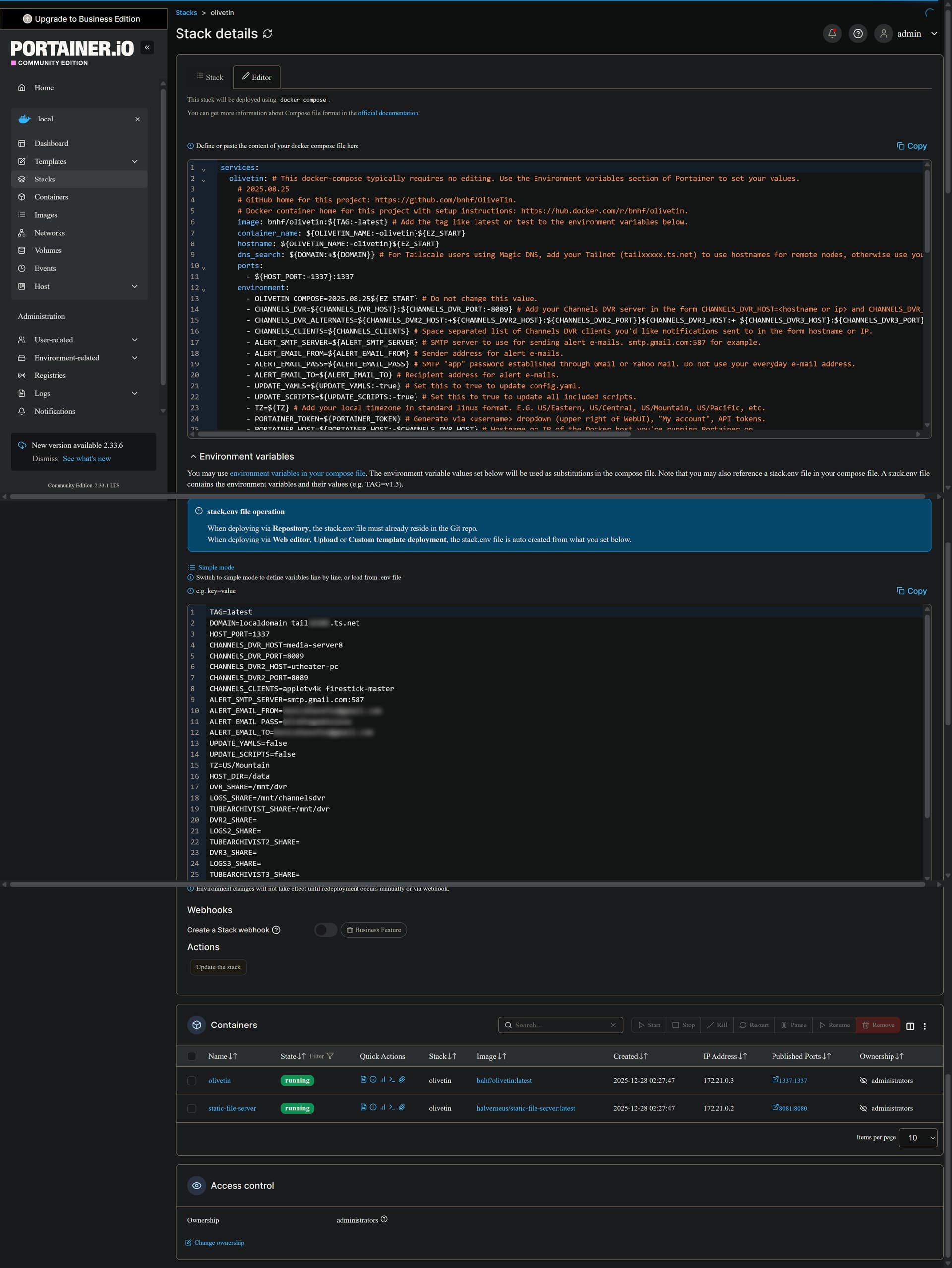
In addition to its use during the EZ-Start process, the generator/tester can be used at any time to create a fresh set of env vars to use in your OliveTin Portainer stack. There's a special section in the Portainer-Stacks Editor specifically for this purpose:

In your case though, you have none of the basic env vars, so there's really nothing to enrich at this point through the generator/tester process.

I'd suggest starting over, and if I'm remembering correctly from earlier in 2024, you're running Docker Desktop for Windows. Using that Docker Desktop interface, you should stop and remove everything related to olivetin, static-file-server and portainer under Containers, Images and Volumes.

With that done, you should be able to move pretty quickly through a fresh installation. Be sure to follow the steps carefully -- there aren't many steps, but they're all important and need to be executed in the correct order.

Thanks for the detailed response. Yes, I am running Docker Desktop on Windows 10, and my CDVR installation is on the same laptop. I will proceed with a cleanup and fresh install following your instructions, but first 2 questions for my own learning curve:

  1. It seems like the OliveTin Environment Variables Generator/Tester OliveTin Action is serving two purposes, one to generate and install envt vars during the EZ_START Installation, and later to inspect/format a text list of envt vars that can be used (via Portainer) to update envt vars after we have moved past EZ_START. Is that correct?

  2. It seems like your process is generalized in that Portainer is used/required to deal with scenarios where perhaps Docker and CDVR are on two different servers, and/or perhaps for other scenarios (Mac, pushing stuff to CDVR clients, etc.). If in fact for a simple installation like mine I was willing to manage my environment variables by using a Docker olivetin terminal, I could do without Portainer. Is this correct?

Yes.

No. Portainer is required to use OliveTin which includes Project One-Click.

"Portainer is required to use OliveTin"

OK, that is where I went wrong. Since my Docker and CDVR are on the same laptop server, and since I am comfortable using the console to set my own environment vars, I thought I could skip the Portainer part of the installation. This, coupled with my lack of understanding about exactly the two different purposes of the OliveTin Environment Variables Generator/Tester, things got hosed. I'll clean up and re-install including the Portainer part.

Thanks for your patience and help.

One more question before I continue: I have been doing this via Windows remote desktop from a different laptop on my home network to the CDVR/Docker/Portainer server laptop in the basement. Can using remote desktop cause any problems during the process? e.g. maybe the process is getting some settings/connection parameters wrong because of the RD? I'll probably do it from the basement anyway, but I was wondering what you think.

No -- RDP is totally safe to use.

OK, I cleaned everything out of Docker and then tried to follow the steps exactly. Twice when trying to " run the Install Portainer on your Docker Host Project One-Click Action" I get the same error:

bbe8461........
Portainer container created successfully

Portainer token creation and environment initialization failed...

After the first failure I tried playing around with creating the token on my own, but went nowhere.
So then I cleaned everything out of Docker, tried again and stopped after the

Portainer token creation and environment initialization failed...

message. Can we focus on getting passed this error? If I can do that I'll feel like I am making some progress.

When I installed Portainer on Docker host, I had to specify http port of 9001 and https port of 9444. I specified the https port of 9444 in the in the Environment Variables Generator/Tester, which provied the following output

TAG=latest
DOMAIN=
HOST_PORT=1337
CHANNELS_DVR_HOST=192.168.68.135
CHANNELS_DVR_PORT=8089
CHANNELS_CLIENTS=
ALERT_SMTP_SERVER=
ALERT_EMAIL_FROM=
ALERT_EMAIL_PASS=
ALERT_EMAIL_TO=
UPDATE_YAMLS=true
UPDATE_SCRIPTS=true
TZ=America/Indianapolis
HOST_DIR=/data
DVR_SHARE=/volume1/NAS_SHARE/channels-data
LOGS_SHARE=/home/DINKNAS_ADMIN/channels-dvr
TUBEARCHIVIST_SHARE=/volume1/NAS_SHARE/channels-data
DVR2_SHARE=
LOGS2_SHARE=
TUBEARCHIVIST2_SHARE=
DVR3_SHARE=
LOGS3_SHARE=
TUBEARCHIVIST3_SHARE=
HOST_SFS_PORT=8080
FOLDER=/web
PORTAINER_TOKEN=ptr_fqj7iw72+3YHBFjKHuu2l7Bj25CJlJas/w3SWPvaF0I=
PORTAINER_HOST=192.168.68.135
PORTAINER_PORT=9444
PORTAINER_ENV=null
PERSISTENT_LOGS=false

Everything worked until I attempted to Create an OliveTin Stack in Portainer. Then I get the following output:

JSON response from https://192.168.68.135:9443/api/stacks/create/standalone/string?endpointId=:
{"code":1024,"msg":"Login has expired, please login again!","debug":"Err - code: 1024, message: Login has expired, please login again!","data":{},"time":0.000211975}
false

and Standard Error of

exit status 1

parse error: Invalid numeric literal at line 1, column 3

Based on the Json response, the host appears to be using 9443 instead of 9444

Thanks for reporting this. I'm surprised this hasn't come-up before, but there was a logic flaw that would affect anyone using alternate ports for both http and https. Apparently, that's been rare.

Anyway, it's fixed now in bnhf/olivetin:latest (aka bnhf/olivetin:2026.01.08). If you're going to start over be sure to delete everything related to olivetin, static-file-server and portainer, in containers, images and volumes. Then, you can run EZ-Start from the beginning.

Can you post the exact EZ-Start docker run command you used from the WSL Linux command line?

Also, can you ping the IP address (or hostname) you're using in the above command, from that same command line, and post the results from that here as well?

Yes, I saved most of that stuff. Here is what I ran from the WSL command line:

docker run -d --name olivetin-ezstart \
--pull always \
-p 1338:1337 \
-e EZ_START=-ezstart \
-e CHANNELS_DVR=http://nnn.nnn.n.nnn:8089 \
-e TZ=$(readlink /etc/localtime) \
-v /config \
-v /var/run/docker.sock:/var/run/docker.sock \
bnhf/olivetin:latest

r.e. the ping:

I'm going to hold off on that because I think I may have discovered a problem. I realized throughout my attempts that I haven't always been fully cleaning up Docker when needed. I found this by quitting (see below) Docker Desktop and then using netstat to check my port usage. I found that even though I thought I had stopped Docker, ports 1337 and/or 1338 might sometimes still be in use. I then realized that stopping Docker Desktop by x-ing out the Docker Desktop GUI window left the underlying Docker engine running. So I am going to make a few more attempts knowing now that simply x-ing out the Docker Desktop GUI isn't enough.

Restarting the laptop certainly cleans everything up, but that is a hassle every time I want to try a fresh EZ-START install. I'm aware that there is a Docker prune command I can run from the WSL terminal, I suspect that might be helpful in cleaning up any debris that may be around. Is that correct?

I'll now pay more attention to making sure Docker is ready (clean) when I attempt the EZ-START install. If I have the same problem as before I'll run the ping as you suggest and report what I find.

works. thanks for the quick turnaround

1 Like

I very carefully ran the script again from a Linux terminal with WSL operational, then the Install Portainer action, got the same Portainer token error:

21073c77eeab0877d5e5d403e4dcf0ad7a755141df9d249a689ae818738664c9
Portainer container created successfully

Portainer token creation and environment initialization failed...

stderr output for the Install Portainer action shows no obvious errors.

I then ran the ping as you requested and got

PING (redacted) (redacted) 56(84) bytes of data.
64 bytes from (redacted): icmp_seq=1 ttl=127 time=0.335 ms
64 bytes from (redacted): icmp_seq=2 ttl=127 time=0.309 ms
64 bytes from (redacted): icmp_seq=3 ttl=127 time=0.295 ms
64 bytes from (redacted): icmp_seq=4 ttl=127 time=0.303 ms
64 bytes from (redacted): icmp_seq=5 ttl=127 time=0.283 ms
64 bytes from (redacted): icmp_seq=6 ttl=127 time=0.276 ms
64 bytes from (redacted): icmp_seq=7 ttl=127 time=0.383 ms
64 bytes from (redacted): icmp_seq=8 ttl=127 time=0.355 ms
64 bytes from (redacted): icmp_seq=9 ttl=127 time=0.297 ms
64 bytes from (redacted): icmp_seq=10 ttl=127 time=0.294 ms
^C
--- (redacted)ping statistics ---
10 packets transmitted, 10 received, 0% packet loss, time 9745ms
rtt min/avg/max/mdev = 0.276/0.313/0.383/0.032 ms

FYI, the docker script ran fine, here are the results:

latest: Pulling from bnhf/olivetin
ccaf924377f9: Pull complete
9a403e889e6f: Pull complete
aadf25bf1781: Pull complete
fe832f298872: Pull complete
2d837dd5ce65: Pull complete
58dd4511bf1c: Pull complete
fc51be28228b: Pull complete
9d73cc56d037: Pull complete
8ea8d7ddf5a8: Pull complete
3e33d22ff327: Pull complete
Digest: sha256:10f3f2c1e522d04550b89ed93722e3c8b2f4f73ec8b16b812a9222a12aa4565e
Status: Downloaded newer image for bnhf/olivetin:latest
58d85ca212e8efa75dacef74a1c6f1e2f4a059353f11fee61d00132fe3fbc127

After the Portainer token failure I looked at Docker Desktop. The engine was paused but the Portainer container was there. I think the engine was running when I ran the ezstart script from the Linux terminal. When I run the ezstart script from the Linux terminal does it matter what state Docker Desktop and the Docker engine are in?