
For full OliveTin functionality, yes. Are you not sharing any directories currently from your Synology? I would think most people would be sharing their recordings directory, to be able access those files from another computer. Sharing the executables (CDVR programs) would be less common, but it should be the same process to do it.
Yeah, I share any CDVR related directories on my network. I have to be able to access them from other computers.
I just copied these environment variables from my original olivetin installation on the Synology.
HOST_DIR=/volume1/docker
DVR_SHARE=/volume1/ChannelsDVR
LOGS_SHARE=/var/packages/ChannelsDVR/target/channels-dvr
TUBEARCHIVIST_SHARE=/volume1/ChannelsDVR
With them, I have olivetin running on the PC now.
Here's the results of the OliveTin Post-Install Healthcheck:
With this new olivetin container running on a separate device from my CDVR server, I'm not sure if this looks correct...
signal: killed

Checking your OliveTin-for-Channels installation...
(extended_check=false)

OliveTin Container Version 2026.03.01
OliveTin Docker Compose Version 2025.08.25

----------------------------------------

Checking that your selected Channels DVR server (192.168.1.100:8089) is reachable by URL:
HTTP Status: 200 indicates success...

  % Total    % Received % Xferd  Average Speed   Time    Time     Time  Current
                                 Dload  Upload   Total   Spent    Left  Speed
100  1276  100  1276    0     0  14057      0 --:--:-- --:--:-- --:--:-- 14177
HTTP Status: 200
Effective URL: http://192.168.1.100:8089/

----------------------------------------

Checking that your selected Channels DVR server's data files (/mnt/192.168.1.100-8089) are accessible:
Folders with the names Database, Images, Imports, Logs, Movies, Streaming and TV should be visible...

total 8
drwxr-xr-x 2 root root 4096 Mar  6 00:29 .
drwxr-xr-x 1 root root 4096 Mar  6 00:29 ..

Docker reports your current DVR_SHARE setting as...
/volume1/ChannelsDVR

If the listed folders are NOT visible, AND you have your Channels DVR and Docker on the same system:

Channels reports this path as...
/volume1/ChannelsDVR

----------------------------------------

Checking that your selected Channels DVR server's log files (/mnt/192.168.1.100-8089_logs) are accessible:
Folders with the names data and latest should be visible...

total 8
drwxr-xr-x 2 root root 4096 Mar  6 00:29 .
drwxr-xr-x 1 root root 4096 Mar  6 00:29 ..

Docker reports your current LOGS_SHARE setting as...
/var/packages/ChannelsDVR/target/channels-dvr

If the listed folders are NOT visible, AND you have your Channels DVR and Docker on the same system:

Channels reports this path as...
/var/packages/ChannelsDVR/target/channels-dvr

----------------------------------------

Checking if your Portainer token is working on ports 9000 and/or 9443:

Portainer http response on port 9000 reports version
Portainer Environment ID for local is
Portainer https response on port 9443 reports version
Portainer Environment ID for local is

----------------------------------------

Here's a list of your current OliveTin-related settings:

HOSTNAME=olivetin
CHANNELS_DVR=192.168.1.100:8089
CHANNELS_DVR_ALTERNATES=
CHANNELS_CLIENTS=
ALERT_SMTP_SERVER=smtp.gmail.com:587
ALERT_EMAIL_FROM=[Redacted]@gmail.com
ALERT_EMAIL_PASS=[Redacted]
ALERT_EMAIL_TO=[Redacted]@yahoo.com
UPDATE_YAMLS=true
UPDATE_SCRIPTS=true
PORTAINER_TOKEN=[Redacted]
PORTAINER_HOST=convertible-pc3
PORTAINER_PORT=9443
PORTAINER_ENV=1

----------------------------------------

Here's the contents of /etc/resolv.conf from inside the container:

# Generated by Docker Engine.
# This file can be edited; Docker Engine will not make further changes once it
# has been modified.

nameserver 127.0.0.11
search localdomain tail[Redacted].ts.net
options ndots:0

# Based on host file: '/etc/resolv.conf' (internal resolver)
# ExtServers: [host(192.168.65.7)]
# Overrides: [search]
# Option ndots from: internal

----------------------------------------

Here's the contents of /etc/hosts from inside the container:

127.0.0.1       localhost
::1     localhost ip6-localhost ip6-loopback
fe00::  ip6-localnet
ff00::  ip6-mcastprefix
ff02::1 ip6-allnodes
ff02::2 ip6-allrouters
172.18.0.3      olivetin
OliveTin::timeout - this action timed out after 20 seconds. If you need more time for this ac
I'm not seeing these directories in the health check:
Database, Images, Imports, Logs, Movies, Streaming and TV should be visible...
Nor am I seeing these:
Folders with the names data and latest should be visible...
This doesn't look right either:
Checking if your Portainer token is working on ports 9000 and/or 9443:

Portainer http response on port 9000 reports version
Portainer Environment ID for local is
Portainer https response on port 9443 reports version
Portainer Environment ID for local is
Well observed -- all those should be fixed. I'd start with getting an Environment ID to show. Try deleting and recreating an OliveTin token on this installation of Portainer, then stop the OliveTin stack and swap the old token for the new. Then re-run the healthcheck.
Done...sadly, no change regarding the Environment ID.
UPDATE: I mistakenly had left your
PORTAINER_HOST=convertible-pc3, rather than using my own host IP. I made the correction and now:
Portainer http response on port 9000 reports version 2.39.0
Portainer Environment ID for local is 1
Portainer https response on port 9443 reports version 2.39.0
Portainer Environment ID for local is 1
A small step in the right direction...
Just so -- nicely done. See if you can get the channels-dvr volume dialed-in. Don't worry about the LOGS_SHARE value just yet.
Man, I have tried just about every iteration of environment variables I could think of for:
HOST_DIR=/volume1/docker
DVR_SHARE=/volume1/ChannelsDVR
LOGS_SHARE=/var/packages/ChannelsDVR/target/channels-dvr
I'm stuck. Do we know if anyone has a similar setup who can help guide me to the proper paths for these variables?
As previously mentioned, I have a native (non-docker) installation running on my Synology NAS, including all TV/Movie recording files. I have several containers running in Docker/Portainer on the same NAS. This includes my original container for OliveTin for Channels. It functions correctly and passes all of the OliveTin Post-Install Healthcheck criteria.
My second device is a Windows 11 PC which has Ubuntu, Debian, Docker, and Portainer running. I am attempting to get the proper OliveTin for Channels stack/container environment variables for this PC which does not have my Channels server running on it.
So, in summary, The Synology NAS has native Channels DVR, Movie/TV files, and CDVR related containers including OliveTin.
Windows PC Portainer Olivetin Stack needs proper environment variables for:
HOST_DIR, DVR_SHARE, and LOGS_SHARE.
I definitely see you're stuck -- so let's try to approach this from a different angle.
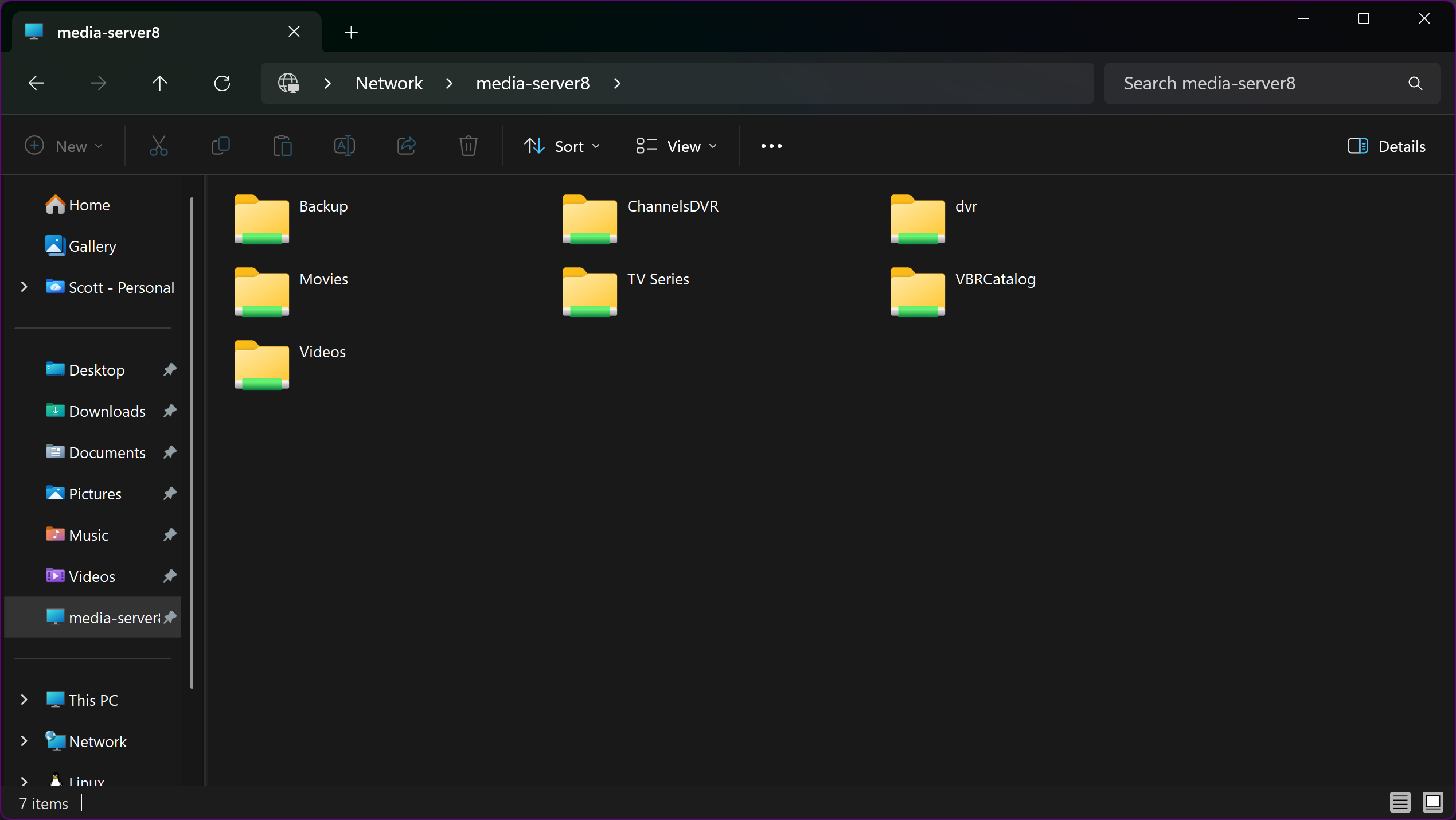
From that Windows 11 PC, are you able to open File Explorer and see your Synology NAS? If so, can you double click on that, and post a screenshot of what's shown?
Hopefully, it'll look something like this:
I’m not sure because I run everything on a Synology. You might have to use the ip of the NAS. I say this because I had to change from my network name for my Synology to the Ip address and folder that my back-ups are generated to. This was after a Win update. It's probably worth a shot.
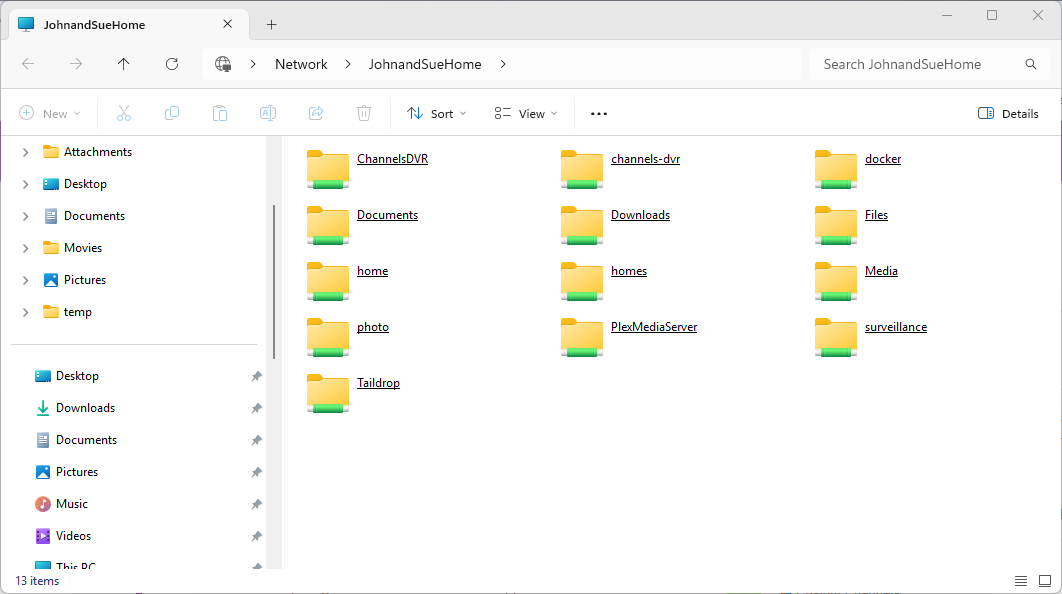
Here it is! For what it's worth, my CDVR Server files reside in the ChannelsDVR folder. The channels-dvr folder is left over from a previously abandoned docker installation of CDVR. That folder is empty.
Perfect.
Now, in Portainer-Volumes on that Windows 11 PC, I want you to create a new volume.
It should look like this, with you adding the username and password of that SMB share (likely your Synology username and password):
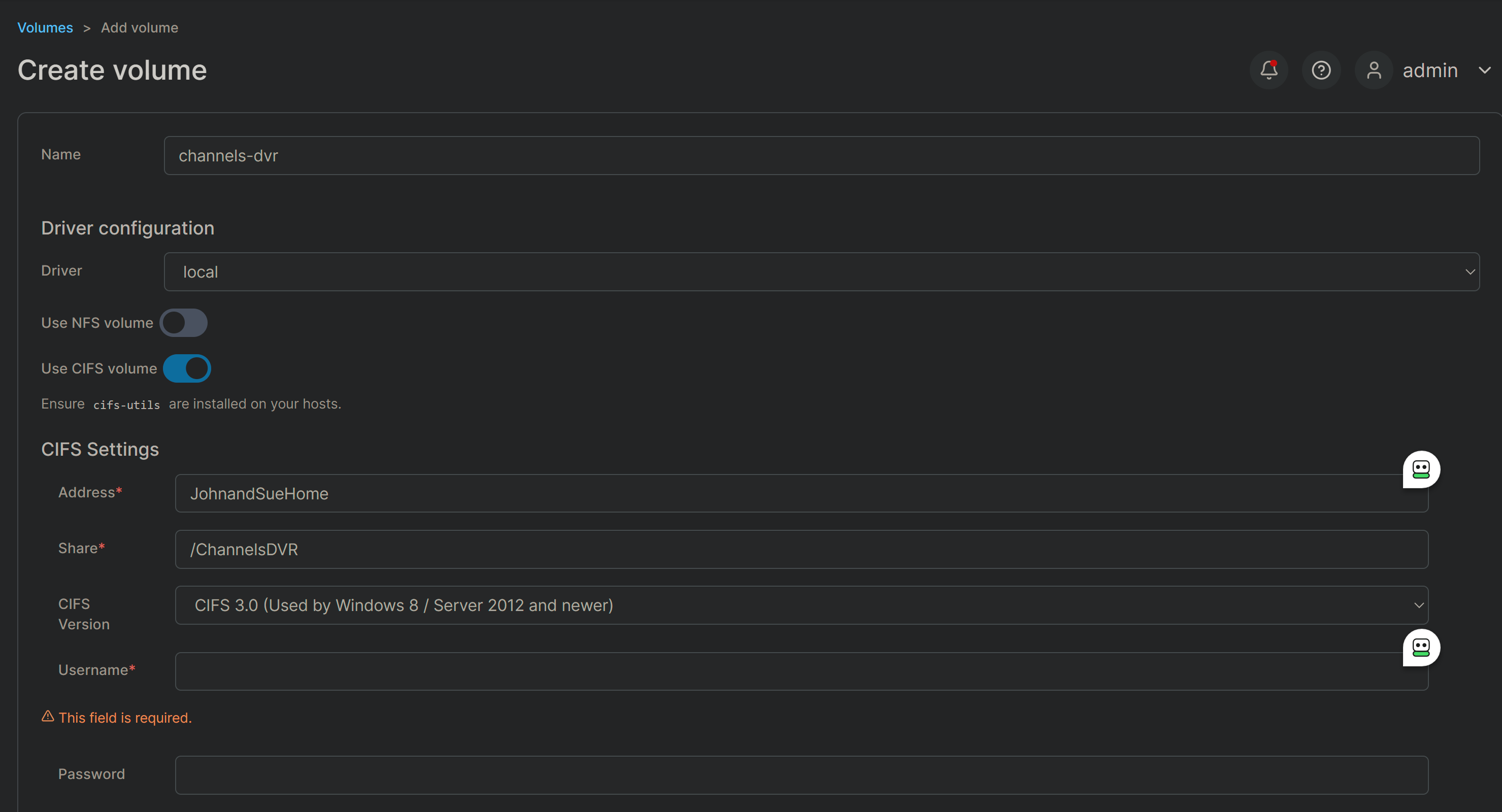
With that done, you can stop the olivetin stack on that PC and replace /volume/ChannelsDVR with channels-dvr (note Portainer Volume names do not start with a slash).
It looks like JohnandSueHome should resolve based on your screenshot, but using the IP address for your Synology is also an option (as @jagrim said). It's also possible CIFS 2.0 might be required for Synology compatibility.
If you're able to restart the stack with that change, you should be good-to-go as far as the DVR_SHARE value. Run the healthcheck to confirm. After that, we can talk about the LOGS_SHARE value.
EDIT: Also, be sure only these lines in your Docker Compose are uncommented (for now):
volumes: # Remove the #x# to enable. Use this section if you've setup a docker volume named channels-dvr, with CIFS or NFS, to bind to /mnt/dvr inside the container. Set ${DVR_SHARE} to channels-dvr (DVR_SHARE=channels_dvr) in that example.
  channels-dvr:
    external: true
I agree, host names worked with my win 11 setup but would all of a sudden one of my servers would become unreachable with OliveTin with a status 100 in the health check. Reverting to IP address has solved the issue no more server drop outs in OliveTin.
More progress! We're getting closer!
Checking that your selected Channels DVR server's data files (/mnt/192.168.1.100-8089) are accessible:
Folders with the names Database, Images, Imports, Logs, Movies, Streaming and TV should be visible...

total 4
drwxr-xr-x 2 root root    0 May  4  2025 #recycle
drwxr-xr-x 2 root root    0 Jan  2 22:26 .
drwxr-xr-x 1 root root 4096 Mar  7 01:01 ..
drwxr-xr-x 2 root root    0 Mar  6 18:18 Database
drwxr-xr-x 2 root root    0 Mar  7 00:55 Images
drwxr-xr-x 2 root root    0 May  5  2024 Imports
drwxr-xr-x 2 root root    0 Aug 31  2022 Logs
drwxr-xr-x 2 root root    0 Mar  6 23:59 Metadata
drwxr-xr-x 2 root root    0 Mar  6 15:14 Movies
drwxr-xr-x 2 root root    0 Dec  5  2022 PlayOn
drwxr-xr-x 2 root root    0 Sep  9 01:23 Streaming
drwxr-xr-x 2 root root    0 Mar  4 15:41 TV

Docker reports your current DVR_SHARE setting as...
/var/lib/docker/volumes/channels-dvr/_data
Now, if you know how to create a share on your Synology, that will allow your CDVR program files to be available on your LAN, then you can repeat the process with a volume called channels-dvr-logs.
You want these directories to be viewable in your new share:
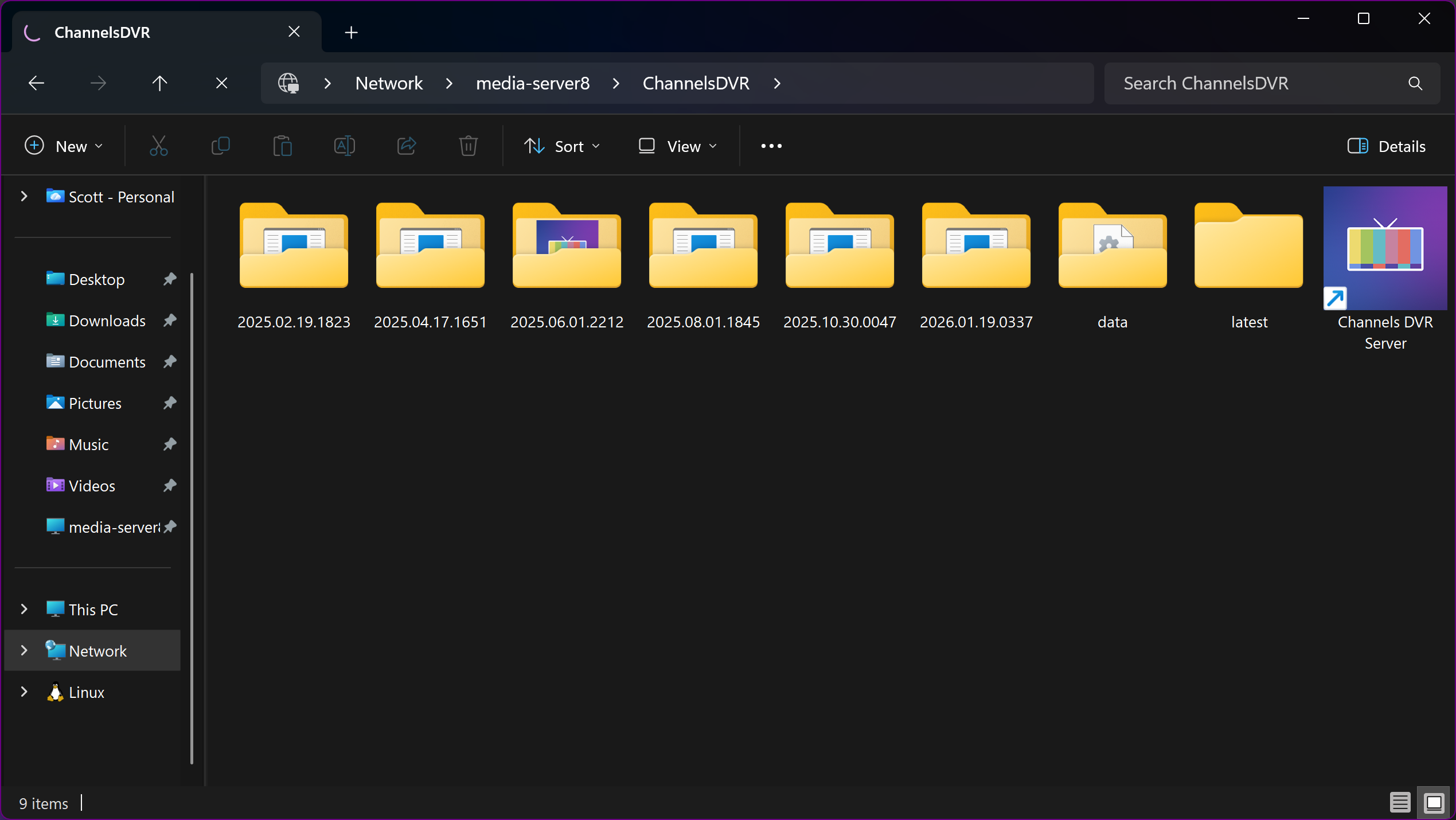
I have no idea where (or how) to look for these directories...
Hopefully a Synology user will come to the rescue here...
Yeah. In the original OliveTin stack on the Synology, the ENV variable is:
LOGS_SHARE=/var/packages/ChannelsDVR/target/channels-dvr
I have never been able to figure out how to browse to that location. I forget how we ever found it.
As we hope today, it was probably another Synology user who pointed us in the right direction back then...
It appears a file location like that may not be easy to share given Synology's designed limitations. It may not be worth it to bother with this, as any Actions that needs access to that location can be run from your other OliveTin container. It's only certain type of log alerts or other log related actions that may be affected. It's up to you if you want to pursue it, but passing on supplying this value is OK too.
This may be the case. We can pursue this later, if someone has more knowledge of Synology than I have. Much of it is a mystery to me...
However, in the meantime, I think that this is not the right HOST_DIR path for this instance of OliveTin
HOST_DIR=/volume1/docker
Shouldn't this point to a location on the PC which is hosting this instance of docker?
Just go to File Manager and create the shared folder with permissions for all. You can place it in another shared folder if you want. I believe, without looking, that mine are in volume1/docker/olivetin. As long as you know where it is and it is shared, you should be okay.
Yes. /data should work since you have WSL2 linux distros installed with integration enabled. It will use /data in your default distro.