
This is where I may get lost... I have absolutely no experience with Linux... I'll give it a try. I've been through the EZ-Start process before and don't expect much trouble there. Thanks!
thanks to all. I was able to update to a DSM 7.2 version and now have container manager version 24.02 running. Will Olivetin and Portainer be happy now?
Should be, but be sure you do this:
As an option, Marius Hosting has a step by step tutorial with pics for installing Portainer on Synology.
Just search in DuckDuckGo.
It’s not as easy as @bnhf but the pictures really helped me.
BTW, you can't use this version of EZ-Start if Portainer is already installed. This version would be required:
Overall, I recommend using this version as it's just EZ'er, start-to-finish. 
installed olivetin. Went to buttton to install portainer and got error "client version 1.53 is too new. Maximum supported API version is 1.43". Running container manager on Synology DSM218+ DSM 7.2
1 Like
OK, let me play around with options to deal with this for a bit, and I'll get back to you...
EDIT: I'm going to add a test, to the olivetin container startup process, that will check for older Docker API versions -- and then pin support to that older API. This will take a bit, but I should be able to get something out later today.
Is there any downside to me just manually deploying a portainer container?
@rss7 I've added an API test described above, and it should pin the Docker API version to yours now. I don't have any older versions of Docker lurking about, so you'll be the tester . Let me know how it goes, but I think this should sort things out.
I already built a portainer container manually and just used it to get mlbserver and EplusTV working. Can I stll do the test for you somehow?
Unfortunately not.
I think that I'm part-way there. I have installed Ubuntu and Debian and enabled WSL2 integration in Docker Desktop.
I have also installed the Olivetin EZ-Start version on port:1338. It is working.
I ran the Portainer Volume Creation for SMB Shares action to create channels-dvr and channels-dvr-logs volumes.
I have run the OliveTin Environment Variables Generator/Tester action and saved my results to notepad for my own reference.
In running the Create an OliveTin Stack in Portainer action, I used all default values with the exception of toggling volume_dvr1: true and volume_logs1: true.
My result:
exit status 1

JSON response from http://192.168.1.200:9000/api/stacks/create/standalone/string?endpointId=1:
{
  "message": "Invalid request payload",
  "details": "Json: invalid character 'U' in string escape code: \"C:\\Users\\jsful\\docker\\olivetin\"..."
}
false
Now I'm stuck and don't understand what I have overlooked.
If you're installing a second CDVR server and a second OliveTin, there's no need to use SMB. I'm assuming you want use the second OliveTin with the second CDVR server, of course. The Generator/Tester should have provided you the correct paths to your log files and data files based on values it got from CDVR.
I was not planning on installing a second CDVR server since my native installation on the Synology is working well. This is likely the source of my problem. I want a second instance of Portainer and Olivetin on a different device than my CDVR server.
My current goal is to move Prismcast to a computer which is more capable of running complex tasks. The Synology is currently running Prismcast. But, it really struggles just to keep a single channel up.
I may eventually migrate other more resource intensive containers to my spare computer. But right now, I just want to get Olivetin running and move Prismcast to the PC.
I think I'm with you now. Your Docker Volumes are not set up correctly then. They shouldn't have the Windows path from another PC, but rather should be using the IP address or hostname of the server, and then the share name -- each in their respective fields in Portainer-Volumes (with CIFS enabled). You'll also need to provide the username and password to access that remote share.
Yeah, that's it. I tried to follow along with your advanced instructions: OliveTin EZ-Start: The Next Generation. Deploy OliveTin-for-Channels from the Command Line without the Need for Portainer to be Installed in Advance! - #16 by bnhf
I included separate ip addresses for the CDVR and Portainer Hosts, But, got fouled up along the way. I'm sure that I have the volumes messed up.
TAG=latest
DOMAIN=
HOST_PORT=1337
CHANNELS_DVR_HOST=192.168.1.100
CHANNELS_DVR_PORT=8089
CHANNELS_CLIENTS=
ALERT_SMTP_SERVER=smtp.gmail.com:587
ALERT_EMAIL_FROM=REDACTED
ALERT_EMAIL_PASS=REDACTED
ALERT_EMAIL_TO=REDACTED
UPDATE_YAMLS=true
UPDATE_SCRIPTS=true
TZ=US/Pacific
HOST_DIR=C:\Users\jsful\docker\olivetin
DVR_SHARE=/volume1/ChannelsDVR
LOGS_SHARE=/var/packages/ChannelsDVR/target/channels-dvr
TUBEARCHIVIST_SHARE=/volume1/ChannelsDVR
DVR2_SHARE=
LOGS2_SHARE=
TUBEARCHIVIST2_SHARE=
DVR3_SHARE=
LOGS3_SHARE=
TUBEARCHIVIST3_SHARE=
HOST_SFS_PORT=8080
FOLDER=/web
PORTAINER_TOKEN=REDACTED
PORTAINER_HOST=192.168.1.200
PORTAINER_PORT=9443
PORTAINER_ENV=1
PERSISTENT_LOGS=false
Your Docker Compose should look like this:
services:
  olivetin: # This docker-compose typically requires no editing. Use the Environment variables section of Portainer to set your values.
    # 2025.09.15
    # GitHub home for this project: https://github.com/bnhf/OliveTin.
    # Docker container home for this project with setup instructions: https://hub.docker.com/r/bnhf/olivetin.
    image: bnhf/olivetin:${TAG:-latest} # Add the tag like latest or test to the environment variables below.
    container_name: ${OLIVETIN_NAME:-olivetin}${EZ_START}
    hostname: ${OLIVETIN_NAME:-olivetin}${EZ_START}
    dns_search: ${DOMAIN:+${DOMAIN}} # For Tailscale users using Magic DNS, add your Tailnet (tailxxxxx.ts.net) to use hostnames for remote nodes, otherwise use your local domain name.
    ports:
      - ${HOST_PORT:-1337}:1337
    environment:
      - OLIVETIN_COMPOSE=2025.08.25${EZ_START} # Do not change this value.
      - CHANNELS_DVR=${CHANNELS_DVR_HOST}:${CHANNELS_DVR_PORT:-8089} # Add your Channels DVR server in the form CHANNELS_DVR_HOST=<hostname or ip> and CHANNELS_DVR_PORT=<port>.
      - CHANNELS_DVR_ALTERNATES=${CHANNELS_DVR2_HOST:+${CHANNELS_DVR2_HOST}:${CHANNELS_DVR2_PORT}}${CHANNELS_DVR3_HOST:+ ${CHANNELS_DVR3_HOST}:${CHANNELS_DVR3_PORT}} # Space separated list of alternate Channels DVR servers to choose from in the form hostname:port or ip:port.
      - CHANNELS_CLIENTS=${CHANNELS_CLIENTS} # Space separated list of Channels DVR clients you'd like notifications sent to in the form hostname or IP.
      - ALERT_SMTP_SERVER=${ALERT_SMTP_SERVER} # SMTP server to use for sending alert e-mails. smtp.gmail.com:587 for example.
      - ALERT_EMAIL_FROM=${ALERT_EMAIL_FROM} # Sender address for alert e-mails.
      - ALERT_EMAIL_PASS=${ALERT_EMAIL_PASS} # SMTP "app" password established through GMail or Yahoo Mail. Do not use your everyday e-mail address.
      - ALERT_EMAIL_TO=${ALERT_EMAIL_TO} # Recipient address for alert e-mails.
      - UPDATE_YAMLS=${UPDATE_YAMLS:-true} # Set this to true to update config.yaml.
      - UPDATE_SCRIPTS=${UPDATE_SCRIPTS:-true} # Set this to true to update all included scripts.
      - TZ=${TZ} # Add your local timezone in standard linux format. E.G. US/Eastern, US/Central, US/Mountain, US/Pacific, etc.
      - PORTAINER_TOKEN=${PORTAINER_TOKEN} # Generate via <username> dropdown (upper right of WebUI), "My account", API tokens.
      - PORTAINER_HOST=${PORTAINER_HOST:-$CHANNELS_DVR_HOST} # Hostname or IP of the Docker host you're running Portainer on.
      - PORTAINER_PORT=${PORTAINER_PORT:-9443} # https port you're running Portainer on. 9443 is the default.
      - PORTAINER_ENV=${PORTAINER_ENV:-2} # Set this is if you're using an alternate Portainer Environment for some reason. 2 is the default.
      - PORTAINER_NAME=${PORTAINER_NAME:-local} # If you'd like to use a Portainer Environment other than "local", set this value to the environment's name (case sensitive).
      - PERSISTENT_LOGS=${PERSISTENT_LOGS:-false} # For supported Actions, log files are retained on an ongoing basis. false is the default.
    volumes:
      - ${HOST_DIR:-/unused}${HOST_DIR:+/olivetin:/config} # Add the parent directory on your Docker host you'd like to use.
      - ${DVR_SHARE:-/unused}${DVR_SHARE:+:/mnt/${CHANNELS_DVR_HOST}-${CHANNELS_DVR_PORT}} # This can either be a Docker volume or a host directory that's connected via Samba or NFS to your Channels DVR network share.
      - ${LOGS_SHARE:-/unused}${LOGS_SHARE:+:/mnt/${CHANNELS_DVR_HOST}-${CHANNELS_DVR_PORT}_logs} # This can either be a Docker volume or a host directory that's connected via Samba or NFS to your Channels DVR logs network share.
      - ${TUBEARCHIVIST_SHARE:-/unused}${TUBEARCHIVIST_SHARE:+:/mnt/${CHANNELS_DVR_HOST}-${CHANNELS_DVR_PORT}_ta} # This can either be a Docker volume or a host directory that's connected via Samba or NFS to your TubeArchivist videos network share.
      - ${DVR2_SHARE:-/unused}${DVR2_SHARE:+:/mnt/${CHANNELS_DVR2_HOST}-${CHANNELS_DVR2_PORT}} # Note that these volume mounts should always be to /mnt/hostname-port or /mnt/ip-port (dash rather than a colon between).
      - ${LOGS2_SHARE:-/unused}${LOGS2_SHARE:+:/mnt/${CHANNELS_DVR2_HOST}-${CHANNELS_DVR2_PORT}_logs} # This can either be a Docker volume or a host directory that's connected via Samba or NFS to your Channels DVR logs network share.
      - ${TUBEARCHIVIST2_SHARE:-/unused}${TUBEARCHIVIST2_SHARE:+:/mnt/${CHANNELS_DVR2_HOST}-${CHANNELS_DVR2_PORT}_ta} # This can either be a Docker volume or a host directory that's connected via Samba or NFS to your TubeArchivist videos network share.
      - ${DVR3_SHARE:-/unused}${DVR3_SHARE:+:/mnt/${CHANNELS_DVR3_HOST}-${CHANNELS_DVR3_PORT}} # Note that these volume mounts should always be to /mnt/hostname-port or /mnt/ip-port (dash rather than a colon between).
      - ${LOGS3_SHARE:-/unused}${LOGS3_SHARE:+:/mnt/${CHANNELS_DVR3_HOST}-${CHANNELS_DVR3_PORT}_logs} # This can either be a Docker volume or a host directory that's connected via Samba or NFS to your Channels DVR logs network share.
      - ${TUBEARCHIVIST3_SHARE:-/unused}${TUBEARCHIVIST3_SHARE:+:/mnt/${CHANNELS_DVR3_HOST}-${CHANNELS_DVR3_PORT}_ta} # This can either be a Docker volume or a host directory that's connected via Samba or NFS to your TubeArchivist videos network share.
      - /var/run/docker.sock:/var/run/docker.sock
    restart: unless-stopped

  static-file-server:
    image: halverneus/static-file-server:latest
    container_name: ${SFS_NAME:-static-file-server}${EZ_START}
    dns_search: ${DOMAIN}
    ports:
      - ${HOST_SFS_PORT:-0}:8080
    environment:
      - FOLDER=${FOLDER:-/web}
    volumes:
      - ${HOST_DIR:-/unused}${HOST_DIR:+/olivetin/data:${FOLDER:-/web}}
    restart: unless-stopped

volumes: # Remove the #x# to enable. Use this section if you've setup a docker volume named channels-dvr, with CIFS or NFS, to bind to /mnt/dvr inside the container. Set ${DVR_SHARE} to channels-dvr (DVR_SHARE=channels_dvr) in that example.
  channels-dvr:
    external: true
  channels-dvr-logs:
    external: true
  #3#tubearchivist:
    #3#external: true
  #4#channels-dvr2:
    #4#external: true
  #5#channels-dvr2-logs:
    #5#external: true
  #6#tubearchivist2:
    #6#external: true
  #7#channels-dvr3:
    #7#external: true
  #8#channels-dvr3-logs:
    #8#external: true
  #9#tubearchivist3:
    #9#external: true
Your env vars similar to these:
TAG=latest
DOMAIN=localdomain tailxxxxx.ts.net
HOST_PORT=1337
CHANNELS_DVR_HOST=media-server8
CHANNELS_DVR_PORT=8089
CHANNELS_CLIENTS=
ALERT_SMTP_SERVER=
ALERT_EMAIL_FROM=
ALERT_EMAIL_PASS=
ALERT_EMAIL_TO=
UPDATE_YAMLS=true
UPDATE_SCRIPTS=true
TZ=America/Denver
HOST_DIR=/data
DVR_SHARE=channels-dvr
LOGS_SHARE=channels-dvr-logs
TUBEARCHIVIST_SHARE=
DVR2_SHARE=
LOGS2_SHARE=
TUBEARCHIVIST2_SHARE=
DVR3_SHARE=
LOGS3_SHARE=
TUBEARCHIVIST3_SHARE=
HOST_SFS_PORT=8080
FOLDER=/web
PORTAINER_TOKEN=[Redacted]
PORTAINER_HOST=convertible-pc3
PORTAINER_PORT=9443
PORTAINER_ENV=1
PERSISTENT_LOGS=false
And your Docker-Volumes similar to these:
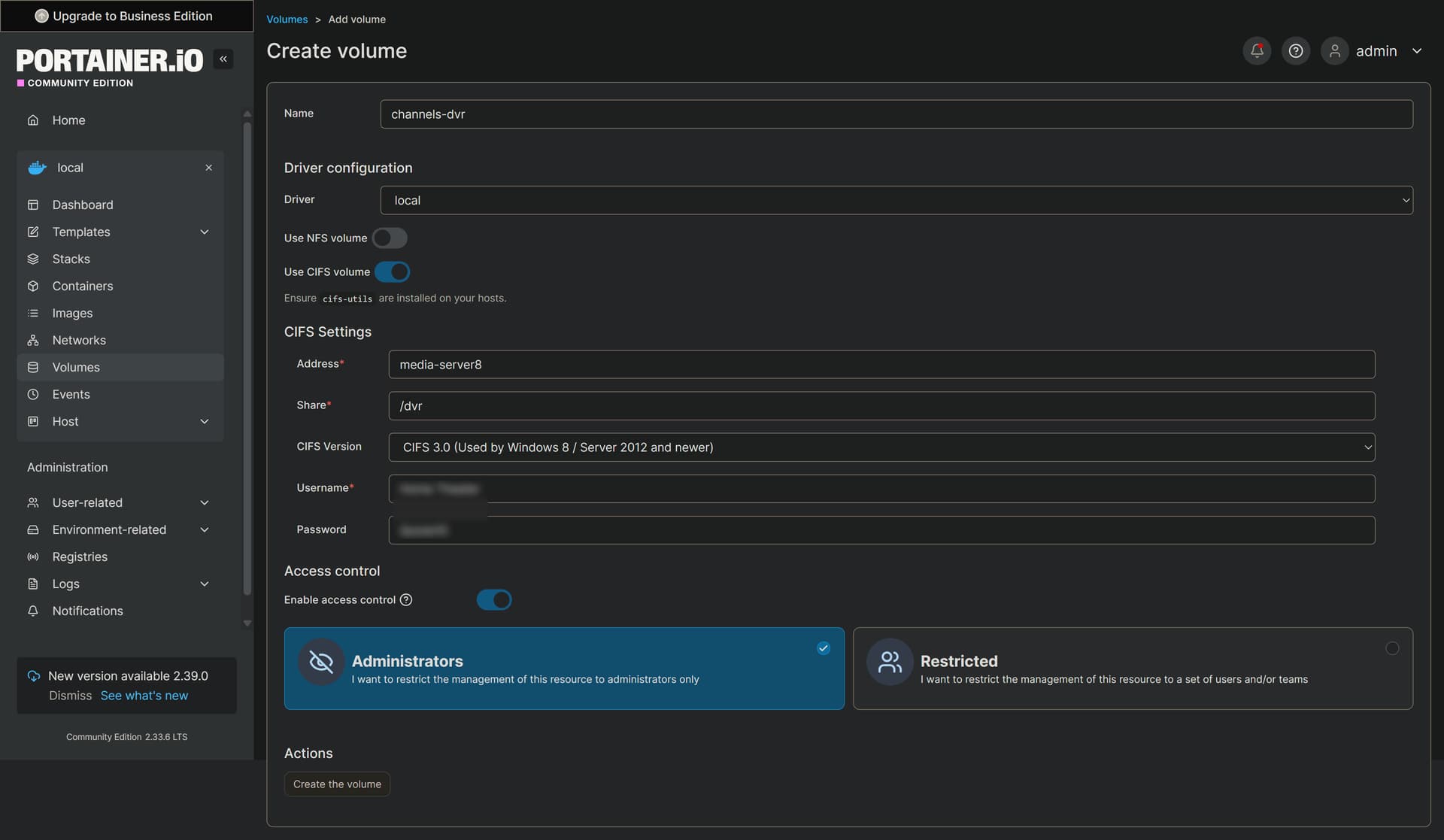
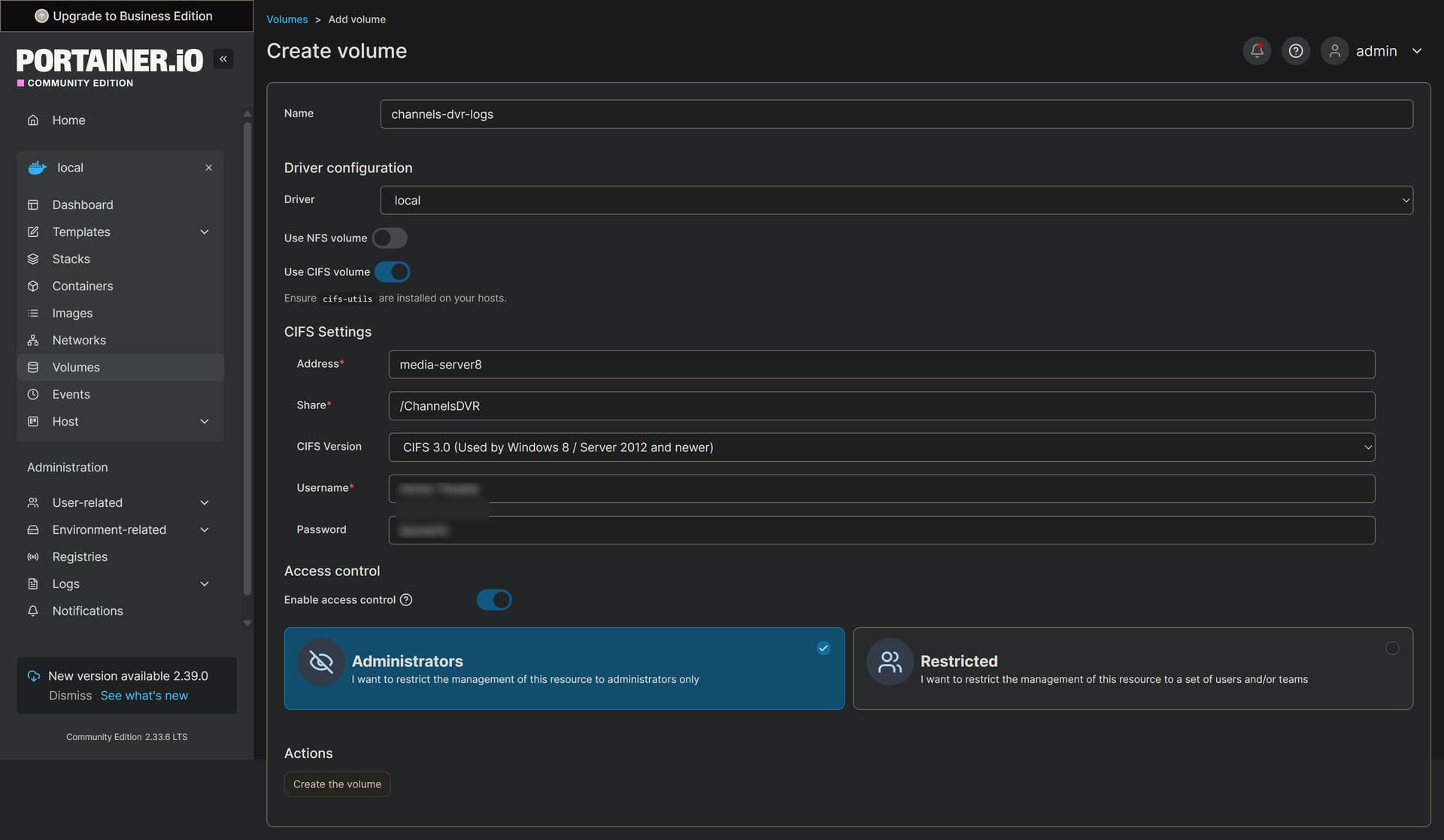
In creating the Docker Volumes, under CIFS Settings, do I create a new username and password for each volume, the same for both? Or, is this simply the username and password I use for Portainer?
Neither.
These Portainer-Volumes are referencing real, reachable SMB shares. The username and password are the ones required to access those shares (typically these would be your credentials for the PC where you made these shares available). They must already exist.
?? So, these should exist on the original device where I set up my original installations of CDVR, Portainer, and olivetin? This would be on the Synology NAS which currently hosts everything? I have no idea how to check that.