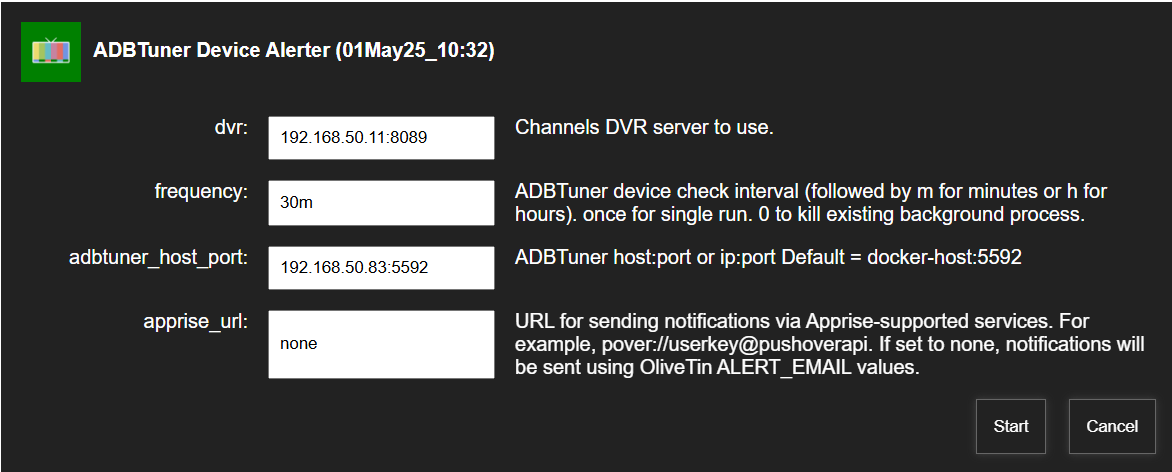
So, if you have it set similar to this:
You're seeing that message? That's the way I have mine set and it's working here. I just tested with true and false values...

So, if you have it set similar to this:
You're seeing that message? That's the way I have mine set and it's working here. I just tested with true and false values...
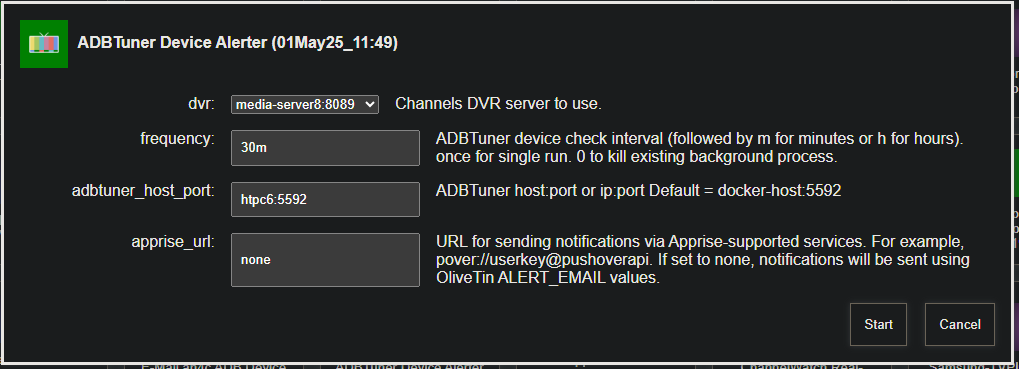
Could it be that my ADBTuner and DVR are on different machines ?
[
  {
    "name": "Remote1",
    "device_ip_address": "192.168.50.177",
    "device_connected": true,
    "streaming_endpoint": "http://192.168.50.242:8086/0.ts",
    "streaming_endpoint_connected": true
  },
  {
    "name": "Remote2",
    "device_ip_address": "192.168.50.47",
    "device_connected": true,
    "streaming_endpoint": "http://192.168.50.242:8086/2.ts",
    "streaming_endpoint_connected": true
  },
  {
    "name": "Remote3",
    "device_ip_address": "192.168.50.67",
    "device_connected": true,
    "streaming_endpoint": "http://192.168.50.242:8086/4.ts",
    "streaming_endpoint_connected": true
  },
  {
    "name": "Remote4",
    "device_ip_address": "192.168.50.37",
    "device_connected": true,
    "streaming_endpoint": "http://192.168.50.242:8086/6.ts",
    "streaming_endpoint_connected": true
  },
  {
    "name": "Remote5",
    "device_ip_address": "192.168.50.184",
    "device_connected": true,
    "streaming_endpoint": "http://192.168.50.242:8086/10.ts",
    "streaming_endpoint_connected": true
  }
]
2025-05-01 10:32:06 - No ALERT_EMAIL configured or apprise_url specified
HOSTNAME=olivetin
CHANNELS_DVR=192.168.50.11:8089
CHANNELS_DVR_ALTERNATES=
CHANNELS_CLIENTS=
ALERT_SMTP_SERVER=
ALERT_EMAIL_FROM=[Redacted]@gmail.com
ALERT_EMAIL_PASS=[Redacted]
ALERT_EMAIL_TO=[Redacted]@gmail.com,xxxxxxxxxx
UPDATE_YAMLS=true
UPDATE_SCRIPTS=true
PORTAINER_TOKEN=[Redacted]
PORTAINER_HOST=192.168.50.11
PORTAINER_PORT=9443
PORTAINER_ENV=null
I was sending the wrong message to the log, it should indicate that all ADBTuner devices are connected. I'm tweaking it now, and I'll push a fix shortly. Thanks for letting me know.
The correct message is being sent to the correct logfile now, so if you could pull :latest again and give it a try, I'd appreciate it. Look in 192.168.50.11-8089_adbtuneralerter_latest.log for confirmation.
You should see:
2025-05-01 12:31:26 - All ADBTuner devices are reporting connected
2025-05-01 12:12:54 - All ADBTuner devices are reporting connected
New bnhf/olivetin:latest (aka bnhf/olivetin:2025.05.02) pushed this morning that converts ChannelWatch from an Action to a Project One-Click deployment. More details here:
I am receiving the below error when trying the final step on OliveTin EZ-Start: The Next Generation. Deploy OliveTin-for-Channels from the Command Line without the Need for Portainer to be Installed in Advance! but since the topic is now closed i couldnt post there  Can you help me figured out the issue? I tried to change the host port from 8080 to 8090 but no luck.
JSON response from http://192.168.10.18:9000/api/stacks/create/standalone/string?endpointId=1:
{"message":"failed to deploy a stack: compose up operation failed: Error response from daemon: Mounts denied: \nThe path /data/olivetin/data is not shared from the host and is not known to Docker.\nYou can configure shared paths from Docker -\u003e Preferences... -\u003e Resources -\u003e File Sharing.\nSee https://docs.docker.com/ for more info.","details":"Failed to deploy a stack: compose up operation failed: Error response from daemon: Mounts denied: \nThe path /data/olivetin/data is not shared from the host and is not known to Docker.\nYou can configure shared paths from Docker -\u003e Preferences... -\u003e Resources -\u003e File Sharing.\nSee https://docs.docker.com/ for more info."}
false
This is likely the issue. What platform are you installing OliveTin on?
Ubuntu desktop 24.04.2. I agree and tried to figure out how to make that path available but couldn’t get it to work. Kinda a novice on Linux. But not afraid to try. lol.
I get the attraction to the Desktop versions of Linux OS's, especially for new users familiar with MacOS or Windows. But the reality is, the Desktop versions of Linux have to be locked down in ways that actually make it more difficult for new users. Especially when, more often than not, the goal is not to replace MacOS or Windows -- but rather to create a server.
You might try using a parent path, that's in the home directory for the user you created when setting things up. Maybe, /home/<your usename> for your HOST_DIR?
I'm not afraid to go Ubuntu server...
Quick back story- Dad & I split the cost of DTV Str3am. We had DTV dish and for a few months both at the same time with two different account logins. With all the changes going on there, some services we login on with stream and some on the sat account (which no longer exists) This is causing all kinds of issues on our devices. Even just regular apps like the AppleTV. For a long time our CDVR server was running on Ubuntu server, and it worked fantastic. We decided to try out things like CC4c etc and moved the system to WIN11 for ease of use. Well then came football season and we just left it alone.
I decided this was a good time to go back to linux and try all the cool new stuff the community has developed.while we wait for DTV to figure out their issues. This test server is a laptop. I've had lots issues with the HDD and the 2.5g Ethernet adapter not coming back after a reboot. Spent hours with ChatGPT trying to get this resolved but have reached my wits end. So thought it may be easier with Ubuntu Desktop. Clearly it's the same amount of hassle.
So, here we are 
Ok so i have figured out the issue is the external drive is not mapped correctly. However, i am going to trash this setup and go back to Ubuntu Server
@bnhf I am trying to get this set up with the EZ-Start method and I've gotten as far as "Install Portainer on your Docker Host" but when I run that I get the following:
c6eda21903057f73ef25d505a2b74545e368d04e074aeee82d18f679818a2482
Portainer container created successfully

Portainer token creation and environment initialization failed...
When I go to port 9000 it looks as if Portainer is running and a local environment was created but there are no stacks. I'm on a Synology NAS and previously I had set up Portainer first. That was on a different machine so I thought I'd try the EZ-Start method this time. Should I just start from scratch and go back to that method or is there something I could do to continue with the EZ-Start method? Thanks!
EDIT: Since Portainer seemed to have installed correctly I went ahead and followed the steps to install OliveTin I used before. The only issue I encountered was that I got an error about ezstart already being associated with another container but once I stopped/deleted the olivetin-ezstart container I was able to proceed as normal and run the variable generator.
Thank you SO much for the EZ-Start. I successfully installed Portainer and Olivetin. I think its running correctly as when I run health check I get the following:
OliveTin Container Version 2025.07.03
OliveTin Docker Compose Version 2025.03.26-ezstart
HTTP Status: 200
Effective URL: http://10.0.0.23:8089/
I tried to Create a Plex-for-Channels Stack in Portainer + CDVR Custom Channels - when activated received error ------>curl: (7) Failed to connect to 10.0.0.23 port 9443: Connection refused
My CDVR server and Portainer, are on different machines. Portainer is running on local Linux VM.
How do I set the script to use local Portainer to create the stack and specify the CDVR IP and port to create the channel source ??.
Thank you,
It looks like you missed a step in the EZ-Start process, as when you're all done, you won't see the -ezstartat the end of your Docker Compose Version. Tale a look at the instructions again and make sure you performed all the steps as described.
For example, did you start accessing OliveTin using port 1337 instead of 1338?
Yes....at the end of the EZ start install I accessed OliveTin on port 1337 and continue to do so. If I was to transition to 1338 I sure did miss something.
1337 is correct when you're done. Could you post your full Healthcheck here please? Standard Output only needed...
Does Olivetin work with the Portainer docker desktop extension or only its standalone?
I've been trying to get a PORTAINER_TOKEN from the extension, however I can not locate its generator. THX
Thanks, I wanted some clarification before uninstalling.
::Update:: Works great, @chDVRuser thanks for the help