
/mnt/n/olivetin. did the trick, I'm up and running - thank you!!
Hi!
I have been running the Olivetin action "Channel Lineup Change Notifications" set to 30 minute intervals.
Since my last lineup change earlier today, I have been receiving duplicate notifications every 30 minutes.
Channels DVR server URL: http://192.168.1.100:8089
Channels DVR version: 2026.06.26.2353

------------------------------

New source with 1 channels: "ADBTuner - app_cbs"
See file /config/192.168.1.100-8089_data/ADBTuner_-_app_cbs.log for the full lineup.
I will try disabling and restarting the action and will advise if the notifications persist.
UPDATE: still sending duplicate notifications after killing and restarting the process.
Just as a reference.
I have 7 of them running. One for each of my servers. 720 minute intervals and they're working fine.
OliveTin for Channels 2026.05.23
Mine was running fine, also. Until I added the source indicated in my notification today. I added the CBS Native Provider source using the Olivetin Project One-Click action "Create Native ADBTuner Channels + CDVR Custom Channels".
It's weird because I have never had issue with this notification action before. I'm on OliveTin for Channels Version 2026.06.19
I wonder if it might have anything to do with either of today's CDVR server updates. It doesn't seem like the changes should be related, but who am I to know such things?
v2026.06.26.1823
• UPDATED: YTTV login process
• IMPROVED: HLS playlist target duration is more accurate
• IMPROVED: HLS performance
v2026.06.26.2353
• FIXED: hopefully fix FS1 authentication
Are you saying that it keeps telling you every 30 minutes that you added the new ADBTuner source?
A new thread should probably be created to work on debugging this issue.
Cue the music:

OliveTin-for-Channels passes the 50K download mark!
pull_count 50043
Many thanks to everyone that's helped this project to keep on truckin'...
3 Likes
Trying to set up Olive Tin on Mac Mini M4 Pro and the deployment error I’m seeing is below.
Channels DVR is set up on Synology in /volume1/ChannelsDVR (10.0.1.65)
It looks like I need a shared folder on the Mac but have been unable to figure where.
Deployment error:
Failed to deploy a stack: compose up operation failed: Error response from daemon: mounts denied: The path /mnt/portainer_data/olivetin is not shared from the host and is not known to Docker. You can configure shared paths from Docker -> Preferences... -> Resources -> File Sharing. See https://docs.docker.com/go/mac-file-sharing/ for more info.
Compose:
services:
  olivetin: # This docker-compose typically requires no editing. Use the Environment variables section of Portainer to set your values.
    # 2026.08.31
    # GitHub home for this project: https://github.com/bnhf/OliveTin.
    # Docker container home for this project with setup instructions: https://hub.docker.com/r/bnhf/olivetin.
    image: bnhf/olivetin:${TAG:-latest} # Add the tag like latest or test to the environment variables below.
    container_name: ${OLIVETIN_NAME:-olivetin}${EZ_START}
    hostname: ${OLIVETIN_NAME:-olivetin}${EZ_START}
    dns_search: ${DOMAIN:+${DOMAIN}} # For Tailscale users using Magic DNS, add your Tailnet (tailxxxxx.ts.net) to use hostnames for remote nodes, otherwise use your local domain name.
    ports:
      - ${HOST_PORT:-1337}:1337
    environment:
      - OLIVETIN_COMPOSE=2025.08.25${EZ_START} # Do not change this value.
      - CHANNELS_DVR=${CHANNELS_DVR_HOST}:${CHANNELS_DVR_PORT:-8089} # Add your Channels DVR server in the form CHANNELS_DVR_HOST=<hostname or ip> and CHANNELS_DVR_PORT=<port>.
      - CHANNELS_DVR_ALTERNATES=${CHANNELS_DVR2_HOST:+${CHANNELS_DVR2_HOST}:${CHANNELS_DVR2_PORT}}${CHANNELS_DVR3_HOST:+ ${CHANNELS_DVR3_HOST}:${CHANNELS_DVR3_PORT}} # Space separated list of alternate Channels DVR servers to choose from in the form hostname:port or ip:port.
      - CHANNELS_CLIENTS=${CHANNELS_CLIENTS} # Space separated list of Channels DVR clients you'd like notifications sent to in the form hostname or IP.
      - ALERT_SMTP_SERVER=${ALERT_SMTP_SERVER} # SMTP server to use for sending alert e-mails. smtp.gmail.com:587 for example.
      - ALERT_EMAIL_FROM=${ALERT_EMAIL_FROM} # Sender address for alert e-mails.
      - ALERT_EMAIL_PASS=${ALERT_EMAIL_PASS} # SMTP "app" password established through GMail or Yahoo Mail. Do not use your everyday e-mail address.
      - ALERT_EMAIL_TO=${ALERT_EMAIL_TO} # Recipient address for alert e-mails.
      - UPDATE_YAMLS=${UPDATE_YAMLS:-true} # Set this to true to update config.yaml.
      - UPDATE_SCRIPTS=${UPDATE_SCRIPTS:-true} # Set this to true to update all included scripts.
      - TZ=${TZ} # Add your local timezone in standard linux format. E.G. US/Eastern, US/Central, US/Mountain, US/Pacific, etc.
      - PORTAINER_TOKEN=${PORTAINER_TOKEN} # Generate via <username> dropdown (upper right of WebUI), "My account", API tokens.
      - PORTAINER_HOST=${PORTAINER_HOST:-$CHANNELS_DVR_HOST} # Hostname or IP of the Docker host you're running Portainer on.
      - PORTAINER_PORT=${PORTAINER_PORT:-9443} # https port you're running Portainer on. 9443 is the default.
      - PORTAINER_ENV=${PORTAINER_ENV:-2} # Set this is if you're using an alternate Portainer Environment for some reason. 2 is the default.
      - PORTAINER_NAME=${PORTAINER_NAME:-local} # If you'd like to use a Portainer Environment other than "local", set this value to the environment's name (case sensitive).
      - PERSISTENT_LOGS=${PERSISTENT_LOGS:-false} # For supported Actions, log files are retained on an ongoing basis. false is the default.
    volumes:
      - ${HOST_DIR:-/unused}${HOST_DIR:+/olivetin:/config} # Add the parent directory on your Docker host you'd like to use.
      - ${DVR_SHARE:-/unused}${DVR_SHARE:+:/mnt/${CHANNELS_DVR_HOST}-${CHANNELS_DVR_PORT}} # This can either be a Docker volume or a host directory that's connected via Samba or NFS to your Channels DVR network share.
      - ${LOGS_SHARE:-/unused}${LOGS_SHARE:+:/mnt/${CHANNELS_DVR_HOST}-${CHANNELS_DVR_PORT}_logs} # This can either be a Docker volume or a host directory that's connected via Samba or NFS to your Channels DVR logs network share.
      - ${TUBEARCHIVIST_SHARE:-/unused}${TUBEARCHIVIST_SHARE:+:/mnt/${CHANNELS_DVR_HOST}-${CHANNELS_DVR_PORT}_ta} # This can either be a Docker volume or a host directory that's connected via Samba or NFS to your TubeArchivist videos network share.
      - ${DVR2_SHARE:-/unused}${DVR2_SHARE:+:/mnt/${CHANNELS_DVR2_HOST}-${CHANNELS_DVR2_PORT}} # Note that these volume mounts should always be to /mnt/hostname-port or /mnt/ip-port (dash rather than a colon between).
      - ${LOGS2_SHARE:-/unused}${LOGS2_SHARE:+:/mnt/${CHANNELS_DVR2_HOST}-${CHANNELS_DVR2_PORT}_logs} # This can either be a Docker volume or a host directory that's connected via Samba or NFS to your Channels DVR logs network share.
      - ${TUBEARCHIVIST2_SHARE:-/unused}${TUBEARCHIVIST2_SHARE:+:/mnt/${CHANNELS_DVR2_HOST}-${CHANNELS_DVR2_PORT}_ta} # This can either be a Docker volume or a host directory that's connected via Samba or NFS to your TubeArchivist videos network share.
      - ${DVR3_SHARE:-/unused}${DVR3_SHARE:+:/mnt/${CHANNELS_DVR3_HOST}-${CHANNELS_DVR3_PORT}} # Note that these volume mounts should always be to /mnt/hostname-port or /mnt/ip-port (dash rather than a colon between).
      - ${LOGS3_SHARE:-/unused}${LOGS3_SHARE:+:/mnt/${CHANNELS_DVR3_HOST}-${CHANNELS_DVR3_PORT}_logs} # This can either be a Docker volume or a host directory that's connected via Samba or NFS to your Channels DVR logs network share.
      - ${TUBEARCHIVIST3_SHARE:-/unused}${TUBEARCHIVIST3_SHARE:+:/mnt/${CHANNELS_DVR3_HOST}-${CHANNELS_DVR3_PORT}_ta} # This can either be a Docker volume or a host directory that's connected via Samba or NFS to your TubeArchivist videos network share.
      - /var/run/docker.sock:/var/run/docker.sock
    restart: unless-stopped

  static-file-server:
    image: halverneus/static-file-server:latest
    container_name: ${SFS_NAME:-static-file-server}${EZ_START}
    dns_search: ${DOMAIN}
    ports:
      - ${HOST_SFS_PORT:-0}:8080
    environment:
      - FOLDER=${FOLDER:-/web}
    volumes:
      - ${HOST_DIR:-/unused}${HOST_DIR:+/olivetin/data:${FOLDER:-/web}}
    restart: unless-stopped

#0#volumes: # Remove the #x# to enable. Use this section if you've setup a docker volume named channels-dvr, with CIFS or NFS, to bind to /mnt/dvr inside the container. Set ${DVR_SHARE} to channels-dvr (DVR_SHARE=channels_dvr) in that example.
  #1#channels-dvr:
    #1#external: true
  #2#channels-dvr-logs:
    #2#external: true
  #3#tubearchivist:
    #3#external: true
  #4#channels-dvr2:
    #4#external: true
  #5#channels-dvr2-logs:
    #5#external: true
  #6#tubearchivist2:
    #6#external: true
  #7#channels-dvr3:
    #7#external: true
  #8#channels-dvr3-logs:
    #8#external: true
  #9#tubearchivist3:
    #9#external: true
Environment Variables:
TAG=latest
DOMAIN=local
HOST_PORT=1337
CHANNELS_DVR_HOST=10.0.1.65
CHANNELS_DVR_PORT=8089
CHANNELS_DVR2_HOST=
CHANNELS_DVR2_PORT=
CHANNELS_CLIENTS=
ALERT_SMTP_SERVER=
ALERT_EMAIL_FROM=
ALERT_EMAIL_PASS=
ALERT_EMAIL_TO=
UPDATE_YAMLS=true
UPDATE_SCRIPTS=true
TZ=America/Chicago
HOST_DIR=/mnt/portainer_data
DVR_SHARE=/mnt/channels-dvr
LOGS_SHARE=/mnt/channels-dvr
TUBEARCHIVIST_SHARE=/mnt/channels-dvr
DVR2_SHARE=
LOGS2_SHARE=
TUBEARCHIVIST2_SHARE=
DVR3_SHARE=
LOGS3_SHARE=
TUBEARCHIVIST3_SHARE=
HOST_SFS_PORT=8080
FOLDER=/web
PORTAINER_TOKEN=(Redacted)
PORTAINER_HOST=10.0.1.40
PORTAINER_PORT=9443
PORTAINER_ENV=2
PERSISTENT_LOGS=false
Your problem area is here.
The first issue is your HOST_DIR value. If you look at your MacOS Docker Desktop settings, you'll see that you're only allowed access to certain parent paths. You can change them, but I think it's better to color inside the lines, and use the default paths.
The second issue is accessing Samba shares. The way this is done in Docker, is to create a Docker Volume (using Portainer) that is configured to access each of your Samba shares. Then use that Docker Volume name in your env var overrides. I recommend setting up a channels-dvr Docker Volume (to access your CDVR recordings), and a channels-dvr-logs Docker Volume (to access your CDVR executables/logs).
So I set up a channels-dvr volume to this path:
/var/lib/docker/volumes/channels-dvr/_data
It added the _data on the end. I had put /volume1/ChannelsDVR. Should I have used 10.0.1.65/volume1/ChannelsDVR for the path? If we can get the DVR correct, I’ll just need to add /Logs to that path (I think).
I have a portainer persistant data folder that I created by docker at the start.
Should I create a Portainer volume pointing to a shared folder named data.
I’m very weak on Mac. I’m just glad I was able to install Portainer with little issue.
Your OliveTin data should go in /Users/jagrim (or whatever your MacOS username is).
The Samba shares need to be setup as Docker Volumes. Look in the Portainer WebUI, and you'll see a section for Volumes. You need to create a Docker Volume for each of your Samba shares. This volume needs to point to a valid Samba (aka CIFS) share on your Synology, and will contain the username and password for that Samba share.
So this is the channels-dvr volume that I created. Does it look correct or what changes should I make. Once it’s correct, I’ll create the logs mount.
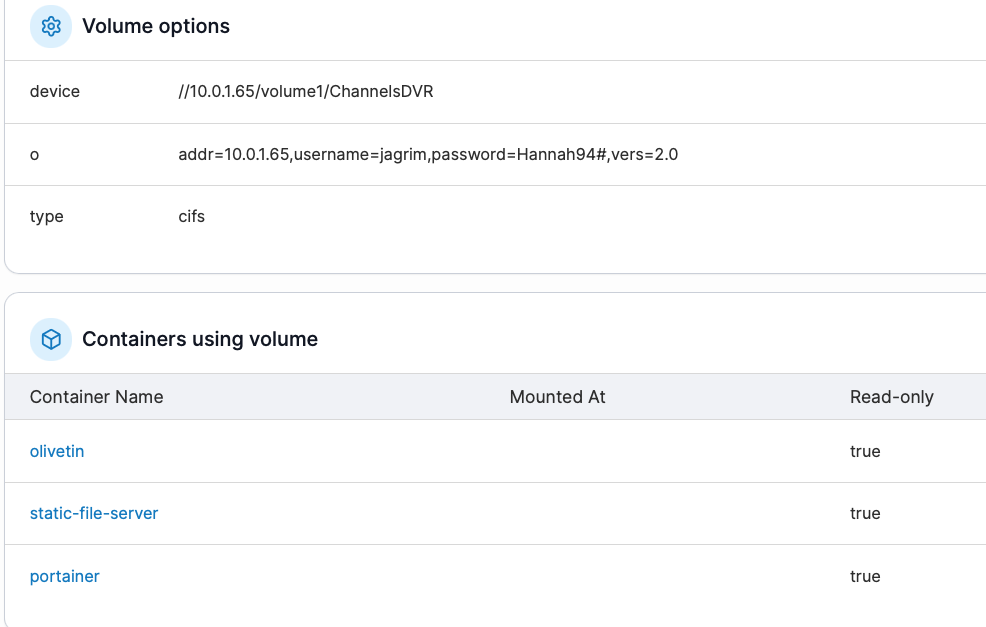
Workin to create a local foldeer now
Do you have a WIndows computer where you can test the Samba shares. The way you have it setup, //10.0.1.65 is the host, volume1 is the share, and ChannelsDVR is folder in that share. This could be correct, but it'd be handy if you could confirm using Windows File Explorer.
Should be Synology220/Volume1/ChannelsDVR
I just had to change the ip to the hostname
Using CIFS/SAMBA it would be \\host\SynoSharedFolderName
So \\10.0.1.65\ChannelsDVR
or \\Synology220\ChannelsDVR
You don't specify volume1 for a Synology share, all the shares are shared folders in volume1
1 Like
Just a thought, maybe add support for generating a adbtuner/apituner json for fios tv+ seeing as how verizon won't give out cablecards anymore.
Still getting the same error. I think I have the mnts to Channels ok but the host directory is killing me.
In Docker Desktop settings, you can find the paths that are allowed, but I know the /Users is one of them. Keep in mind upper/lowercase matters. You can open a terminal on the Mac, and do an ls -la /Users to see the subdirectories. One of them will be your Mac username:
slayer@Mac-Mini-M4 ~ % ls -la /Users
total 0
drwxr-xr-x   5 root    admin   160 Aug 31 05:35 .
drwxr-xr-x  22 root    wheel   704 Aug 12 20:51 ..
-rw-r--r--   1 root    wheel     0 Aug 12 20:51 .localized
drwxrwxrwt  13 root    wheel   416 Aug 31 05:35 Shared
drwxr-x---+ 33 slayer  staff  1056 Sep  4 19:50 slayer
So, in my case my HOST_DIR value would be /Users/slayer
We have made some headway as I think were getting past the local host directory.
This is the current error:
failed to deploy a stack: compose up operation failed: Error response from daemon: mounts denied: The path /mnt/channel-dvr is not shared from the host and is not known to Docker. You can configure shared paths from Docker -> Preferences... -> Resources -> File Sharing. See Change your Docker Desktop settings | Docker Docs for more info.
TAG=latest
DOMAIN=local
HOST_PORT=1337
CHANNELS_DVR_HOST=10.0.1.65
CHANNELS_DVR_PORT=8089
CHANNELS_DVR2_HOST=
CHANNELS_DVR2_PORT=
CHANNELS_CLIENTS=
ALERT_SMTP_SERVER=
ALERT_EMAIL_FROM=
ALERT_EMAIL_PASS=
ALERT_EMAIL_TO=
UPDATE_YAMLS=true
UPDATE_SCRIPTS=true
TZ=America/Chicago
HOST_DIR=/Users/alang
DVR_SHARE=/mnt/channel-dvr
LOGS_SHARE=/mnt/channel-dvr
TUBEARCHIVIST_SHARE=/mnt/channel-dvr
DVR2_SHARE=
LOGS2_SHARE=
TUBEARCHIVIST2_SHARE=
DVR3_SHARE=
LOGS3_SHARE=
TUBEARCHIVIST3_SHARE=
HOST_SFS_PORT=8080
FOLDER=/web
PORTAINER_TOKEN=(REDACTED)
PORTAINER_HOST=10.0.1.40
PORTAINER_PORT=9443
PORTAINER_ENV=2
PERSISTENT_LOGS=false
I got to call it a night. I will probably be out of touch to Sunday — Geaux Tigers
Docker Volumes are referenced by their name only. So, if you created one volume named channels-dvr, then that's the value you use for DVR_SHARE. Then, hopefully you created another Docker Volume called channels-dvr-logs, and that's the value you'd use for LOGS_SHARE. TUBEARCHIVIST_SHARE is usually the same value as DVR_SHARE.
You also need to un-comment a few things in the "volumes:" section. They start with #0#, #1# and #2#. That will define avolumes: section along with channels-dvr and channels-dvr-logs volumes specifically.