
I've improved the date and time setting from this morning, thanks to some input from @chDVRuser. It's a fuzzy logic type of thing, but I'm suggesting either 24hr hh:mm or mm/dd/yyyy hh:mm as sensible options. You can also do stuff like Next Friday at 16:00 apparently, but I didn't test for that.

I just deployed your docker-compose and setting a manual recording looks great. Thank for effort.
1 Like
OK so I stumbled around and managed to get this installed on my Mac mini. I manually created this config.yaml file using the example snippet above. I composed the docker and now it's running. I am able to access to dashboard and execute commands, but the log file shows errors for each. What am I missing, or what am I doing wrong?


I re-deployed the stack trying localhost:8089 instead of 10.0.1.21:8089 for the CHANNELS_DVR env variable, since I have Portainer running on the same Mac mini as my Channels DVR server and that's the IP address. But unfortunately that didn't make any difference, all command attempts gave the same errors in the log.
Thanks for any help, this project feels very promising! I'm happy to experiment with adding any new scripts with your instruction once I've got it working properly.
You are using the wrong docker-compose. Use the one listed in post #29
As @cyoungers pointed out, you're not using the final docker-compose. In addition, there's an issue with the way you're doing your volume mapping:

Directory bindings like this are done in the following fashion:
<path_on_docker_host>:<path_in_container>
You can change the part to the left on the colon, but not the part to the right. And, of course, you need the colon.
EDIT: Also, Linux timezones are a specific thing, and US/Western isn't one of them. 

You'll want to use US/Pacific, or whatever, from this list:
1 Like
Thanks, that did the trick. I saw deployment created a bunch of new files alongside config.yaml, so that's when I knew I got the path_on_docker_host correct:

I then tested all of the Actions on my olivetin webUI and they worked! Note that I did have to rename manualrecord.sh to manualrecordings.sh for that Action to work, though.
Then I created the fixyoutubethumbnails.sh file and pasted in the ChatGPT translation in the code above, edited with one YouTube playlist video_group. But the next step, I think, is adding some parameters to identify it in config.yaml. What should I enter in there?
1 Like
OK, before I answer that, tell me more about the video_group change you made. Do you have multiple video_groups? Sounds like something we should prompt for in OliveTin, no? Are those groups from a list of fixed names (i.e. can we have a drop-down menu), or are these names made-up by the user where we would just have a text entry field?
If we setup OliveTin correctly, users shouldn't really need to edit scripts themselves, but rather enter needed variables in the webUI. Good catch on the mis-named script -- I've fixed that in the repo.
In order to have your manual recordings display correctly in DVR > Manage > Shows, you need to assign an Airing.SeriesID.
For manual recordings I recommended using the value manual/channel#.
{
    "Name": "Dabl manual recording",
    "Time": 1695664560,
    "Duration": 60,
    "Channels": ["6781"],
    "Airing": {
        "Source": "manual",
        "Channel": "6781",
        "Time": 1695664560,
        "Duration": 60,
        "Title": "Dabl manual recording with SeriesID",
        "Summary": "Dabl manual recording with SeriesID",
        "SeriesID": "manual/6781"
    }
}

{
    "Name": "Dabl manual recording",
    "Time": 1695664500,
    "Duration": 60,
    "Channels": ["6781"],
    "Airing": {
        "Source": "manual",
        "Channel": "6781",
        "Time": 1695664500,
        "Duration": 60,
        "Title": "Dabl manual recording without SeriesID",
        "Summary": "Dabl manual recording without SeriesID"
    }
}
Like this?
{
    "Name": "$name",
    "Time": $time,
    "Duration": $duration,
    "Channels": ["$channel"],
    "Airing": {
        "Source": "$source",
        "Channel": "$channel",
        "Time": $time,
        "Duration": $duration,
        "Title": "$name",
        "Summary": "$summary",
        "SeriesID": "$source/$channel",
        "Image": "$image"
    }
}
Exactly 
Yes, I do have multiple video_groups, these are my groups of video downloads that CDVR has already imported and their filenames are specifically formatted, so this script knows how to parse the details into metadata and apply a proper thumbnail. The scripts I have set up reference one video_group per playlist/folder. The way I've been getting the video_groups I want the scripts to scan, is by visiting the new group in CDVR web admin first and getting it from the URL. It's a long collections of letters and numbers:

Also available in the documented API
1 Like
@chDVRuser is giving us a method to extract the VIDEO_GROUP_IDS, which should allow us to automate the process fully (thanks!). But, in the meantime let's see if our translated script does the job. Update your fixyoutubethumbnails.sh script as follows:
#!/bin/bash

# Define server URL and video group
server_url="$CHANNELS_DVR"
video_group="$1"

# Retrieve source files using curl and parse JSON
source_files=$(curl -s "${server_url}/dvr/groups/${video_group}/files")

# Iterate through each file
for file in $(echo "$source_files" | jq -c '.[]'); do
  # Extract file_id, title, and yt_match from JSON
  file_id=$(echo "$file" | jq -r '.ID')
  title=$(echo "$file" | jq -r '.Airing.EpisodeTitle')
  yt_match=$(echo "$title" | grep -oE '_\((\d{4}-\d{2}-\d{2})\))?_?\[([^]]+)\]')

  if [[ -n $yt_match ]]; then
    yt_date=$(echo "$yt_match" | sed -E 's/_\((\d{4}-\d{2}-\d{2})\))?_?\[([^]]+)\]/\1/')
    yt_id=$(echo "$yt_match" | sed -E 's/_\((\d{4}-\d{2}-\d{2})\))?_?\[([^]]+)\]/\2/')
    yt_thumbnail_url="https://i3.ytimg.com/vi/${yt_id}/maxresdefault.jpg"
    new_title=$(echo "$title" | sed -E "s/$yt_match//")

    # Construct the JSON package
    package='{"Thumbnail": "'$yt_thumbnail_url'", "Airing": {"EpisodeTitle": "'$new_title'"'

    if [[ -n $yt_date ]]; then
      package+=', "OriginalDate": "'$yt_date'"'
    fi

    package+='}}'

    # Make a PUT request using curl to update the file
    curl -X PUT -H "Content-Type: application/json" -d "$package" "${server_url}/dvr/files/${file_id}"
  fi
done
And, add this snippet to your config.yaml:
  - title: Fix YouTube Thumbnails
    icon: '<img src = "https://community-assets.getchannels.com/original/2X/5/55232547f7e8f243069080b6aec0c71872f0f537.png" width = "48px"/>'
    shell: /config/fixyoutubethumbnails.sh "{{ video_group }}"
    arguments:
      - name: video_group
        type: ascii_identifier
        description: Enter the Video Group ID where you'd like to have the thumbnails fixed
Sometimes OliveTin will take changes to the yaml on-the-fly without objection, but if the interface doesn't properly reflect changes you've made, restarting the container is the most reliable to put things in order.
Test it out if you would please, and if it looks good, we'll take it to the next level and retrieve the IDs from the API and do them all in one shot.
A couple of the concepts for OliveTin have been of the recurring/repeating variety. How do you think it work to have a button launch a shell script, which in turn would launch another script in the background, and then write the PID of that background script to a file?
A second button would then be assigned to read that PID file and kill the process. I'd also include a test in the originating script so that it would check if there's already a background process running, in the event someone inadvertently tries to launch again without killing an existing process first.
Seems like it would be an easy way to handle recurring tasks without implementing cron (typically not present in Docker containers) -- with the plus of keeping everything happening through the OliveTin interface.
This is an interesting concept and I was wondering about this too.
I have a couple of scripts that are meant to run "forever" in the background and was curious whether OliveTin could handle that.
FYI, those two scripts are:
1/ monitor changes in channel lineups
2/ auto-skip recordings of programs that have already been imported
I can talk more about them if there is an interest.
Not sure if that was directed at me, but I use Synology Task Manager (basically creates cron jobs on my NAS) which is easy to get to via the web UI interface. On my Windows PC I use the Windows Task Manager.
For someone unfamiliar with cron jobs or a task manager, that may be helpful.
Definitely, let's discuss. Sounds like the kind of thing others might be interested in.
It was, and thanks for the feedback.
Just finished testing this concept with OliveTin, and it does work. Requires a touch more than just adding an "&" to run the child script in the background -- but nothing major. I combined it with a "ping" to healthcheck.io (as referenced in another recent Playground post) for testing, and it worked as expected.
In fact, I think healthcheck.io might be a nice companion to this idea, as it'll send an e-mail if a process-specific ping isn't received on the desired schedule. A reasonable way to know if the background process is no longer running, and doing its thing.
The other idea that occurred to me, is that rather than having two buttons, entering "0" as the time interval would be a way to kill the background process if desired. In addition, I'll have the test to confirm there isn't already a child process running. I'll write them as functions for easy integration with future scripts.
1 Like
OK testing now, specifically with newly downloaded videos. I got the script installed but it doesn't appear to be working. I am using videos from this YouTube channel as an example: https://www.youtube.com/playlist?list=PL1B627337ED6F55F0
These get imported and are formatted as expected:

Here's an example filename: Charlie Wilson_ Tiny Desk Concert_(2023-06-05)_[J3jUEB7qmt8].mp4
I am pasting the video_group I got from here:
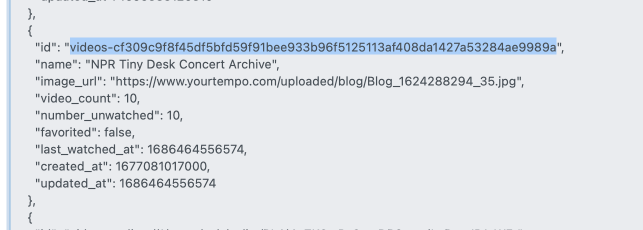
But the log for the "Fix YouTube Thumbnails" Action just shows a long list of errors:

Happy to keep trying, let me know what else I can look at or change. Thanks!
I see a couple of problems, but it'd be nice to have some test data to confirm. Could you do a:
curl -s <your_channels_dvr>:8089/dvr/groups/<your_video_group_id>/files
and post the data here. Be sure to use three back ticks before and after the data for a code block.