I have been curious to test your Olivetin EZ-Start. Now, I have a good reason to give it a shot.
Fortunately, I still have my Portainer token saved. I may have found some of the other variables I used before. 
So, I almost have it back to normal.
I think that I may have my DVR_SHARE and/or LOGS_SHARE folders incorrectly identified.
From the Olivetin Post-Install Healthcheck:
/volume1/ChannelsDVR

If the listed folders are NOT visible, AND you have your Channels DVR and Docker on the same system:

Channels reports this path as...
/volume1/ChannelsDVR

----------------------------------------

Checking that your selected Channels DVR server's log files (/mnt/192.168.1.100-8089_logs) are accessible:
Folders with the names data and latest should be visible...

total 0
drwxrwxrwx 1 root   root       36 May  4 13:50 #recycle
d--------- 1 root   root      124 Jun 19 20:19 .
drwxr-xr-x 1 root   root      124 Jul 11 15:59 ..
drwxrwxrwx 1 root   root       24 Jun 17 09:58 @eaDir
d--------- 1   1026 users    1320 Jul 11 00:05 Database
d--------- 1   1026 users  491078 Jul 11 15:36 Images
d--------- 1   1026 users      28 May  5  2024 Imports
d--------- 1   1026 users      32 Aug 31  2022 Logs
d--------- 1   1026 users  224824 Jul 11 02:59 Movies
drwx------ 1 242120 242120     16 Dec  5  2022 PlayOn
d--------- 1   1026 users      40 Jun 19 20:19 Streaming
d--------- 1   1026 users   15646 Jul 10 19:59 TV

Docker reports your current LOGS_SHARE setting as...
/volume1/ChannelsDVR

If the listed folders are NOT visible, AND you have your Channels DVR and Docker on the same system:

Channels reports this path as...
/var/packages/ChannelsDVR/target/channels-dvr
I fixed it. I dug around to find that you helped me with this exact problem on my first Olivetin deployment.
I needed to make the following change to the ENV:
LOGS_SHARE=/var/packages/ChannelsDVR/target/channels-dvr
I also see that the Health check I ran today suggested that very same thing. My aging brain couldn't quite put it all together.
1 Like
I've moved my channelsDVR server over to a MINI-S PC running Ubuntu and that seems to be working. So I ran the EZ start to install OliveTin and got that running. Now I want to run the Fix YouTube Thumbnails script but I'm getting errors. Here is the Standard Error. Any ideas what might be happening?
+ for id in "${ids[@]}"
+ echo 'Fixing thumbnails for video_group videos-e1a94ec86060971a293bcf7223a9a6998d15ef92bd2ef48e44e4984d58a30fef'
+ ruby /config/fix_thumbnails.rb videos-e1a94ec86060971a293bcf7223a9a6998d15ef92bd2ef48e44e4984d58a30fef
/usr/lib/ruby/2.7.0/net/http.rb:960:in `initialize': Failed to open TCP connection to :8089 (Connection refused - connect(2) for nil port 8089) (Errno::ECONNREFUSED)
	from /usr/lib/ruby/2.7.0/net/http.rb:960:in `open'
	from /usr/lib/ruby/2.7.0/net/http.rb:960:in `block in connect'
	from /usr/lib/ruby/2.7.0/timeout.rb:95:in `block in timeout'
	from /usr/lib/ruby/2.7.0/timeout.rb:105:in `timeout'
	from /usr/lib/ruby/2.7.0/net/http.rb:958:in `connect'
	from /usr/lib/ruby/2.7.0/net/http.rb:943:in `do_start'
	from /usr/lib/ruby/2.7.0/net/http.rb:932:in `start'
	from /usr/lib/ruby/2.7.0/net/http.rb:1483:in `request'
	from /var/lib/gems/2.7.0/gems/httparty-0.23.1/lib/httparty/request.rb:157:in `perform'
	from /var/lib/gems/2.7.0/gems/httparty-0.23.1/lib/httparty.rb:621:in `perform_request'
	from /var/lib/gems/2.7.0/gems/httparty-0.23.1/lib/httparty.rb:531:in `get'
	from /var/lib/gems/2.7.0/gems/httparty-0.23.1/lib/httparty.rb:654:in `get'
	from /config/fix_thumbnails.rb:7:in `<main>'
/usr/lib/ruby/2.7.0/net/http.rb:960:in `initialize': Connection refused - connect(2) for nil port 8089 (Errno::ECONNREFUSED)
	from /usr/lib/ruby/2.7.0/net/http.rb:960:in `open'
	from /usr/lib/ruby/2.7.0/net/http.rb:960:in `block in connect'
	from /usr/lib/ruby/2.7.0/timeout.rb:95:in `block in timeout'
	from /usr/lib/ruby/2.7.0/timeout.rb:105:in `timeout'
	from /usr/lib/ruby/2.7.0/net/http.rb:958:in `connect'
	from /usr/lib/ruby/2.7.0/net/http.rb:943:in `do_start'
	from /usr/lib/ruby/2.7.0/net/http.rb:932:in `start'
	from /usr/lib/ruby/2.7.0/net/http.rb:1483:in `request'
	from /var/lib/gems/2.7.0/gems/httparty-0.23.1/lib/httparty/request.rb:157:in `perform'
	from /var/lib/gems/2.7.0/gems/httparty-0.23.1/lib/httparty.rb:621:in `perform_request'
	from /var/lib/gems/2.7.0/gems/httparty-0.23.1/lib/httparty.rb:531:in `get'
	from /var/lib/gems/2.7.0/gems/httparty-0.23.1/lib/httparty.rb:654:in `get'
from /config/fix_thumbnails.rb:7:in `<main>'```How do results look when you run the OliveTin Post-Install Healthcheck? It looks like you're not reaching your CDVR server in what you posted. Did you install Ubuntu Server or Ubuntu Desktop?
1 Like
I believe desktop. Was that a mistake?
Checking your OliveTin-for-Channels installation...
(extended_check=false)

OliveTin Container Version 2025.04.22
OliveTin Docker Compose Version 2025.03.26

----------------------------------------

Checking that your selected Channels DVR server (:8089) is reachable by URL:
HTTP Status: 200 indicates success...

curl: (3) URL using bad/illegal format or missing URL
HTTP Status: 000
Effective URL: http://:8089

----------------------------------------

Checking that your selected Channels DVR server's data files (/mnt/-8089) are accessible:
Folders with the names Database, Images, Imports, Logs, Movies, Streaming and TV should be visible...


If the listed folders are NOT visible, AND you have your Channels DVR and Docker on the same system:

Channels reports this path as...

----------------------------------------

Checking that your selected Channels DVR server's log files (/mnt/-8089_logs) are accessible:
Folders with the names data and latest should be visible...


If the listed folders are NOT visible, AND you have your Channels DVR and Docker on the same system:

Channels reports this path as...

----------------------------------------

Checking if your Portainer token is working on ports 9000 and/or 9443:

Portainer http response on port 9000 reports version
Portainer Environment ID for local is
Portainer https response on port 9443 reports version
Portainer Environment ID for local is

----------------------------------------

Here's a list of your current OliveTin-related settings:

HOSTNAME=olivetin
CHANNELS_DVR=:8089
CHANNELS_DVR_ALTERNATES=
CHANNELS_CLIENTS=
ALERT_SMTP_SERVER=
ALERT_EMAIL_FROM=[Redacted]@
ALERT_EMAIL_PASS=[Redacted]
ALERT_EMAIL_TO=[Redacted]@
UPDATE_YAMLS=true
UPDATE_SCRIPTS=true
PORTAINER_HOST=
PORTAINER_PORT=9443
PORTAINER_ENV=2

----------------------------------------

Here's the contents of /etc/resolv.conf from inside the container:

# Generated by Docker Engine.
# This file can be edited; Docker Engine will not make further changes once it
# has been modified.

nameserver 127.0.0.11
search
options ndots:0

# Based on host file: '/etc/resolv.conf' (internal resolver)
# ExtServers: [host(192.168.0.80) host(192.168.0.166) host(100.100.100.100)]
# Overrides: [search]
# Option ndots from: internal

----------------------------------------

Here's the contents of /etc/hosts from inside the container:

127.0.0.1	localhost
::1	localhost ip6-localhost ip6-loopback
fe00::	ip6-localnet
ff00::	ip6-mcastprefix
ff02::1	ip6-allnodes
ff02::2	ip6-allrouters
172.18.0.3 olivetin```Generally you want to use Server, unless you have a specific reason to use Desktop. You'll have the occasional unexpected hoop to jump through with Desktop.
Check your OliveTin Portainer stack, it doesn't appear you have a value entered for CHANNELS_DVR_HOST or PORTAINER_HOST at a minimum.
How embarrassing. I installed OliveTin via EZ-Start but I did not continue to follow your remaining directions on generating the environment variables.
I'm getting the Fix YouTube thumbnails to work. Thanks for the help.
@bnhf , After reinstalling OliveTin, I notice that it seems to behave a little differently now.
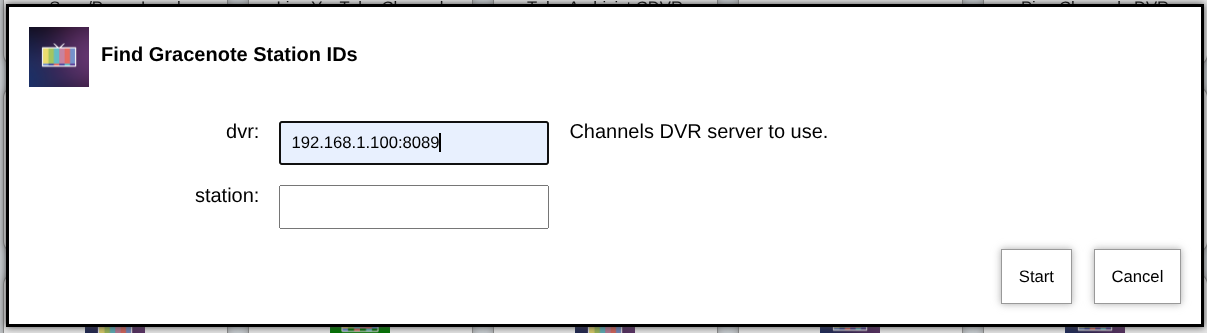
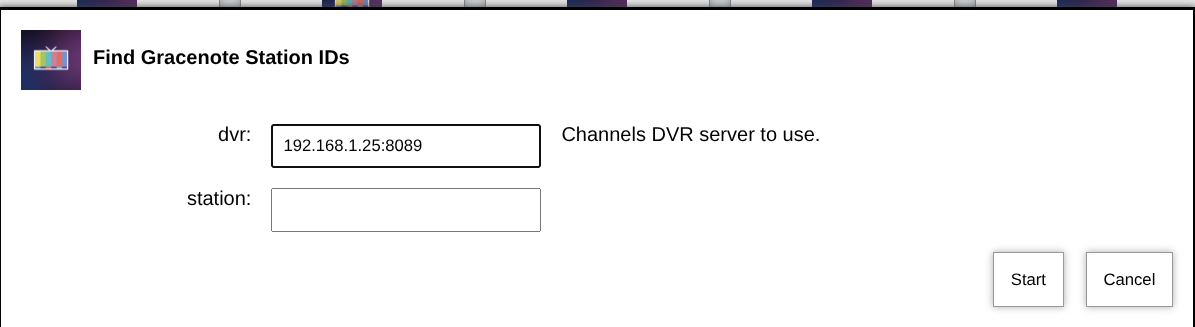
In the past, when choosing one of the actions, the window which opened to make entries for some of the variables used to populate with the last used previous value.
For instance, dvr: 192.168.1.100:8089, as below:
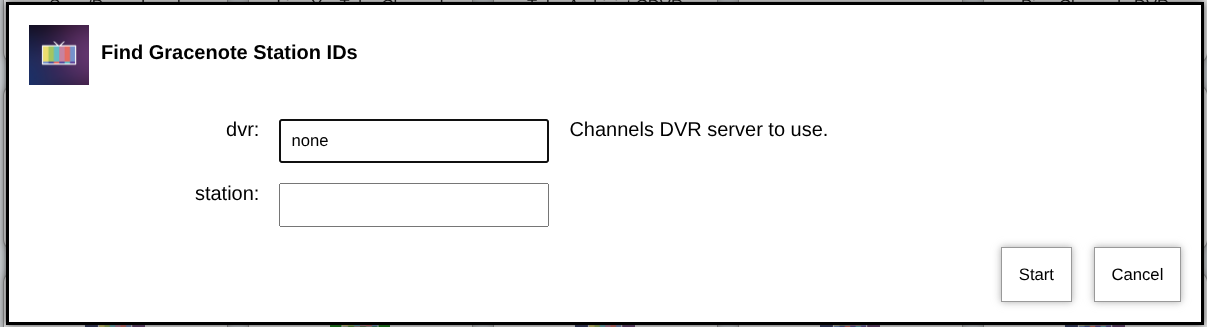
Now, it seems to only populate with blanks or default arguments,
For instance, dvr: none, as below:
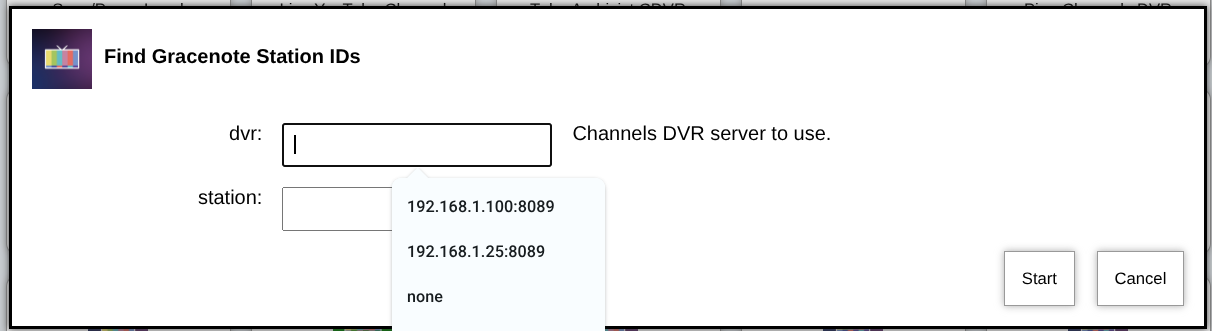
To fill the variable entry box, I have to clear the "none" value and click or start typing. Then, previous values appear in a drop-down list.
Could you post the full Standard Output from the OliveTin Post-Install Healthcheck. The one from 9 days ago is only part of the output.
Of Course! Here's the whole thing.
Checking your OliveTin-for-Channels installation...
(extended_check=false)

OliveTin Container Version 2025.07.10
OliveTin Docker Compose Version 2025.03.26

----------------------------------------

Checking that your selected Channels DVR server (192.168.1.100:8089) is reachable by URL:
HTTP Status: 200 indicates success...

  % Total    % Received % Xferd  Average Speed   Time    Time     Time  Current
                                 Dload  Upload   Total   Spent    Left  Speed

  0     0    0     0    0     0      0      0 --:--:-- --:--:-- --:--:--     0
100  1276  100  1276    0     0  1246k      0 --:--:-- --:--:-- --:--:-- 1246k
HTTP Status: 200
Effective URL: http://192.168.1.100:8089/

----------------------------------------

Checking that your selected Channels DVR server's data files (/mnt/192.168.1.100-8089) are accessible:
Folders with the names Database, Images, Imports, Logs, Movies, Streaming and TV should be visible...

total 0
drwxrwxrwx 1 root   root       36 May  4 13:50 #recycle
d--------- 1 root   root      124 Jul 15 09:02 .
drwxr-xr-x 1 root   root      124 Jul 15 07:06 ..
drwxrwxrwx 1 root   root       24 Jun 17 09:58 @eaDir
d--------- 1   1026 users    1320 Jul 19 19:34 Database
d--------- 1   1026 users  511682 Jul 20 13:55 Images
d--------- 1   1026 users      28 May  5  2024 Imports
d--------- 1   1026 users      32 Aug 31  2022 Logs
d--------- 1   1026 users  225866 Jul 20 05:14 Movies
drwx------ 1 242120 242120     16 Dec  5  2022 PlayOn
d--------- 1   1026 users      40 Jun 19 20:19 Streaming
d--------- 1   1026 users   15950 Jul 18 13:29 TV

Docker reports your current DVR_SHARE setting as...
/volume1/ChannelsDVR

If the listed folders are NOT visible, AND you have your Channels DVR and Docker on the same system:

Channels reports this path as...
/volume1/ChannelsDVR

----------------------------------------

Checking that your selected Channels DVR server's log files (/mnt/192.168.1.100-8089_logs) are accessible:
Folders with the names data and latest should be visible...

total 4
drwxr-xr-x 1 242120 242120  200 Jul 19 19:26 .
drwxr-xr-x 1 root   root    124 Jul 15 07:06 ..
drwxr-xr-x 1 242120 242120  154 Jul 16 01:10 2025.07.16.0128
drwxr-xr-x 1 242120 242120  154 Jul 16 23:11 2025.07.17.0309
drwxr-xr-x 1 242120 242120  154 Jul 17 16:12 2025.07.17.2006
drwxr-xr-x 1 242120 242120  154 Jul 18 16:30 2025.07.18.2058
drwxr-xr-x 1 242120 242120  154 Jul 19 09:41 2025.07.19.0550
drwxr-xr-x 1 242120 242120  154 Jul 19 19:25 2025.07.19.2021
drwxr-xr-x 1 242120 242120 2990 Jul 20 13:52 data
lrwxrwxrwx 1 242120 242120   15 Jul 19 19:25 latest -> 2025.07.19.2021

Docker reports your current LOGS_SHARE setting as...
/var/packages/ChannelsDVR/target/channels-dvr

If the listed folders are NOT visible, AND you have your Channels DVR and Docker on the same system:

Channels reports this path as...
/var/packages/ChannelsDVR/target/channels-dvr

----------------------------------------

Checking if your Portainer token is working on ports 9000 and/or 9443:

Portainer http response on port 9000 reports version 2.27.9
Portainer Environment ID for local is 2
Portainer https response on port 9443 reports version 2.27.9
Portainer Environment ID for local is 2

----------------------------------------

Here's a list of your current OliveTin-related settings:

HOSTNAME=olivetin
CHANNELS_DVR=192.168.1.100:8089
CHANNELS_DVR_ALTERNATES=
CHANNELS_CLIENTS=
ALERT_SMTP_SERVER=smtp.gmail.com:587
ALERT_EMAIL_FROM=[Redacted]@gmail.com
ALERT_EMAIL_PASS=[Redacted]
ALERT_EMAIL_TO=[Redacted]@yahoo.com
UPDATE_YAMLS=true
UPDATE_SCRIPTS=true
PORTAINER_TOKEN=[Redacted]
PORTAINER_HOST=192.168.1.100
PORTAINER_PORT=9443
PORTAINER_ENV=2

----------------------------------------

Here's the contents of /etc/resolv.conf from inside the container:

nameserver 127.0.0.11
nameserver 2603:8001:7b00:4f16:ea9f:80ff:fe97:2c15
options ndots:0

----------------------------------------

Here's the contents of /etc/hosts from inside the container:

127.0.0.1	localhost
::1	localhost ip6-localhost ip6-loopback
fe00::0	ip6-localnet
ff00::0	ip6-mcastprefix
ff02::1	ip6-allnodes
ff02::2	ip6-allrouters
192.168.48.3	olivetin
Your healthcheck looks good. Could this be something with the browser? Have you tried clearing cached images and files from your browsing history? Or maybe try another browser to see if it looks the same?
Just tried both suggestions. I cleared cached images and files on Chrome and the outcome is the same. Same with the Edge browser on a different computer.
Maybe I've gone batty and remembering incorrectly. I could swear that it used to at least keep the first entry (dvr: ) on some of these actions. It saved a lot of keystrokes when doing repetitive tasks like looking up Gracenote ID's.
If you have a single DVR specified it should be filled in for you. If you have multiple DVRs you should have a dropdown to choose between them.
Can you post the following from the env vars section of your OliveTin stack?:
CHANNELS_DVR_HOST=media-server8
CHANNELS_DVR_PORT=8089
CHANNELS_DVR2_HOST=utheater-pc
CHANNELS_DVR2_PORT=8089
Post any env vars containing CHANNELS_DVR...
This is all I have:
CHANNELS_DVR_HOST=192.168.1.100
CHANNELS_DVR_PORT=8089
What's your HOST_DIR value?:
Mine:
HOST_DIR=/data
I have this for the new installation:
HOST_DIR=/volume1/docker
I found my original variables on an older installation on my backup server, running OliveTin-for-Channels 2025.03.05. The variables are pretty much the same as above and as I previously posted.
The differences I see are that it has "DOMAIN=tailxxxxx.ts.net" and "CHANNELS_DVR2_HOST=another-server" and does not have "TUBEARCHIVIST_SHARE=/volume1/ChannelsDVR" as an environment variable at all.
TAG=latest
DOMAIN=tailxxxxx.ts.net
HOST_PORT=1337
CHANNELS_DVR_HOST=192.168.1.25
CHANNELS_DVR_PORT=8089
CHANNELS_DVR2_HOST=another-server
CHANNELS_DVR2_PORT=8089
and
HOST_DIR=/volume1/docker
DVR_SHARE=/volume1/ChannelsDVR
The dvr: drop-down does auto fill on that one:
I think this has something to do with your original setup having two servers defined (even though one was bogus), and now you only have one. Let me play around with this and see if I can duplicate what you're seeing...
EDIT: I probably should make sure you've tried stopping and restarting the OliveTin stack?
Excellent question! That's the first thing I tried. (Proving that I am able to learn from previous mistakes)
Now, this may sound crazy...But, I tried playing around with the ENV variables a bit.
I added two lines with the "dummy" values for a 2nd DVR as my other server had:
CHANNELS_DVR2_HOST=another-server
CHANNELS_DVR2_PORT=8089
When I opened the Gracenote ID action, this time I got a blank for the dvr: entry box, rather than "none".
It had a tab for pulling a drop down menu, which included both the main server IP and "another-server" to select from"
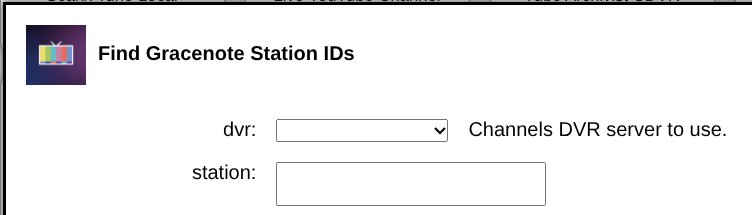
I remarked that this was interesting, yet not what I really was hoping for. So, I deleted the two added lines and updated the stack again.
Here's what makes me nuts...this time...wait for it...
BOOM! The main dvr: box populated right away!