
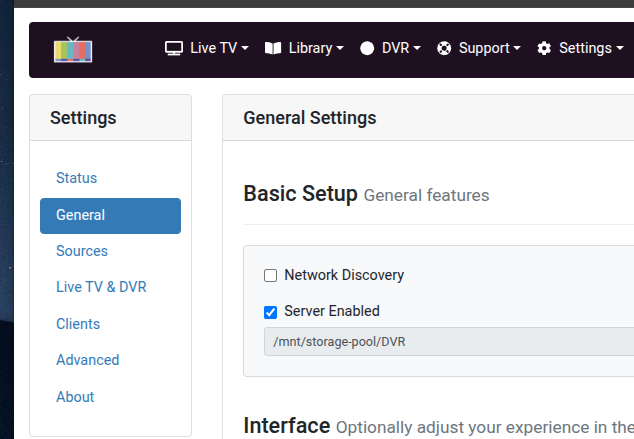
Better yet what does this show?
That’s not the issue.
Thanks though/
Gonna give up to Sunday'
No need to do that. FastChannels should be fine.
Good idea. Just be sure your Samba username, password are and the CIFS version (see @chDVRuser comment above) are correct.
Proper Docker Volumes are referenced by name only. If a slash is present it's a path, not a Volume name.
The point was it might give you a direction to your correct volume paths.
I’ve always know that info- numerous containers.
I’m trying to link my Mac mini to my Synology NAS. I want to move all my containers from the Synology to the Mac Mini.
@bnhf
I did remove FC- I’ll read it later. I stopped the container. Went to docker desktop and deleted the required volumes plus the one in use with OT. Recreated the volumes in Portainer but they only show in Docker. The ones I deleted were also not showing in the Volumes section of Portainer. I believe that's the issue I'm facing.
Possible cause:
I have Portainer installed on (2) Synology NAS's using instructions from Marius. I used docker desktop to install. Both my other installations can be accessed with http:// but the Mac mini requires https:/
I’m thinking about reinstalling Portainer using the below:
docker run -d -p 8000:8000 -p 9000:9000 -p 9443:9443 --name portainer \
--restart=always \
-v /var/run/docker.sock:/var/run/docker.sock \
-v portainer_data:/data \
portainer/portainer-ce:latest \
--http-enabled
So my Environmental Variable for DVR Share should be channels-dvr.
Here's a check list for you:
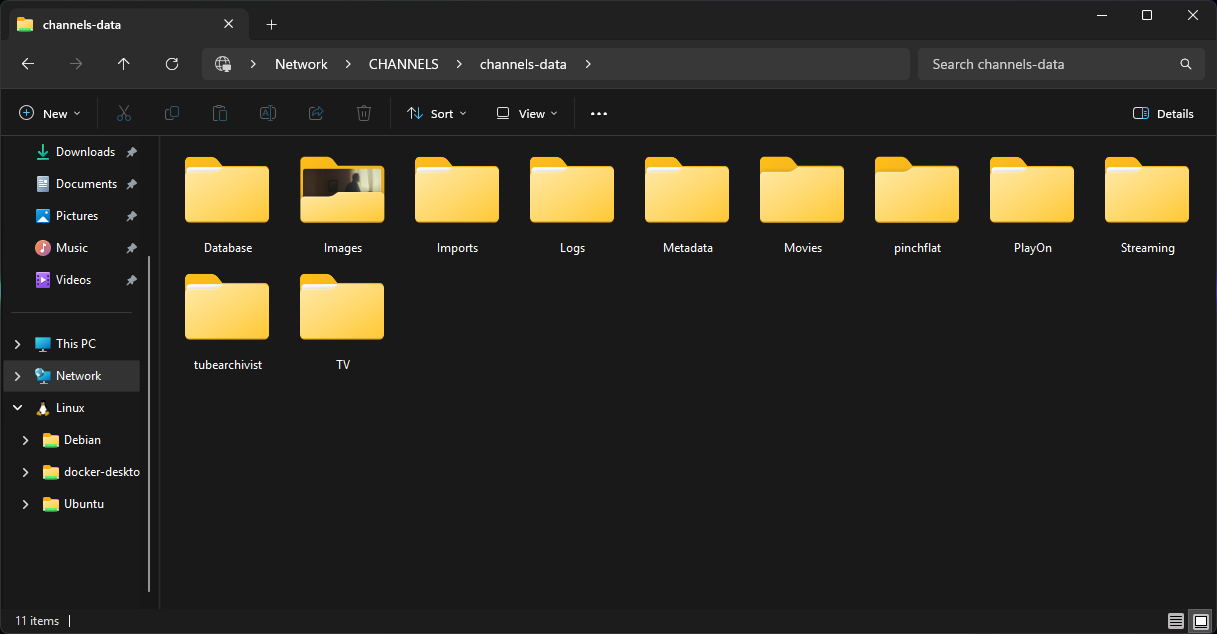
Make sure you have CDVR recordings and other data files setup as a Samba share, and that you can access that share from another computer. These are the directories you should be able to see in that share:
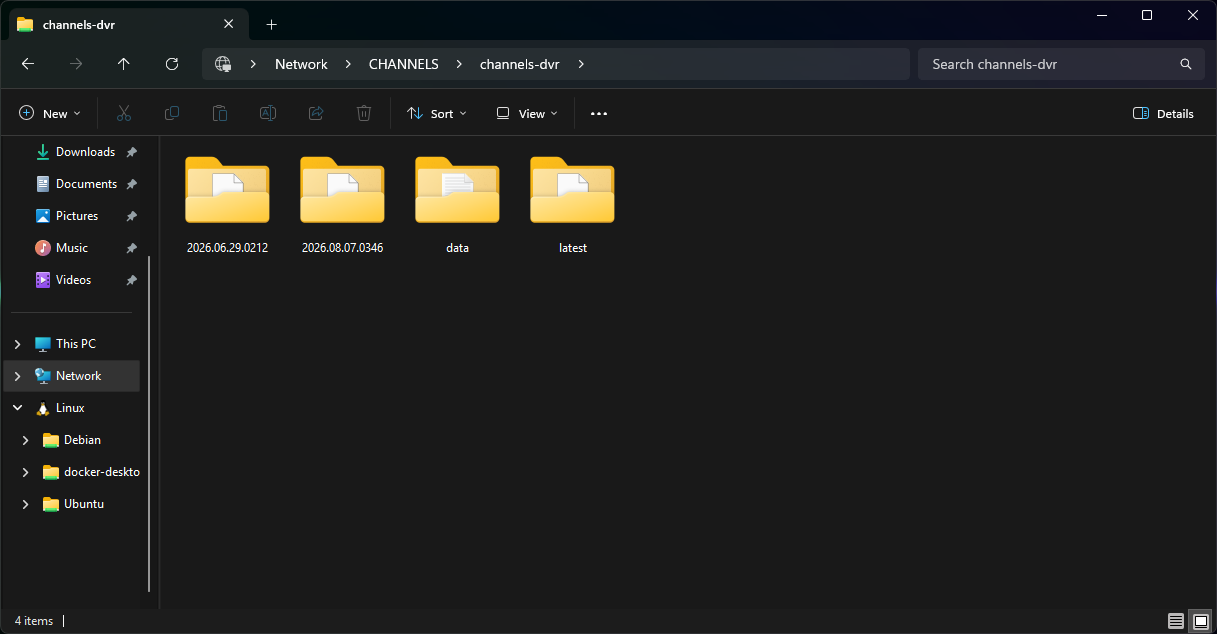
Then, your CDVR program files and logs need to be setup as a second share, with confirmed access from another computer. You should see these directories in that share:
With those Samba shares established, and confirmed, set each up in Portainer-Volumes using the name channels-dvr for the former and channels-dvr-logs for the latter. Those are the exact names to use for your DVR_SHARE and LOGS_SHARE env var values.
I believe you other values in hand, including the need to change the HOST_SFS_PORT to something other than 8080, since that's in use on your host. Don't forget to uncomment the first 5 lines in the volumes section of the Docker Compose, so that they look like this:
volumes: # Remove the #x# to enable. Use this section if you've setup a docker volume named channels-dvr, with CIFS or NFS, to bind to /mnt/dvr inside the container. Set ${DVR_SHARE} to channels-dvr (DVR_SHARE=channels_dvr) in that example.
  channels-dvr:
    external: true
  channels-dvr-logs:
    external: true
We’re making a little progress. I reran this am using DVR Share= channels-dvr and DVR Logs Share= channels-dvr-logs.
After running, the volumes now show up in Portainer Volumes and show as being used by OliveTin in Docker Desktop but error was unable to find host. It gave a wierd ip address . I need to change the Volumes share path because I believe I used Synology220/volume1/ChannelsDVR instead of Synology220/ChannelsDVR.
Probably won’t have much time today (Game Day) except for fixing access to Portainer from https:// to http://
In looking at your screenshots, Using Finder, I can see all the folders (1st shot) in Synology220/ChannelsDVR but nothing for the channels-dvr folders. I'm thinking those will be created once OliveTin spins up without any error.
No, you need to create that share on your Synology first. If it can't be viewed as a Samba share by other computers, you won't be able to configure it in Portainer-Volumes on your Mac Mini -- or bind it to OliveTin.
So before I read your post, I recreated the volumes and reran the stack with the below error
Error:
failed to deploy a stack: compose up operation failed: external volume "channels-dvr-logs" not found
We got past the channels-dvr issue and stopped at the channels-dvr-logs. Because the volume created for channels-dvr-logs points to /Synology220/ChannelsDVR/Logs, should I create the folder in the Channels DVR Logs Folder or create it on the Synology
I should have emphasized in my "check list" post that the order of how you approach this must be followed exactly.
In other words, you first need create the Samba shares on your Synology (these are network shares of existing folders). Then, you need to confirm these shares are accessible by other computers on your LAN. After that, you create the Portainer-Volumes, and then lastly spin-up OliveTin.
Don't bother trying to deploy OliveTin, until you have these other ducks in a row. 
Since it appeared that channels-dvr was pointing to the correct location (Synology220/ChannelsDVR), I left that alone. I added a shared folder named channels-dvr-logs then recreated that volume. I can go back easily and create another shared folder named channels-dvr if needed
Results of post Install health check
signal: killed

Checking your OliveTin-for-Channels installation...
(extended_check=false)

OliveTin Container Version 2026.09.01
OliveTin Docker Compose Version 2025.08.25

----------------------------------------

Checking that your selected Channels DVR server (10.0.1.65:8089) is reachable by URL:
HTTP Status: 200 indicates success...

  % Total    % Received % Xferd  Average Speed   Time    Time     Time  Current
                                 Dload  Upload   Total   Spent    Left  Speed
100  1276  100  1276    0     0  14375      0 --:--:-- --:--:-- --:--:-- 14500
HTTP Status: 200
Effective URL: http://10.0.1.65:8089/

----------------------------------------

Checking that your selected Channels DVR server's data files (/mnt/10.0.1.65-8089) are accessible:
Folders with the names Database, Images, Imports, Logs, Movies, Streaming and TV should be visible...

total 16
drwxr-xr-x 2 root root     0 Sep 12 08:46 .
drwxr-xr-x 1 root root  4096 Sep 12 10:29 ..
-rwxr-xr-x 1 root root 10244 Sep 12 10:23 .DS_Store
drwxr-xr-x 2 root root     0 Sep 11 11:31 Database
drwxr-xr-x 2 root root     0 Sep 12 05:00 Images
drwxr-xr-x 2 root root     0 Apr 14  2023 Imports
drwxr-xr-x 2 root root     0 Jul 12 14:48 Logs
drwxr-xr-x 2 root root     0 Sep 12 02:59 Metadata
drwxr-xr-x 2 root root     0 Sep 11 16:06 Movies
drwxr-xr-x 2 root root     0 Aug 27 06:59 Streaming
drwxr-xr-x 2 root root     0 Sep 11 16:43 TV
drwxr-xr-x 2 root root     0 Jul 14  2025 Test

Docker reports your current DVR_SHARE setting as...
/var/lib/docker/volumes/channels-dvr/_data

If the listed folders are NOT visible, AND you have your Channels DVR and Docker on the same system:

Channels reports this path as...
/volume1/ChannelsDVR

----------------------------------------

Checking that your selected Channels DVR server's log files (/mnt/10.0.1.65-8089_logs) are accessible:
Folders with the names data and latest should be visible...

total 4
drwxr-xr-x 2 root root    0 Sep 12 10:25 #recycle
drwxr-xr-x 2 root root    0 Sep 12 10:25 .
drwxr-xr-x 1 root root 4096 Sep 12 10:29 ..

Docker reports your current LOGS_SHARE setting as...
/var/lib/docker/volumes/channels-dvr-logs/_data

If the listed folders are NOT visible, AND you have your Channels DVR and Docker on the same system:

Channels reports this path as...
/var/packages/ChannelsDVR/target/channels-dvr

----------------------------------------

Checking if your Portainer token is working on ports 9000 and/or 9443:

Portainer http response on port 9000 reports version 2.45.0
Portainer Environment ID for local is 3
Portainer https response on port 9443 reports version
Portainer Environment ID for local is

----------------------------------------

Here's a list of your current OliveTin-related settings:

HOSTNAME=olivetin
CHANNELS_DVR=10.0.1.65:8089
CHANNELS_DVR_ALTERNATES=
CHANNELS_CLIENTS=
ALERT_SMTP_SERVER=
ALERT_EMAIL_FROM=[Redacted]@
ALERT_EMAIL_PASS=[Redacted]
ALERT_EMAIL_TO=[Redacted]@
UPDATE_YAMLS=true
UPDATE_SCRIPTS=true
PORTAINER_TOKEN=[Redacted]
PORTAINER_HOST=10.0.1.40
PORTAINER_PORT=9443
PORTAINER_ENV=2

----------------------------------------

Here's the contents of /etc/resolv.conf from inside the container:

# Generated by Docker Engine.
# This file can be edited; Docker Engine will not make further changes once it
# has been modified.

nameserver 127.0.0.11
search local
options ndots:0

# Based on host file: '/etc/resolv.conf' (internal resolver)
# ExtServers: [host(192.168.65.7)]
# Overrides: [search]
# Option ndots from: internal

----------------------------------------

Here's the contents of /etc/hosts from inside the container:

127.0.0.1       localhost
::1     localhost ip6-localhost ip6-loopback
fe00::  ip6-localnet
ff00::  ip6-mcastprefix
ff02::1 ip6-allnodes
ff02::2 ip6-allrouters
172.18.0.3      olivetin
OliveTin::timeout - this action timed out after 20 seconds. If you need more time~~~This is just what you want to see.
This part is not correct yet. Don't worry about trying to re-deploy OliveTin, until you get your Samba share created on the Synology that contains those two directories (data and latest, which are your CDVR program directories).
Once you've created that share, and you can see that share and those directories from other computers on your LAN, then create a volume called channels-dvr-logs in Portainer-Volumes.
Focus on this chain, starting on the Synology and working outward from there.
The channels-dvr volume points to the Synology220/ChannelsDVR folder on the Synology.
I created the the channels-dvr-logs shared folder on the synology and created the volume in Portainer.
I did increase to CIFS level 3.
When I deployed the stack and ran the health check, I posted those results above.
I also created a channels-dvr share but it errors out when deploying so I deleted it and we’re back to the above healthcheck. On the Synology, there are no folders like in your screenshot. I’ve added a screen shot of the Synology. I do have data, docker folders but they are for everything currently running on the NAS. I don’t know where these CDVR Program files are located.
The /etc/resolv.conf & /etc/hosts. were created by ’Gordon’. These may be an issue or not.
My plans for tomorrow are:
Wipe Portainer and Docker Desktop from the Mac. Run a clean install of Docker desktop & Portainer then try and resetup.
Thanks for the help. I believe we’re really close. I’ve got a couple of ideas to try-maybe I’ll get lucky!!
If you have a question, I can probably answer but will be from memory and at the tailgate!!!
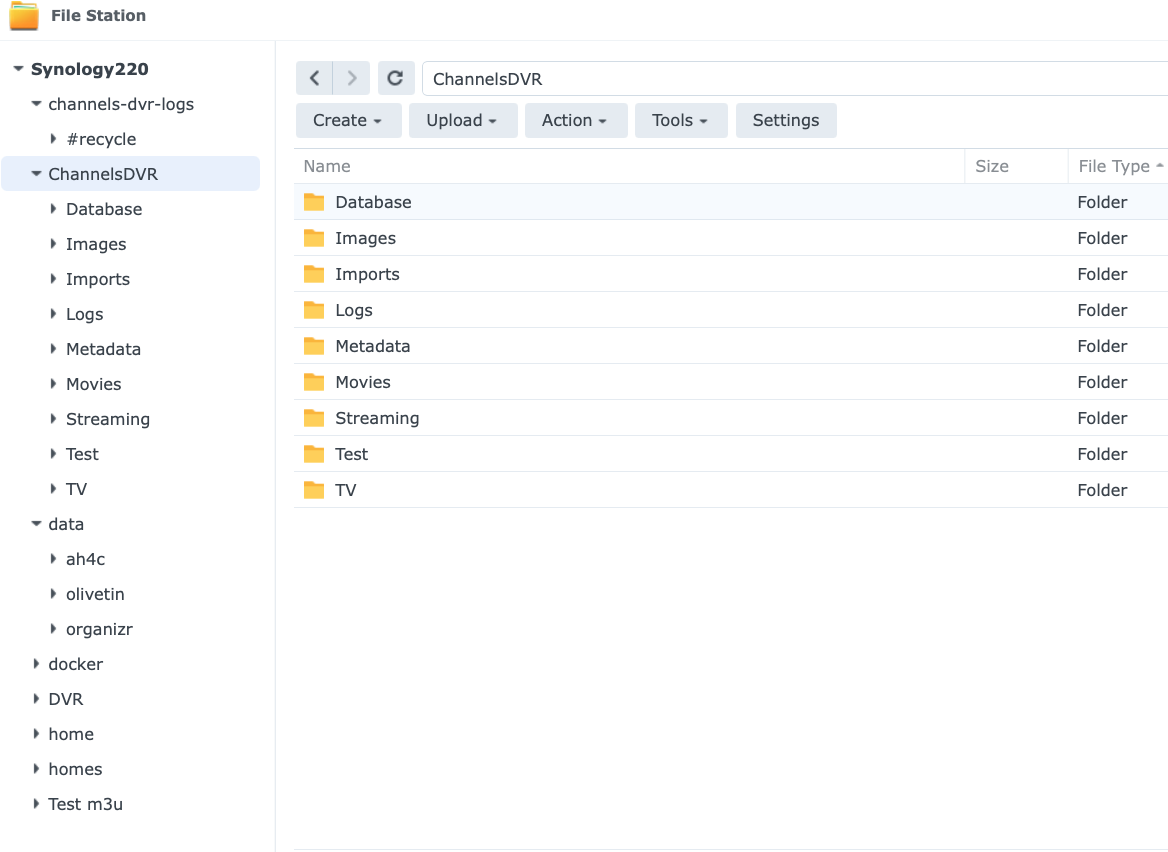
@jagrim I did a little research this afternoon, and I'm not too sure Synology allows a path like /volume1/@appstore/ChannelsDVR (which is where CDVR is installed on your NAS I believe) to be a Samba share.
If this is in fact the case (@chDVRuser?), you should probably just use a dummy value for LOGS_SHARE (something that exists, but is empty, would be best) -- and we'll call it a day. Any Action that you want to run that requires access to those files can be done from the OliveTin you have running on the NAS. Most Actions will work fine on the Mac Mini.
Synology doesn't. It has to be a path that exists as a Shared Folder.
That's why I run CDVR in a container and set the executables/log file path to be under the /volume1/docker directory and have the Shared folder /volume1/docker shared.
i.e. /volume1/docker/channels-dvr
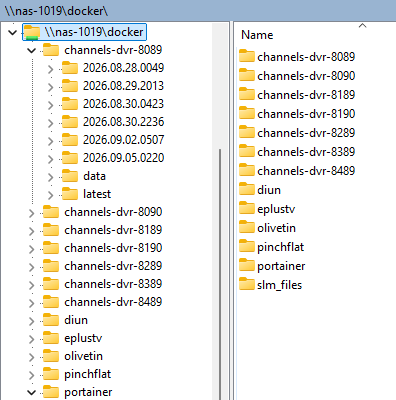
Of course you need to set permissions on /volume1/docker for the user to access it from the share
Results of Post Health Check after uninstalling and removing DD & Portainer.
Not sure what that 1st error.
jq: error (at <stdin>:0): Cannot index string with string "Name"
Checking your OliveTin-for-Channels installation...
(extended_check=false)

OliveTin Container Version 2026.09.01
OliveTin Docker Compose Version 2025.08.25

----------------------------------------

Checking that your selected Channels DVR server (10.0.1.65:8089) is reachable by URL:
HTTP Status: 200 indicates success...

  % Total    % Received % Xferd  Average Speed   Time    Time     Time  Current
                                 Dload  Upload   Total   Spent    Left  Speed
100  1276  100  1276    0     0   499k      0 --:--:-- --:--:-- --:--:--  623k
HTTP Status: 200
Effective URL: http://10.0.1.65:8089/

----------------------------------------

Checking that your selected Channels DVR server's data files (/mnt/10.0.1.65-8089) are accessible:
Folders with the names Database, Images, Imports, Logs, Movies, Streaming and TV should be visible...

total 16
drwxr-xr-x 2 root root     0 Sep 12 08:46 .
drwxr-xr-x 1 root root  4096 Sep 13 12:57 ..
-rwxr-xr-x 1 root root 10244 Sep 12 10:23 .DS_Store
drwxr-xr-x 2 root root     0 Sep 13 11:32 Database
drwxr-xr-x 2 root root     0 Sep 13 10:31 Images
drwxr-xr-x 2 root root     0 Apr 14  2023 Imports
drwxr-xr-x 2 root root     0 Jul 12 14:48 Logs
drwxr-xr-x 2 root root     0 Sep 13 12:44 Metadata
drwxr-xr-x 2 root root     0 Sep 11 16:06 Movies
drwxr-xr-x 2 root root     0 Aug 27 06:59 Streaming
drwxr-xr-x 2 root root     0 Sep 13 11:59 TV
drwxr-xr-x 2 root root     0 Jul 14  2025 Test

Docker reports your current DVR_SHARE setting as...
/var/lib/docker/volumes/channels-dvr/_data

If the listed folders are NOT visible, AND you have your Channels DVR and Docker on the same system:

Channels reports this path as...
/volume1/ChannelsDVR

----------------------------------------

Checking that your selected Channels DVR server's log files (/mnt/10.0.1.65-8089_logs) are accessible:
Folders with the names data and latest should be visible...

total 16
drwxr-xr-x 2 root root    0 Sep 12 10:25 #recycle
drwxr-xr-x 2 root root    0 Sep 12 10:45 .
drwxr-xr-x 1 root root 4096 Sep 13 12:57 ..
-rwxr-xr-x 1 root root 8196 Sep 12 10:45 .DS_Store

Docker reports your current LOGS_SHARE setting as...
/var/lib/docker/volumes/channels-dvr-logs/_data

If the listed folders are NOT visible, AND you have your Channels DVR and Docker on the same system:

Channels reports this path as...
/var/packages/ChannelsDVR/target/channels-dvr

----------------------------------------

Checking if your Portainer token is working on ports 9000 and/or 9443:

Portainer http response on port 9000 reports version 2.27.6
Portainer Environment ID for local is
Portainer https response on port 9000 reports version
Portainer Environment ID for local is

----------------------------------------

Here's a list of your current OliveTin-related settings:

HOSTNAME=olivetin
CHANNELS_DVR=10.0.1.65:8089
CHANNELS_DVR_ALTERNATES=
CHANNELS_CLIENTS=
ALERT_SMTP_SERVER=
ALERT_EMAIL_FROM=[Redacted]@
ALERT_EMAIL_PASS=[Redacted]
ALERT_EMAIL_TO=[Redacted]@
UPDATE_YAMLS=true
UPDATE_SCRIPTS=true
PORTAINER_TOKEN=[Redacted]
PORTAINER_HOST=10.0.1.65
PORTAINER_PORT=9000
PORTAINER_ENV=2

----------------------------------------

Here's the contents of /etc/resolv.conf from inside the container:

# Generated by Docker Engine.
# This file can be edited; Docker Engine will not make further changes once it
# has been modified.

nameserver 127.0.0.11
search local
options ndots:0

# Based on host file: '/etc/resolv.conf' (internal resolver)
# ExtServers: [host(192.168.65.7)]
# Overrides: [search]
# Option ndots from: internal

----------------------------------------

Here's the contents of /etc/hosts from inside the container:

127.0.0.1       localhost
::1     localhost ip6-localhost ip6-loopback
fe00::  ip6-localnet
ff00::  ip6-mcastprefix
ff02::1 ip6-allnodes
ff02::2 ip6-allrouters
172.18.0.3      olivetin
Cut & Paste is not always your friend. Fixed the typo
Current results of Post Health check
signal: killed

Checking your OliveTin-for-Channels installation...
(extended_check=false)

OliveTin Container Version 2026.09.01
OliveTin Docker Compose Version 2025.08.25

----------------------------------------

Checking that your selected Channels DVR server (10.0.1.65:8089) is reachable by URL:
HTTP Status: 200 indicates success...

  % Total    % Received % Xferd  Average Speed   Time    Time     Time  Current
                                 Dload  Upload   Total   Spent    Left  Speed
100  1276  100  1276    0     0  13809      0 --:--:-- --:--:-- --:--:-- 13720
HTTP Status: 200
Effective URL: http://10.0.1.65:8089/

----------------------------------------

Checking that your selected Channels DVR server's data files (/mnt/10.0.1.65-8089) are accessible:
Folders with the names Database, Images, Imports, Logs, Movies, Streaming and TV should be visible...

total 16
drwxr-xr-x 2 root root     0 Sep 12 08:46 .
drwxr-xr-x 1 root root  4096 Sep 13 13:41 ..
-rwxr-xr-x 1 root root 10244 Sep 12 10:23 .DS_Store
drwxr-xr-x 2 root root     0 Sep 13 11:32 Database
drwxr-xr-x 2 root root     0 Sep 13 10:31 Images
drwxr-xr-x 2 root root     0 Apr 14  2023 Imports
drwxr-xr-x 2 root root     0 Jul 12 14:48 Logs
drwxr-xr-x 2 root root     0 Sep 13 12:44 Metadata
drwxr-xr-x 2 root root     0 Sep 11 16:06 Movies
drwxr-xr-x 2 root root     0 Aug 27 06:59 Streaming
drwxr-xr-x 2 root root     0 Sep 13 11:59 TV
drwxr-xr-x 2 root root     0 Jul 14  2025 Test

Docker reports your current DVR_SHARE setting as...
/var/lib/docker/volumes/channels-dvr/_data

If the listed folders are NOT visible, AND you have your Channels DVR and Docker on the same system:

Channels reports this path as...
/volume1/ChannelsDVR

----------------------------------------

Checking that your selected Channels DVR server's log files (/mnt/10.0.1.65-8089_logs) are accessible:
Folders with the names data and latest should be visible...

total 16
drwxr-xr-x 2 root root    0 Sep 12 10:25 #recycle
drwxr-xr-x 2 root root    0 Sep 12 10:45 .
drwxr-xr-x 1 root root 4096 Sep 13 13:41 ..
-rwxr-xr-x 1 root root 8196 Sep 12 10:45 .DS_Store

Docker reports your current LOGS_SHARE setting as...
/var/lib/docker/volumes/channels-dvr-logs/_data

If the listed folders are NOT visible, AND you have your Channels DVR and Docker on the same system:

Channels reports this path as...
/var/packages/ChannelsDVR/target/channels-dvr

----------------------------------------

Checking if your Portainer token is working on ports 9000 and/or 9443:

Portainer http response on port 9000 reports version 2.45.0
Portainer Environment ID for local is 3
Portainer https response on port 9000 reports version
Portainer Environment ID for local is

----------------------------------------

Here's a list of your current OliveTin-related settings:

HOSTNAME=olivetin
CHANNELS_DVR=10.0.1.65:8089
CHANNELS_DVR_ALTERNATES=
CHANNELS_CLIENTS=
ALERT_SMTP_SERVER=
ALERT_EMAIL_FROM=[Redacted]@
ALERT_EMAIL_PASS=[Redacted]
ALERT_EMAIL_TO=[Redacted]@
UPDATE_YAMLS=true
UPDATE_SCRIPTS=true
PORTAINER_TOKEN=[Redacted]
PORTAINER_HOST=10.0.1.40
PORTAINER_PORT=9000
PORTAINER_ENV=2

----------------------------------------

Here's the contents of /etc/resolv.conf from inside the container:

# Generated by Docker Engine.
# This file can be edited; Docker Engine will not make further changes once it
# has been modified.

nameserver 127.0.0.11
search local
options ndots:0

# Based on host file: '/etc/resolv.conf' (internal resolver)
# ExtServers: [host(192.168.65.7)]
# Overrides: [search]
# Option ndots from: internal

----------------------------------------

Here's the contents of /etc/hosts from inside the container:

127.0.0.1       localhost
::1     localhost ip6-localhost ip6-loopback
fe00::  ip6-localnet
ff00::  ip6-mcastprefix
ff02::1 ip6-allnodes
ff02::2 ip6-allrouters
172.18.0.3      olivetin
OliveTin::timeout - this action timed out after 20 seconds. If you need more time~~~When I try to install WatchTower via OIivetin I get the following error and I am trying to find a way to fix it? Thanks in advance for any help
exit status 1
JSON response from https://:9443/api/stacks/create/standalone/string?endpointId=:
Finished -- with errors
It looks like you're missing a value for PORTAINER_HOST. Could you run the standard OliveTin Post-Install Healthcheck -- so we can see if you're missing any other values? Post the results here. It should look like similar to this:
Checking your OliveTin-for-Channels installation...
(extended_check=false)

OliveTin Container Version 2026.09.22
OliveTin Docker Compose Version 2025.08.25

----------------------------------------

Checking that your selected Channels DVR server (channels:8089) is reachable by URL:
HTTP Status: 200 indicates success...

  % Total    % Received % Xferd  Average Speed   Time    Time     Time  Current
                                 Dload  Upload   Total   Spent    Left  Speed
100  1276  100  1276    0     0   200k      0 --:--:-- --:--:-- --:--:--  207k
HTTP Status: 200
Effective URL: http://channels:8089/

----------------------------------------

Checking that your selected Channels DVR server's data files (/mnt/channels-8089) are accessible:
Folders with the names Database, Images, Imports, Logs, Movies, Streaming and TV should be visible...

total 4
drwxr-xr-x 2 1000 1000    0 Jul 28 19:56 .
drwxr-xr-x 1 root root 4096 Sep 22 12:31 ..
drwxr-xr-x 2 1000 1000    0 Sep 25 08:31 Database
drwxr-xr-x 2 1000 1000    0 Sep 24 10:12 Images
drwxr-xr-x 2 1000 1000    0 Jul 28 09:02 Imports
drwxr-xr-x 2 1000 1000    0 Aug 10 07:02 Logs
drwxr-xr-x 2 1000 1000    0 Sep 24 10:12 Metadata
drwxr-xr-x 2 1000 1000    0 Jul 28 19:56 Movies
drwxr-xr-x 2 1000 1000    0 Jul 28 09:14 PlayOn
drwxr-xr-x 2 1000 1000    0 Jul 28 19:56 Streaming
drwxr-xr-x 2 1000 1000    0 Sep 11 23:03 TV
drwxr-xr-x 2 1000 1000    0 Sep 25  2025 pinchflat
drwxr-xr-x 2 1000 1000    0 Jul 28 09:14 tubearchivist

Docker reports your current DVR_SHARE setting as...
/mnt/dvr

If the listed folders are NOT visible, AND you have your Channels DVR and Docker on the same system:

Channels reports this path as...
/channels-data

----------------------------------------

Checking that your selected Channels DVR server's log files (/mnt/channels-8089_logs) are accessible:
Folders with the names data and latest should be visible...

total 4
drwxr-xr-x 2 1000 1000    0 Aug  7 13:53 .
drwxr-xr-x 1 root root 4096 Sep 22 12:31 ..
drwxr-xr-x 2 1000 1000    0 Jul 26 05:50 2026.06.29.0212
drwxr-xr-x 2 1000 1000    0 Aug  7 13:53 2026.08.07.0346
drwxr-xr-x 2 1000 1000    0 Sep 25 10:50 data
drwxr-xr-x 2 1000 1000    0 Aug  7 13:53 latest

Docker reports your current LOGS_SHARE setting as...
/mnt/channelsdvr

If the listed folders are NOT visible, AND you have your Channels DVR and Docker on the same system:

Channels reports this path as...
/channels-dvr

----------------------------------------

Checking if your Portainer token is working on ports 9000 and/or 9443:

Portainer http response on port 9000 reports version 2.45.0
Portainer Environment ID for local is 2
Portainer https response on port 9443 reports version 2.45.0
Portainer Environment ID for local is 2

----------------------------------------

Here's a list of your current OliveTin-related settings:

HOSTNAME=olivetin
CHANNELS_DVR=channels:8089
CHANNELS_DVR_ALTERNATES=utheater-pc:8089
CHANNELS_CLIENTS=appletv4k firestick-master
ALERT_SMTP_SERVER=smtp.gmail.com:587
ALERT_EMAIL_FROM=[Redacted]@gmail.com
ALERT_EMAIL_PASS=[Redacted]
ALERT_EMAIL_TO=[Redacted]@gmail.com
UPDATE_YAMLS=false
UPDATE_SCRIPTS=false
PORTAINER_TOKEN=[Redacted]
PORTAINER_HOST=htpc6
PORTAINER_PORT=9443
PORTAINER_ENV=2