
DrivePool is the best -- good choice! Is D: part of a larger pool? If so, I wouldn't use that. If it represents the pool of drives then that's OK.
In my opinion, yes. Debian is the OS so many other Linux distros are based on, including Ubuntu and Linux Mint.
Browser refresh maybe?
Yes, D represents my pool of drives. It is the only one I use. I unassigned the windows letter assignement for each of the drives in the pool and only use the one letter drive assignment for the pool.
Ah, nope, it is just being pretty slow to load the data. Left the tab open for a few minutes and now it has appeared.
Accessing the Windows filesystem from WSL is not as fast as if you had a Linux distro, but it'll be fine for now, and you can copy the folder over to Debian when you get that going.
1 Like
Awesome! thanks so much for your help on this. I really like your work on this and look forward to using it. I feel like I have also learned some more about docker.
1 Like
Well, I didn't realize how fast it was to just install debian on this thing so it is there now. Is it now just a matter of moving that folder to the Debian directory and changing the path in the container?
That should work. I know I've moved individual files back and forth using Windows File Explorer, but I'm not positive I've done folders. Did you get prompted to set your Linux username and password? If so, hopefully they're the same as you used on Windows to avoid permissions issues...
EDIT: You'll want to get familiar with Windows Terminal now too; if you're not already. It's a very cool way to access your distro, PowerShell or the Command prompt.
I did. But, I didn't set them the same and I am having permission issues when I go to mnt/d or mnt/c. It won't allow me to access the folder.
I am a bit familiar. I usually have to look online to find out what commands to use for certain things as I haven't used it enough to remember them, but I do have some working knowledge of it.
For any of you that didn't notice Organizr updated a couple of weeks ago, it's similar to the CDVR container in that a new container is not necessarily required -- it updates itself internally. Looks like 100+ new features, fixes and notes:

A couple of different logo options for using the LinkPi WebUI (requires simple Caddy reverse proxy to use in an iFrame) through Organizr:


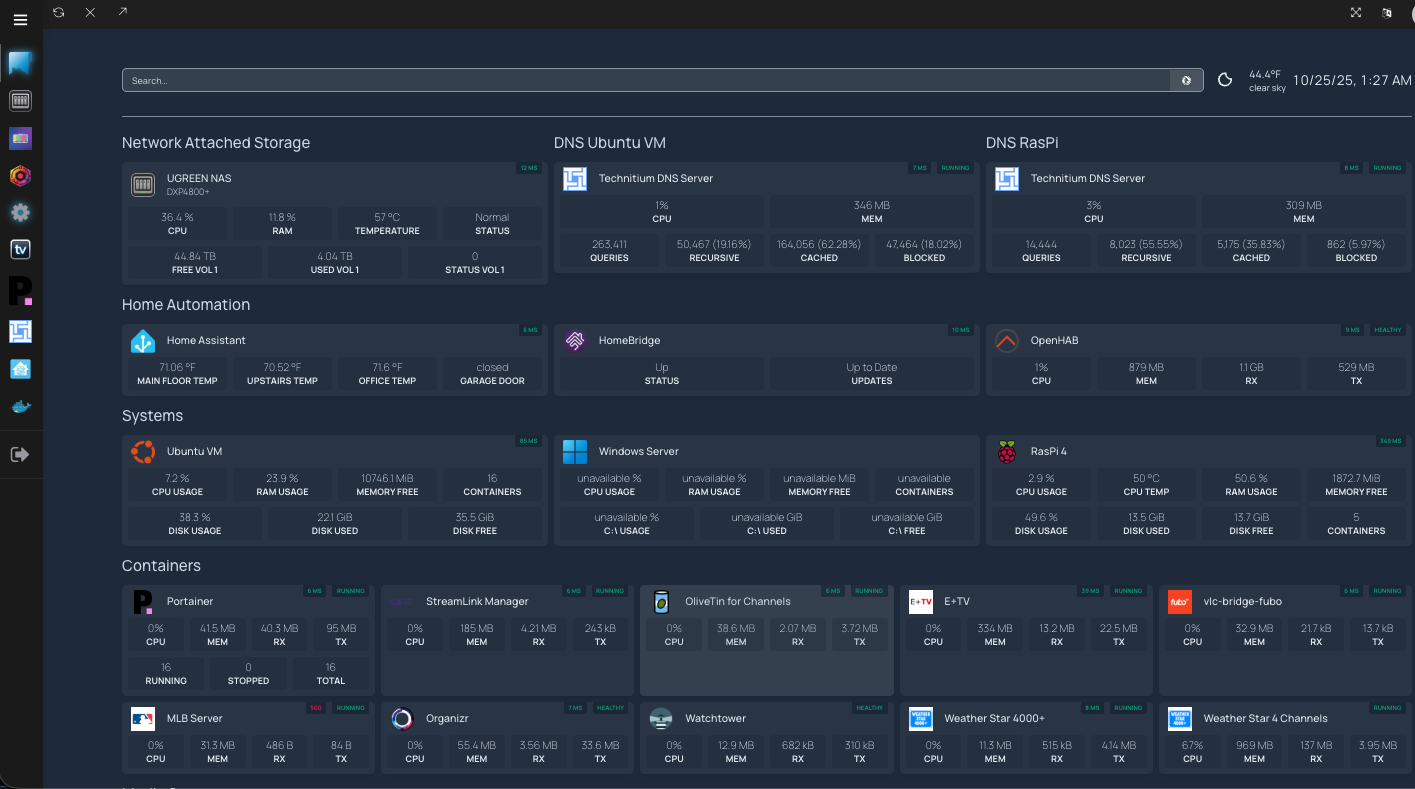
Organizr is a great tool. I have been running it for a while now along with homepage (https://gethomepage.dev/ or Homepage · GitHub) to have a nice dashboard overview of my network. Has anyone else done something similar?
2 Likes
Homepage looks super interesting. Would you be willing to share your YAML?
Sure thing. First note is that I have some more items on the page if I scroll down, including a view of channels. Here is the rest of the page:

The YAML files are as follows:
services.yaml:
---
- Systems:
  - Ubuntu VM:
        icon: ubuntu-linux.png
        href: http://X.X.X.X
        siteMonitor: http://X.X.X.X
        description:
        widgets:
          - type: homeassistant
            url: http://X.X.X.X
            key: homeassistant API key goes here
            custom:
              - state: sensor.cpu_usage
                label: CPU Usage
              - state: sensor.memory_usage
                label: RAM Usage
              - state: sensor.memory_free
                label: Memory Free
              - state: sensor.containers_active
                label: Containers
          - type: homeassistant
            url: http://X.X.X.X
            key: homeassistant API key goes here
            custom:
              - state: sensor.disk_usage
                label: Disk Usage
              - state: sensor.disk_used
                label: Disk Used
              - state: sensor.disk_free
                label: Disk Free
  - Windows Server:
        icon: windows-11.png
        href: http://X.X.X.X
        description:
        widgets:
          - type: homeassistant
            url: http://X.X.X.X
            key: homeassistant API key goes here
            custom:
              - state: sensor.windows_server_cpu_usage
                label: CPU Usage
              - state: sensor.windows_server_memory_usage
                label: RAM Usage
              - state: sensor.windows_server_memory_free
                label: Memory Free
              - state: sensor.windows_server_containers_active
                label: Containers
          - type: homeassistant
            url: http://X.X.X.X
            key: homeassistant API key goes here
            custom:
              - state: sensor.windows_server_c_disk_usage
                label: C:\ Usage
              - state: sensor.windows_server_c_disk_used
                label: C:\ Used
              - state: sensor.windows_server_c_disk_free
                label: C:\ Free
  - RasPi 4:
        icon: raspberry-pi.png
        href: http://X.X.X.X
        siteMonitor: http://X.X.X.X
        description:
        widgets:
          - type: homeassistant
            url: http://X.X.X.X
            key: homeassistant API key goes here
            custom:
              - state: sensor.raspi_4_cpu_usage
                label: CPU Usage
              - state: sensor.raspi_4_cpu_thermal_0_temperature
                label: CPU Temp
              - state: sensor.raspi_4_memory_usage
                label: RAM Usage
              - state: sensor.raspi_4_memory_free
                label: Memory Free
          - type: homeassistant
            url: http://X.X.X.X
            key: eyJhbGciOiJIUzI1NiIsInR5cCI6IkpXVCJ9.eyJpc3MiOiI4MDQ1OTk2NWU3YTk0NDQ2ODU5OTQ1OGJmYmIzMGY2MyIsImlhdCI6MTc1MzU2NDYxNiwiZXhwIjoyMDY4OTI0NjE2fQ.kGk1POuDrcTU9ukg0MH16NcmJNSA_RZvI9zeAm1eLu4
            custom:
              - state: sensor.raspi_4_etc_hosts_disk_usage
                label: Disk Usage
              - state: sensor.raspi_4_etc_hosts_disk_used
                label: Disk Used
              - state: sensor.raspi_4_etc_hosts_disk_free
                label: Disk Free
              - state: sensor.raspi_4_containers_active
                label: Containers

- Row 1:
  - Network Attached Storage:
    - UGREEN NAS:
        icon: sh-ugreen-nas
        href: https://X.X.X.X
        siteMonitor: https://X.X.X.X
        description: DXP4800+
        widgets:
          - type: homeassistant
            url: http://X.X.X.X
            key: homeassistant API key goes here
            custom:
              - state: sensor.ugreen_nas_cpu_usage
                label: CPU
              - state: sensor.ugreen_nas_ram_usage
                label: RAM
              - state: sensor.ugreen_nas_cpu_temperature
                label: Temperature
              - state: sensor.ugreen_nas_server_status
                label: Status
          - type: homeassistant
            url: http://X.X.X.X
            key: homeassistant API key goes here
            custom:
              - state: sensor.ugreen_nas_pool_1_volume_1_available_size
                label: Free Vol 1
              - state: sensor.ugreen_nas_pool_1_volume_1_used_size
                label: Used Vol 1
              - state: sensor.ugreen_nas_pool_1_volume_1_status
                label: Status Vol 1

  - DNS Ubuntu VM:
    - Technitium DNS Server:
        icon: technitium.png
        href: https://X.X.X.X
        widget:
          type: technitium
          url: http://X.X.X.X
          key: API key goes here
          range: LastDay
          fields:
            - totalQueries
            - totalBlocked
            - totalRecursive
            - totalCached
        server: my-docker
        container: dns-server
        showStats: true
        siteMonitor: http://X.X.X.X
  - DNS RasPi:
    - Technitium DNS Server:
        icon: technitium.png
        href: https://X.X.X.X
        widget:
          type: technitium
          url: http://X.X.X.X
          key: API key goes here

          range: LastDay
          fields:
            - totalQueries
            - totalBlocked
            - totalRecursive
            - totalCached
        server: my-raspi-docker
        container: dns-server
        showStats: true
        siteMonitor: http://X.X.X.X

- Home Automation:
    - Home Assistant:
        href: https://X.X.X.X
        icon: home-assistant.png
        siteMonitor: http://X.X.X.X
        widget:
          type: homeassistant
          url: http://X.X.X.X
          key: homeassistant API key goes here
          custom:
            - state: sensor.main_floor_current_temperature
              label: Main Floor Temp
            - state: sensor.upstairs_current_temperature
              label: Upstairs Temp
            - state: sensor.tstat_current_temperature
              label: Office Temp
            - state: cover.garage_door_ha
              label: Garage Door
    - HomeBridge:
        icon: homebridge.png
        widget:
          type: homebridge
          url: http://X.X.X.X
          username: admin
          password: homebridge Password
        href: https://X.X.X.X
        siteMonitor: http://X.X.X.X

    - OpenHAB:
        icon: openhab.png
        href: https://X.X.X.X
        siteMonitor: http://X.X.X.X
        server: my-raspi-docker
        container: openhab
        showStats: true

- Containers:
    - Portainer:
        icon: portainer.png
        widget:
          type: portainer
          url: http://X.X.X.X
          env: 3
          key: portainer API key goes here
        href: https://X.X.X.X
        server: my-docker
        container: portainer
        showStats: true
        siteMonitor: http://X.X.X.X
    - StreamLink Manager:
        icon: /icons/streamlink-manager.png
        href: https://X.X.X.X
        server: my-docker
        container: slm
        showStats: true
        siteMonitor: http://X.X.X.X
    - OliveTin for Channels:
        href: https://X.X.X.X
        icon: olivetin.png
        server: my-docker
        container: olivetin
        showStats: true
        siteMonitor: http://X.X.X.X
    - E+TV:
         icon: /icons/eplustv.png
         href: https://X.X.X.X
         server: my-docker
         container: eplustv
         showStats: true
         siteMonitor: http://X.X.X.X
    - vlc-bridge-fubo:
        icon: /icons/fubo.png
        href: https://X.X.X.X
        server: my-docker
        container: vlc-bridge-fubo
        showStats: true
        siteMonitor: http://X.X.X.X
    - MLB Server:
        icon: /icons/MLB.png
        href: https://X.X.X.X
        server: my-docker
        container: mlbserver
        showStats: true
        siteMonitor: http://X.X.X.X
    - Organizr:
        icon: organizr.png
        href: https://X.X.X.X
        server: my-docker
        container: organizr
        showStats: true
        siteMonitor: http://X.X.X.X
    - Watchtower:
        icon: watchtower.png
        server: my-docker
        container: watchtower
        showStats: true
    - Weather Star 4000+:
        icon: /icons/weatherstar4000plus.png
        href: https://X.X.X.X
        server: my-docker
        container: ws4kp
        showStats: true
        siteMonitor: http://X.X.X.X
    - Weather Star 4 Channels:
        icon: /icons/weatherstar4000plus.png
        server: my-docker
        container: ws4channels
        showStats: true
- Containers - Other Servers:
    - Portainer RasPi:
        icon: portainer.png
        widget:
          type: portainer
          url: http://X.X.X.X
          env: 3
          key: portainer API key goes here
        href: https://X.X.X.X
        server: my-raspi-docker
        container: portainer
        showStats: true
        siteMonitor: http://X.X.X.X
    - Portainer Win 11:
        icon: portainer.png
        widget:
          type: portainer
          url: http://X.X.X.X
          env: 3
          key: portainer API key goes here
        href: https://X.X.X.X
        server: my-win11-docker
        container: portainer
        showStats: true
        siteMonitor: http://X.X.X.X
    - Portainer UGreen:
        icon: portainer.png
        widget:
          type: portainer
          url: http://X.X.X.X
          env: 3
          key: portainer API key goes here
        href: https://X.X.X.X
        server: my-ugreen-docker
        container: portainer
        showStats: true
        siteMonitor: http://X.X.X.X
    - ollama:
        icon: ollama.png
        href: https://X.X.X.X
        server: my-win11-docker
        container: ollama
        showStats: true
        siteMonitor: http://X.X.X.X
    - open-webui:
        icon: open-webui.png
        href: https://X.X.X.X
        server: my-win11-docker
        container: open-webui
        showStats: true
        siteMonitor: http://X.X.X.X
    - Watchtower:
        icon: watchtower.png
        server: my-win11-docker
        container: watchtower
        showStats: true
- Media Servers:
      - Channels DVR:
          icon: channels-dvr.png
          widget:
            type: channelsdvrserver
            fields:
              - recordings
              - scheduled
              - passes
            url: http://X.X.X.X
          href: https://X.X.X.X
          siteMonitor: http://X.X.X.X
      - Plex:
          icon: plex.png
          widget:
            type: plex
            url: http://X.X.X.X
            key: plex API key goes here
          href: https://X.X.X.X
          siteMonitor: http://X.X.X.X
      - emby:
          icon: emby.png
          widget:
            type: emby
            url: http://X.X.X.X
            key: emby API key goes here
            enableBlocks: true
          href: https://X.X.X.X
          siteMonitor: http://X.X.X.X
widgets.yaml:
---
- search:
    provider: duckduckgo
    target: _blank

- openweathermap:
    label: #optional
    latitude: your latitude goes here
    longitude: your longitude goes here
    units: imperial # metric or imperial
    provider: openweathermap
    apiKey: openweathermap API goes here # required only if not using provider, this reveals api key in requests
    cache: 5 # Time in minutes to cache API responses, to stay within limits
    format: # optional, Intl.NumberFormat options
      maximumFractionDigits: 1

- datetime:
    format:
      dateStyle: short
      timeStyle: short
      hour12: true
settings.yaml:
---
providers:
  openweathermap: openweathermapapikey
  weatherapi: weatherapiapikey

hideErrors: true

layout:
  - Row 1:
      header: false
      useEqualHeights: true
      style: row
      columns: 3
  - Home Automation:
      useEqualHeights: true
      style: row
      columns: 3
  - Systems:
      style: row
      columns: 3
      useEqualHeights: true
  - Containers:
      useEqualHeights: true
      style: row
      columns: 5
  - Media Servers:
      useEqualHeights: true
      style: row
      columns: 3
  - Containers - Other Servers:
      useEqualHeights: true
      style: row
      columns: 5
docker.yaml:
---
my-docker:
  socket: /var/run/docker.sock

my-win11-docker:
  host: x.x.x.x
  port: xxxx

my-raspi-docker:
  host: x.x.x.x
  port: xxxx

my-ugreen-docker:
  host: x.x.x.x
  port: xxxx
There is much that can be done with homepage that I have not tried yet, including Docker autodiscovery as well as different formatting options. Many like using tabs instead of scrolling for better organization.
1 Like
If anybody cares heres my settings for homepage

services.yaml
---
# For configuration options and examples, please see:
# https://gethomepage.dev/en/configs/services
- App Managers:
    - Portainer:
        icon: portainer.png
        href: http://ip:9000
        description: Container WebUI
        widget:
            type: portainer
            url: http://ip:9000
            env: 3
            key: key
    - Watchtower:
        icon: watchtower.png
        href: http://ip:6080
        description: Container Updater
        widget:
            type: watchtower
            url: http://ip:6080
            key: key
    - Olivetin:
        icon: olivetin.png
        href: http://ip:1337
        description: Channels DVR manager

- Media Player and DVR:
    - Jellyfin:
        icon: jellyfin.png
        href: http://ip:8096
        description: Movies & TV Shows
        widget:
            type: jellyfin
            url: http://ip:8096
            key: key
            showEpisodeNumber: true
    - Emby:
        icon: emby.png
        href: http://ip:8097
        description: Movies & TV Shows
        widget:
            type: emby
            url: http://ip:8097
            key: key
            showEpisodeNumber: true
    - Jellystat:
        icon: jellystat.png
        href: http://ip:4000
        description: Tautulli for Jellyfin
        widget:
            type: jellystat
            url: http://ip:4000
            key: key
    - Jellyseerr:
        icon: jellyseerr.png
        href: http://ip:5055
        description: Media Requester for Jellyfin
        widget:
            type: jellyseerr
            url: http://ip:5055
            key: key

    - Channels DVR:
        icon: https://encrypted-tbn0.gstatic.com/images?q=tbn:ANd9GcRy15_OmJl7xjoypg1fEPYUqgnNX17f5CxQiQD-4J8yZRjxHe4&s
        href: http://ip:8089
        description: DVR App
        widget:
            type: channelsdvrserver
            url: http://ip:8089
    - Channelwatch:
        icon: https://raw.githubusercontent.com/CoderLuii/ChannelWatch/main/ui/public/favicon.png
        href: http://ip:8501
        description: Tautulli for Channels
    - AH4C:
        icon: ah4c.png
        href: http://ip:7654
        description: IR blaster controller
    - LinkPi:
        icon: /icons/linkpi.png
        href: http://192.168.1.57
        description: HDMI Encoder UI
    - Stream Link Manager for Channels:
        icon: /icons/slm.png
        href: http://ip:5000
        description: Stream Link Manager


- The arrs:
    - Sonarr:
        icon: sonarr.png
        href: http://ip:8989
        description: Series management
        widget:
          type: sonarr
          url: http://ip:8989
          key: key
    - Sonarr-Anime:
        icon: sonarr.png
        href: http://ip:8990
        description: Anime series management
        widget:
          type: sonarr
          url: http://ip:8990
          key: key
    - Sonarr-4K:
        icon: sonarr.png
        href: http://ip:8991
        description: 4K Series management
        widget:
          type: sonarr
          url: http://ip:8991
          key: key

    - Radarr:
        icon: radarr.png
        href: http://ip:7878
        description: Movie management
        widget:
          type: radarr
          url: http://ip:7878
          key: key
    - Radarr-Anime:
        icon: radarr.png
        href: http://ip:7879
        description: Movie management
        widget:
          type: radarr
          url: http://ip:7879
          key: key
    - Radarr-4K:
        icon: radarr.png
        href: http://ip:7880
        description: 4K Movie management
        widget:
          type: radarr
          url: http://ip:7880
          key: key
    - Radarr-Anime4K:
        icon: radarr.png
        href: http://ip:7881
        description: 4K Anime Movie management
        widget:
          type: radarr
          url: http://ip:7881
          key: key
    - Shoko:
        icon: shoko.png
        href: http://ip:8111
        description: Anime management
    - Bazarr:
        icon: bazarr.png
        href: http://ip:6767
        description: Subtitle management
        widget:
          type: bazarr
          url: http://ip:6767
          key: key
    - Bazarr-4K:
        icon: bazarr.png
        href: http://ip:6769
        description: Movie Subtitle management
        widget:
          type: bazarr
          url: http://ip:6769
          key: key
    - Fileflows:
        icon: fileflows.png
        href: http://ip:5005
        description: Media management
        widget:
          type: fileflows
          url: http://ip:5005
    - Prowlarr:
        icon: prowlarr.png
        href: http://ip:9696
        description: Indexer management
        widget:
          type: prowlarr
          url: http://ip:9696
          key: key

- Media Downloaders:
    - Autobrr:
        icon: autobrr.png
        href: http://ip:7474
        description: Autodl replacement
        widget:
          type: autobrr
          url: http://ip:7474
          key: key
    - Sabnzbd:
        icon: sabnzbd.png
        href: http://ip:8082
        description: Usenet downloader
        widget:
          type: sabnzbd
          url: http://ip:8082
          key: key
    - Qbittorrent:
        icon: qbittorrent.png
        href: http://ip:9080
        description: Torrent downloader
        widget:
          type: qbittorrent
          url: http://ip:9080
          username: user
          password: pass

- Adblockers:
    - Adguard Home:
        icon: https://getumbrel.github.io/umbrel-apps-gallery/adguard-home/icon.svg
        href: http://ip/
        description: Adblocker for devices
        widget:
          type: adguard
          url: http://ip/
          username: user
          password: pass
wigets.yaml
---
# For configuration options and examples, please see:
# https://gethomepage.dev/en/configs/widgets
- datetime:
    text_size: xl
    format:
      dateStyle: short
      timeStyle: short
      hour12: true

- resources:
    cpu: true
    memory: true
    disk: /

- search:
    provider: custom
    url: https://searx.tiekoetter.com/search?q=
    target: _blank
    suggestionUrl: https://searx.tiekoetter.com/autocompleter?q= # Optional
    showSearchSuggestions: true # Optional
bookmarks.yaml
---
# For configuration options and examples, please see:
# https://gethomepage.dev/en/configs/bookmarks

- Developer:
    - Github:
        - abbr: GH
          href: https://github.com/

- Social:
    - Discord:
        - abbr: DS
          href: https://discord.com/
    - Twitter:
        - abbr: TW
          href: https://twitter.com/

- Entertainment:
    - YouTube:
        - abbr: YT
          href: https://youtube.com/
    - Netflix:
        - abbr: NF
          href: https://netflix.com/
    - Paramount Plus:
        - abbr: PP
          href: https://paramountplus.com/
- Finders:
    - Reelgood:
        - abbr: RG
          href: https://reelgood.com/
    - JustWatch:
        - abbr: JW
          href: https://justwatch.com/
everything else I kept at default but its a start
Thanks for posting about Homepage! I see lots of possibilities for it. One thing I haven't figured out, is why your Portainer cards have more data on them than mine:
Yours:

Mine:

Here's the same section of my YAML, and I don't see any functional differences:
- Container Management:
    - htpc6:
        icon: portainer.png
        href: http://htpc6/#Portainer
        description: Portainer
        server: my-docker
        showStats: true
        siteMonitor: http://htpc6:9000
        widget:
            type: portainer
            url: http://htpc6:9000
            env: 2
            key: "{{HOMEPAGE_VAR_HTPC6_PORTAINER_TOKEN}}"
Any idea where that additional data is coming from? my-docker is defined in the docker.yaml file, and /var/run/docker.sock is bound to var/run/docker.sock in the container:
---
# For configuration options and examples, please see:
# https://gethomepage.dev/configs/docker/

# my-docker:
#   host: 127.0.0.1
#   port: 2375

my-docker:
  socket: /var/run/docker.sock
EDIT: Never mind, I see it now -- I was missing the container: value. 
For docker's running on other hosts you need to use a docker socket proxy, but the local ones should work, as you found out just with the container value.
It's all working well now.  Here's the Docker Compose I'm using for my
 docker-socket-proxy stack, for anyone who's interested:
services:
  dockerproxy:
    image: ghcr.io/tecnativa/docker-socket-proxy:${TAG:-latest}
    container_name: docker-socket-proxy
    ports:
      - ${HOST_PORT:-2375}:2375
    environment:
      - CONTAINERS=${CONTAINERS:-1} # Allow access to viewing containers
      - POST=${POST:-0} # Disallow any POST operations (effectively read-only)
    volumes:
      - /var/run/docker.sock:/var/run/docker.sock:ro # Mounted as read-only
    restart: unless-stopped
I'm liking Homepage! I took a little bit different approach, since I have many virtualizations running Organizr and Portainer. I'm going to use Homepage as an alternate way to launch Organizr wherever it's running (right into the appropriate "Tab"). I'll be moving it to its own LXC shortly. In the meantime, here's where I am:

Still more I want to do (including a few custom widgets), but here are my yamls for what's running so far:
services.yaml:
---
# For configuration options and examples, please see:
# https://gethomepage.dev/configs/services/

- Up'n'Away Router:
    - Ubiquiti Router:
        - udm-se:
            icon: unifi.png
            href: https://unifi.ui.com/dashboard
            description: UnFi Dream Machine SE
            widget:
              type: unifi
              url: https://unifi-dream-machine-se/
              key: "{{HOMEPAGE_VAR_UDM_SE_KEY}}"

- Up'n'Away Network:
    - Proxmox Server (Local):
        - pve2:
            icon: proxmox.png
            href: https://pve2:8006/
            description: Proxmox VE Server
            widget:
              type: proxmox
              url: https://pve2:8006
              username: "{{HOMEPAGE_VAR_PVE2_TOKEN_ID}}"
              password: "{{HOMEPAGE_VAR_PVE2_TOKEN_SECRET}}"
              node: pve2

    - Proxmox Server (Remote):
        - pve0:
            icon: proxmox.png
            href: https://pve0:8006/
            description: Proxmox VE Server
            widget:
              type: proxmox
              url: https://pve0:8006
              username: "{{HOMEPAGE_VAR_PVE0_TOKEN_ID}}"
              password: "{{HOMEPAGE_VAR_PVE0_TOKEN_SECRET}}"
              node: pve0

    - DNS Server (Primary):
        - RaspberryPi3:
            icon: pi-hole.png
            href: http://raspberrypi3/admin/
            description: Pi-hole DNS Server
            widget:
              type: pihole
              url: http://raspberrypi3
              version: 6
              key: "{{HOMEPAGE_VAR_RPI3_PIHOLE_APP_PASSWORD}}"
    - DNS Server (Secondary):
        - RaspberryPi4:
            icon: pi-hole.png
            href: http://raspberrypi4/#Pi-hole
            description: Pi-hole DNS Server
            widget:
              type: pihole
              url: http://raspberrypi4:81
              version: 6
              key: "{{HOMEPAGE_VAR_RPI4_PIHOLE_APP_PASSWORD}}"

- Proxmox LXCs/VMs:
    - Media-Server8:
        icon: proxmox.png
        #href: http://media-server8/
        description: pve2
        showStats: true
        proxmoxNode: pve2
        proxmoxVMID: 101
        proxmoxType: qemu
    - htpc6:
        icon: proxmox.png
        href: http://htpc6/
        description: pve2
        showStats: true
        proxmoxNode: pve2
        proxmoxVMID: 110
        proxmoxType: lxc
    - Ueland-Server:
        icon: proxmox.png
        #href: http://media-server8/
        description: pve0
        showStats: true
        proxmoxNode: pve0
        proxmoxVMID: 100
        proxmoxType: qemu
    - channels0:
        icon: proxmox.png
        href: http://channels0/
        description: pve0
        showStats: true
        proxmoxNode: pve0
        proxmoxVMID: 102
        proxmoxType: lxc

- Tailnet:
    - Media-Server8:
        icon: tailscale.png
        href: https://login.tailscale.com/admin/machines
        description: media-server8.tailxxxxx.ts.net
        widget:
            type: tailscale
            deviceid: xxxxxxxxxxxxCNTRL
            key: "{{HOMEPAGE_VAR_TAILSCALE_API_KEY}}"
    - htpc6:
        icon: tailscale.png
        href: https://login.tailscale.com/admin/machines
        description: htpc6.tailxxxxx.ts.net
        widget:
            type: tailscale
            deviceid: xxxxxxxxxxxxCNTRL
            key: "{{HOMEPAGE_VAR_TAILSCALE_API_KEY}}"
    - UTheater-PC:
        icon: tailscale.png
        href: https://login.tailscale.com/admin/machines
        description: utheater-pc.tailxxxxx.ts.net
        widget:
            type: tailscale
            deviceid: xxxxxxxxxxxxCNTRL
            key: "{{HOMEPAGE_VAR_TAILSCALE_API_KEY}}"
    - channels0:
        icon: tailscale.png
        href: https://login.tailscale.com/admin/machines
        description: channels0.tailxxxxx.ts.net
        widget:
            type: tailscale
            deviceid: xxxxxxxxxxxxCNTRL
            key: "{{HOMEPAGE_VAR_TAILSCALE_API_KEY}}"
    - tailscale-exit:
        icon: tailscale.png
        href: https://login.tailscale.com/admin/machines
        description: tailscale-exit.tailxxxxx.ts.net
        widget:
            type: tailscale
            deviceid: xxxxxxxxxxxxCNTRL
            key: "{{HOMEPAGE_VAR_TAILSCALE_API_KEY}}"

- Container Management:
    - htpc6:
        icon: portainer.png
        href: http://htpc6/#Portainer
        description: Portainer
        server: htpc6
        container: portainer
        showStats: true
        siteMonitor: http://htpc6:9000
        widget:
            type: portainer
            url: http://htpc6:9000
            env: 2
            key: "{{HOMEPAGE_VAR_HTPC6_PORTAINER_TOKEN}}"
    - nuc10-vm2:
        icon: portainer.png
        href: http://nuc10-vm2/#Portainer
        description: Portainer
        server: nuc10-vm2
        container: portainer
        showStats: true
        siteMonitor: http://nuc10-vm2:9000
        widget:
            type: portainer
            url: http://nuc10-vm2:9000
            env: 2
            key: "{{HOMEPAGE_VAR_NUC10_VM2_PORTAINER_TOKEN}}"
    - gluetun:
        icon: portainer.png
        href: http://gluetun/#Portainer
        description: Portainer
        server: gluetun
        container: portainer
        showStats: true
        siteMonitor: http://gluetun:9000
        widget:
            type: portainer
            url: http://gluetun:9000
            env: 2
            key: "{{HOMEPAGE_VAR_GLUETUN_PORTAINER_TOKEN}}"
    - rpi6:
        icon: portainer.png
        href: http://raspberrypi6/#Portainer
        description: Portainer
        server: rpi6
        container: portainer
        showStats: true
        siteMonitor: http://raspberrypi6:9000
        widget:
            type: portainer
            url: http://raspberrypi6:9000
            env: 2
            key: "{{HOMEPAGE_VAR_RPI6_PORTAINER_TOKEN}}"
    - rpi7:
        icon: portainer.png
        href: http://raspberrypi6/#Portainer
        description: Portainer-Agent
        server: rpi7
        container: portainer_agent
        showStats: true
        siteMonitor: http://raspberrypi6:9000/#!/3/docker/dashboard
        widget:
            type: portainer
            url: http://raspberrypi6:9000
            env: 3
            key: "{{HOMEPAGE_VAR_RPI6_PORTAINER_TOKEN}}"
    - rpi8:
        icon: portainer.png
        href: http://raspberrypi6/#Portainer
        description: Portainer-Agent
        server: rpi8
        container: portainer_agent
        showStats: true
        siteMonitor: http://raspberrypi6:9000/#!/4/docker/dashboard
        widget:
            type: portainer
            url: http://raspberrypi6:9000
            env: 4
            key: "{{HOMEPAGE_VAR_RPI6_PORTAINER_TOKEN}}"
    - rpi9:
        icon: portainer.png
        href: http://raspberrypi6/#Portainer
        description: Portainer
        server: rpi9
        container: portainer_agent
        showStats: true
        siteMonitor: http://raspberrypi6:9000/#!/5/docker/dashboard
        widget:
            type: portainer
            url: http://raspberrypi6:9000
            env: 5
            key: "{{HOMEPAGE_VAR_RPI6_PORTAINER_TOKEN}}"
    - rpi10:
        icon: portainer.png
        href: http://raspberrypi10/#Portainer
        description: Portainer
        server: rpi10
        container: portainer
        showStats: true
        siteMonitor: http://raspberrypi10:9000
        widget:
            type: portainer
            url: http://raspberrypi10:9000
            env: 2
            key: "{{HOMEPAGE_VAR_RPI10_PORTAINER_TOKEN}}"
    - rpi11:
        icon: portainer.png
        href: http://raspberrypi10/#Portainer
        description: Portainer
        server: rpi11
        container: portainer_agent
        showStats: true
        siteMonitor: http://raspberrypi10:9000
        widget:
            type: portainer
            url: http://raspberrypi10:9000
            env: 3
            key: "{{HOMEPAGE_VAR_RPI10_PORTAINER_TOKEN}}"
    - rpi12:
        icon: portainer.png
        href: http://raspberrypi10/#Portainer
        description: Portainer
        server: rpi12
        container: portainer_agent
        showStats: true
        siteMonitor: http://raspberrypi10:9000
        widget:
            type: portainer
            url: http://raspberrypi10:9000
            env: 4
            key: "{{HOMEPAGE_VAR_RPI10_PORTAINER_TOKEN}}"

- UPS Backups:
    - rpi4:
        icon: apc.png
        description: Network Closet
        server: rpi4
        container: apcupsd
        showStats: true
        widget:
            type: apcups
            url: http://raspberrypi4:3551
    - rpi6:
        icon: apc.png
        description: Loft
        server: rpi6
        container: apcupsd
        showStats: true
        widget:
            type: apcups
            url: http://raspberrypi6:3551/
    - rpi7:
        icon: apc.png
        description: Master Bedroom
        server: rpi7
        container: apcupsd
        showStats: true
        widget:
            type: apcups
            url: http://raspberrypi7:3551
    - rpi8:
        icon: apc.png
        description: Great Room
        server: rpi8
        container: apcupsd
        showStats: true
        widget:
            type: apcups
            url: http://raspberrypi8:3551
    - rpi9:
        icon: apc.png
        description: Meadow Room
        server: rpi9
        container: apcupsd
        showStats: true
        widget:
            type: apcups
            url: http://raspberrypi9:3551
    - rpi10:
        icon: apc.png
        description: Network Shelf
        server: rpi10
        container: apcupsd
        showStats: true
        widget:
            type: apcups
            url: http://raspberrypi10:3551
settings.yaml:
---
# For configuration options and examples, please see:
# https://gethomepage.dev/configs/settings/

backgroundOpacity: 0.6
cardBlur: md # or sm, lg
headerStyle: underlined # or boxed, boxedWidgets, clean

background: https://i.ibb.co/6XTvshc/forest-bridge.gif

providers:
  openweathermap: openweathermapapikey
  weatherapi: weatherapiapikey

layout:
  Up'n'Away Router:
    header: false     # hides "Row 1" so you only see the child headers
    style: row
    columns: 4
    useEqualHeights: true
    Ubiquiti Router:
      style: row
      columns: 1
      useEqualHeights: true

  Up'n'Away Network:  # parent that holds both groups
    header: false     # hides "Row 1" so you only see the child headers
    style: row
    columns: 4
    useEqualHeights: true
    Proxmox Servers:
      style: row
      columns: 1
      useEqualHeights: true
    DNS Servers:
      style: row
      columns: 1
      useEqualHeights: true

  Tailnet:
    style: row
    columns: 4
    useEqualHeights: true

  Proxmox LXCs/VMs:
    style: row
    columns: 4
    useEqualHeights: true

  Container Management:
    style: row
    columns: 4
    useEqualHeights: true

  UPS Backups:
    style: row
    columns: 4
    useEqualHeights: true
docker.yaml:
---
# For configuration options and examples, please see:
# https://gethomepage.dev/configs/docker/

htpc6:
  socket: /var/run/docker.sock

nuc10-vm2:
  host: nuc10-vm2
  port: 2375

gluetun:
  host: gluetun
  port: 2375

rpi4:
  host: raspberrypi4
  port: 2375

rpi6:
  host: raspberrypi6
  port: 2375

rpi7:
  host: raspberrypi7
  port: 2375

rpi8:
  host: raspberrypi8
  port: 2375

rpi9:
  host: raspberrypi9
  port: 2375

rpi10:
  host: raspberrypi10
  port: 2375

rpi11:
  host: raspberrypi11
  port: 2375

rpi12:
  host: raspberrypi12
  port: 2375
proxmox.yaml:
---
pve0:
  url: https://pve0:8006
  token: "{{HOMEPAGE_VAR_PVE0_TOKEN_ID}}"
  secret: "{{HOMEPAGE_VAR_PVE0_TOKEN_SECRET}}"

pve2:
  url: https://pve2:8006
  token: "{{HOMEPAGE_VAR_PVE2_TOKEN_ID}}"
  secret: "{{HOMEPAGE_VAR_PVE2_TOKEN_SECRET}}"
And, here's the Docker Compose I'm using:
services:
  homepage:
    image: ghcr.io/gethomepage/homepage:${TAG:-latest}
    container_name: homepage
    dns_search: ${DOMAIN} # Change to the name of your LAN's domain, which is usually local or localdomain
    dns_opt:
      - ndots:${NDOTS:-1}
    ports:
      - ${HOST_PORT:-3000}:3000
    environment:
      - HOMEPAGE_ALLOWED_HOSTS=${HOMEPAGE_ALLOWED_HOSTS} # required, may need port. See gethomepage.dev/installation/#homepage_allowed_hosts
      - HOMEPAGE_VAR_UDM_SE_KEY=${HOMEPAGE_VAR_UDM_SE_KEY}
      - HOMEPAGE_VAR_PVE0_TOKEN_ID=${HOMEPAGE_VAR_PVE0_TOKEN_ID}
      - HOMEPAGE_VAR_PVE0_TOKEN_SECRET=${HOMEPAGE_VAR_PVE0_TOKEN_SECRET}
      - HOMEPAGE_VAR_PVE2_TOKEN_ID=${HOMEPAGE_VAR_PVE2_TOKEN_ID}
      - HOMEPAGE_VAR_PVE2_TOKEN_SECRET=${HOMEPAGE_VAR_PVE2_TOKEN_SECRET}
      - HOMEPAGE_VAR_TAILSCALE_API_KEY=${HOMEPAGE_VAR_TAILSCALE_API_KEY}
      - HOMEPAGE_VAR_HTPC6_PORTAINER_TOKEN=${HOMEPAGE_VAR_HTPC6_PORTAINER_TOKEN}
      - HOMEPAGE_VAR_NUC10_VM2_PORTAINER_TOKEN=${HOMEPAGE_VAR_NUC10_VM2_PORTAINER_TOKEN}
      - HOMEPAGE_VAR_GLUETUN_PORTAINER_TOKEN=${HOMEPAGE_VAR_GLUETUN_PORTAINER_TOKEN}
      - HOMEPAGE_VAR_RPI4_PORTAINER_TOKEN=${HOMEPAGE_VAR_RPI4_PORTAINER_TOKEN}
      - HOMEPAGE_VAR_RPI6_PORTAINER_TOKEN=${HOMEPAGE_VAR_RPI6_PORTAINER_TOKEN}
      - HOMEPAGE_VAR_RPI10_PORTAINER_TOKEN=${HOMEPAGE_VAR_RPI10_PORTAINER_TOKEN}
      - HOMEPAGE_VAR_RPI3_PIHOLE_APP_PASSWORD=${HOMEPAGE_VAR_RPI3_PIHOLE_APP_PASSWORD}
      - HOMEPAGE_VAR_RPI4_PIHOLE_APP_PASSWORD=${HOMEPAGE_VAR_RPI4_PIHOLE_APP_PASSWORD}
    volumes:
      - ${HOST_DIR:-/data}/homepage:/app/config
      - ${HOST_DIR:-/data}/homepage/images:/app/public/images
      - /var/run/docker.sock:/var/run/docker.sock # (optional) For docker integrations
Here's the GIF I'm using for the background:

Looks good. This is why I like homepage. There is no right way to use it. Find out how you like it and what works for you and it seems to work well.
1 Like