All of my passes (apart from one) are suddenly showing no upcoming airings. How can I troubleshoot this?
The guide data still appears to be accurate.

All of my passes (apart from one) are suddenly showing no upcoming airings. How can I troubleshoot this?
The guide data still appears to be accurate.
I have a HDHomeRun QUATRO (1251AD53), does channels get the xmltv data from the homerun? I thought it used an .xmltv URL that I specified, but I can't find that anywhere.
I see in the logs that it's pulling back about 4000 listings, and the guide seems to be populated, however my schedule is still showing as empty.
Submitted logs 2b836291-afcf-478d-a826-f75067008c96
Are your passes set to only record new episodes? I ask because most TV seasons have wrapped up and won't have new episodes until the fall.
Most people add HDHR tuners to Channels DVR like this
Are you confusing an xmltv URL with an M3U source or are you in a country where gracenote has no guide data available and use an xmltv epg source?
No they're set to all. I can see the issue, if I go into advanced on an existing pass it says SeriesID = xmltv/345678 (something similar to that). The number matches existing recorded episodes. But in my current version of the guide those numbers seem to be gone, for example if I re-add an existing show in advanced it's not matching by the show name.
This happened once or twice before and I refreshed the guide or something similar and it all started working again, but this time nothing is fixing it.
@tmm1, sorry to ping you direct, do you have any ideas, currently my DVR is a bit broken and I'd like to fix it before I miss too many recordings.
The latter, Gracenote is no good (New Zealand). So I do have an xmltv source. I use it for Plex and I think I must have used it when I set up channels, but I can't find any reference to it in my settings.
Looks like you're using http://i.mjh.nz/nz/epg.xml and they have changed the metadata so it no longer matches your passes?
That would make sense. I can follow up with them. Out of interest, how did you see that I'm using that source?
Thanks!
In your diagnostics. I think if you click the gear icon next to your HDHR and select Guide Provider > Change or something like that you can see the URL set.
I've been through all those options and none of them show the epg url 
Thank you for the pointer though, I'll go and have a closer look at the epg.xml.
When you added your HDHR Tuner as a source and select a guide provider,
it gives you these choices. Not sure how to change it without remove & add again.
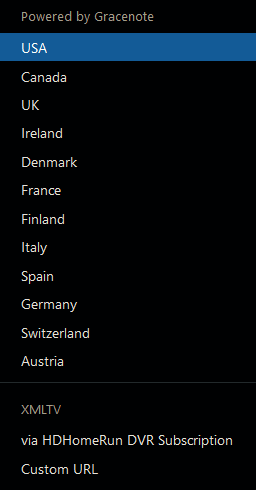
Thanks everyone for your help. I found that if I removed the existing guide provider (via "Remove Provider") then I was able to add a new one. I've switched over to a slightly different provider and things are looking much better again.