Peacock Deep Links

I’ve been playing around with Peacock’s sports schedule and ended up building a little side project I wanted to share: PeacockDeepLinks. It’s a small Dockerized service that scrapes Peacock’s API and turns it into virtual channels (XMLTV + M3U) you can plug into Channels DVR and friends. Under the hood it writes a SQLite DB, then exports XMLTV + M3U that you can point at Streamlink, Chrome Capture / CH4C, ADBTuner, etc. It’s very much BETA – I wanted to get it out early so people can start experimenting and tell me what’s useful vs garbage.

I’ve pre-wired a couple of different “styles” so you don’t have to overthink it on day one. There’s a “one channel per event” style M3U that’s great for Streamlink (each event is its own short-lived channel, perfect for SLM-style setups), and there’s also a lane-based layout that looks a lot like ESPN4CC4C: a fixed set of numbered lanes with placeholders, which works nicely for Chrome Capture / CH4C and other virtual-channel workflows. You can control lane counts, days ahead, starting channel number, padding, refresh schedule, and even the Peacock slug (default /sports/live-and-upcoming) via env vars.

If you try it, I’d love feedback on lane count, how aggressive the padding should be, and whether the “one channel per event” vs “lanes” split actually matches how you want to wire this into Channels/Streamlink/CH4C. Repo (with README + Portainer guide) is here:

Happy to tweak schemas, envs, or output formats while this is still in beta.

2 Likes

I should add- I haven’t figured out the exact schema to call Peacock app from FireTV just yet for Streamlink. This does work on AppleTV.

Worst case for now, test the guide view.

I'll admit I'm not too savvy when it comes to the docker compose. Can you give an exact example of how and where the ip needs to be placed?

I got the container running but now how do i let this conainer know tha ti have ADB Tuner?
do i need to add it somewhere
Excited to get this going. so far looks great.

The readme is well documented on installation. Give it a shot. If you have Porttainer installed, it’s even easier.

This isn’t ready for ADBTuner just yet. I need to figure out the Firestick schema to call the app. I’ll have some time this weekend to get that nailed down. For now, play with the guide or use the standard links on AppleTV.

And I need @bnhf help for the ADB stuff. He’s the pro. I just setup foundation for his magic.

Looking forward to the update.
I got the container going and i'm getting guide data. Looking forward to connecting things up.
great work so far.

Did some digging on how Peacock handles deep links across platforms, and it’s kind of a mixed bag.

FIRE TV (com.peacock.peacockfiretv)

  • The Fire TV build doesn’t expose a real public deep-link entry.
  • AmazonMainActivity is just the normal launcher (MAIN + LAUNCHER / LEANBACK).
  • There’s a SetupActivity with an ACTION_VIEW intent filter, but it doesn’t declare any elements (no scheme, no host, no path).
  • That means there’s no clean peacock://… or https://…/deeplink contract we can target ourselves.
  • All the “Watch with Peacock” / universal search behavior on Fire TV looks like it’s wired through Amazon’s private integrations (launcher catalog, Alexa VSK, etc.), not something third-party apps can call directly.
  • Net: on Firestick you can launch the app by package name, but you can’t reliably deep-link into a specific show/game from your own app. From a deeplink/automation point of view, Firestick is basically dead on arrival.

ANDROID TV / ONN (com.peacocktv.peacockandroid)

  • The Android TV / Onn build actually has a proper app link on GoogleMainActivity.
  • It declares an ACTION_VIEW + DEFAULT + BROWSABLE intent filter with:
    • scheme = https
    • host = www.peacocktv.com (via a string resource)
    • pathPattern = /deeplink
  • In practice, that means URLs like:
    https://www.peacocktv.com/deeplink?...
    get handed straight into the Peacock app instead of a browser, as long as the app is installed.
  • There is no custom peacock:// scheme in the manifest – everything goes through https://www.peacocktv.com/deeplink.

APPLE TV (tvOS)

  • On Apple TV, normal https:// links to Peacock also get routed into the app and land on the right event (based on the query params).
  • So tvOS behaves like a “good citizen” here: regular HTTPS deep links into Peacock actually work as you’d hope.

TL;DR

  • Firestick: no usable public deep-link contract. You can open Peacock, but you can’t cleanly drop the user into a specific event from your own app.
  • Onn / Android TV: supports real deep links via:
    https://www.peacocktv.com/deeplink?...
  • Apple TV (tvOS): also honors normal https:// links and opens into the correct Peacock event.
  • So if you want proper Peacock deeplinks, your options today are basically tvOS and Android TV/Onn. Firestick is a non-starter for deep-link magic.
1 Like

thanks for sharing. Looking forward to having the connection established between channels and Peacock through ADBTuner.
I have ONN 4k boxes.

1 Like

@KineticMan,

Is this supposed to be able to setup as a custom channel? I'm asking because when I try to use the m3u link from the admin page, I get an error message saying the url is unreachable. Thanks for your help.

Which link are you trying to use? ADB Tuner still needs to be connected and we are waiting for the intigration.

1 Like

I've tried all kinds of variations of these links from the admin page.

:globe_with_meridians: For Chrome Capture (Lane-based with deeplinks)

do you have Chrome capture running on your system. I saw something in the compose file that looks for an instance of Chrome Capture stuff. Let us know.

Yup, have had it running for awhile now. But without the ability to add the custom channel, I can't get an epg nor any video.

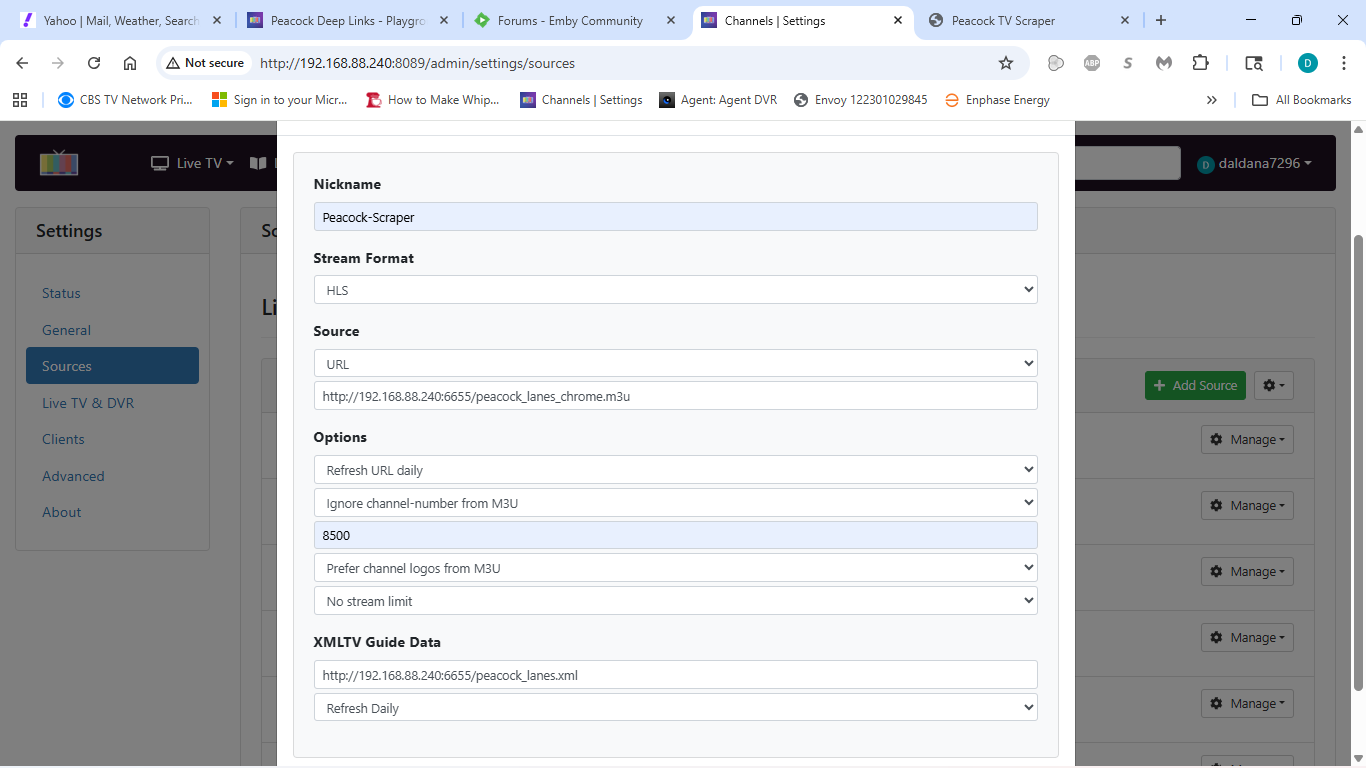
Show a screenshot of the custom channel you’re trying to add (from admin page).

1 Like

Here you go. I've also tried http://192.168.88.240/chrome/m3u and a couple of other variations.

1 Like

I'm seeing the stream format set to HLS. usually, it would be mpeg-ts.
If you are trying to launch an app, it would be a streamlink i'm thinking.

thanks

Is there an API call, similar ESPN4cc4c, to grab the deeplink for use in ADBTuner?

Something along these lines:

http://htpc6:6655/whatson/1?deeplink=1

yes I planned ahead this time. side note- my idea is to keep finding more services that I can scrape and just build a "deeplinks manager" that would serve up a master DB and can pick/choose what services you have. getting real close on scraping that fruit company's api and its a goldmine.

API Endpoints

File Downloads

GET /lanes/xmltv          # Lane-based XMLTV
GET /lanes/m3u            # Lane-based M3U (ADBTuner)
GET /chrome/m3u           # Chrome Capture M3U
GET /direct/xmltv         # Direct mode XMLTV
GET /direct/m3u           # Direct mode M3U

Dynamic Deeplinks (ADBTuner)

GET /api/lane/{id}/deeplink              # Redirect to current event
GET /api/lane/{id}/deeplink?format=json  # JSON response
GET /api/lane/{id}/deeplink?format=text  # Plain text URL

Example:

Get current deeplink for lane 1 curl http://192.168.86.72:6655/api/lane/1/deeplink?format=text

Response:

https://www.peacocktv.com/deeplink?deeplinkData=%7B%22pvid%22%3A%22...%22%7D

Status & Control

GET  /api/status          # System status (JSON)
POST /api/refresh         # Trigger manual refresh
1 Like

Ok, setup custom channel as a streamlink (see screen print below) and Channels takes it. I get an epg, but when I try to play anything, chrome does not open up and no video. I've tried both the node version of cc4c and the docker container version.

As an aside, I also tried the direct links version in Emby with the same result.

1 Like