
I have been playing with Prismcast. Trying to get a Philo custom (non-TVE) channel in to channels dvr. Everything has successfully installed. Channel shows up within channels dvr. But when I try to play the channel I get this error: (The media could not be loaded, either because the server or network failed or because the format is not supported.) This happens from either inside channels dvr or from Firestick. Spent way too long on this and would appreciate any ideas out there. Thanks!
Try playing a PrismCast channel in VLC player.
Go to the Channels tab in PrismCast and click the Copy stream url button next to a channel

Then click Copy HLS URL

Open VLC and select Open Network Stream and paste the URL you copied to play it.
Does it play in VLC?
Thanks for the idea. Does not play in VLC.....

Welcome!
If you're looking for the best experience with being able to use Philo with Channels DVR it's, candidly, not going to be with PrismCast. That's going to be with the FastChannels ah4c bridge. It requires some hardware, either Capture Cards or a network encoder, but the tuning speeds and overall experience are very, very good.
Yes. Chrome has remembered the Philo login authentication. I should add that the channel plays correctly with the test button within the Prismcast UI.
Thanks, I'll check it out......
What test button?
Next to edit in the channels list in the prismcast UI
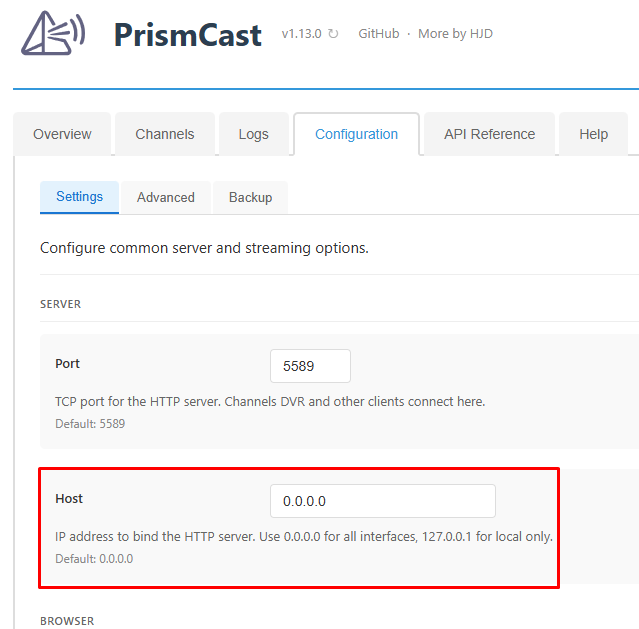
That wont work. It's using localhost which is only reachable on the device you're running Prismcast on.
That's not reachable over a network, only from the device PrismCast is running on.
What is PrismCast installed on?
Set to what?
Both prismcast and channels dvr are on the same win11 device. Changed to ip address instead of localhost amyway. Still fails with same error
0.0.0.0
What does the playlist URL look like.
PrismCast Overview tab
Quick Start
To add PrismCast channels to Channels DVR:
- Go to Settings → Custom Channels in your Channels DVR server.
- Click Add Source and select M3U Playlist.
- Enter the playlist URL:
http://192.168.1.9:5589/playlistCopy - Set Stream Format to HLS.
- Optionally, go to the Channels tab and set the service filter to only include streaming services you subscribe to. This controls which channels Channels DVR sees in the playlist.
- Your configured channels will be imported automatically.
Individual channels can also be streamed directly using HLS URLs like http://192.168.1.9:5589/hls/nbc/stream.m3u8.
Quick Start
To add PrismCast channels to Channels DVR:
- Go to Settings → Custom Channels in your Channels DVR server.
- Click Add Source and select M3U Playlist.
- Enter the playlist URL:
http://192.168.0.37:5589/playlistCopy - Set Stream Format to HLS.
- Optionally, go to the Channels tab and set the service filter to only include streaming services you subscribe to. This controls which channels Channels DVR sees in the playlist.
- Your configured channels will be imported automatically.
Individual channels can also be streamed directly using HLS URLs like http://192.168.0.37:5589/hls/nbc/stream.m3u8.
Try this in VLC player
http://192.168.0.37:5589/hls/gaf/stream.m3u8
On mine for abc it takes 13 seconds to start playing.
Never runs in VLC. Keeps opening and minimizing the prismcast chrome window. I think the errors have something to do with my chrome.....
What does the PrismCast log look like when you attempt to play the channel?
[2026/09/29 06:42:33.404 PM] [fs1-f6mrns] Streaming FS1: Fox One, foxLive, native HLS, H264 9.5Mbps 1080p. Tuned in 8.3s.
[2026/09/29 06:43:24.185 PM] [fs1-f6mrns] Stream ended after 59s.
What does your channel setup look like?
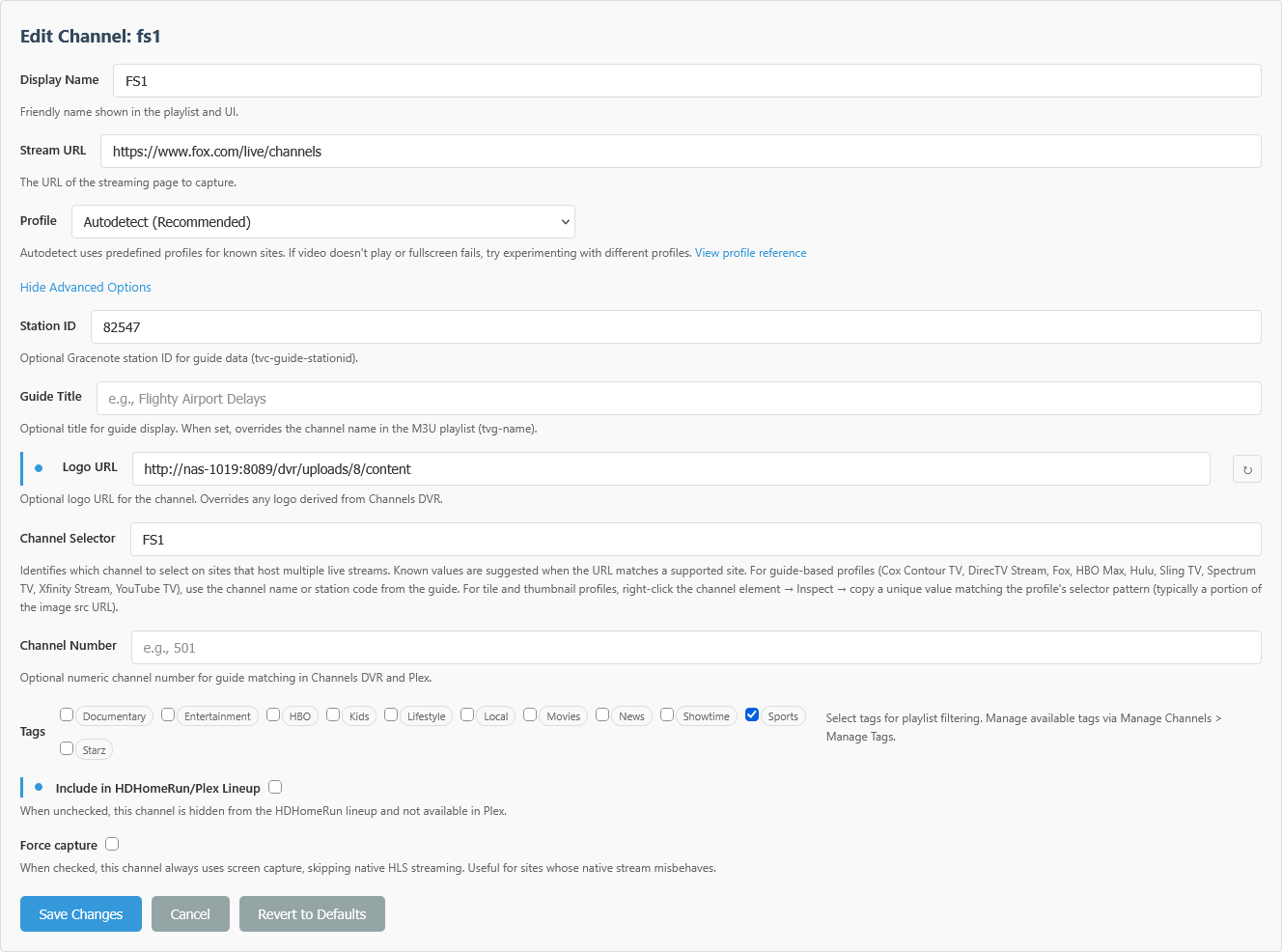
[2026/09/29 06:53:51.736 PM] [ERROR] [gaf-p8ty9b] Stream setup failed for Philo - Stream Live and On-Demand TV Waiting for selector video failed.
[2026/09/29 06:53:51.753 PM] [gaf-p8ty9b] Stream ended after 14s (setup failed).
[2026/09/29 06:53:51.753 PM] [WARN] Stream setup failed for gaf: Failed to start stream.