Problems with Personal Media setup

Help!

I can't get the Personal Media sources set up with this procedure:
Adding a Personal Media Source

  1. Select the Add Source button in the Personal Media section.
  2. Choose the type of content you are importing.
  3. Select the Add Folder button to view your file system.
  4. Pick the folder to import from.

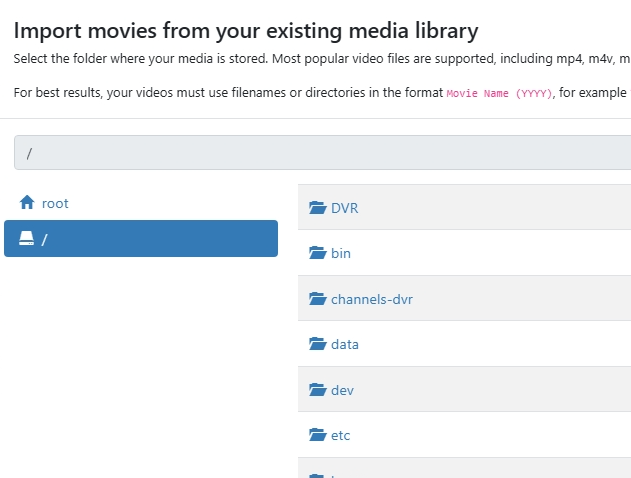
The problem is that I do not see the shared folder where the recordings are located.
image

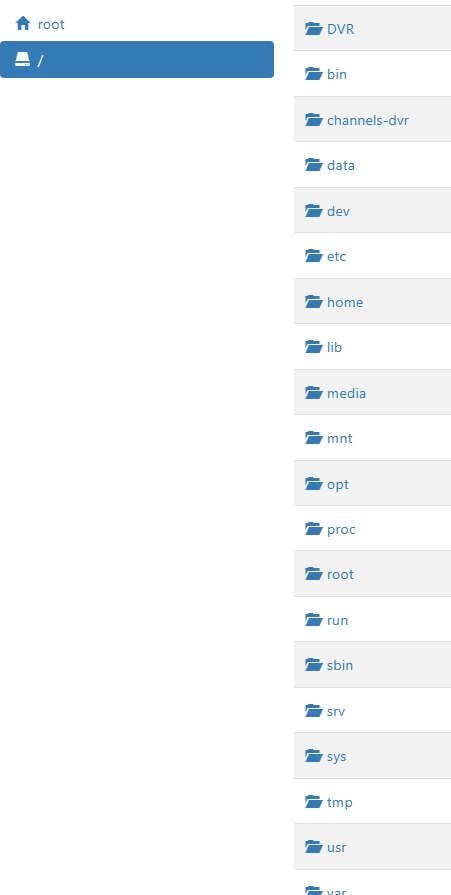
The DVR shared folder is visible, but so are all the linux folders are too!
The share, currently called Multimedia is not visible. I currently have about 10TB (3000 files) that I am porting over from Windows Media Center. I am toying with the idea of writing a program to generate the symbolic links that will convert the WMC folder organization and file naming convention to conform to what channels expects in the same.

Thanks in advance.
What kind of Linux system are you running?

Is your Multimedia share on a different physical drive?

What is the full path to your Multimedia share?

Sorry, forgot to add this:
OS linux alpine
3.21.2 (kernel: 5.10.60-qnap)

Running it on QNAP NAS TS-264 (22TB RAID 1) with the latest firmware QTS 5.2.9.3410 in a Docker Container
No, not a separate drive - different shares off the same volume

DataVol1
/Container
/DVR
/Multimedia
/Public
/Genealogy

Would make it easier for the rest of us to follow if you could show fully qualified path names starting at the root directory, like
/path-to/Container
/path-to/DVR
/path-to/Multimedia
/path-to/Public

You can make the folder on the NAS a SMB share. Create a user on your NAS with the same username as your Channels DVR runs under and give it RW to the share.

Under sources you can point to this SMB share. Note that if you have a mix of TV Shows, Movies, and Videos, It's best to have each in their own folder or share. If you are already organized this way, it should be easy.

Note that some of the add on developers don't support this setup yet Channels works great this way.

I'll give it a shot, but I'm confused, as the shared folder that I am attempting to add a source is on the server, disk, and volume.

I am also concerned as to why the linux folders are exposed.
I have the feeling I messed up somewhere with the mount points during the install

You need to declare the volume mapping for the docker container.
Channels DVR can only see directories inside the container.
(Those linux directories you see are inside the alpine linux container)
What does your docker compose look like?

version: '3.9'
services:
  channels-dvr:
    image: fancybits/channels-dvr:tve
    container_name: channels-dvr
    network_mode: host
    restart: on-failure:10
    devices:
      - /dev/dri:/dev/dri # Enables Intel QuickSync Hardware Transcoding
    volumes:
      - /share/CACHEDEV1_DATA/Container/channels-dvr:/channels-dvr
      - /share/CACHEDEV1_DATA/DVR:/DVR

You need to add a volume mapping for where your imports are on your HOST OS.

You've only defined where Channels DVR executables go
/share/CACHEDEV1_DATA/Container/channels-dvr

and where it's recordings go
/share/CACHEDEV1_DATA/DVR

Thanks, that was it.
I didn't recall this being mentioned in the documentation. I assumed that the owner of the container, app and share all being the same, it would be visible to the app.