
Does this work on 139+ builds?
I've futzed about with this, but cannot get past this crash every time I try to tune something with Channels:
Error: net::ERR_BLOCKED_BY_CLIENT at chrome-extension://jjndjgheafjngoipoacpjgeicjeomjli/options.html#55200
at
navigate (/opt/chrome-capture-for-channels/node_modules/puppeteer-core/lib/cjs/puppeteer/cdp/Frame.js:183:27)
at
process.processTicksAndRejections (node:internal/process/task queues:95:5)
at
async Deferred.race (/opt/chrome-capture-for-channels/node_modules/puppeteer-core/lib/cjs/puppeteer/util/Deferred.js:36:20)
at
async CdpFrame.goto
at async CapPage. goto
(/opt/chrome-capture-for-channels/node_modules/puppeteer-core/lib/cjs/puppeteer/cdp/Frame.js:149:25)
(/opt/chrome-capture-for-channels/node_modules/puppeteer-core/1ib/cjs/puppeteer/api/Page.js:574:20)
My research seems to indicate this is from a Chrome security setting that is supposed to be disable-able. But I tried adding the disable flag (HttpsFirstBalancedModeAutoEnable) to main.js and still I'm met with this error.
Interestingly through the Docker method it works just fine. Curious if you had any ideas of other workarounds? I'd prefer to run it the LXC way!
Thanks!
The problem atm is the same as what's being reported in the cc4c thread -- which is that Chrome 139 doesn't work with cc4c. Mine works, as I'm on an older version of Chrome and have avoided updating.
I would imagine you can specify a previous version of Chrome (the last 138 should be fine), but I'm not sure how that's done since we're getting Chrome from the Google repo. You might need to download it as a deb file and install it that way.
1 Like
Awesome, thanks! I shall dabble with a downgrade.
Update:
Downgrading to 138 worked like a charm. Thanks again!
There is a new workaround.
@Ryboflavins I just updated the instructions in Post #1 to incorporate the latest stable version of Chrome and have switched the chrome-capture-for-channels repo to clone back to @fancybits -- as @tmm1 has made numerous changes and updates to it:
1 Like
Also, for those using this Proxmox implementation of cc4c, here's my recommended approach for starting cc4c at login -- along with an auto restart similar to Docker's restart: unless-stopped:
Add the following to the bottom of /root/.bashrc
nano /root/.bashrc
./cc4c.sh
Then create the following shell script and make it executable:
nano /root/cc4c.sh
#!/bin/bash
# cc4c.sh
# 2025.09.11

cd /opt/chrome-capture-for-channels
pkill -TERM -x Xvfb   2>/dev/null || true
pkill -TERM -x x11vnc 2>/dev/null || true
[[ -f /tmp/.X99-lock ]] && rm /tmp/.X99-lock

while true; do
  google-chrome --version
  echo "Starting xvfb, x11vnc, and npm..."

  # Start Xvfb
  Xvfb :99 -screen 0 1920x1080x16 &
  XVFB_PID=$!

  # Start x11vnc
  x11vnc -quiet -nopw -display :99 -forever >x11vnc.log 2>&1 &
  X11VNC_PID=$!

  sleep 1
  grep "The VNC desktop is:" x11vnc.log
  echo "The VNC port is:         $HOST_VNC_PORT"
  sleep 1

  # Start your npm app
  DISPLAY=:99 bun main.js -v $VIDEO_BITRATE -a $AUDIO_BITRATE -f $FRAMERATE -p $CC4C_PORT -w $VIDEO_WIDTH -h $VIDEO_HEIGHT
  NODE_EXIT_CODE=$?

  echo "node exited with code $NODE_EXIT_CODE"

  # Clean up processes
  echo "Killing xvfb ($XVFB_PID) and x11vnc ($X11VNC_PID)..."
  kill $XVFB_PID $X11VNC_PID 2>/dev/null

  wait $XVFB_PID $X11VNC_PID 2>/dev/null

  [[ -f /tmp/.X99-lock ]] && rm /tmp/.X99-lock

  echo "Restarting everything in 2 seconds..."
  sleep 2
done
chmod +x /root/cc4c.sh
Also, you need to add some additional env var values to /etc/environment. Which when done, should be along these lines:
nano /etc/environment
DISPLAY=:99
CHROME_BIN=/usr/bin/google-chrome
DOCKER=true
LIBGL_ALWAYS_INDIRECT=1
LIBVA_DRIVER_NAME=iHD
PUPPETEER_SKIP_CHROMIUM_DOWNLOAD=true
HOST_PORT=5589
CC4C_PORT=5589
HOST_VNC_PORT=5900
VIDEO_BITRATE=9500000
AUDIO_BITRATE=256000
FRAMERATE=60
VIDEO_WIDTH=1920
VIDEO_HEIGHT=1080
VIDEO_CODEC=h264_vaapi
AUDIO_CODEC=aac
TZ=US/Mountain
Finally, logout and log back in for this all to take effect:
exit
When you log back in cc4c will start automatically, with error recovery.
Thanks so much! I setup a fresh container this way and it worked immediately!
Now if only I could get device passthrough to work for hardware encoding.
1 Like
Intel GPU?
1 Like
Yup! i7-11700. It works on my Channels LXC, but for some reason Device Passthrough is greyed out now on my containers.
I improved the cc4c.sh script above to be more robust in terms of cleaning up after trapped or untrapped errors. Plus, there are additions to the /etc/environment file that need to be made. Check this post:
1 Like
Also, for anybody that's made the jump to v2.01, and you want to pull the few minor changes that have been made since:
cd /opt/chrome-capture-for-channels
git pull --ff-only
Updated! Thanks for this.
2 Likes
Thanks for the terrifc guide - I have this deployed in a ProxMox Container and it does work but I can't seem to get hardware encoding working, decode does work according to Chrome's GPU page.
For reference I am using a system with an i7-13700H. Encoding works for other containters (channels, scrypted & plex). Am I missing something or is it not possible? There is a lot of dated discussions saying it's not possible yet I see other people saying it works.
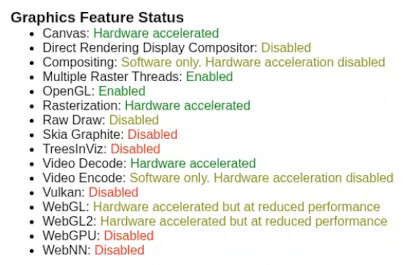
AFAIK it is not possible for chrome to use h/w encoding. Many people have tried but it does not work.
1 Like
Thanks for clearing that up!
since i'm fairly new to LXC containers - since this is headless how can i run a display or chrome on the container to add user credentials
Both this LXC version, and the Docker version of cc4c support VNC, so once you have an active stream -- connect using a VNC client and enter your credentials.
1 Like
@bnhf directed me to this thread after I tried rolling my own Proxmox LXC using the Dockerfile as a guide. Alas, I get the same result doing it this way as I did with own attempt. Specifically, the browser exits with the following whenever I attempt to start playback by connecting to http://hostname:5589/stream?url=...
root@cc4c2:/opt/chrome-capture-for-channels# Xvfb :99 -screen 0 1920x1080x16 & x11vnc -quiet -nopw -display :99 -forever & bun main.js -v 9500000 -a 256000
[1] 348
[2] 349
Xlib:  extension "DPMS" missing on display ":99".

The VNC desktop is:      cc4c2:0
PORT=5900
[2025/12/26 23:18:17.592] Selected settings:
[2025/12/26 23:18:17.595] Video Bitrate: 9500000 bps (9.5Mbps)
[2025/12/26 23:18:17.595] Audio Bitrate: 256000 bps (256kbps)
[2025/12/26 23:18:17.595] Minimum Frame Rate: 30 fps
[2025/12/26 23:18:17.595] Port: 5589
[2025/12/26 23:18:17.595] Resolution: 1920x1080
[2025/12/26 23:18:17.601] Chrome Capture server listening on port 5589
[2025/12/26 23:19:01.854] Launching Browser, Opts {
  executablePath: '/usr/bin/google-chrome',
  pipe: true,
  headless: false,
  defaultViewport: null,
  userDataDir: '/opt/chrome-capture-for-channels/chromedata',
  args: [
    '--no-first-run',
    '--hide-crash-restore-bubble',
    '--allow-running-insecure-content',
    '--autoplay-policy=no-user-gesture-required',
    '--disable-blink-features=AutomationControlled',
    '--hide-scrollbars',
    '--window-size=1920,1080',
    '--disable-notifications',
    '--disable-background-networking',
    '--disable-background-timer-throttling',
    '--disable-background-media-suspend',
    '--disable-backgrounding-occluded-windows',
    '--auto-accept-this-tab-capture',
    '--allowlisted-extension-id=jjndjgheafjngoipoacpjgeicjeomjli',
    '--use-gl=angle',
    '--use-angle=gl-egl',
root@cc4c2:/opt/chrome-capture-for-channels# bun main.js -v 9500000 -a 256000
[2025/12/26 23:21:11.923] Selected settings:
[2025/12/26 23:21:11.924] Video Bitrate: 9500000 bps (9.5Mbps)
[2025/12/26 23:21:11.924] Audio Bitrate: 256000 bps (256kbps)
[2025/12/26 23:21:11.924] Minimum Frame Rate: 30 fps
[2025/12/26 23:21:11.924] Port: 5589
[2025/12/26 23:21:11.924] Resolution: 1920x1080
[2025/12/26 23:21:11.930] Chrome Capture server listening on port 5589
[2025/12/26 23:21:30.402] Launching Browser, Opts {
  executablePath: '/usr/bin/google-chrome',
  pipe: true,
  headless: false,
  defaultViewport: null,
  userDataDir: '/opt/chrome-capture-for-channels/chromedata',
  args: [
    '--no-first-run',
    '--hide-crash-restore-bubble',
    '--allow-running-insecure-content',
    '--autoplay-policy=no-user-gesture-required',
    '--disable-blink-features=AutomationControlled',
    '--hide-scrollbars',
    '--window-size=1920,1080',
    '--disable-notifications',
    '--disable-background-networking',
    '--disable-background-timer-throttling',
    '--disable-background-media-suspend',
    '--disable-backgrounding-occluded-windows',
    '--auto-accept-this-tab-capture',
    '--allowlisted-extension-id=jjndjgheafjngoipoacpjgeicjeomjli',
    '--use-gl=angle',
    '--use-angle=gl-egl',
    '--enable-features=VaapiVideoDecoder,VaapiVideoEncoder',
    '--ignore-gpu-blocklist',
    '--enable-zero-copy',
    '--enable-drdc',
    '--no-sandbox'
  ],
  ignoreDefaultArgs: [
    '--enable-automation',
    '--disable-extensions',
    '--disable-default-apps',
    '--disable-component-update',
    '--disable-component-extensions-with-background-pages',
    '--enable-blink-features=IdleDetection',
    '--mute-audio'
  ],
  enableExtensions: [
    '/opt/chrome-capture-for-channels/node_modules/puppeteer-stream/extension'
  ]
}
[2025/12/26 23:21:30.597] [Info] Restarting following first-run puppeteer-stream extension installation