Hi all,
Wondering if someone can help me with this or point me in the right direction.
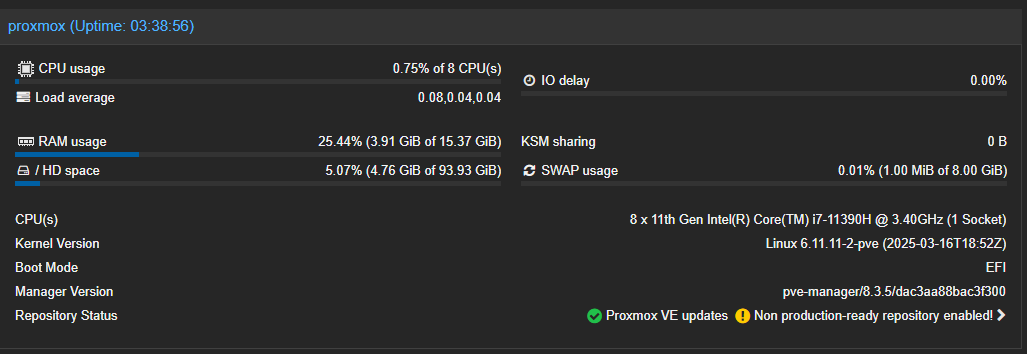
I've recently started learning Proxmox and have started to migrate services from Windows to containers. Plex with transcoding capabilities is fine. However, I'm experiencing terrible packet loss and picture degradation with Channels DVR, watching HDHR channels.
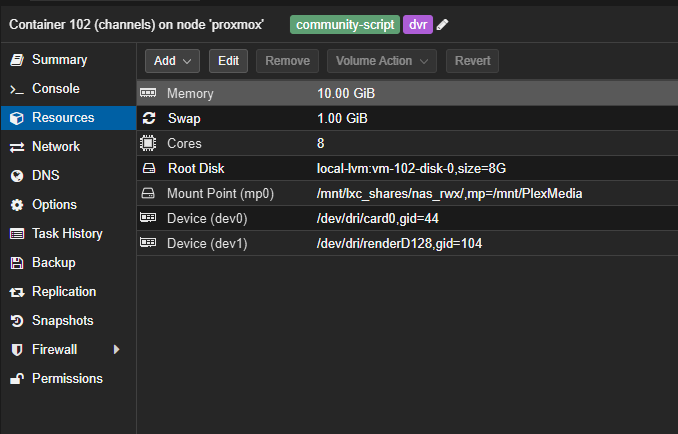
I set Channels DVR up using a helper script, and added the passthrough for the iGPU (Hardware transcoding is available).
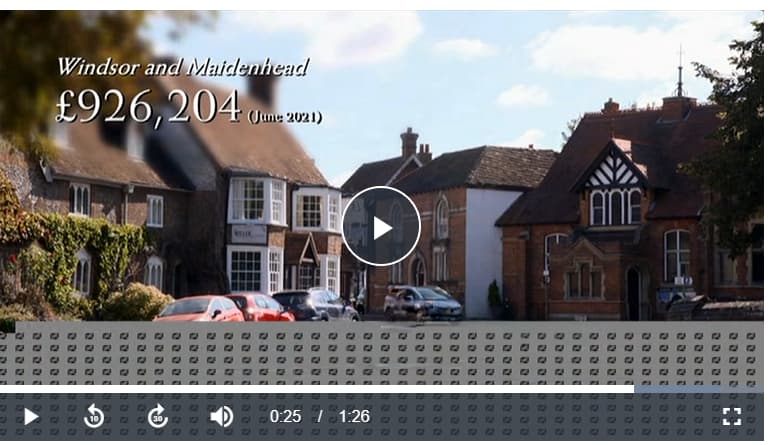
This is an example of what I see when I start streaming.
Note: /mnt/PlexMedia/DVR/Streaming is a CIFS share on my NAS.
2025/04/04 14:08:42.804034 [ENC] Starting encoder for ch2 in /mnt/PlexMedia/DVR/Streaming/ch2-dANY-ip192.168.1.88-3069596952/encoder-1-1168150514 at 1 (1.537678) (encoder=h264_vaapi, codec=h264, acodec=aac, resolution=576, deinterlacer=hardware, bitrate=9744, segment_size=0.01)
2025/04/04 14:08:42.878633 [HLS] ffmpeg: ch2-dANY-ip192.168.1.88-remux:  [mpegts @ 0x31e054c0] Packet corrupt (stream = 0, dts = 2403678395), dropping it.
2025/04/04 14:08:43.290251 [HLS] ffmpeg: ch2-dANY-ip192.168.1.88-1-h264-aac---9744-256-576-2-0--hardware-false-false-0.01-0:  [h264_vaapi @ 0x30e35b00] Buffering settings are ignored in AVBR RC mode.
2025/04/04 14:08:43.710499 [HLS] ffmpeg: ch2-dANY-ip192.168.1.88-remux:  [mpegts @ 0x31e054c0] Packet corrupt (stream = 1, dts = 2403662404), dropping it.
2025/04/04 14:08:44.403403 [HLS] ffmpeg: ch2-dANY-ip192.168.1.88-remux:  [mpegts @ 0x31e054c0] Packet corrupt (stream = 0, dts = 2403804395), dropping it.
2025/04/04 14:08:44.434975 [HLS] ffmpeg: ch2-dANY-ip192.168.1.88-remux:  [mpegts @ 0x31e054c0] Packet corrupt (stream = 1, dts = 2403748804), dropping it.
2025/04/04 14:08:46.161099 [HLS] ffmpeg: ch2-dANY-ip192.168.1.88-remux:  [mpegts @ 0x31e054c0] Packet corrupt (stream = 0, dts = 2403926795), dropping it.
2025/04/04 14:08:46.240575 [HLS] ffmpeg: ch2-dANY-ip192.168.1.88-remux:  [mpegts @ 0x31e054c0] Packet corrupt (stream = 1, dts = 2403889204), dropping it.
2025/04/04 14:08:46.720003 [HLS] ffmpeg: ch2-dANY-ip192.168.1.88-remux:  [mpegts @ 0x31e054c0] Packet corrupt (stream = 1, dts = 2403932404), dropping it.
2025/04/04 14:08:46.752185 [HLS] ffmpeg: ch2-dANY-ip192.168.1.88-remux:  [mpegts @ 0x31e054c0] Packet corrupt (stream = 0, dts = 2403977195), dropping it.
2025/04/04 14:08:46.951172 [HLS] ffmpeg: ch2-dANY-ip192.168.1.88-remux:  [mpegts @ 0x31e054c0] Packet corrupt (stream = 0, dts = 2404034795), dropping it.
2025/04/04 14:08:46.951197 [HLS] ffmpeg: ch2-dANY-ip192.168.1.88-remux:  [mpegts @ 0x31e054c0] Packet corrupt (stream = 1, dts = 2403975604), dropping it.
2025/04/04 14:08:47.436375 [HLS] ffmpeg: ch2-dANY-ip192.168.1.88-remux:  [mpegts @ 0x31e054c0] Packet corrupt (stream = 1, dts = 2404018804), dropping it.
2025/04/04 14:08:47.923927 [HLS] Stopping transcoder session ch2-dANY-ip192.168.1.88 (out=8.697689s finished=false first_seq=1 last_seq=5)
2025/04/04 14:08:47.936243 [TNR] Closed connection to 12526485/0 for ch2 BBC TWO
Any help is appreciated!