Question about backing up database

Hey all, my media drive has died, and I'm trying to save the Channels database somewhere else so I can restore it on a new drive. Since the database is stored along with the media, I'm not sure how to do this.

Basically my Channels server is still up and running, and I'm afraid to shut it down for fear of it not starting up when it can't find the database. But the drive that all the media on is gone.

If I just add a new Storage Path in the settings, will that allow me to save the database to the new location? Or is there some other way to do this?

The working copy is not on the media drive, its stored separately under ~/Library/Application Support/ChannelsDVR/data

You can swap out the storage and then a new backup will be stored on the new drive you provide

Ah, excellent. Thank you!

And just to be clear, when I swap out the media drive, other than the missing media, everything else will pick up right where it left off, correct? (Future recordings, season passes, etc)?

Also, what's the easiest way to mass delete content from the Channels server? Since it won't know that the media for the existing recordings is missing, I wanted to delete everything before I put the new drive in.

There's a prune feature that will delete records for any movie files that cannot be found on disk.

Ok I've searched everywhere for this command but I can't find it. I really tried researching it before coming back here, but for the life of me I can't find it. Can you tell me where to find this?

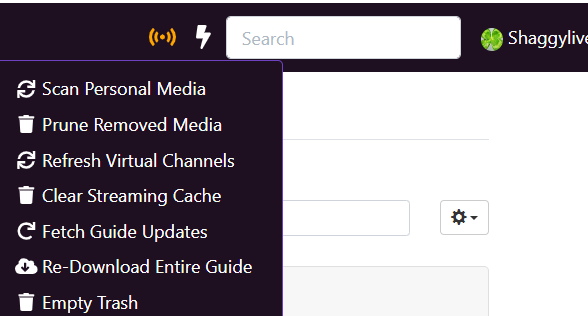
the lightning bolt next to the search box at the top of all the web ui pages

Lightning bolt? I only have the activity icon. Don't see a lightning bolt.

Screenshot 2026-02-03 at 8.36.25 PM

And to the right of the search box is just my username.

I'm not sure. i'm all windows and chrome here. I think it's been there even before joining the beta or other add-ons i've done.
bummer, thought I could answer an easy one.
lighning bolt

No worries, thanks for trying. I did find the option to do it on a per-show basis. But I was hoping for a global setting.

I'm on the beta as well, so it's not that.

It's under settings area under database maintenance iirc

It's under Settings > Sources tab > Personal Media section > :gear:▾ > Prune Removed Media

For quicker access, you can add Prune Removed Media to the global Quick Actions menu (:zap:) under Settings > General tab > Interface section > Quick Actions

I would prefer Aman answer this himself, but I think what he's referring to is
Settings > General > Library Database > Maintenance :gear: > Manage Recordings Database > Missing/Deleted

It displays recordings in the database, but no longer on disk, and lets you Trash them.

If only there were a user manual with a Table of Contents and an Index...
Right now it's try it and see what happens or search the Forum.
I did the "try it and see what happens".
Moved a Recorded Movie on my disk and tried it.

Thank you! This was the trick to get the menu @Shaggylive was referring to.

That action only prunes imported personal media (Imports/TV, Imports/Movies & Imports/Videos), not recordings.

This topic was automatically closed 30 days after the last reply. New replies are no longer allowed.