Re-scan storage paths

Is there a way to get channels to scan all storage paths and restore recordings that may have been deleted (and are not in the trash)?

I am seeing a situation where there is a whole season of a show in the secondary storage path folder and only two episodes are appearing within channels. Not sure what happened here...
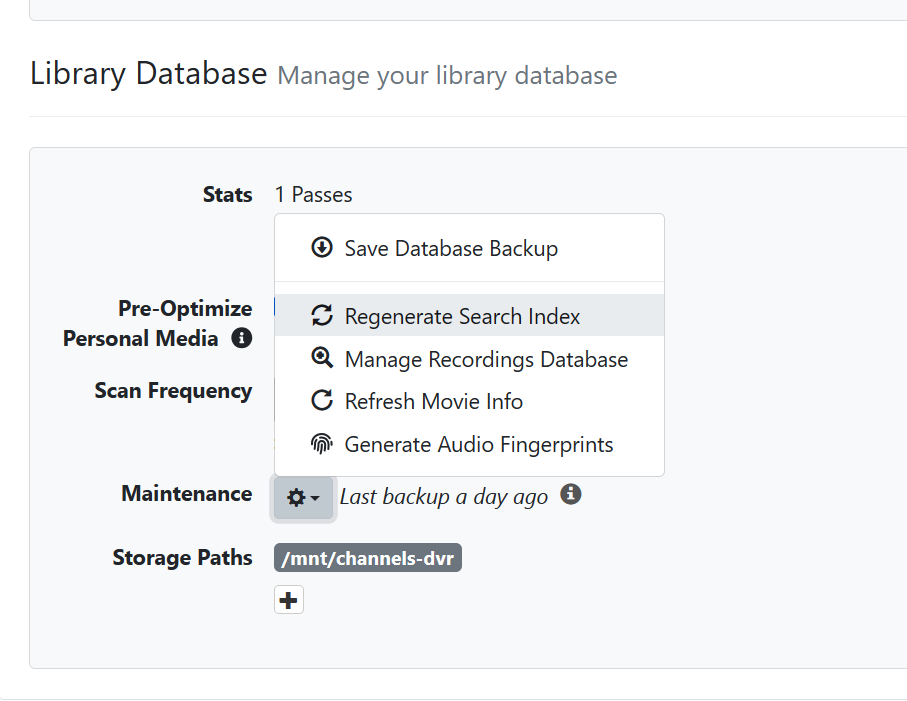
Settings on the top, Sources on the left.

Under Personal Media next to Add Sources there is a gear. You can do it from the gear.

Do you mean "Scan Personal Media"? - I'm familiar with that but it only scans the import "Movies" or "TV Show" folders, not the DVR (storage path) folders from Settings->General near the bottom of the page - I suppose that I can move the recordings to the "TV Show" folder, and then "Scan Personal Media", but was hoping there was a "re-import" method.

I just started using a second storage path for DVR recordings, with a scheme to keep recent content on NVMe and older content on the Unraid Drive Array, so I am hoping this is an isolated incident and not a problem with the process.

Have you checked the database to see if there are any files missing("Manage Recordings Database")? I'm not sure if "Regenerate Search Index" will help but can't hurt to try.

That's a good idea. Have you looked at the log? You can see it from Support Logs.

How large is your library? Mine is not that big so I keep it all on mirrored SSDs. You can do that in Unraid by creating a ZFS mirror.

I have not used multiple storage paths the way your are. I used to keep recordings and personal media on separate shares on my NAS. That worked well. As you stated, you could move your older recordings to a folder and point to it as personal media and configure automatic scans at a frequency that works for you.

Someone that has used multiple storage paths for recordings may be able to give you some pointers.

This topic was automatically closed 30 days after the last reply. New replies are no longer allowed.