Recording frustration

I'm really frustrated about the way Channels handles recordings, maybe it's a setting maybe it's the way it's designed. I have a SD Flex tuner with ATSC 3.0 tuners. My ATSC 3.0 signal coming fine but Channels does not support CC which I need. If I use the SD HD app CC are shown, so I know they are there. Anyway I'm trying to migrate my recordings from the 3.0 channels to the 1.0 channels so as to get CC.

I've deleted the pass on for example ch 107.1 and the selected ch.7.1 to record, but if I look at my recordings it's gone back to 107.1 not the 7.1 I choose. I've even gone in on my client and banned 107.1, I still want it available though, and it still defaults recording to ch. 107.1! Why are my choices being over written?

If I choose to record a certain channel it's because I WANT it to record that channel, not what it thinks I should record.

This tuner has both 107.1 and 7.1 marked as favorites. They're also on the same tuner, and they're both HD.

These are all of the things Channels uses to decide which channel to record an airing from when it exists on multiple channels. The last thing it does is choose the higher channel number, it does this as a final try at getting the best channel (HD channels are usually higher than SD channels and this is in case channels aren't marked as HD at all).

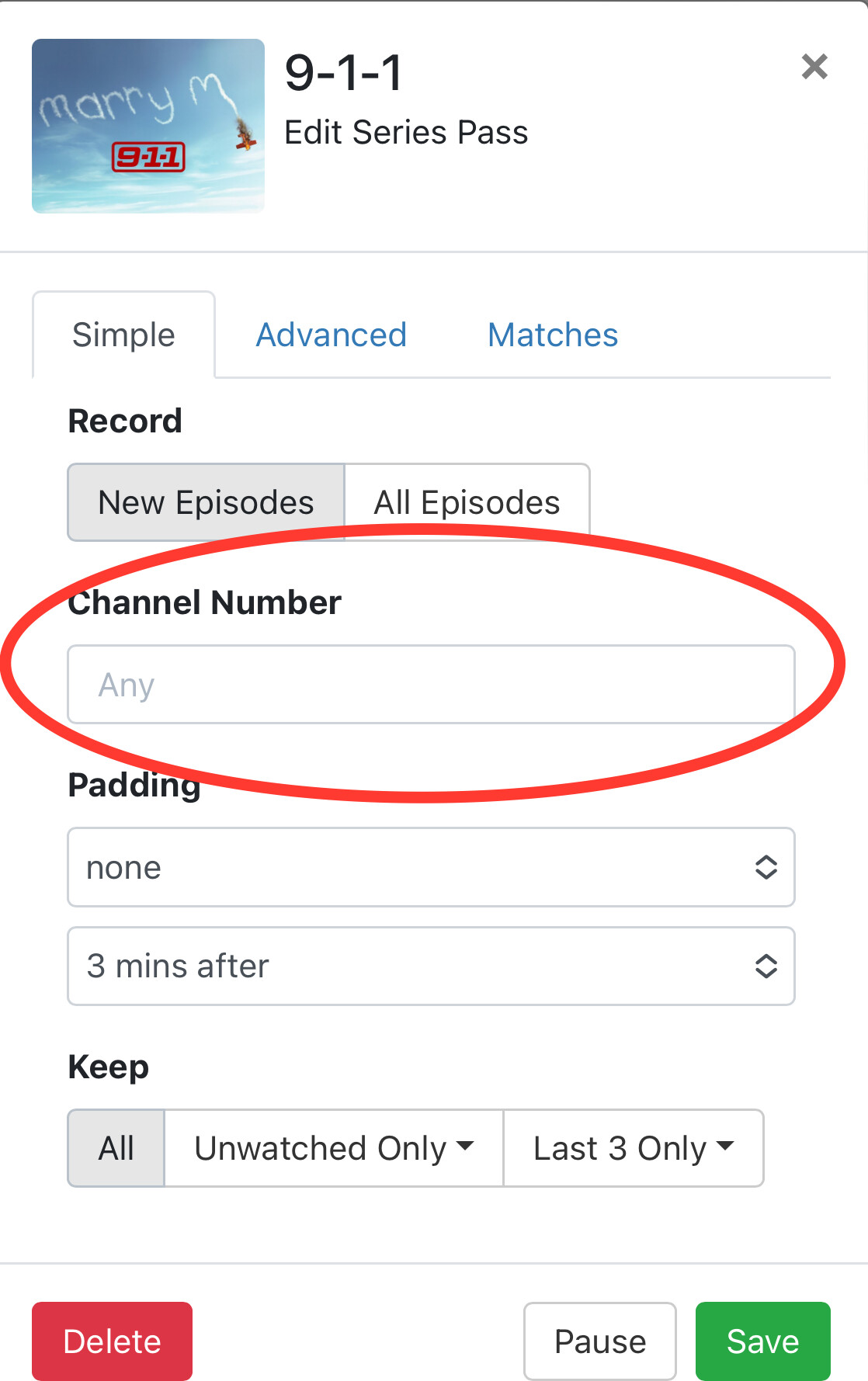
What you want to do is go into your pass and manually set the channel you want it to record from. This will ensure it only records the airings found on that channel.

2 Likes

That is a labor intensive method for those of us that have a lot of passes. I'll dig in a bit and see if that is workable for me. In my case I have 5 ABC outlets to choose from, ATSC 1& 3. There is one even higher in the list ch 112.1 but somehow I got the app to ignore it, odds are by deleting it.

The optimal solution is to let the human decide what channel to record. Higher is not always better.

Edit - How do I adjust the channel? I went into my passes and can find nothing that allows me to edit the channel. If you mean a true manual pass, that is impractical since shows often move time slots.

You could try disabling the channel in the DVR, but enabling it on the client. That way you can still tune it, but the DVR will not consider it for recording.

1 Like

1 Like

It absolutely supports closed captions. I use it all the time at night when i keep the tv volume low...

Channels supports ATSC1 closed captions (CTA-708); ATSC3 specifies TTML captions (A/343), which Channels does not yet support. (At least, it previously did not, but perhaps that has changed.)

Many channels were broadcasting both older style CCs embedded in the video stream as well as TTML, so Channels was able to use the embedded CCs.

(@tmm1 @maddox Aman or Jon, do you have any status update about TTML decode in Ffmpeg/Avcodec?)

2 Likes

CC from ATSC 3.0 is currently not supported.

Reminder: ATSC 3.0 is an experimental technology, not just an experimental feature in Channels.

1 Like

To make sure i wanst crazy i just tested it with my atsc 3 channels and it works great :slightly_smiling_face:

Then that broadcast must be also sending CTA-708 Closed Captions in addition to the TTML/A/343 subtitles.

On the dvr web ui

Thanks. In the years of using Channels I've never seen the screen to chose the channel to record from till now. Might want to make it more obvious.

Where I live I get feeds from 3 separate markets, Flint, Detroit and Lansing, Flint and Detroit ATSC 3.0 feeds come in strong. I ignore the Flint stations due to the fact that they are inept, and have a hard time getting things right, DD sound can be a mess for weeks even after calling them. My antenna is pointed toward Detroit and those are the channels I want.

Which leads me to another point regarding having the default recording set to the highest channel. ABC in Detroit is 7.1, while Flint is 12.1. Those of us with rotors point our antennas to where we need them. If my antenna is pointed toward Detroit there is no way 12.1 will come in. Making the default the higher channel guarantees I will not have a viewable recording. I can't believe I'm the only one in this situation. The obvious solution is to let the human choose which channel to record from the guide. It only seems logical. Might want to keep this in mind for future updates.

I live 15 miles or so from the Flint ATSC 3.0 lighthouse tower so it comes in strong no matter what direction my antenna is facing. The Detroit lighthouse channel for ATSC 3.0 also comes in with a 90% signal strength. So both are about equal. I just wish Channels could decode ATSC 3.0 CC so there was not a problem to begin with. BTW, I think the quality of the ATSC 3.0 channels is slightly better, so from that angle I'd opt for them but no CC is a deal breaker for me.
Thanks...

The solution is to only mark one of them in "Favorites".

If by marking it with a "Heart" I did deselect 107.1, but that made no difference. I want the ATSC 3.0 channels available to me, I just do not want to record them.
I've had DVRS for 30 years, old Replay, first gen TiVos, and all of Directv iterations. When I"m in the guide on any of them if I select a recording on a certain channel from the grid, they system simply records that channel. None of them treat it like a guess and override my personal choice. Now I know how to fix it, but really I should not have to.

I guess I understand the concept of the coding that went into the current method, I just feel it's fundamentally flawed and counter intuitive and not real world practical.

If you manually select an item in the guide to record that particular airing, it will record on that particular channel.

If you ask an airing to record on a channel from the guide, it will record from that channel.

But you are talking about picking an airing from the guide and creating a Series Pass, whose goal is to record the show without any care of what channel it is on. The point of a Series Pass is to get every episode of the show, without artificial limits like which channel it’s airing on (unless you specify it). This is a feature.

You have 5 ABC channels, all with varying reliability. You are very much outside the norm of most Channels fans. So, yes, you’re running into some issues.

The good news is, Channels does in fact have mechanisms in place to handle your situation. So because of your outside of the norms situation, you’ll need to use outside the norms features provided.

For the passes that you are having the described troubles with, edit them and hard code the channel number you want to record from.

Or remove the heart from all your ABC channels and only heart the one you want to prioritize for recording. This will not make the other channels unavailable, it just doesn’t mark them as favorites. Utilizing Channel Collections, you don’t even need to favorite channels to improve your guide, and is the proper way to control your guide.

Mark the ASTC 3.0 channels active, but not favorite ("Heart" outline, but not filled in).
Mark the non-ASTC-3 channels with the heart filled in as a solid color (Favorite).

I think this will do what you want.

And you do this in the web ui under sources. Adding or removing hearts in the clients have no effect on how the dvr records. It has to be in the server, source, manage lineup, heart the ones you want to record from and unheart the ones you don’t.

Thanks all.I was making changes in the various clients, not the web UI, that is why they were not doing what I wanted. i went in and set a fixed channel in all my passes, as I add more I'll remember to go to the web UI.

This topic was automatically closed 365 days after the last reply. New replies are no longer allowed.