
I reduced the number of threads for the commercial detection. I also rebooted my Verizon router and my QNAP server that I'm running Channels on. Not sure which one of the 3 actions actually fixed the problem, but glad to be up and running again!
1 Like
Unfortunately I spoke too soon. I had the issue again last night. It appears to only be an issue during primetime (8pm - 11pm). At this point I'm going to guess that it's an issue with my Verizon FIOS during peek hours.
2 Likes
Are your [SNR] Buffer statistics still showing drops
1 Like
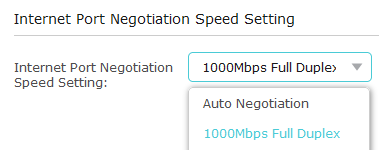
Check to make sure your negotiated speed on the router is 1000Mbps and not 100Mbps:

I've had this exact issue with Verizon Fios where my bandwidth and speed was being taken down because the router and Verizon were not talking to each other correctly. I'm not sure where the setting is if you're using the default Verizon router, but I can usually fix mine by toggling the "Internet Port Negotiation Speed" between Auto and 1000, eventually settling back at 1000:
1 Like
Last night during prime time I was recording 6 shows (yes, we watch a lot TV) with 0 buffer drops!
1 Like
I currently have the WAN Port set to Auto and it's connected at Full-Duplex 1,000 Mbps. I also have my QNAP Channels DVR server connected into the LAN 10GE port which is connected at Full-Duplex 2,500 Mbps. Do I need to override the Auto setting for either of these, or am I good since it looks like they're both connected with Full Duplex at the right speed? See screenshot:
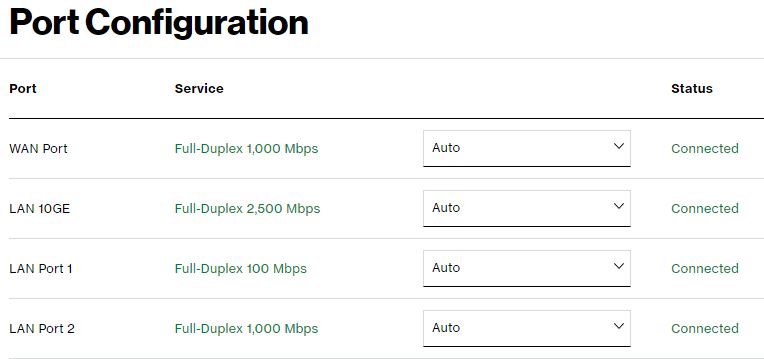
If they are connected at the right speed, then you shouldn't need to override. Ah well, thought it worth a look!