
thanks for the reply I just I'll create a rule.
Appreciate the product and the work that has been done.
Any tips to try on these automatically added parent channels?
The channels that get automatically added are typically events. It’s working great, but I’d like to see them in channel collection on CDVR. Can anyone think of any tags that I could add to the automation and use that for the automatic channel collections feature inside CDvR?
*to clarify, the channels do show up in the guide, I’m just looking for a filter for them
Maybe give them a Genre of something rarely used, like Winter Olympics, and then set up an automatic Channel Collection for just that value?
solid idea!
to confirm, you suggest trying "Winter Olympics" under Guide Genres (tvc-guide-genres) Override as a manual test, and for the automation, use "tvc-guide-genres" OR "tvc-guide-categories" ?
i did test manually and SLM def passed to CDVR but i dont have any active events to truly test it on tonight.
had some varied success playing with Automatic Channels in the past. works like a dream with clean Gracenote data.
Yes, although I think you only need this one for the automation:
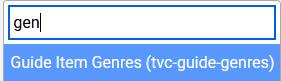
I don't believe Categories are used for this purpose since they aren't a standardized list. However, if you do want to manually test it, you can do that field as well in the More Parents area.
As of v2025.07.06.1709, this is now available, along with a host of other new functionality around check station status. Everyone can see the details here:
Some highlights include:
- Ability to detect DRM and disable those stations based upon that status.
- User control settings for number of attempts and time between attempts.
- New feature to skip the remainder of a playlist after a certain number of failures.
- An 'Examine' capability to get metadata and information about existing child stations and input links, both directly on its own dedicated page and within the existing 'Unassigned' and 'Assigned' areas. Note that this works with both HLS and MPEG-TS, and even DRM.
1 Like
just following back up -- your software did what you intended and passed along "Winter Olympics" into the tvc-guide-genres into the M3U, but Automatic Channels on CDVR still didnt pick it up. Wondering if bug in CDVR .. will keep experimenting to find a tag that Automatic Channels will pickup.
*i think I figured it out. If the custom Source (as example - PLM - Non-Gracenote (HLS)) has a XML/EPG file, CDVR automatic channels ignores any custom tvc-guide-genres in the M3U, and only looks at the XML EPG file.
by chance babson, anyway to have PLM force append something into the XML/EPG file? like add "Winter Olympics" into the TVC-Guide for the XML/EPG file (instead of the M3U?)
I'm using PLM Manual Streaming Stations for a few YT Live Stream channels.
http://[SLM_SERVER]:[SLM_PORT]/playlists/streams/youtubelive?url=[YOUTUBE_URL]
Just ran across an error this morning with one of the channels.
ERROR: [youtube] CG2XDTgvZPo: Sign in to confirm you’re not a bot.
This repeated for about 6 minutes until CDVR timed out trying to record the channel.
container log
2025-07-13 07:00:00.004129:  INFO: Starting to retrieve manifest for https://www.youtube.com/@CBNnewsonline/live.
[debug] Encodings: locale UTF-8, fs utf-8, pref UTF-8, out missing (logger) (No ANSI), error utf-8 (No ANSI), screen missing (logger) (No ANSI)
[debug] yt-dlp version [email protected] from yt-dlp/yt-dlp [7977b329e] (pip) API
[debug] params: {'verbose': True, 'no_warnings': False, 'format': 'all', 'retries': 0, 'fragment_retries': 0, 'logger': <__main__.YTDLLogger object at 0x7fb82731ff20>, 'extractor_args': {'youtube': {'player_client': ['web_safari'], 'formats': ['missing_pot'], 'player_skip': ['configs', 'webpage', 'js'], 'skip': ['dash', 'translated_subs']}}, 'compat_opts': set(), 'http_headers': {'User-Agent': 'Mozilla/5.0 (Windows NT 10.0; Win64; x64) AppleWebKit/537.36 (KHTML, like Gecko) Chrome/92.0.4515.159 Safari/537.36', 'Accept': 'text/html,application/xhtml+xml,application/xml;q=0.9,*/*;q=0.8', 'Accept-Language': 'en-us,en;q=0.5', 'Sec-Fetch-Mode': 'navigate'}}
[debug] Python 3.12.11 (CPython x86_64 64bit) - Linux-4.4.302+-x86_64-with-glibc2.36 (OpenSSL 3.0.16 11 Feb 2025, glibc 2.36)
[debug] exe versions: none
[debug] Optional libraries: certifi-2025.04.26, pycrypto-3.23.0, requests-2.32.3, sqlite3-3.40.1, urllib3-2.4.0
[debug] Proxy map: {}
[debug] Request Handlers: urllib, requests
[debug] Plugin directories: none
[debug] Loaded 1859 extractors
2025-07-13 07:00:00.184318:  INFO: Extracting info from https://www.youtube.com/@CBNnewsonline/live...
[youtube:tab] Extracting URL: https://www.youtube.com/@CBNnewsonline/live
[youtube:tab] @CBNnewsonline/live: Downloading webpage
2025-07-13 07:00:01.286057:  INFO: URL redirected to https://www.youtube.com/watch?v=CG2XDTgvZPo.
[debug] [youtube] [pot] PO Token Providers: none
[debug] [youtube] [pot] PO Token Cache Providers: memory
[debug] [youtube] [pot] PO Token Cache Spec Providers: webpo
[youtube] Extracting URL: https://www.youtube.com/watch?v=CG2XDTgvZPo
[WARNING] [youtube] No GVS PO Token provided for web_safari client, which may be required for working web_safari formats. This client will be deprioritized
[youtube] CG2XDTgvZPo: Downloading web safari player API JSON
[ERROR] ERROR: [youtube] CG2XDTgvZPo: Sign in to confirm you’re not a bot. Use --cookies-from-browser or --cookies for the authentication. See  https://github.com/yt-dlp/yt-dlp/wiki/FAQ#how-do-i-pass-cookies-to-yt-dlp  for how to manually pass cookies. Also see  https://github.com/yt-dlp/yt-dlp/wiki/Extractors#exporting-youtube-cookies  for tips on effectively exporting YouTube cookies
[ERROR]   File "/usr/local/lib/python3.12/site-packages/yt_dlp/extractor/common.py", line 748, in extract
    ie_result = self._real_extract(url)
                ^^^^^^^^^^^^^^^^^^^^^^^
  File "/usr/local/lib/python3.12/site-packages/yt_dlp/extractor/youtube/_video.py", line 3821, in _real_extract
    self.raise_no_formats(reason, expected=True)
  File "/usr/local/lib/python3.12/site-packages/yt_dlp/extractor/common.py", line 1269, in raise_no_formats
    raise ExtractorError(msg, expected=expected, video_id=video_id)

2025-07-13 07:00:01.575518:  ERROR: While attempting to retrieve https://www.youtube.com/watch?v=CG2XDTgvZPo, received ERROR: [youtube] CG2XDTgvZPo: Sign in to confirm you’re not a bot. Use --cookies-from-browser or --cookies for the authentication. See  https://github.com/yt-dlp/yt-dlp/wiki/FAQ#how-do-i-pass-cookies-to-yt-dlp  for how to manually pass cookies. Also see  https://github.com/yt-dlp/yt-dlp/wiki/Extractors#exporting-youtube-cookies  for tips on effectively exporting YouTube cookies.
[debug] Encodings: locale UTF-8, fs utf-8, pref UTF-8, out missing (logger) (No ANSI), error utf-8 (No ANSI), screen missing (logger) (No ANSI)
[debug] yt-dlp version [email protected] from yt-dlp/yt-dlp [7977b329e] (pip) API
[debug] params: {'verbose': True, 'no_warnings': False, 'format': 'all', 'retries': 0, 'fragment_retries': 0, 'logger': <__main__.YTDLLogger object at 0x7fb8275a5fd0>, 'extractor_args': {'youtube': {'player_client': ['web'], 'formats': ['missing_pot'], 'player_skip': ['configs', 'webpage', 'js'], 'skip': ['dash', 'translated_subs']}}, 'compat_opts': set(), 'http_headers': {'User-Agent': 'Mozilla/5.0 (Windows NT 10.0; Win64; x64) AppleWebKit/537.36 (KHTML, like Gecko) Chrome/92.0.4515.159 Safari/537.36', 'Accept': 'text/html,application/xhtml+xml,application/xml;q=0.9,*/*;q=0.8', 'Accept-Language': 'en-us,en;q=0.5', 'Sec-Fetch-Mode': 'navigate'}}
[debug] Python 3.12.11 (CPython x86_64 64bit) - Linux-4.4.302+-x86_64-with-glibc2.36 (OpenSSL 3.0.16 11 Feb 2025, glibc 2.36)
[debug] exe versions: none
[debug] Optional libraries: certifi-2025.04.26, pycrypto-3.23.0, requests-2.32.3, sqlite3-3.40.1, urllib3-2.4.0
[debug] Proxy map: {}
[debug] Request Handlers: urllib, requests
[debug] Plugin directories: none
[debug] Loaded 1859 extractors
2025-07-13 07:00:01.760517:  INFO: Extracting info from https://www.youtube.com/@CBNnewsonline/live...
[youtube:tab] Extracting URL: https://www.youtube.com/@CBNnewsonline/live
[youtube:tab] @CBNnewsonline/live: Downloading webpage
2025-07-13 07:00:02.807969:  INFO: URL redirected to https://www.youtube.com/watch?v=CG2XDTgvZPo.
[debug] [youtube] [pot] PO Token Providers: none
[debug] [youtube] [pot] PO Token Cache Providers: memory
[debug] [youtube] [pot] PO Token Cache Spec Providers: webpo
[youtube] Extracting URL: https://www.youtube.com/watch?v=CG2XDTgvZPo
[WARNING] [youtube] No GVS PO Token provided for web client, which may be required for working web formats. This client will be deprioritized
[youtube] CG2XDTgvZPo: Downloading web player API JSON
[ERROR] ERROR: [youtube] CG2XDTgvZPo: Sign in to confirm you’re not a bot. Use --cookies-from-browser or --cookies for the authentication. See  https://github.com/yt-dlp/yt-dlp/wiki/FAQ#how-do-i-pass-cookies-to-yt-dlp  for how to manually pass cookies. Also see  https://github.com/yt-dlp/yt-dlp/wiki/Extractors#exporting-youtube-cookies  for tips on effectively exporting YouTube cookies
[ERROR]   File "/usr/local/lib/python3.12/site-packages/yt_dlp/extractor/common.py", line 748, in extract
    ie_result = self._real_extract(url)
                ^^^^^^^^^^^^^^^^^^^^^^^
  File "/usr/local/lib/python3.12/site-packages/yt_dlp/extractor/youtube/_video.py", line 3821, in _real_extract
    self.raise_no_formats(reason, expected=True)
  File "/usr/local/lib/python3.12/site-packages/yt_dlp/extractor/common.py", line 1269, in raise_no_formats
    raise ExtractorError(msg, expected=expected, video_id=video_id)

2025-07-13 07:00:02.973879:  ERROR: While attempting to retrieve https://www.youtube.com/watch?v=CG2XDTgvZPo, received ERROR: [youtube] CG2XDTgvZPo: Sign in to confirm you’re not a bot. Use --cookies-from-browser or --cookies for the authentication. See  https://github.com/yt-dlp/yt-dlp/wiki/FAQ#how-do-i-pass-cookies-to-yt-dlp  for how to manually pass cookies. Also see  https://github.com/yt-dlp/yt-dlp/wiki/Extractors#exporting-youtube-cookies  for tips on effectively exporting YouTube cookies.
[info | 2025-07-13 07:00:02,978] - 172.23.0.1 - - [13/Jul/2025 07:00:02] "GET /playlists/streams/stream?url=https://www.youtube.com/@CBNnewsonline/live HTTP/1.1" 200 -
An hour later it was working fine and recorded an airing from that channel.
Has anyone else seen this error?
1 Like
Sounds like it would be possible, added as a request:
1 Like
Huh, that hasn't happened before, but might have been YouTube doing their never-ending whack-a-mole. I guess I'd just say to keep an eye out for the time being!
I do have some commented out code that might address this if it becomes prevalent. It's rather intensive so I'd rather not have to move it into production unless absolutely necessary.
That's what I was thinking.
Maybe using YT Live channels and Pinchflat is hitting YT too much.
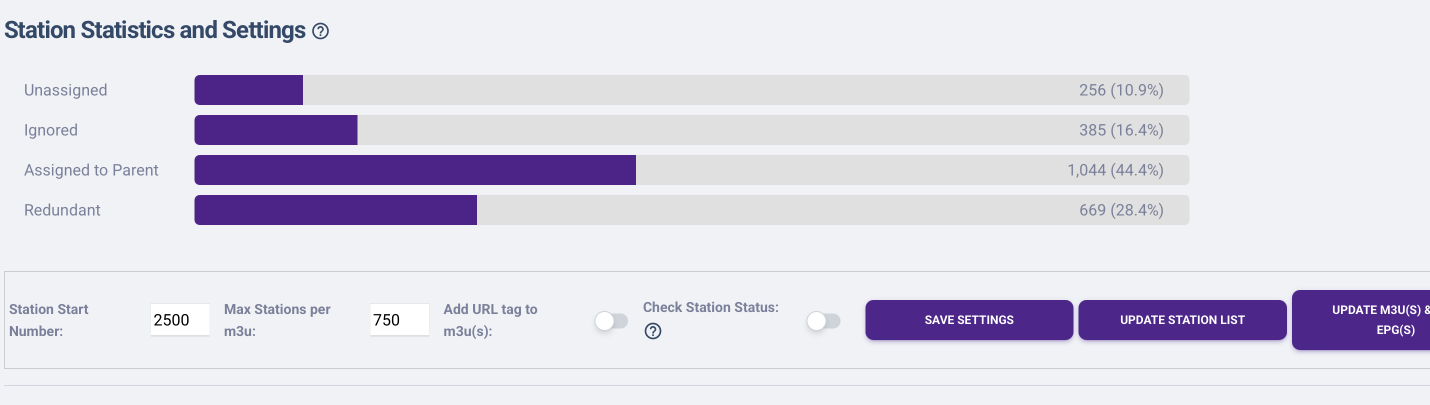
Hi, loving the utility, consolidation and automation that PLM brings to my Channels server. I'm having an issue this morning though, hopefully there's an explanation. I have six FAST providers added to PLM. I hadn't classified new channels as parent/child in a few months, or even gone into PLM's management page, so this morning I started to dive back in to check in on things, and do just that. I saw there were about 250 new "unassigned" channels. All of the other channels were previously categorized. I started to scroll through, categorized one as parent, one as a child, and ignored 5 or 6. Then saved, and scrolled through to ignore 10 more. After a page refresh though, I now see that my "Station Statistics and Settings" reporitng that nearly all of the channels (2,181) are now unassigned, only 141 are assigned and only 32 are ignored. Like, the assignments have been reset? I'm not sure why it would be those numbers reported though. So now I'm wondering what did I do wrong? And what's the best way to restore from a backup so I don't have to re-assign thousands of channels? I checked the wiki, and the "Files" feature but don't see more specifics about what file to restore, and where from. I'm obviously confused and don't want to make anything go worse if I can help it. My docker installation is on an M1 Mac mini. Thanks for any guidance 
I can't figure it out from what you described because the Unassigned page cannot impact the assigned stations. I could see if you used the Assigned page and clicked the Set Visible button after scrolling through almost everything, but that doesn't sound like what happened.
The file you'll need is PlaylistManager_ChildToParent.csv from the most recent backups directory (probably should be one from whenever your backup ran this morning, assuming you didn't disable this feature). You can either just copy it into the main program_files directory and replace the file that is there, or upload using Files with this selection:
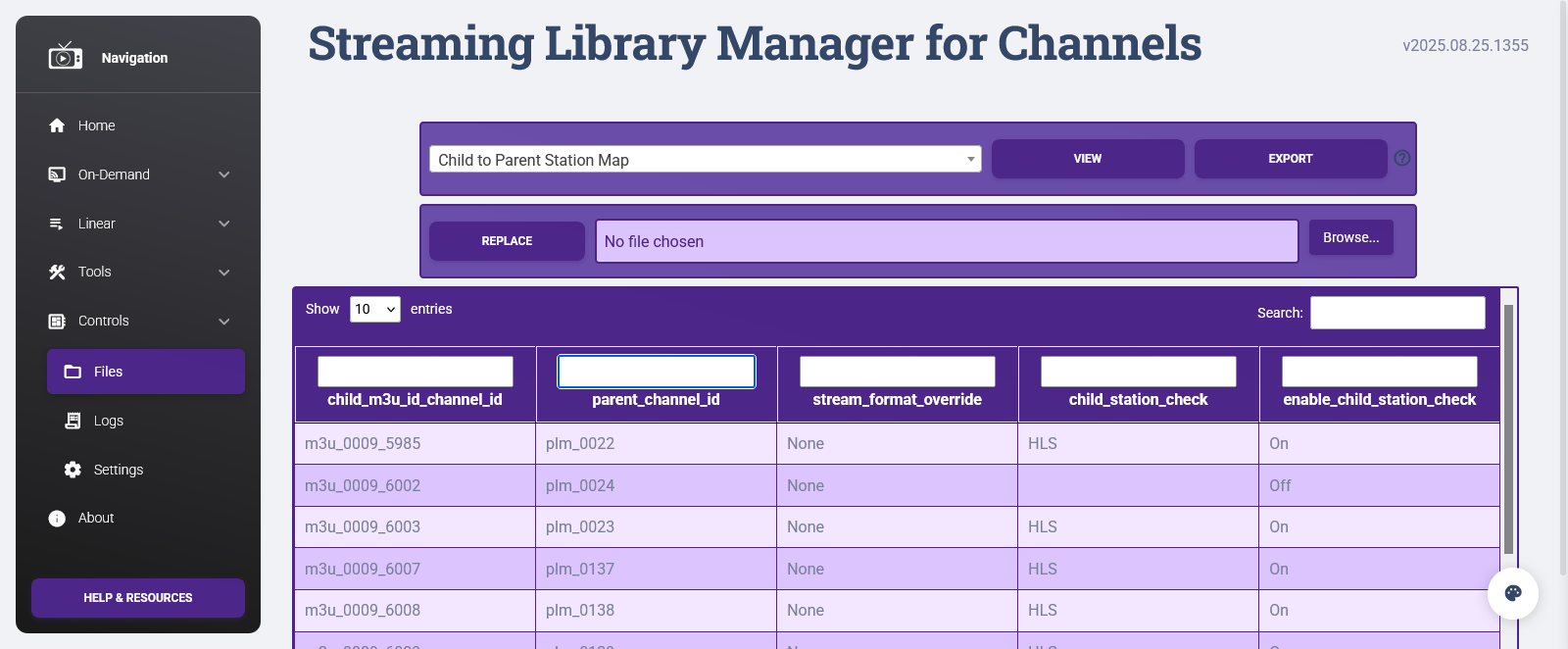
There's no need to stop or reset SLM as part of this; it always just reads the file live.
Phew! Back in business. Thanks.
For anyone else following along, I used Docker Desktop to locate the backup file. And then PLM's "Files" tool to restore it.
When I have time later this week I'll get back into filtering the newer channels...
me again-- i know this is a small detail but hey worth asking...
after i prune some of these "dead parent" channels, i noticed PLM still incrementatily adds +1 to the channel number even after deleting.
example: lets say MMA Event ended and was channel 2500.. i cleaned up the Parent a month later and let's say 50 other events, I would have expected PLM to go back to channel 2500 on the next automatically added parent, but the channel number for a new event is 2551.
Not the worlds biggest deal, but I have my channels all nicely categorized by channel number. Anyway to get it to go back to 2500 (or 2501, 2502, etc) if that channel number isn't being used?
I did look at doing something with CHNUM in automation but wanted your input!
Not likely. It's an internal numbering schema that justs +1 to the max number found. Looking for "available" numbers and potentially running into conflicts does not sounds like a can of processing worms I want to open. That's why the manual channel number override exists!
Babs- my OCD doesn’t like you. But I understand!
Just posting this here in case this helps some other OCD person like me.
I came up with a workaround- any of the automatically added channels, using the Automation feature in "Manage Playlists", I set the auto-created channel to "set 'Stream Format Override' to MPEG-ES" and that will create a seperate custom source on CDVR (looks like it defaults to HLS). Then, under CDVR, I edited that custom source to ignore CHNUM from PLM and set the channel number range to what I prefer. In theory, this source will now just be the auto-generated channels in a set range, then you could always just go into PLM and manually edit number override if you wanted.
I'm struggling adding custom channel logos to my Playlists.
Since I pick up numerous ABCs, CBS, FOX and NBC markups, I want to change each logo to their custom channel logo so that I can easily identify which ABC etc. I'm picking.
I go into Parent Stations and I'm trying to set these custom logos for example.
.png)

After I create the M3U, refresh in Channels and make sure the "Prefer Logos from M3U" is checked, I don't see these pop up in the guide. The logos in the guide for these stations is blank. Am I linking them incorrectly? What am I missing?
1 Like
Just confirming that this isn't your situation:
https://github.com/babsonnexus/stream-link-manager-for-channels/wiki/Troubleshooting-&-FAQ#plm-i-set-custom-logos-and-they-show-up-in-the-web-but-they-dont-appear-in-the-channels-app
However, I've noticed this, too, and have blank logos in the guide all over the place. I think a bug was introduced in this version (or a bit earlier):
I was going to investigate to see if I could figure out a common denominator first, but since you brought it up...
@tmm1, @maddox, @eric, submitted diagnostics from client: dfaa4991-6b38-4f1c-8c9a-8be25e058a0d