
That's what I was thinking.
Maybe using YT Live channels and Pinchflat is hitting YT too much.
Hi, loving the utility, consolidation and automation that PLM brings to my Channels server. I'm having an issue this morning though, hopefully there's an explanation. I have six FAST providers added to PLM. I hadn't classified new channels as parent/child in a few months, or even gone into PLM's management page, so this morning I started to dive back in to check in on things, and do just that. I saw there were about 250 new "unassigned" channels. All of the other channels were previously categorized. I started to scroll through, categorized one as parent, one as a child, and ignored 5 or 6. Then saved, and scrolled through to ignore 10 more. After a page refresh though, I now see that my "Station Statistics and Settings" reporitng that nearly all of the channels (2,181) are now unassigned, only 141 are assigned and only 32 are ignored. Like, the assignments have been reset? I'm not sure why it would be those numbers reported though. So now I'm wondering what did I do wrong? And what's the best way to restore from a backup so I don't have to re-assign thousands of channels? I checked the wiki, and the "Files" feature but don't see more specifics about what file to restore, and where from. I'm obviously confused and don't want to make anything go worse if I can help it. My docker installation is on an M1 Mac mini. Thanks for any guidance 
I can't figure it out from what you described because the Unassigned page cannot impact the assigned stations. I could see if you used the Assigned page and clicked the Set Visible button after scrolling through almost everything, but that doesn't sound like what happened.
The file you'll need is PlaylistManager_ChildToParent.csv from the most recent backups directory (probably should be one from whenever your backup ran this morning, assuming you didn't disable this feature). You can either just copy it into the main program_files directory and replace the file that is there, or upload using Files with this selection:
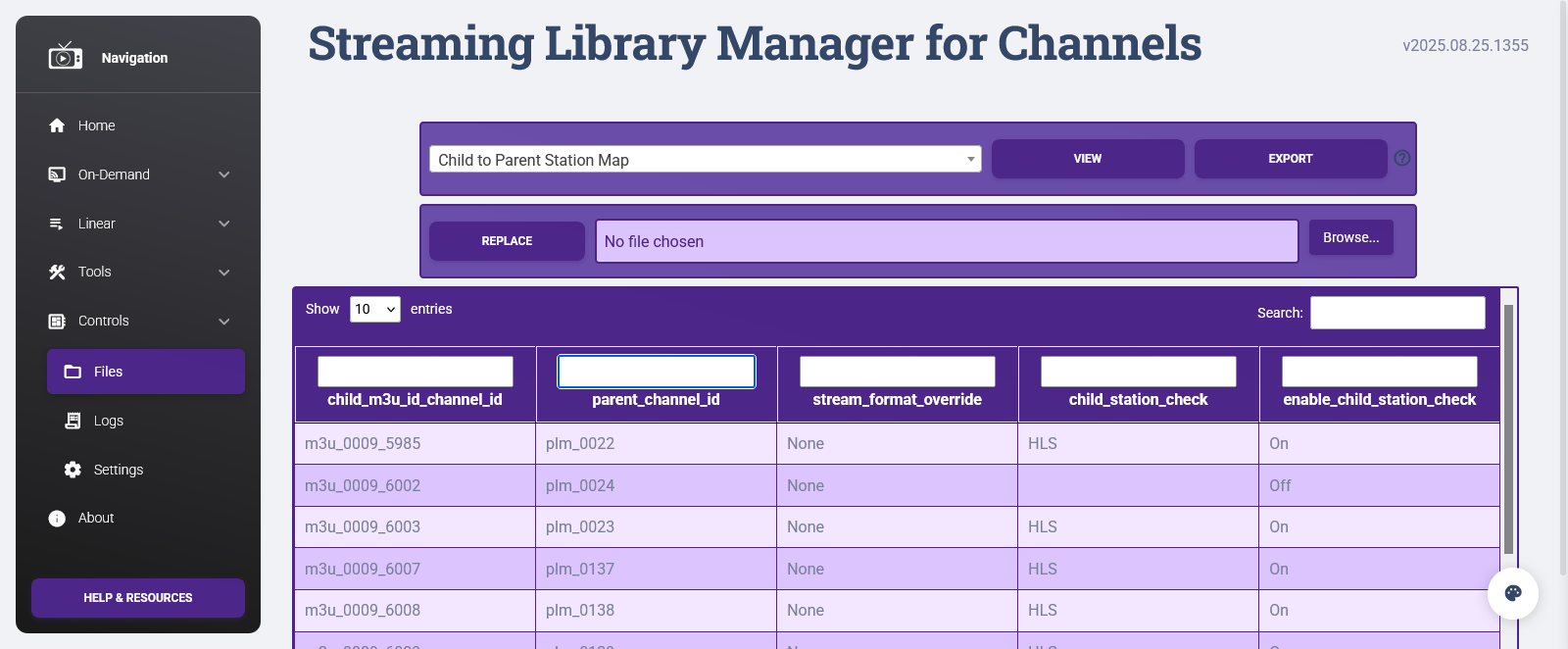
There's no need to stop or reset SLM as part of this; it always just reads the file live.
Phew! Back in business. Thanks.
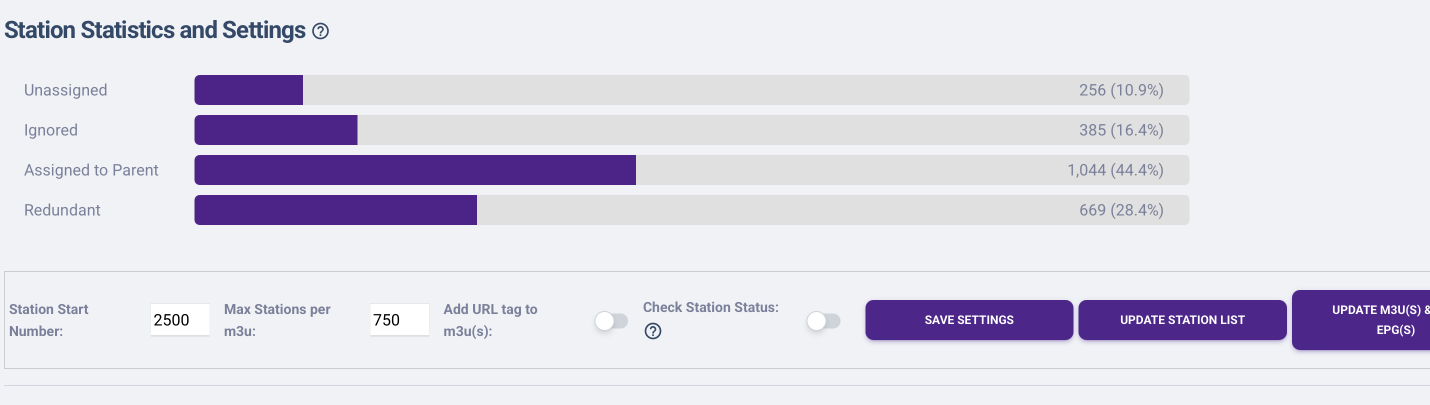
For anyone else following along, I used Docker Desktop to locate the backup file. And then PLM's "Files" tool to restore it.
When I have time later this week I'll get back into filtering the newer channels...
me again-- i know this is a small detail but hey worth asking...
after i prune some of these "dead parent" channels, i noticed PLM still incrementatily adds +1 to the channel number even after deleting.
example: lets say MMA Event ended and was channel 2500.. i cleaned up the Parent a month later and let's say 50 other events, I would have expected PLM to go back to channel 2500 on the next automatically added parent, but the channel number for a new event is 2551.
Not the worlds biggest deal, but I have my channels all nicely categorized by channel number. Anyway to get it to go back to 2500 (or 2501, 2502, etc) if that channel number isn't being used?
I did look at doing something with CHNUM in automation but wanted your input!
Not likely. It's an internal numbering schema that justs +1 to the max number found. Looking for "available" numbers and potentially running into conflicts does not sounds like a can of processing worms I want to open. That's why the manual channel number override exists!
Babs- my OCD doesn’t like you. But I understand!
Just posting this here in case this helps some other OCD person like me.
I came up with a workaround- any of the automatically added channels, using the Automation feature in "Manage Playlists", I set the auto-created channel to "set 'Stream Format Override' to MPEG-ES" and that will create a seperate custom source on CDVR (looks like it defaults to HLS). Then, under CDVR, I edited that custom source to ignore CHNUM from PLM and set the channel number range to what I prefer. In theory, this source will now just be the auto-generated channels in a set range, then you could always just go into PLM and manually edit number override if you wanted.
I'm struggling adding custom channel logos to my Playlists.
Since I pick up numerous ABCs, CBS, FOX and NBC markups, I want to change each logo to their custom channel logo so that I can easily identify which ABC etc. I'm picking.
I go into Parent Stations and I'm trying to set these custom logos for example.
.png)

After I create the M3U, refresh in Channels and make sure the "Prefer Logos from M3U" is checked, I don't see these pop up in the guide. The logos in the guide for these stations is blank. Am I linking them incorrectly? What am I missing?
1 Like
Just confirming that this isn't your situation:
https://github.com/babsonnexus/stream-link-manager-for-channels/wiki/Troubleshooting-&-FAQ#plm-i-set-custom-logos-and-they-show-up-in-the-web-but-they-dont-appear-in-the-channels-app
However, I've noticed this, too, and have blank logos in the guide all over the place. I think a bug was introduced in this version (or a bit earlier):
I was going to investigate to see if I could figure out a common denominator first, but since you brought it up...
@tmm1, @maddox, @eric, submitted diagnostics from client: dfaa4991-6b38-4f1c-8c9a-8be25e058a0d
Interesting. So the logos do show up on the web guide. However, the logo links are .png files.
Based on your Troubleshooting guide, it looks like the apps should be able to read .png and .jpg files. Maybe this isn't true?
It's still true. As I said above, mine were working fine until a few days ago. I believe a bug has been introduced on the Channels client side while trying to fix other guide issues.
I played with the logo links and it seems like some come in, others don't. I'll wait to hear from the developers to see what they find out. Thanks for all your efforts!
@maddox @tmm1 @eric Did you guys have a chance to look at the above request? Wondering what you found out or if it's an issue with me.
1 Like
This sounds like a good addition to channels dvr
but for the average person its far too technical i'm using a mac mini and i don't see any option to install this on the mac so i assume docker is the only option
Does the playlist manager have to be installed on the same computer that the channels dvr server is as i do have a windows machine that i can use but the mac mini is where the server is installed
As i said previously its a very good idea but when reading the comments not many non tech people will understand what your talking about.
You can run Docker on Mac OS:
You can then install the docker version.
Scroll down on the below page and there is an excellent video that explains things.
1 Like
In addition to what @Morris_Altman has pointed out, the entire Wiki is your vast, fully screen-captured, video recorded, and annotated answer to everything. For instance:
https://github.com/babsonnexus/stream-link-manager-for-channels/wiki/Troubleshooting-&-FAQ#gen-why-is-there-no-macos--my-random-operating-system-os-installation-path

And on the page you were given a link to...

This thread has nearly a year of discussions through various iterations, updates, and suggestions. The Wiki is your resource for the easiest, clearest, and most up-to-date info. Just follow along like hundreds of others and you'll be fine!
Was the channel logo issue ever addressed?
I'm struggling getting guide data for Pluto to work. I'm using the m3u and epg from the output, adding them to Playlist for Channels. I see the Pluto stations in my guide, but guide data isn't populating. Any help or advice as to what I'm doing wrong?
Show us screen shot of your custom channels settings for this source