Thanks man - only other thing i noticed - i had gone through all my pluto channels and was doing tubi and i would assign like 20-30 leave and come back and many of them would just be back in unassigned - not sure if i'm missing something simple - it happened a half dozen times
Eventually i just sent them all to parent channels and i'll sort them out later
Hmm...reminds me of the bug I had one time. I wonder if storing the settings through an sqlite file (or a postgres database) can help remedy that @babsonnexus
Funny enough, I prototype'd that in the early days, but decided to lean towards transparency and simplicity, and thus stripped out all the SQL stuff. Outside a major rebuild, I probably won't reverse course at this juncture.
I was made aware of this because of a problem with my CBSNEWS TVE feed being MPEG-TS, and Channels erroring on it.
I've tried to resolve that situation by following the guidance, and no matter where I set the MPEG-TS override in SLM, it still fails when trying to watch it through Channels DVR with the same reason. I'm not sure if this is an SLM issue, a Channels issue, or a setup issue.
I eventually worked around this by setting the CBSNEWS from my TVE provider as the parent, but then adding a stream source from Watch CBS News 24/7, our free live news stream as given in an example and overwriting the channel number to match the original TVE value.
I'd love to get this resolved the proper way, but I do have a workaround in place.
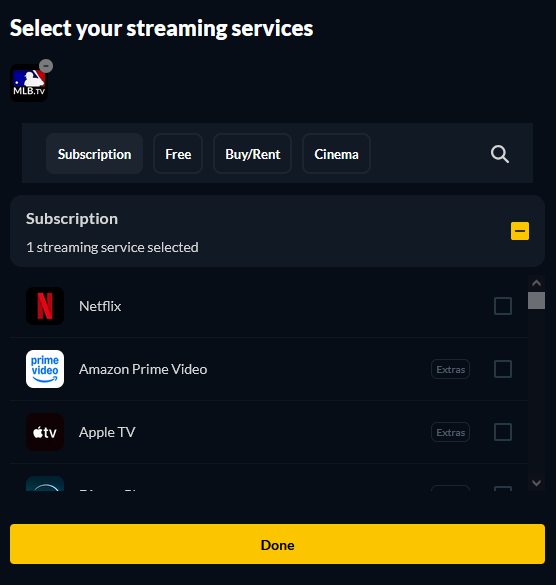
In the process I noted that MLB TV was an available on-demand source, but I can't figure out how to add any items from that source? I've searched for team names, tried to pull information from a date range, but nothing seems to show up for me. Any guidance on how to get a non-traditional source like that configured?
Not enough information provided to know, but it sounds like you might be trying to stick MPEG-TS peg into a HLS hole. For starters, check your Stream Format in your source in Channels to make sure you have is set for MPEG-TS for the m3u that is providing that station. Also, I have no idea what steps you actually took. Like, you said you set the station to MPEG-TS, but did you refresh your m3u's after doing so, and then update those in Channels after that? There are just too many questions to even begin to hazard what you may or may not have done.
Review Troubleshooting & FAQstarting here. You can also test on JustWatch yourself to see what they have in new releases, since they are the source of info:
Some more detail on the CBSNEWS PVE issue. I use Philo for a TVE provider in CDVR. There doesn't appear to be an option in the PVE source provider options in CDVR to set it to MPEG-TS or HLS.
I've had it configured as the TVE provider for quite some time now, and this channel previously worked without issue. However, when I went to tune to it yesterday, I received the error: "TVE Error: Detected MPEG-TS instead of HLS playlist" on my TV screen.
Spun up a docker container and tried to configure it to get around the issue.
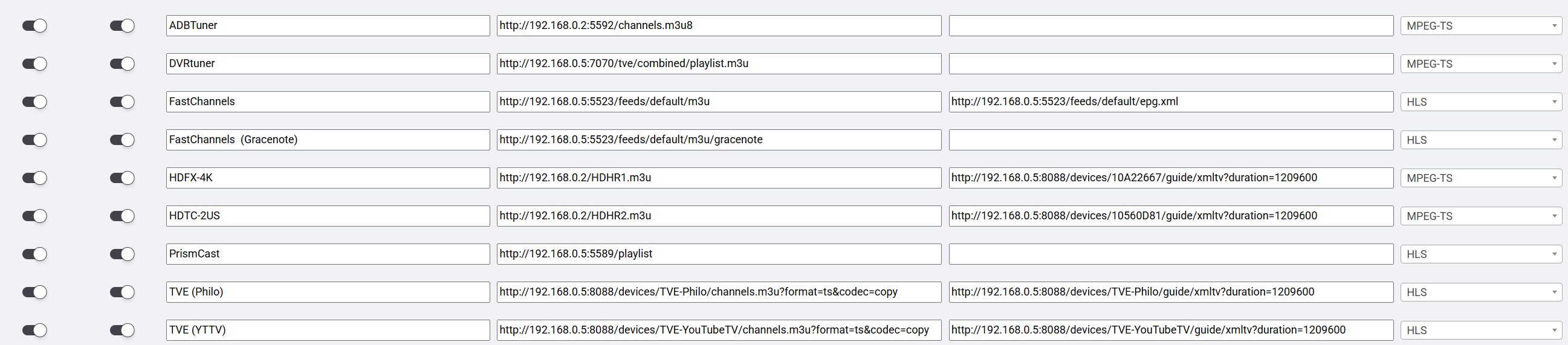
I pulled in the Philo TVE provider m3u into SLM as a playlist with Stream Format "HLS". In the Assigned Stations setting, I set the "Stream Format Override" to "MPEG-TS". I saved that, updated the M3Us and added them to CDVR. I received the same error.
I then went ahead and pulled the m3u as a separate playlist with Stream Format "MPEG-TS". I then removed the Parent Station from the original m3u, and added the new playlists entry for this station as the Parent Station, and left "Stream Format Override" as "None". I again regenerated the m3u, removed the existing entries from CDVR manually, added them again through SLM, and then tuned to the new station number with the same error result.
I then went back into SLM and set the Stream Format Override for the Assigned Station to "MPEG-TS", updated the m3us in SLM and refreshed them in CDVR, and received the same error.
At that point in time, I noted the option to add this as a streaming station, and set up the Streaming Station for the cbsnews.com link.
I configured the streaming station as suggested in the guide.
I removed the SLM providers from CDVR manually.
I set the TVE entry to use the Streaming Station as its parent (to be able to pull in the EPG information).
I overrode the channel number (in SLM under Parent Stations) to match what the Philo TVE entry is being assigned in CDVR
Set the Preferred Playlist to be the PLM - Streaming Stations, then regenerated the m3us from SLM and only added the m3u Playlist - Gracenote (MPEG-TS) [01] (containing 1 station) to CDVR, and it now works.
Copy, I thought that might be the case, but just wanted to see if maybe I'd configured this wrong.
EDIT - Didn't realize I had TVE m3u import set to MPEG vs HLS. Modified the format under the Manage Playlist to correct, but same question below still applies in a mixed source enviroment).
Sorry as this should be clear to me but I'm still new to testing out PLM.
I have multiple sources that are a mix of HLS and MPEG-TS.
My question is, if my HDHR Tuners were having an issue and PLM had to fallback to a HLS source (TVE as an example), how does Channels manage an HLS source coming through the MPEG feed? Just want to make sure I am setting this up correctly to have full redundency.
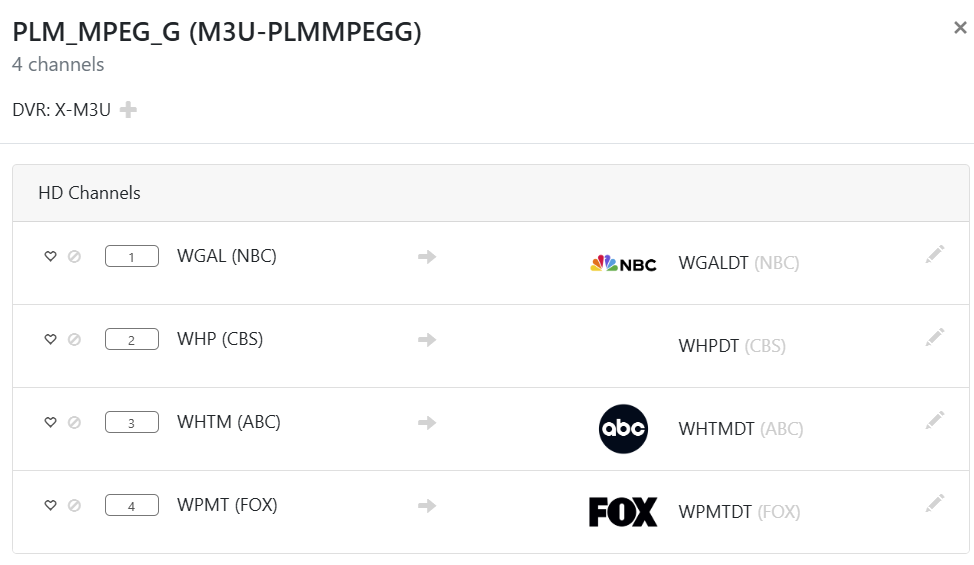
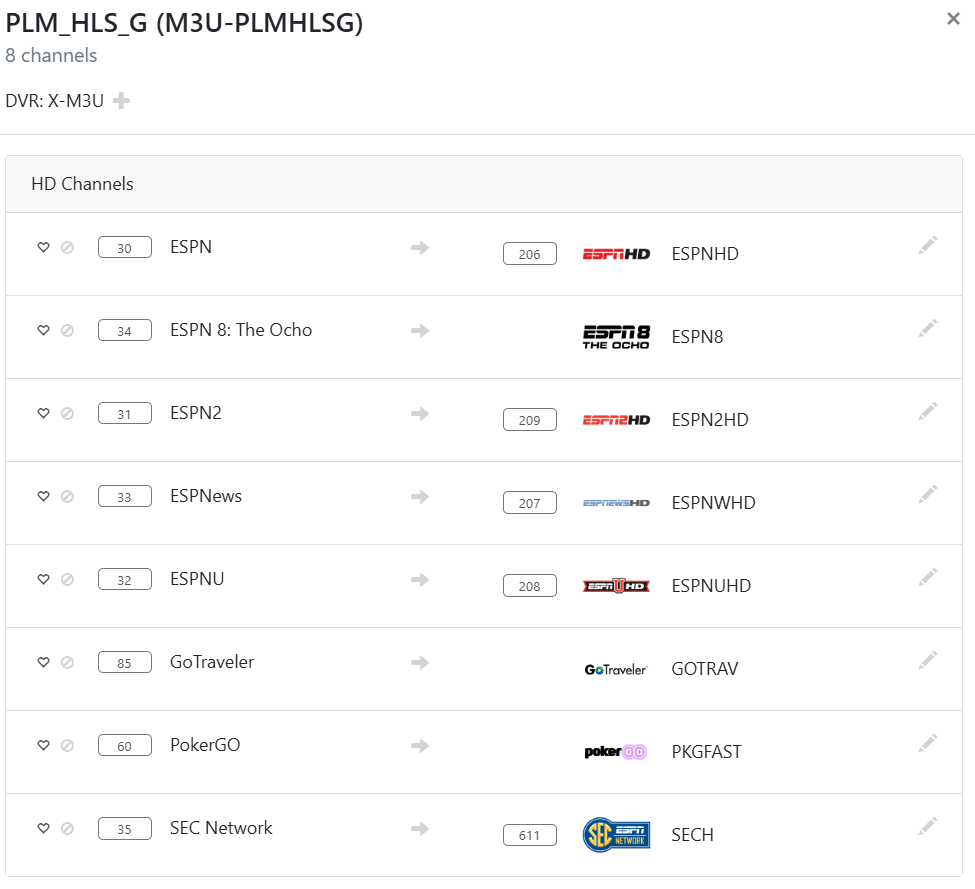
If a Parent station's source Child station is now HLS instead of MPEG-TS (or vice versa), it will move from one resulting PLM playlist to another, like with these two:
However, the unique channel_id is still the same, so as far as Channels is concerned, it's still the same station and will maintain everything about it (Channel Collections, Gracenote guide data, attachment to recordings, etc...).
Should you somehow have a HLS station on an MPEG-TS playlist (which can only happen in PLM from intentional misidentification), Channels identifies and handles it. This isn't true of a MPEG-TS station on a HLS playlist. Some recommend making everything MPEG-TS due to this, but I don't. My feeling is that if a difference exists, there may be a benefit, so why not take advantage? Others don't think it matters, but let's not debate this again as this has been done to death elsewhere and I don't want any more spam on this topic in this thread.
That's a personal preference. For OTA and TVE versions, I actually keep both and use source order, favorites, and station numbers in Channels to manage which ones go first:
Most everything else, though, I just have a preference order in PLM and only keep one version. So something like Channels TVE > EplusTV > PrismCast (and a bunch of other stuff, just not complicating it here).
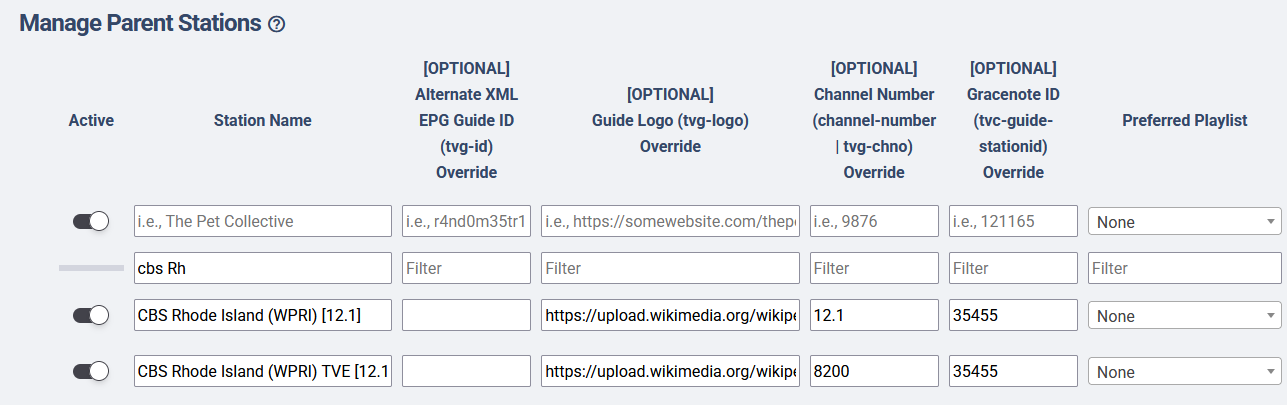
If I am interpreting your response correctly, you have your setup so there isn't 1 CBS Parent Channel that has multiple sources feeding it. You have multiple parent channels setup, "delineating" them based on the source type and use a separate channel (12.1 for MPEG, 8200 for HLS)? Thus in CDVR you have 2 entries and then use favorite or source preference in the channels source (since MPEG-TS has a separate M3U than HLS)?
What I was looking to do was to have 1 "physical" channel per actual channel in the guide in CDVR that was fed by PLM. In the event that primary channel fails for any reason the backup channel would be picked up inside the single "physical" channel (usually OTA -> TVE -> PrismCast -> FAST -> ADBtuner) and not have to fall back to another channel in my guide.
Can I setup 2 Parent Channels (CBS - HLS; CBS - MPEG) and map the aprropriate streams to each and then have them both use the same channel number? Not sure how Channels will react to that, I'll start playing around now as I've only setup about 20 of the 200 I usually setup and would like to make sure I don't have to do any re-work after setting it up.
Thanks,
Jay
P.S. Great tool by the way. Way more features than I can fathom using right now, but as I get more comfortable with it, I'll see what else I can do with this.
Not quite; I have 2 CBS Parent Stations. One is for my HDHR, the other one is for every other source (Channels TVE, PrismCast, etc...). This has nothing to do with HLS and MPEG-TS or any technical reason; it's just to have a safety backup version in Channels should my preferred one (OTA) go down.
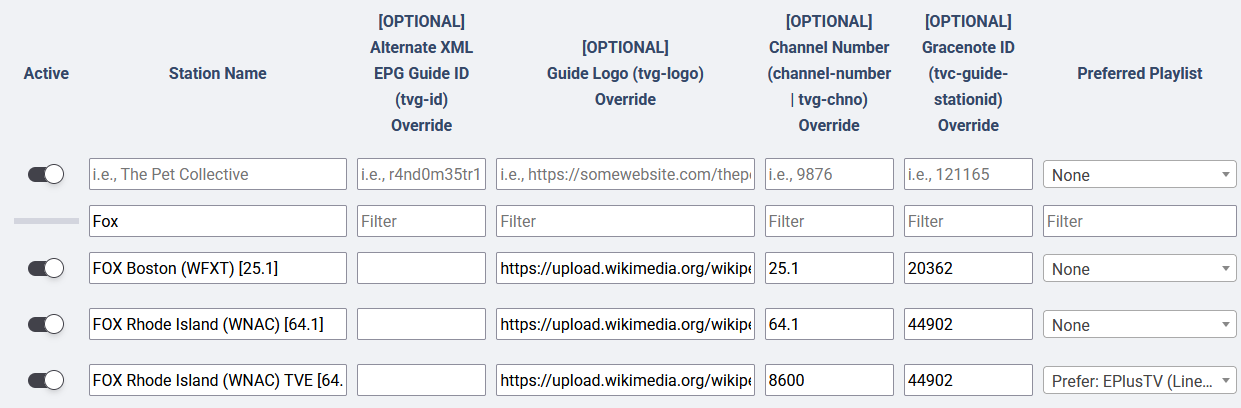
Let's look at another example. I do the same thing with my local Fox:
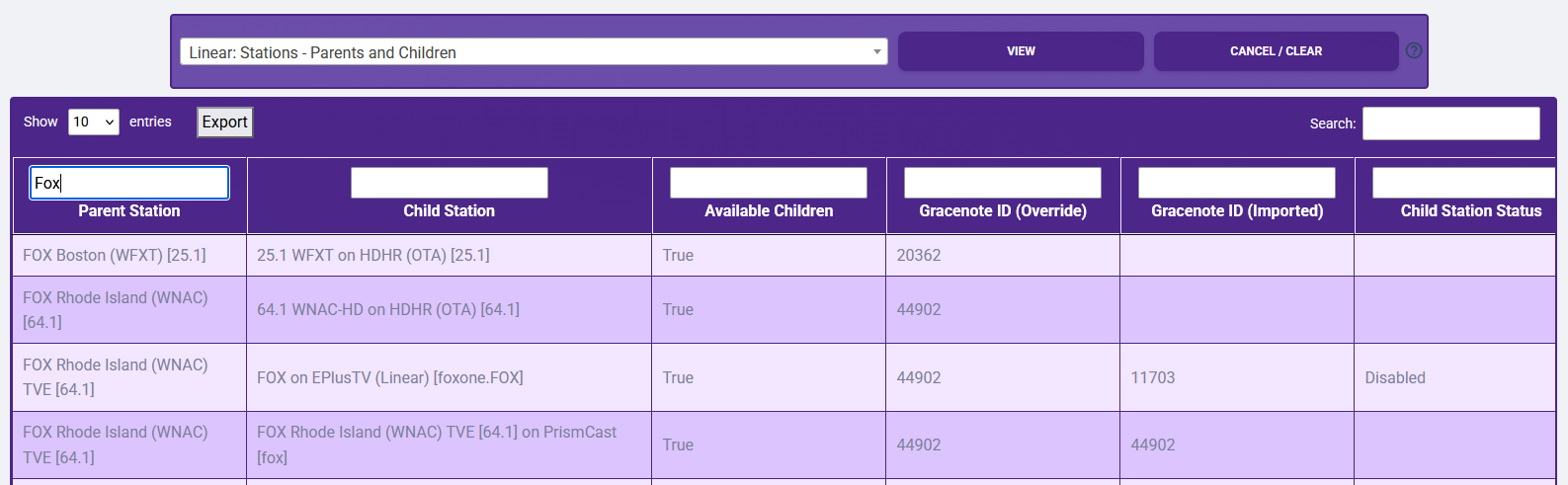
So, by PLM logic, I end up with the local OTA Market 1, local OTA Market 2, and Local TVE Market 2 versions of the station. In this example, you can also see that since the EPlusTV feed has a status of "Disabled", PLM has moved on to the next priority. Thus, my Local TVE Market 2 is using PrismCast instead.
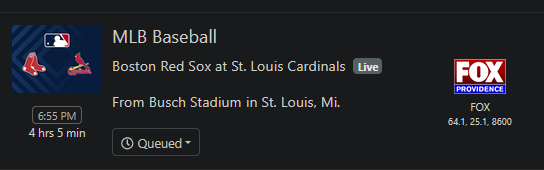
After that, I end up with only the three Fox stations in Channels. Based upon my Channels DVR priority order of sources and favorites, the OTA stations come up first (with an order between them of which market I prefer), then the TVE one:
In other words, Channels DVR handles Providence OTA > Boston OTA > Providence TVE. Within Providence TVE, PLM determines which SINGULAR one I get, with EplusTV > PrismCast.
And again, I only do this for personal preference; no one has to do what I did. I could just as easily had one "Fox Local" and let PLM handle everything and call it a day.
To be very clear, PLM does not have fallback at this time, it only has assignment. A Parent with multiple children will only select one of those children, based upon PLM priority order and checked status. So if you assign OTA, TVE, PrismCast, FAST, and ADBTuner versions to a single parent, and that is your priority order in PLM, PLM is only going to give the OTA one (if it has a valid or no status).
If we continue with my example from above, looking at my PLM m3u, I can see my Fox Providence station's streaming url is the HDHR...
... and my TVE one is PrismCast due to EPlusTV having a status of "Disabled", thus moving on to the next priority...
The internal logic of which child to use happens at the time of the m3u build, not at the time of watching. If you want backups in Channels DVR, presently you must have multiple PLM Parents.
Channels DVR must have unique station numbers. Nevertheless, you don't need to do that. If you just want one CBS, assign all the children to one parent. Based upon the child's stream format, PLM will determine which stream format playlist it belongs in.
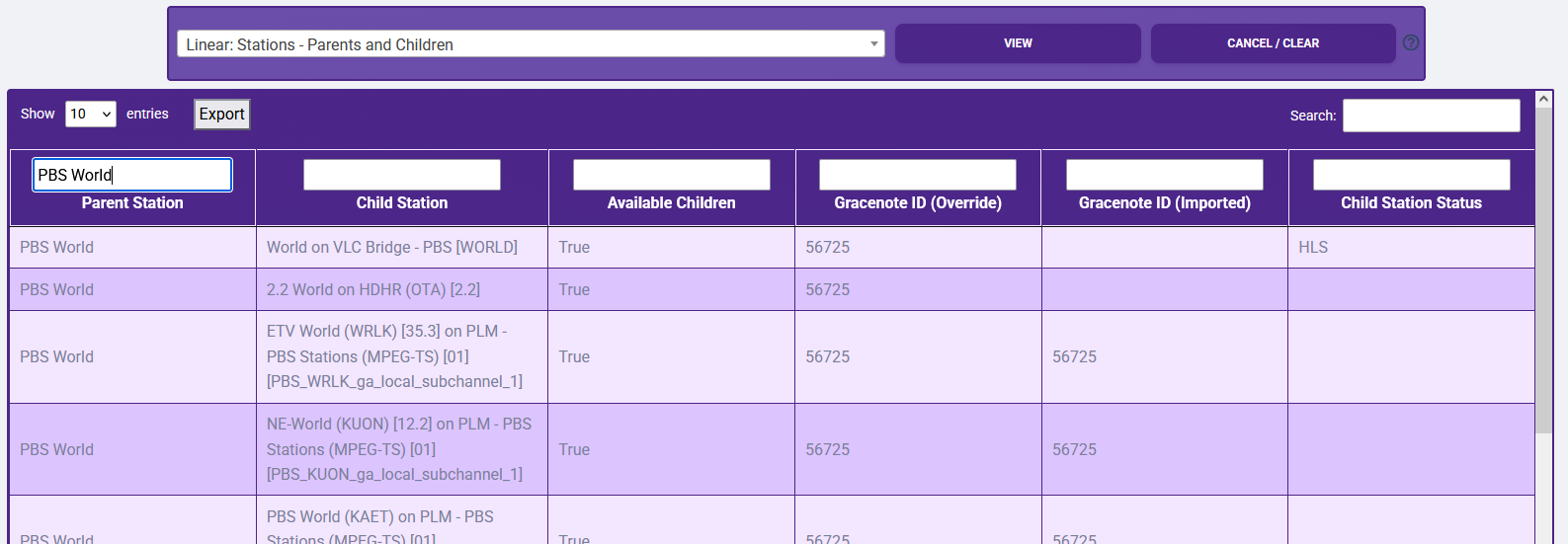
Here's another example to look at with "PBS World":
I have 75 children assigned to the singular parent. Based upon source priority order, VLC Bridge PBS > HDHR OTA > PLM Internal PBS Playlist. VLC Bridge PBS is set as MPEG-TS; however a station check reveals that PBS World is actually HLS. Thus, the parent station is assigned to my PLM HLS Gracenote playlist. If during the check station status routine the VLC Bridge PBS came back as "Disabled" for any reason, then the next time the PLM m3u's are built, PBS World will go to the next priority, which is the HDHR OTA one. Since I don't check the station status for that source, it has a status of "null", and thus will be chosen no matter what. Also, since this my HDHR OTA source, it is MPEG-TS. As such, PBS World moves from PLM HLS Gracenote to PLM MPEG-TS Gracenote.
But it does not matter because the channel-id is unique to the Parent and is the same no matter the playlist:
Further, this means as far as Channels DVR is concerned, this is the same station, just being provided by a different "Custom Channel". The next time the m3u's are updated in Channels DVR, all of this will be seamlessly reflected. And, of course, you shouldn't need to do anything because this can all be handled by automation.
Please forgive me if the answer to this question is in here somewhere but I'll blame it on old eyes. Did you ever figure this out? This happening to me but not with PlutoTV.
I was having a problem with an EPG from a PLM source in channels and went into PLM to try to diagnose. For most menu items under "Linear", I'm getting an internal server error page. Only Stream Stations, Parent Stations, and More Parents work, all others give the error page. I'm also getting the error if I try to run either of the PLM automations.
I'm using SLM on Windows and have the latest release installed. I've tried stopping and restarting the service, running upgrade from terminal and rebooting the machine, without sucess.
The log for clicking on Final Playlists is....
[error | 2026-04-23 14:41:41,001] - Exception on /playlists [GET]
Traceback (most recent call last):
  File "flask\app.py", line 1511, in wsgi_app
  File "flask\app.py", line 919, in full_dispatch_request
  File "flask\app.py", line 917, in full_dispatch_request
  File "flask\app.py", line 902, in dispatch_request
  File "slm.py", line 6544, in webpage_playlists
  File "slm.py", line 9214, in get_child_to_parents
  File "slm.py", line 9214, in <dictcomp>
KeyError: 'm3u_id'
2026-04-23 14:41:41.006842:  ERROR: Webpage responded... 500 INTERNAL SERVER ERROR
    Client IP: 192.168.4.55
    Method: GET
    URL: http://192.168.4.55:5000/playlists
    Headers:
        Host: 192.168.4.55:5000
        Connection: keep-alive
        Upgrade-Insecure-Requests: 1
        User-Agent: Mozilla/5.0 (Windows NT 10.0; Win64; x64) AppleWebKit/537.36 (KHTML, like Gecko) Chrome/147.0.0.0 Safari/537.36 Edg/147.0.0.0
        Accept: text/html,application/xhtml+xml,application/xml;q=0.9,image/avif,image/webp,image/apng,*/*;q=0.8,application/signed-exchange;v=b3;q=0.7
        Referer: http://192.168.4.55:5000/logs
        Accept-Encoding: gzip, deflate
        Accept-Language: en-GB,en;q=0.9,en-US;q=0.8
    User Agent: Mozilla/5.0 (Windows NT 10.0; Win64; x64) AppleWebKit/537.36 (KHTML, like Gecko) Chrome/147.0.0.0 Safari/537.36 Edg/147.0.0.0
    Args: ImmutableMultiDict([])
    Data: No data
[info | 2026-04-23 14:41:41,010] - 192.168.4.55 - - [23/Apr/2026 14:41:41] "e[35me[1mGET /playlists HTTP/1.1e[0m" 500 -
I'm wondering if you are having a port conflict at 5000, especially if you have Zoom installed. I ran into this a while back where Zoom has decided to take over port 5000 for some reason and I couldn't manage to get rid of it, so had to change my development port. It might not be Zoom, it could be some other program, but my best recommendation would be to change the port and see if that resolves things.
Thanks both. I don't have Zoom and the only process I can see on Port 5000 in Windows Resource Monitor under Listening Ports is slm.exe. But I'll still try changing the port and see if that helps.
So, I changed the port to 4000 (nothing using that port previously) and still had the same error. The log was exactly the same as above, but obviously the port was 4000.
I decided to uninstall and do a fresh install following the instructions here...
Interestingly, on a clean install, I can access all areas without error, but obviously I've lost everything I've previously set up. When I replace the "clean" program_files folder with my saved copy, I'm back to the same errors. So it seems somewhere in the program_files folder there is something causing an issue.
Are there any specific files I can replace from my saved copy, without replacing the entire folder, that will keep my set up?
Thanks @babsonnexus and @Jean0987654321 . As above, I failed with the port change and the fresh install with restoring my original program_files folder, but I have now resolved the problem.
After a bit of trial and error, logic suggested there was some issue in the playlists, so I did another fresh install, copied just the StreamLinkManager files back, which restored previous efforts on that, and just the PlaylistManager_StreamingStations file, which restored that. That just left me to start from scratch on the Manage Playlists. Thankfully my set up is pretty basic, so it wasn't too much effort. All good now.
Do you still have your original files? I'd be interested to see what the difference is between them and your fixed ones. For instance, is one of them (especially PlaylistManager_Combinedm3us.csv missing its header row or have some character in one of the more recent bottom rows that is not liked? If you do find something, please let me know; and also if you can remember what you were doing right before the issues above started. If there is some type of bug that can be triggered, even by unlikely actions, I'd like to snuff it out in a future version.
Yes, I still had the old PlaylistManager_Combinedm3us.csv file, and you are spot on, it's missing the column headers. The date modified metadata for that file was 16/04/2026 at 02:00, so I suspect this was an scheduled automation, I certainly wasn't tinkering at that time on a Thursday morning! I can't be fully sure what automation used to run at 02:00 but I suspect it was Playlist Manager: Update Station List because that is the default on my clean install.
Thanks again for your help and all the work you put in on this.