Thanks!!
I knew it was a permissions issue - just needed to go to the correct spot to fix.

Thanks!!
I knew it was a permissions issue - just needed to go to the correct spot to fix.
Now that Jeopardy and Wheel of Fortune are available on Hulu and Peacock, I've noticed a bit of an oddity at the source for the Stream Links. For Hulu, instead of going to individual episodes, it seems to be going to the show page. Not a huge deal, but the show page is different on Hulu for Disney+. As such, this is what can be done with a Stream Link Mapping to get that corrected:
hulu\.com/series/.+?-([a-f0-9\-]{36})$
SHOW
Replace pattern (REGEX) with...
disneyplus.com/browse/entity-\1
Do note that I've learned that both shows are only going to be the five most recent episodes, plus a smattering of "classic" ones, so these Stream Links will not get you a complete archive, or even a recent one.
Sorry if this was already covered, but I noticed the stream link for Amazon prime content will auto play the episode/movie, but it always starts from beginning. Does anyone know if there is a mapping override that will autoplay but resume instead?
For now, I turned off the mapping override so it just goes to the landing page.
Im trying to set SLM up and i'm a bit confused. I have a Computer running linux and have Docker running on it, also have portainer installed. And my Channels Dvr software resides on a Win 11 computer. When setting up the extensions for SLM, specifically SLM_MEDIA_FOLDER , Do I use smb:// Ip_address_/ media directory? and if i do, how do i get around the from login needed username and password for My Win 11 directory share?
And also when I try to install SLM through Portainer using stacks, Im encountering an installation error when copying the installation method found on Github.
SLM needs access to wherever your Channels DVR folder is. If those are on two separate machines and/or different OSes, it is up to you to set up a share between them that will work without any interaction. If that is not going to work for your specific situation, you'll need install SLM on the machine with Channels DVR. You could either install Docker Desktop and deploy from there (please follow the directions linked on the Wiki for setting up WSL first) or just use the Windows version.
Not much to go on here. I'm guessing it has something to do with your environmental variables, or lack thereof. I just did a test install a few days ago and did not encounter any problems.
FYI, just a heads up that there is a very, very big update coming in a few days!
Based on what you're describing, you'll need to add your Samba share to Portainer-Volumes first, and then use the Volume name you establish there in your SLM stack, along with slm_files:
Here's a post describing the process in another context:

I was hoping to get this all out by the 10K threshold, but I missed it. So instead, I'll now announce that as of v2025.12.15.1330, SLM has been 85% rewritten from the ground up in an effort to simplify interactions, make maintenance easier and cleaner, introduce new capabilities, improve performance, and future proof against planned and unplanned functionality.
These changes include, but are not limited to:
And these are just the big ticket items! There are so many small adjustments and changes that are just too numerous to list. Suffice to say, the entire experience has changed and will be much easier for new users, but still familiar to long-term ones.
Thanks so much for the update.
The program has been very helpful.
Would I use the volume name in the "value" portion of the environmental variables?
Yes, as shown in the example I linked, you need to add the env var value -- plus add your new volume to the separate volumes: section of the Compose.
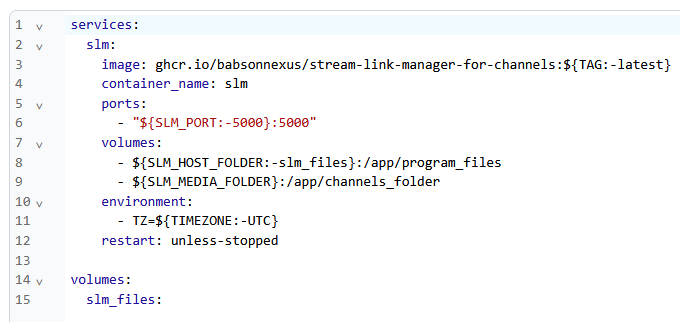
Like this (assuming the Volume you created was named channels-dvr):
services:
  slm:
    image: ghcr.io/babsonnexus/stream-link-manager-for-channels:${TAG:-latest}
    container_name: slm
    ports:
      - ${SLM_PORT:-5000}:5000
    volumes:
      - ${SLM_HOST_FOLDER:-slm_files}:/app/program_files
      - ${SLM_MEDIA_FOLDER}:/app/channels_folder
    environment:
      - TZ=${TIMEZONE:-UTC}
    restart: unless-stopped

volumes:
  slm_files:
  channels-dvr:
    external: true
With env var values similar to these:
TAG=latest
SLM_PORT=5000
SLM_HOST_FOLDER=slm_files
SLM_MEDIA_FOLDER=channels-dvr
TZ=America/New_York
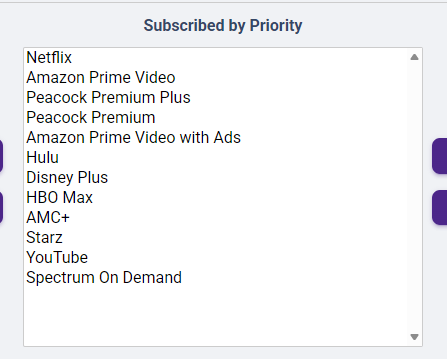
I've got HBO Max setup as HBO Max as a provider, but ever since the name change back to HBO Max, none of the stream links do anything. Is there a fix for this? I can't find an answer in the faq
It's a HBO Max problem:
This FAQ does cover this situation:
https://github.com/babsonnexus/stream-link-manager-for-channels/wiki/Troubleshooting-&-FAQ#slm-a-stream-link-generated-and-the-movie-or-show-is-available-in-my-media-player-client-but-when-i-click-to-launch-it-i-get-an-error-it-works-in-the-web-though--the-stream-link-works-on-one-platform-like-ipad-os-but-does-not-work-in-another-like-tvos
I'm 99% certain if I did an app teardown I would find that TWD neglected to update to accept hbomax.com and hbomax:// and still just has "max" in there.
It might be interesting to do a Stream Link Mapping of a simple string replacement of "hbomax" to just "max" and see if it launches. In the web when I tested it did autoforward back to hbomax, so it might work. I don't have an account at the moment to check, though, so we'll have to depend on you!
Thanks for the suggestion. I'll try it tonight.
I set up HBO Max around 12/1. Have not seen any issues when tuning to watch. Just my 2 cents!!
Are you on Android? If so, this might be only an Apple issue.
Well thank you for all your help. Ive taken your advice and all seems to go well up to the point when deploying the stack, I get access denied by my windows share. Im aware this is my problem do to some sort of networking issue I have. At this point I'm just about giving up on it.
Ive installed Samba, and cifs on both machines. went though permissions, and made sure cifs was enabled on windows. I even went as far as trying to install NFS and using that, with no joy. Ive tryed to setup the Volume using the different versions and the only one that doesnt give me a variable error is the v3.0, which in turns tells me i dont have permission. So with that being said (i know long winded) I wont be wasting anymore of your guys time, that way you can help someone that actually know what they are doing. Again Thank you.
Firetv Cube but I can test on an AppleTv if you’d like
To clarify my issue, Channels does nothing when clicking watch on an HBO Max stream link on Apple TV. All other services it launches the appropriate app.
Yep, that's Android-based. Looks like WBD did the right thing on that platform. If you can check your Apple TV, that'd be great just for additional confirmation that it's localized to Apple.
Not doing anything is the same as an error, but I've updated the FAQ to make that clear. Basically, Channels sends the command but nothing responds, therefore nothing happens! I know for a fact that Kanopy on Android is like that, too, so have experienced the same. A very weird one is Hoopla where it opens the mobile app version because of bad coding on their side.
Just tried on AppleTV 4K and it doesn’t do anything when hitting watch!!


