Just above is what Channels says is the path to your recordings. Is that what your env var list showed?
And, above is where Channels DVR says your CDVR logs are stored. How does that compare with the env var list?

Just above is what Channels says is the path to your recordings. Is that what your env var list showed?
And, above is where Channels DVR says your CDVR logs are stored. How does that compare with the env var list?
yes that is what Env Var shows.
TAG=latest
DOMAIN=
HOST_PORT=1337
CHANNELS_DVR_HOST=192.168.50.219
CHANNELS_DVR_PORT=8089
ALERT_EMAIL_SERVER=
ALERT_EMAIL_FROM=
ALERT_EMAIL_PASS=
ALERT_EMAIL_TO=
UPDATE_YAMLS=true
UPDATE_SCRIPTS=true
TZ=
HOST_DIR=/data
DVR_SHARE=/mnt/md0/DVR-storage/DVR
LOGS_SHARE=/home/terry/channels-dvr
TUBEARCHIVIST_SHARE=/mnt/md0/DVR-storage/DVR
HOST_SFS_PORT=8080
FOLDER=/web
PORTAINER_TOKEN=
PORTAINER_HOST=192.168.50.149
PORTAINER_PORT=9000
PORTAINER_ENV=2
PERSISTENT_LOGS=false
I only have the DVR-storage and channels-dvr folders shared via SMB if that makes any difference.
OK, so I see your CDVR server and Docker/Portainer host are on different systems. Are both of those paths mounted on the Docker/Portainer host via SMB, or are you sharing them to the CDVR host via SMB?
As a side note, the PORTAINER_PORT setting is only for https, 9000 is used for http -- and that port is fixed at 9000. So, you'd want to leave that value empty or set to 9443. 9000 is used first via http.
both can be seen and browsed. I was using 9000 so as to avoid any insecure site warnings.
On the Docker/Portainer host? And if so, on what paths? If I'm understanding what you're doing, the paths that Channels is reporting, are likely not the same paths as you're using as mount points on the Docker/Portainer host -- and those are the paths we need.
So you're using http:// and port 9000, that's not a problem. But you don't want to set the the https:// port to 9000 too. PORTAINER_PORT is only for changing https://. http:// is automatically at 9000.
Given that neither of the paths reported by your CDVR server are the correct paths on your Docker host, and given your statement just above, I'm going to guess that the SMB shares are not mounted to the file system on the Docker host.
If they can be seen and browsed on the Docker host only as SMB shares, they need to be added to Portainer as Docker Volumes. Then those Docker Volumes are used as values for DVR_SHARE and LOGS_SHARE.
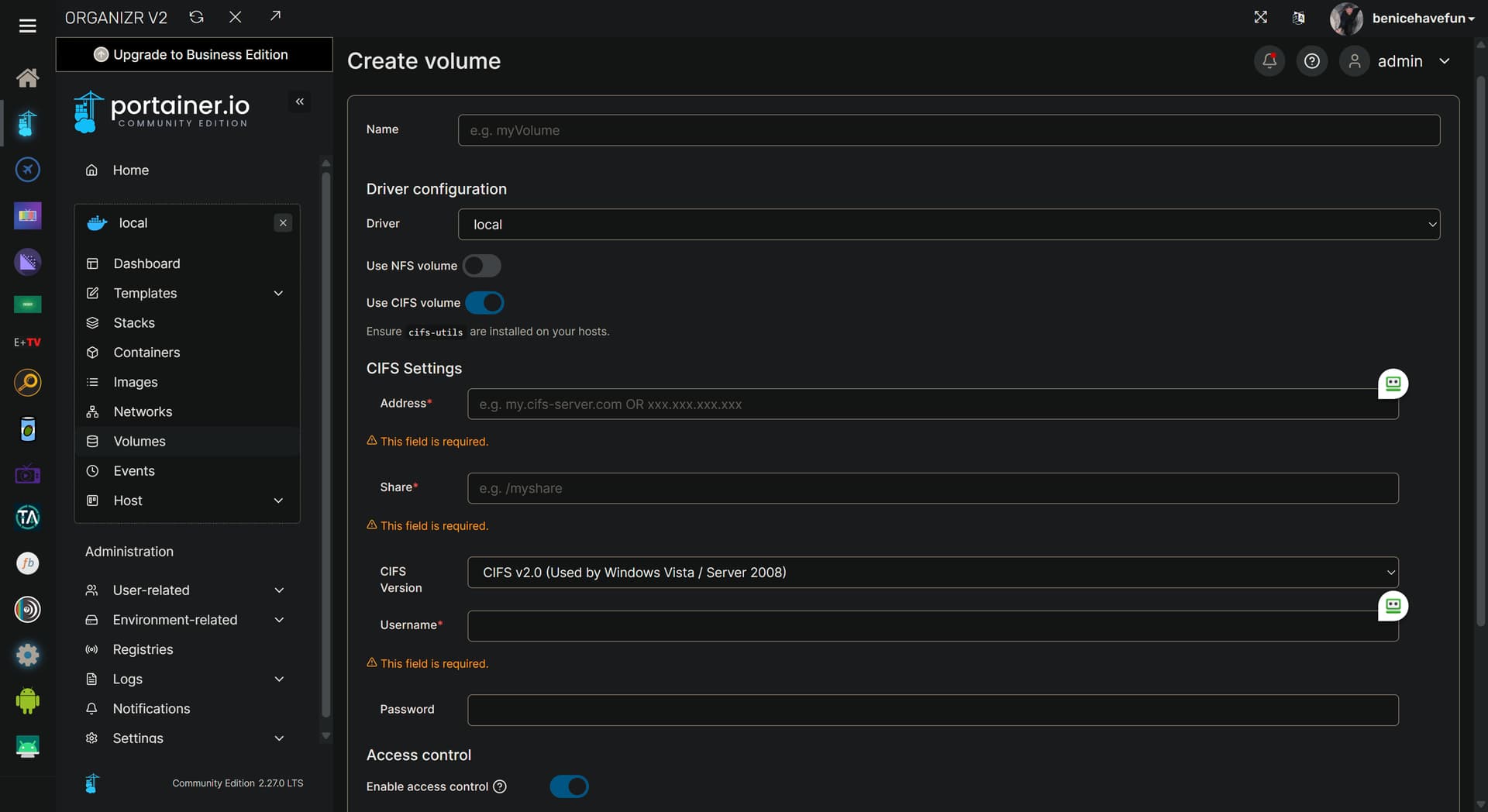
This is done using Portainer-Volumes. Add a volume, name it (I recommend channels-dvr for your recordings and channels-dvr-logs for the executables) and select CIFS. Then you need to specify the SMB server and SMB share names with the username and password for accessing them:
A couple of last things to do, which is to use those names, and assuming you used my recommended names, you'll be changing these two values by stopping and editing the Portainer-Stack:
DVR_SHARE=channels-dvr
LOGS_SHARE=channels-dvr-logs
And, in the compose itself, you have to uncomment (remove the #) these lines:
  #channels-dvr:
    #external: true
  #channels-dvr-logs:
    #external: true
Let me know if I'm on track here please!
You Sir are awesome! That was it.
Checking your OliveTin-for-Channels installation...
(extended_check=false)

Version 2025.03.17

----------------------------------------

Checking that your selected Channels DVR server (192.168.50.219:8089) is reachable by URL:
HTTP Status: 200 indicates success...

  % Total    % Received % Xferd  Average Speed   Time    Time     Time  Current
                                 Dload  Upload   Total   Spent    Left  Speed

  0     0    0     0    0     0      0      0 --:--:-- --:--:-- --:--:--     0
100  1276  100  1276    0     0   415k      0 --:--:-- --:--:-- --:--:--  623k
HTTP Status: 200
Effective URL: http://192.168.50.219:8089/

----------------------------------------

Checking that your selected Channels DVR server's data files (/mnt/192.168.50.219-8089) are accessible:
Folders with the names Database, Images, Imports, Logs, Movies, Streaming and TV should be visible...

total 4
drwxr-xr-x 2 root root    0 Mar 18 00:10 .
drwxr-xr-x 1 root root 4096 Mar 18 10:00 ..
drwxr-xr-x 2 root root    0 Mar 17 17:31 Database
drwxr-xr-x 2 root root    0 Mar 16 23:00 Images
drwxr-xr-x 2 root root    0 Feb 10  2024 Imports
drwxr-xr-x 2 root root    0 Feb  7  2024 Logs
drwxr-xr-x 2 root root    0 Mar 18 00:10 Movies
drwxr-xr-x 2 root root    0 Feb 10  2024 PlayOn
drwxr-xr-x 2 root root    0 Mar 18 00:10 TV

If the listed folders are NOT visible, AND you have your Channels DVR and Docker on the same system:

Channels reports this path as...
/mnt/md0/DVR-storage/DVR

----------------------------------------

Checking that your selected Channels DVR server's log files (/mnt/192.168.50.219-8089_logs) are accessible:
Folders with the names data and latest should be visible...

total 12
drwxr-xr-x 2 root root    0 Mar  6 16:02 .
drwxr-xr-x 1 root root 4096 Mar 18 10:00 ..
drwxr-xr-x 2 root root    0 Feb 24 02:04 2025.02.24.0656
drwxr-xr-x 2 root root    0 Feb 25 02:59 2025.02.25.0015
drwxr-xr-x 2 root root    0 Feb 27 02:11 2025.02.27.0156
drwxr-xr-x 2 root root    0 Mar  1 15:24 2025.03.01.2019
drwxr-xr-x 2 root root    0 Mar  2 16:33 2025.03.02.2319
drwxr-xr-x 2 root root    0 Mar  6 16:02 2025.03.06.2119
drwxr-xr-x 2 root root    0 Mar 18 00:45 Streaming
drwxr-xr-x 2 root root    0 Mar 18 09:49 data
-rwxr-xr-x 1 root root 3903 Feb 16 14:47 install.sh
drwxr-xr-x 2 root root    0 Mar  6 16:02 latest
-rwxr-xr-x 1 root root 1192 Feb 16 14:47 uninstall.sh

If the listed folders are NOT visible, AND you have your Channels DVR and Docker on the same system:

Channels reports this path as...
/home/terry/channels-dvr

----------------------------------------

Checking if your Portainer token is working on ports 9000 and/or 9443:

Portainer http response on port 9000 reports version 2.21.1
Portainer Environment ID for local is
Portainer https response on port 9443 reports version 2.21.1
Portainer Environment ID for local is

----------------------------------------

Here's a list of your current OliveTin-related settings:

HOSTNAME=olivetin
CHANNELS_DVR=192.168.50.219:8089
CHANNELS_DVR_ALTERNATES=
CHANNELS_CLIENTS=
ALERT_SMTP_SERVER=
ALERT_EMAIL_FROM=[Redacted]@
ALERT_EMAIL_PASS=[Redacted]
ALERT_EMAIL_TO=[Redacted]@
UPDATE_YAMLS=true
UPDATE_SCRIPTS=true
PORTAINER_HOST=192.168.50.149
PORTAINER_PORT=9443
PORTAINER_ENV=2

----------------------------------------

Here's the contents of /etc/resolv.conf from inside the container:

# Generated by Docker Engine.
# This file can be edited; Docker Engine will not make further changes once it
# has been modified.

nameserver 127.0.0.11
search local
options ndots:0

# Based on host file: '/etc/resolv.conf' (internal resolver)
# ExtServers: [host(192.168.65.7)]
# Overrides: [search]
# Option ndots from: internal

----------------------------------------

Here's the contents of /etc/hosts from inside the container:

127.0.0.1	localhost
::1	localhost ip6-localhost ip6-loopback
fe00::	ip6-localnet
ff00::	ip6-mcastprefix
ff02::1	ip6-allnodes
ff02::2	ip6-allrouters
172.20.0.3	olivetin
Sweet!
The only other thing I'd suggest, is for you to create your Portainer token, and add it to OliveTin. This will open up all of the Project One-Click stuff.
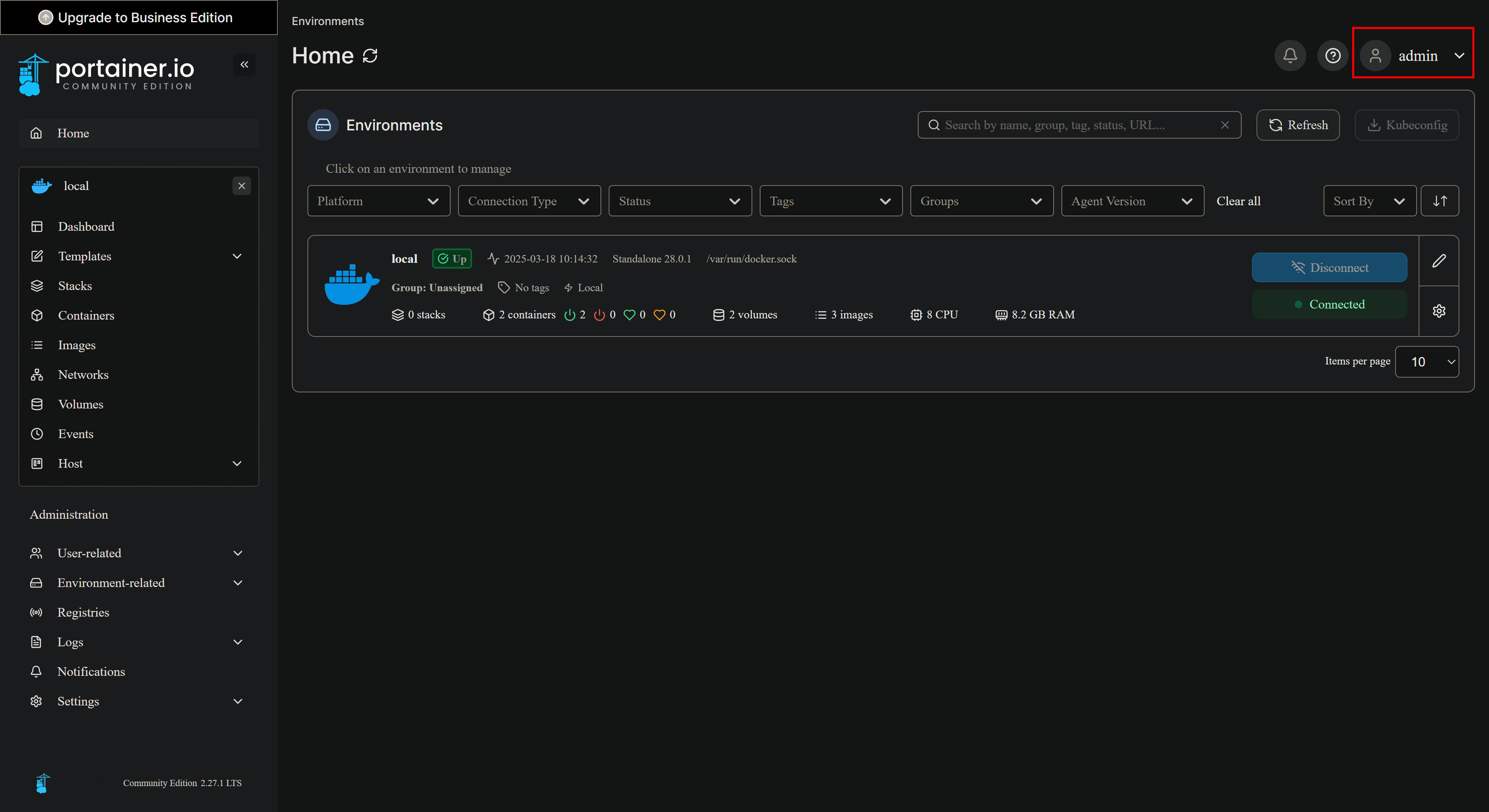
That's done by going into My account by clicking on the username dropdown in the upper right corner:
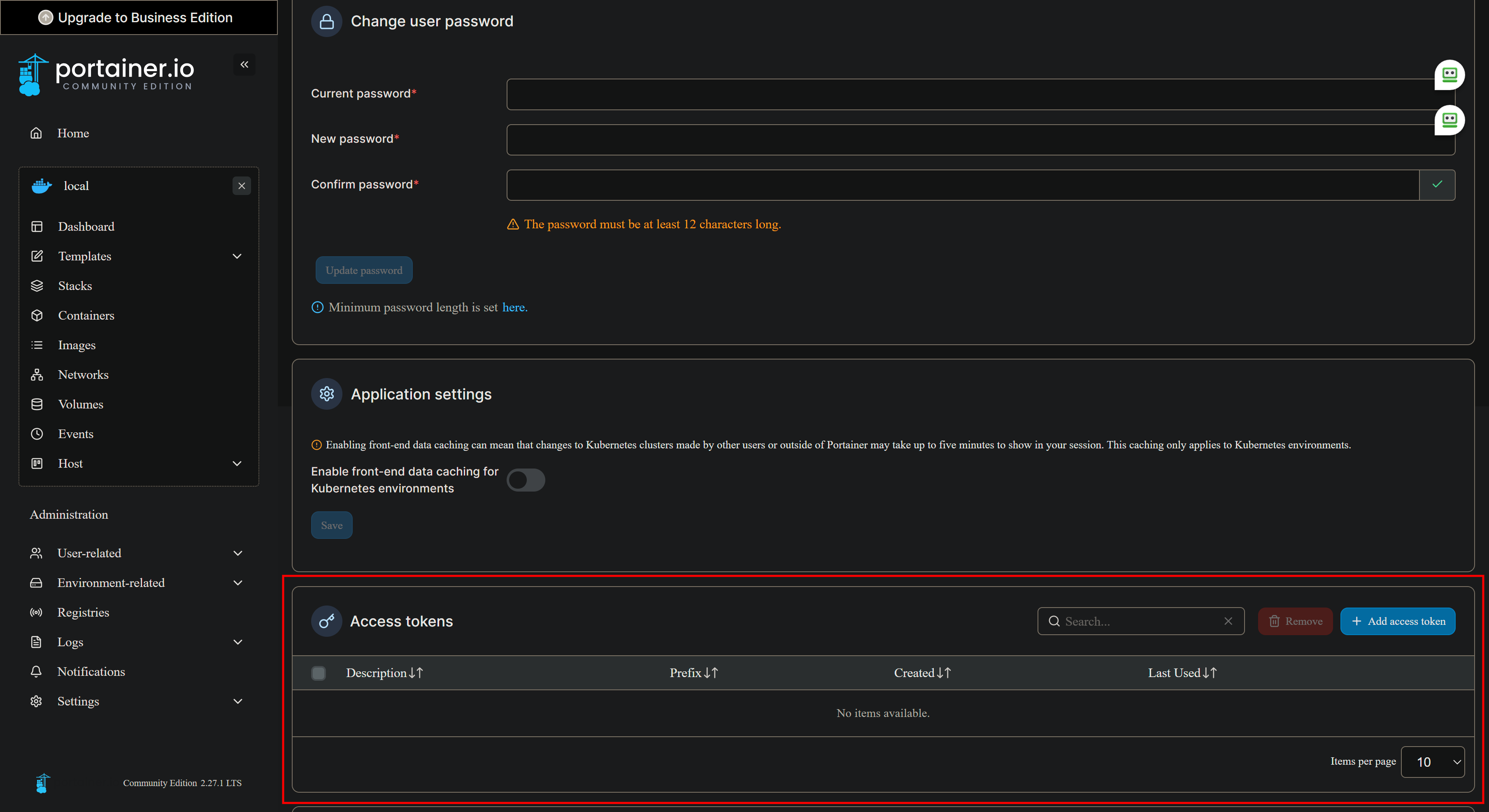
Then scroll down to the Access tokens area, and add a token named olivetin:
Copy-and-paste to a secure location (in case you need it again), and then update your OliveTin Portainer-Stack env var (in Advanced mode) with your new token:
PORTAINER_TOKEN=
I could not find 'your' account; so I used my own and that seemed to work 
This really is EZ-Start to get OliveTin up and running. It was just me figuring "It's already SMB shared, what's the problem?"
I know EZ-Start is early development but any way to add Alternate DVRs coming?
I'm working on adding support to EZ-Start for a second DVR. Beyond that has required editing of the Docker Compose -- and I'm inclined to keep it that way. Adding additional DVRs is pretty easy, following the same layout used for DVR2.
Out of curiosity, how many are you running?
Currently 3
OS
linux debian
bookworm/sid (kernel: 6.8.0-52-generic)
CPU
4 cores / AMD FX(tm)-4100 Quad-Core Processor
load averages:  0.13  0.27  0.14
16 GB Ram
OS
HC Technology.,Ltd. HCAR5000-MI2
windows Microsoft Windows 11 Pro
10.0.26100.3476 Build 26100.3476 (kernel: 10.0.26100.3476 Build 26100.3476)
CPU
16 cores / AMD Ryzen 7 5700U with Radeon Graphics
load averages:  0.00  0.00  0.00
64 GB Ram
OS
Micro-Star International MS-7C35
windows Microsoft Windows 11 Pro
10.0.22631.5039 Build 22631.5039 (kernel: 10.0.22631.5039 Build 22631.5039)
CPU
16 cores / AMD Ryzen 7 3700X 8-Core Processor
load averages:  0.00  0.00  0.00
32 GB Ram
The first one is getting kind of long in the tooth. OliveTin running here. RDP into PC.
The second is a mini PC which is actually slower processing comskip than the old AMD 4100. (Side note I get errors trying to deploy OliveTin on this PC. Want OliveTin running here, maybe volume issues causing it.) RDP into PC.
The last one which is my Main PC is setup to test out USB HDMI capture. This is running WSL Docker Desktop. (Channels is not running in Docker.)
You've inspired me -- I'm working on supporting 3 before customizing the compose is required. 
Alrighty then! New bnhf/olivetin:latest (aka bnhf/olivetin:2025.03.19) pushed with OliveTin EZ-Start support for up to 3 DVRs. @TerryD, when you have a chance to test this (be sure to use the newly updated 2025.03.18 compose in post #1 -- which will be there in a few moments), let me know how it works for you. Once confirmed, I can add support for more DVRs if anyone wants more.
getting errors trying to deploy stack.
Failed to deploy a stack: time="2025-03-19T10:47:02Z" level=warning msg="The \"EZ_START\" variable is not set. Defaulting to a blank string." time="2025-03-19T10:47:02Z" level=warning msg="The \"EZ_START\" variable is not set. Defaulting to a blank string." time="2025-03-19T10:47:02Z" level=warning msg="The \"EZ_START\" variable is not set. Defaulting to a blank string." time="2025-03-19T10:47:02Z" level=warning msg="The \"CHANNELS_DVR2_PORT\" variable is not set. Defaulting to a blank string." time="2025-03-19T10:47:02Z" level=warning msg="The \"CHANNELS_DVR3_HOST\" variable is not set. Defaulting to a blank string." time="2025-03-19T10:47:02Z" level=warning msg="The \"CHANNELS_CLIENTS\" variable is not set. Defaulting to a blank string." time="2025-03-19T10:47:02Z" level=warning msg="The \"ALERT_SMTP_SERVER\" variable is not set. Defaulting to a blank string." time="2025-03-19T10:47:02Z" level=warning msg="The \"EZ_START\" variable is not set. Defaulting to a blank string." time="2025-03-19T10:47:02Z" level=warning msg="The \"EZ_START\" variable is not set. Defaulting to a blank string." time="2025-03-19T10:47:02Z" level=warning msg="The \"DVR2_SHARE\" variable is not set. Defaulting to a blank string." time="2025-03-19T10:47:02Z" level=warning msg="The \"CHANNELS_DVR2_PORT\" variable is not set. Defaulting to a blank string." time="2025-03-19T10:47:02Z" level=warning msg="The \"LOGS2_SHARE\" variable is not set. Defaulting to a blank string." time="2025-03-19T10:47:02Z" level=warning msg="The \"CHANNELS_DVR2_PORT\" variable is not set. Defaulting to a blank string." time="2025-03-19T10:47:02Z" level=warning msg="The \"TUBEARCHIVIST2_SHARE\" variable is not set. Defaulting to a blank string." time="2025-03-19T10:47:02Z" level=warning msg="The \"CHANNELS_DVR2_PORT\" variable is not set. Defaulting to a blank string." invalid spec: :/mnt/192.168.50.32:8089-: empty section between colons
This is with the 2025.03.18 compose, and your existing env vars? Or was this using a new set of env vars?
found a typo This was not causing the deploy errors but was just giving text after IP / not showing port number
I do have this working kind of, will post my compose and var.
version: '3.9'
services:
  olivetin: # This docker-compose typically requires no editing. Use the Environment variables section of Portainer to set your values.
    # 2025.03.18
    # GitHub home for this project: https://github.com/bnhf/OliveTin.
    # Docker container home for this project with setup instructions: https://hub.docker.com/repository/docker/bnhf/olivetin.
    image: bnhf/olivetin:${TAG:-latest} # Add the tag like latest or test to the environment variables below.
    container_name: ${OLIVETIN_NAME:-olivetin}${EZ_START}
    hostname: ${OLIVETIN_NAME:-olivetin}${EZ_START}
    dns_search: ${DOMAIN:+${DOMAIN}} # For Tailscale users using Magic DNS, add your Tailnet (tailxxxxx.ts.net) to use hostnames for remote nodes, otherwise use your local domain name.
    ports:
      - ${HOST_PORT:-1337}:1337
    environment:
      - CHANNELS_DVR=${CHANNELS_DVR_HOST}:${CHANNELS_DVR_PORT:-8089} # Add your Channels DVR server in the form CHANNELS_DVR_HOST=<hostname or ip> and CHANNELS_DVR_PORT=<port>.
      - ${CHANNELS_DVR2_HOST:+CHANNELS_DVR_ALTERNATES=${CHANNELS_DVR2_HOST}:${CHANNELS_DVR2_PORT}} ${CHANNELS_DVR3_HOST:+${CHANNELS_DVR3_HOST}:${CHANNELS_DVR3_PORT}} # Space separated list of alternate Channels DVR servers to choose from in the form hostname:port or ip:port.
      - CHANNELS_CLIENTS=${CHANNELS_CLIENTS} # Space separated list of Channels DVR clients you'd like notifications sent to in the form hostname or IP.
      - ALERT_SMTP_SERVER=${ALERT_SMTP_SERVER} # SMTP server to use for sending alert e-mails. smtp.gmail.com:587 for example.
      - ALERT_EMAIL_FROM=${ALERT_EMAIL_FROM} # Sender address for alert e-mails.
      - ALERT_EMAIL_PASS=${ALERT_EMAIL_PASS} # SMTP "app" password established through GMail or Yahoo Mail. Do not use your everyday e-mail address.
      - ALERT_EMAIL_TO=${ALERT_EMAIL_TO} # Recipient address for alert e-mails.
      - UPDATE_YAMLS=${UPDATE_YAMLS:-true} # Set this to true to update config.yaml.
      - UPDATE_SCRIPTS=${UPDATE_SCRIPTS:-true} # Set this to true to update all included scripts.
      - TZ=${TZ} # Add your local timezone in standard linux format. E.G. US/Eastern, US/Central, US/Mountain, US/Pacific, etc.
      - PORTAINER_TOKEN=${PORTAINER_TOKEN} # Generate via <username> dropdown (upper right of WebUI), "My account", API tokens.
      - PORTAINER_HOST=${PORTAINER_HOST:-$CHANNELS_DVR_HOST} # Hostname or IP of the Docker host you're running Portainer on.
      - PORTAINER_PORT=${PORTAINER_PORT:-9443} # https port you're running Portainer on. 9443 is the default.
      - PORTAINER_ENV=${PORTAINER_ENV:-2} # Set this is if you're using an alternate Portainer Environment for some reason. 2 is the default.
      - PERSISTENT_LOGS=${PERSISTENT_LOGS:-false} # For supported Actions, log files are retained on an ongoing basis. false is the default.
    volumes:
      - ${HOST_DIR:-olivetin}${EZ_START:-/olivetin}:/config # Add the parent directory on your Docker you'd like to use.
      - ${DVR_SHARE:-olivetin}${EZ_START}:/mnt/${CHANNELS_DVR_HOST}-${CHANNELS_DVR_PORT} # This can either be a Docker volume or a host directory that's connected via Samba or NFS to your Channels DVR network share.
      - ${LOGS_SHARE:-olivetin}${EZ_START}:/mnt/${CHANNELS_DVR_HOST}-${CHANNELS_DVR_PORT}_logs # This can either be a Docker volume or a host directory that's connected via Samba or NFS to your Channels DVR logs network share.
      - ${TUBEARCHIVIST_SHARE:+${TUBEARCHIVIST_SHARE}:/mnt/${CHANNELS_DVR_HOST}-${CHANNELS_DVR_PORT}_ta} # This can either be a Docker volume or a host directory that's connected via Samba or NFS to your TubeArchivist videos network share.
      #- ${DVR2_SHARE}:/mnt/${CHANNELS_DVR2_HOST}-${CHANNELS_DVR2_PORT} # Note that these volume mounts should always be to /mnt/hostname-port or /mnt/ip-port (dash rather than a colon between).
      #- ${LOGS2_SHARE}:/mnt/${CHANNELS_DVR2_HOST}-${CHANNELS_DVR2_PORT}_logs # This can either be a Docker volume or a host directory that's connected via Samba or NFS to your Channels DVR logs network share.
      #- ${TUBEARCHIVIST2_SHARE}:/mnt/${CHANNELS_DVR2_HOST}-${CHANNELS_DVR2_PORT}_ta # This can either be a Docker volume or a host directory that's connected via Samba or NFS to your TubeArchivist videos network share.
      - /var/run/docker.sock:/var/run/docker.sock
    restart: unless-stopped

  static-file-server:
    image: halverneus/static-file-server:latest
    container_name: ${SFS_NAME:-static-file-server}${EZ_START}
    dns_search: ${DOMAIN}
    ports:
      - ${HOST_SFS_PORT:-8080}:8080
    environment:
      - FOLDER=${FOLDER:-/web}
    volumes:
      - ${HOST_DIR}/olivetin/data:${FOLDER:-/web}
    restart: unless-stopped

volumes: # use this section if you've setup a docker volume named channels-dvr, with CIFS or NFS, to bind to /mnt/dvr inside the container. Set ${DVR_SHARE} to channels-dvr (DVR_SHARE=channels_dvr) in that example.
  olivetin-ezstart:
    name: olivetin-ezstart
  channels-dvr:
    external: true
  channels-dvr-logs:
    external: true
  tubearchivist:
    external: true
  channels-dvr2:
    external: true
  channels-dvr-logs2:
    external: true
  tubearchivist2:
    external: true
TAG=latest
DOMAIN=local
HOST_PORT=1337
CHANNELS_DVR_HOST=192.168.50.219 # will list folders
CHANNELS_DVR_PORT=8089
CHANNELS_DVR2_HOST=192.168.50.32 # no folders maybe volume issue using DrivePool
CHANNELS_DVR2_PORT=8089
CHANNELS_DVR3_HOST=192.168.50.149 # no folders local host
CHANNELS_DVR3_PORT=8089
ALERT_EMAIL_SERVER=
ALERT_EMAIL_FROM=
ALERT_EMAIL_PASS=
ALERT_EMAIL_TO=
UPDATE_YAMLS=true
UPDATE_SCRIPTS=true
TZ=US/Pacific
HOST_DIR=/data
DVR_SHARE=channels-dvr
LOGS_SHARE=channels-dvr-logs
TUBEARCHIVIST_SHARE=channels-dvr
HOST_SFS_PORT=8080
FOLDER=/web
PORTAINER_TOKEN=ptr_6Mcrj/12VVkIRmiJ1GRTEjC81+eGyLoOy6SylBOn6Xs=
PORTAINER_HOST=192.168.50.149
PORTAINER_PORT=9443
PORTAINER_ENV=2
PERSISTENT_LOGS=false
Typo fixed in post #1, including a closing right curly bracket for that same conditional. Thanks for identifying it.
I'm working on some sort of conditional deployment of the volumes, for DVR2 and DVR3...
Ok I have this working on all 3. DVR2 gave me the most problem but I think iot's because I use DrivePool and OliveTin seemed to be having touble locating it has drive G:\ when trying to connect.
Here is what I have that is working.
version: '3.9'
services:
  olivetin: # This docker-compose typically requires no editing. Use the Environment variables section of Portainer to set your values.
    # 2025.03.18
    # GitHub home for this project: https://github.com/bnhf/OliveTin.
    # Docker container home for this project with setup instructions: https://hub.docker.com/repository/docker/bnhf/olivetin.
    image: bnhf/olivetin:${TAG:-latest} # Add the tag like latest or test to the environment variables below.
    container_name: ${OLIVETIN_NAME:-olivetin}${EZ_START}
    hostname: ${OLIVETIN_NAME:-olivetin}${EZ_START}
    dns_search: ${DOMAIN:+${DOMAIN}} # For Tailscale users using Magic DNS, add your Tailnet (tailxxxxx.ts.net) to use hostnames for remote nodes, otherwise use your local domain name.
    ports:
      - ${HOST_PORT:-1337}:1337
    environment:
      - CHANNELS_DVR=${CHANNELS_DVR_HOST}:${CHANNELS_DVR_PORT:-8089} # Add your Channels DVR server in the form CHANNELS_DVR_HOST=<hostname or ip> and CHANNELS_DVR_PORT=<port>.
      - ${CHANNELS_DVR2_HOST:+CHANNELS_DVR_ALTERNATES=${CHANNELS_DVR2_HOST}:${CHANNELS_DVR2_PORT}} ${CHANNELS_DVR3_HOST:+${CHANNELS_DVR3_HOST}:${CHANNELS_DVR3_PORT}} # Space separated list of alternate Channels DVR servers to choose from in the form hostname:port or ip:port.
      - CHANNELS_CLIENTS=${CHANNELS_CLIENTS} # Space separated list of Channels DVR clients you'd like notifications sent to in the form hostname or IP.
      - ALERT_SMTP_SERVER=${ALERT_SMTP_SERVER} # SMTP server to use for sending alert e-mails. smtp.gmail.com:587 for example.
      - ALERT_EMAIL_FROM=${ALERT_EMAIL_FROM} # Sender address for alert e-mails.
      - ALERT_EMAIL_PASS=${ALERT_EMAIL_PASS} # SMTP "app" password established through GMail or Yahoo Mail. Do not use your everyday e-mail address.
      - ALERT_EMAIL_TO=${ALERT_EMAIL_TO} # Recipient address for alert e-mails.
      - UPDATE_YAMLS=${UPDATE_YAMLS:-true} # Set this to true to update config.yaml.
      - UPDATE_SCRIPTS=${UPDATE_SCRIPTS:-true} # Set this to true to update all included scripts.
      - TZ=${TZ} # Add your local timezone in standard linux format. E.G. US/Eastern, US/Central, US/Mountain, US/Pacific, etc.
      - PORTAINER_TOKEN=${PORTAINER_TOKEN} # Generate via <username> dropdown (upper right of WebUI), "My account", API tokens.
      - PORTAINER_HOST=${PORTAINER_HOST:-$CHANNELS_DVR_HOST} # Hostname or IP of the Docker host you're running Portainer on.
      - PORTAINER_PORT=${PORTAINER_PORT:-9443} # https port you're running Portainer on. 9443 is the default.
      - PORTAINER_ENV=${PORTAINER_ENV:-2} # Set this is if you're using an alternate Portainer Environment for some reason. 2 is the default.
      - PERSISTENT_LOGS=${PERSISTENT_LOGS:-false} # For supported Actions, log files are retained on an ongoing basis. false is the default.
    volumes:
      - ${HOST_DIR:-olivetin}${EZ_START:-/olivetin}:/config # Add the parent directory on your Docker you'd like to use.
      - ${DVR_SHARE:-olivetin}${EZ_START}:/mnt/${CHANNELS_DVR_HOST}-${CHANNELS_DVR_PORT} # This can either be a Docker volume or a host directory that's connected via Samba or NFS to your Channels DVR network share.
      - ${LOGS_SHARE:-olivetin}${EZ_START}:/mnt/${CHANNELS_DVR_HOST}-${CHANNELS_DVR_PORT}_logs # This can either be a Docker volume or a host directory that's connected via Samba or NFS to your Channels DVR logs network share.
      - ${TUBEARCHIVIST_SHARE:+${TUBEARCHIVIST_SHARE}:/mnt/${CHANNELS_DVR_HOST}-${CHANNELS_DVR_PORT}_ta} # This can either be a Docker volume or a host directory that's connected via Samba or NFS to your TubeArchivist videos network share.
      - ${DVR2_SHARE}:/mnt/${CHANNELS_DVR2_HOST}-${CHANNELS_DVR2_PORT} # Note that these volume mounts should always be to /mnt/hostname-port or /mnt/ip-port (dash rather than a colon between).
      - ${LOGS2_SHARE}:/mnt/${CHANNELS_DVR2_HOST}-${CHANNELS_DVR2_PORT}_logs # This can either be a Docker volume or a host directory that's connected via Samba or NFS to your Channels DVR logs network share.
      - ${TUBEARCHIVIST2_SHARE}:/mnt/${CHANNELS_DVR2_HOST}-${CHANNELS_DVR2_PORT}_ta} # This can either be a Docker volume or a host directory that's connected via Samba or NFS to your TubeArchivist videos network share.
      - ${DVR3_SHARE}:/mnt/${CHANNELS_DVR3_HOST}-${CHANNELS_DVR3_PORT} # Note that these volume mounts should always be to /mnt/hostname-port or /mnt/ip-port (dash rather than a colon between).
      - ${LOGS3_SHARE}:/mnt/${CHANNELS_DVR3_HOST}-${CHANNELS_DVR3_PORT}_logs # This can either be a Docker volume or a host directory that's connected via Samba or NFS to your Channels DVR logs network share.
      - ${TUBEARCHIVIST3_SHARE}:/mnt/${CHANNELS_DVR3_HOST}-${CHANNELS_DVR3_PORT}_ta} # This can either be a Docker volume or a host directory that's connected via Samba or NFS to your TubeArchivist videos network share.
      - /var/run/docker.sock:/var/run/docker.sock
    restart: unless-stopped

  static-file-server:
    image: halverneus/static-file-server:latest
    container_name: ${SFS_NAME:-static-file-server}${EZ_START}
    dns_search: ${DOMAIN}
    ports:
      - ${HOST_SFS_PORT:-8080}:8080
    environment:
      - FOLDER=${FOLDER:-/web}
    volumes:
      - ${HOST_DIR}/olivetin/data:${FOLDER:-/web}
    restart: unless-stopped

volumes: # use this section if you've setup a docker volume named channels-dvr, with CIFS or NFS, to bind to /mnt/dvr inside the container. Set ${DVR_SHARE} to channels-dvr (DVR_SHARE=channels_dvr) in that example.
  olivetin-ezstart:
    name: olivetin-ezstart
  channels-dvr:
    external: true
  channels-dvr-logs:
    external: true
  tubearchivist:
    external: true
  channels-dvr2:
    external: true
  channels-dvr-logs2:
    external: true
  tubearchivist2:
    external: true
If you notice anything I may have messed up please let me know.
TAG=latest
DOMAIN=local
HOST_PORT=1337
CHANNELS_DVR_HOST=192.168.50.219
CHANNELS_DVR_PORT=8089
CHANNELS_DVR2_HOST=192.168.50.32
CHANNELS_DVR2_PORT=8089
CHANNELS_DVR3_HOST=192.168.50.149
CHANNELS_DVR3_PORT=8089
ALERT_EMAIL_SERVER=
ALERT_EMAIL_FROM=
ALERT_EMAIL_PASS=
ALERT_EMAIL_TO=
UPDATE_YAMLS=true
UPDATE_SCRIPTS=true
TZ=US/Pacific
HOST_DIR=/data
DVR_SHARE=channels-dvr
LOGS_SHARE=channels-dvr-logs
TUBEARCHIVIST_SHARE=channels-dvr
DVR2_SHARE=channels-dvr2
LOGS2_SHARE=C:/ProgramData/ChannelsDVR
TUBEARCHIVIST2_SHARE=channels-dvr2
DVR3_SHARE=F:/DVR-storage/DVR
LOGS3_SHARE=C:/ProgramData/ChannelsDVR
TUBEARCHIVIST3_SHARE=F:/DVR-storage/DVR
HOST_SFS_PORT=8080
FOLDER=/web
PORTAINER_TOKEN=ptr_6Mcrj/12VVkIRmiJ1GRTEjC81+eGyLoOy6SylBOn6Xs=
PORTAINER_HOST=192.168.50.149
PORTAINER_PORT=9443
PORTAINER_ENV=2
PERSISTENT_LOGS=false
Something's a little funky in this section I think. Given OliveTin is running on Debian Linux, all of the SHARE paths are relative to your Linux system. So you shouldn't be using any Windows paths.
Paths need to be local on your Linux system, or you need to create Docker Volumes to reference SMB (or NFS) shares. There's also a third option, which I don't believe you're using, which is to mount an SMB or NFS share to your local file system.
You mentioned installing OliveTin locally on other systems, and that's also an option, but then you have multiple instances of OliveTin. If you want one central OliveTin instance then you need to set things up just like we did with DVR #1.
Also, one slight change should be made here, channels-dvr-logs2 should be channels-dvr2-logs. I'll be posting a new Docker Compose, and pushing a new container fairly soon that will support up to 3 DVRs from one OliveTin instance. The only modification that would need to be made (with up to 3 DVRs), is to uncomment Docker Volume names for any Docker Volumes you've created.
Otherwise, the idea is that compose will work without changes. And, in the EZ-Start fashion, the OliveTin Environment Variables Generator/Tester Action will handle 3 DVRs. I'll post here once I've pushed this update.
Ok let me try to clarify my setup.
Terry-NAS Linux raid array
DVR1 resides here. (direct install to Linux)
Mini-T Win 11 DrivePool Array
DVR2 resides here. (direct install to Win)
Local Host Win 11 running WSL Docker Desktop / Portainer / OliveTin (one instance)
DVR3 resides here. (direct install to Win)
This mash up is why I have a mixture of Linux and Windows paths but I'm highly open to a better way of doing things.