
I installed this in Windows. How do I uninstall it?
- In Task Manager, make sure
slm.exeis not running. If it is, close it. - In Task Scheduler, delete the
Streaming Library Managertask. - In Environment Variables, delete the
SLM_PORT - Delete the directory where you did the install.
NOTE: If you are migrating to another environment or installation type, you MUST save your program_files directory first to maintain everything you have done. Place the entire contents of that in the new location's installation and you'll be GTG!
Hello, is this what I’m looking for if I’m wanting Channels to show the newest Wheel of Fortune, Jeopardy, or Saturday Night Live shows as they air (daily/every Saturday)? Like when those new episodes air, will Saturday Night Live be under Next Up/Recently Updated the following day? (Yes I understand these will be links to the Peacock app)
Thank you.
They are treated as any regular new episode, so if that is how it works for you with recordings, it will work the same for you with Stream Links.
In my experience, JustWatch (on which SLM is dependent for getting the links) is not able to keep up with the dailies likes Jeopardy. A weekly like SNL seems better.
2 Likes
For anyone who thinks this project is abandoned  , here's a bunch of recent fixes and upgrades:
If you are every interested what I am up to around SLM/PLM/MTM, things are always up-to-date on the repo!
3 Likes
Forgive me if this is not the right forum. Let me preface this by saying that I know just enough to be dangerous (not in a good way) and I have tried to find the solution but I haven't or maybe I can't comprehend the answers. Whatever I have tried or tried to try has not worked but I am willing to try again because there's no guarantee that I did it correctly. Using macOS, Docker, and Portainer. I updated SLM 1-2 days ago. Docker and Portainer are up-to-date. I have restarted Docker and even my computer.
While updating/assigning the unassigned channels this morning, they all reverted back to "Unassigned Stations"-even ones that had been previously assigned. I do see that there are Parent Stations still listed but all channels are unassigned. I'd really like to not reassign them manually if I don't need to because there's a lot of them. What did I do wrong/how can I fix this?
Not enough info to know for sure, but maybe you or a cloud backup thing had certain program files locked during the upgrade or some other activity?
There are backups of the program files, both daily and when you did an upgrade (depending upon how long it has been). You'll want to check the PlaylistManager_ChildToParent.csv backed up file and if it looks like it has your assignments, then move that into the main program_files directory, replacing the existing file. If it's been too long (or you did multiple restarts of SLM) and you only have backups since the issue appeared, then I'm afraid you are out of luck and will have to do the reassignment.
There is a dedicated PLM thread, but this is generic enough for any similar situation anyway.
Thank you very much! Sounds easy enough, so we’ll see. 
i’m not sure if this is related to the software version I’m on which is v2026.06.25.1156 but I just noticed that two shows which went off of their streaming services did not get updated stream link files despite being on other services I have included in my provider list. For example, I had lNew Girl bookmaried, and had been watching this through Hulu. it appears this is no longer available on Hulu, but is available on Amazon prime which I also have in my provider list however, the stream link files continued to point to Hulu. I’ve examined the show and it shows available on Amazon prime and not Hulu. I’ve even had slm regenerate the stream link files and I’ve also moved Amazon Prime above Hulu in my provider list, but none of these seem to have fixed the issue. I suppose I could just set the preference to be Amazon prime for the show but if this is an issue, I wanted to bring it to your attention. I apologize if this is instead of user issue.
Jim
oh, and although I did not explicitly say so I’ve rerun the automated task Stream Link/File Manage both manually and as part of its daily scheduled run several times.
Per the Troubleshooting & FAQ section on the Wiki, this is because of the source data from JustWatch. If you go to their website and search for the program, you can see that in the Stream (aka subscription) options, Hulu is listed, but Amazon Prime is not:
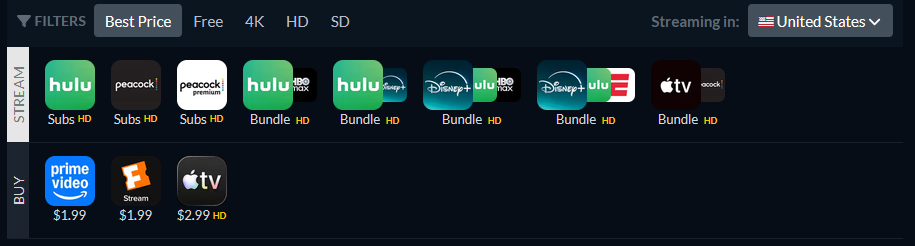
Notably, even though in SLM and here you see the "Prime Video" icon, it is not available on the provider "Amazon Prime Video". This program is available on Amazon for purchase, so that would be the provider "Amazon Video" if you did that.
SLM is completely dependent upon JustWatch having correct data. If you find an issue like this, just follow the directions in the link above to submit the issue to them. Potentially, while waiting for a fix, you could manually override the Stream Links, but I'm sure you'd rather not for something with so many episodes.
However, I did just check, and New Girl is on Hulu/Disney+. I'm wondering if there was a slight gap for some licensing reasoning or the other. If you are using an Android TV device, I have found Hulu has killed the ability to accept deep links, so if you click to launch it, nothing happens (a different error also discussed on the Troubleshooting & FAQ wiki page). You pretty much have to do the Hulu to Disney+ conversion now to get it to work there.
1 Like
Thank you so much! I never caught the “Stream” vs “Buy” next to the rows of icons on JustWatch. I will also use the link when I find inaccuracies. Again thanks for the great app and support!
Jim
Installed this and was trying to figure out how to bookmark shows. Did a search in Manage Programs and got results but didn't see an obvious "bookmark" button.
I must have clicked the wrong thing because for the last half hour or more I get this message when trying to go back to the Manage Programs page:
2026-07-20 12:12:04.964444: WARNING: A SLM process is currently underway and, due to this, 'Manage Programs' functionality cannot be run at this time. If you were executing an action, your last position will be saved and be available when the process completes. Please try again later.
There is nothing special on the home page dialog box and nothing obvious seemed to be going on in the logs.
Any ideas what to do?
1 Like
Please follow the directions on the Wiki...
Not enough info to know for sure, but that's a sign that a SLM process is running. But if you aren't seeing anything in the logs, then most likely something got started but never finished. You can just restart SLM and it will clear out, no harm, no foul. If you can recall exactly what you did to get to that state and I can replicate, I'll see if I can patch it out.
@babsonnexus any plans on implementing a hdhomerun proxy like Dispatcharr/Xteve/Threadfin/Antennas has? I think having a hdhomerun proxy would be nice as that would enable tuner sharing on Channels and for those who don't want to use Channels, they can run SLM with Plex with the url (eg. http://192.168.1.74:5000) and also where else adding Custom Channel isn't possible
I would have probably said no just a week ago, but now that I've already done the work to develop single stream m3u's for both fallback feeds and mixing Gracenote with XML EPG, I'm pretty much only a small hop away from being able to create a single list that could serve as the basis for a HDHR proxy. I'll look into it, but a lower priority...
1 Like
@babsonnexus Request for help...
Editing to add that this is the latest version... v2026.09.28.1044...
I have had SLM set up for quite a while with a few YT streaming stations and your fix using the PBS via millie...
It's been working with no issues...
Today, I wanted to add a streaming channel for Arirang TV and I added it in the Streaming Library Manager for Media Players page...
I matched the other entries...
I click Add and I get the following error:

If I click Save, same error...
I closed the Streaming Stations page, refreshed the main SLM page and then went back to try and add...
Same error...
I went as far as restarting the container...
Same error...
I then went into the log page and got this:
[info | 2026-10-10 13:29:20,196] - 10.89.3.25 - - [10/Oct/2026 13:29:20] "e[35me[1mPOST /playlists/streams HTTP/1.1e[0m" 500 -
[info | 2026-10-10 13:29:27,461] - 10.89.3.25 - - [10/Oct/2026 13:29:27] "GET /logs HTTP/1.1" 200 -
[info | 2026-10-10 13:29:27,491] - 10.89.3.25 - - [10/Oct/2026 13:29:27] "e[36mGET /static/assets/css/nucleo-icons.css HTTP/1.1e[0m" 304 -
[info | 2026-10-10 13:29:27,491] - 10.89.3.25 - - [10/Oct/2026 13:29:27] "e[36mGET /static/assets/css/nucleo-svg.css HTTP/1.1e[0m" 304 -
[info | 2026-10-10 13:29:27,493] - 10.89.3.25 - - [10/Oct/2026 13:29:27] "e[36mGET /static/assets/img/slm_navicon.png HTTP/1.1e[0m" 304 -
[info | 2026-10-10 13:29:27,493] - 10.89.3.25 - - [10/Oct/2026 13:29:27] "e[36mGET /static/assets/css/material-dashboard.css?v=3.0.0 HTTP/1.1e[0m" 304 -
[info | 2026-10-10 13:29:27,494] - 10.89.3.25 - - [10/Oct/2026 13:29:27] "e[36mGET /static/assets/js/core/popper.min.js HTTP/1.1e[0m" 304 -
[info | 2026-10-10 13:29:27,497] - 10.89.3.25 - - [10/Oct/2026 13:29:27] "e[36mGET /static/assets/js/core/bootstrap.min.js HTTP/1.1e[0m" 304 -
[info | 2026-10-10 13:29:27,499] - 10.89.3.25 - - [10/Oct/2026 13:29:27] "e[36mGET /static/assets/js/plugins/perfect-scrollbar.min.js HTTP/1.1e[0m" 304 -
[info | 2026-10-10 13:29:27,500] - 10.89.3.25 - - [10/Oct/2026 13:29:27] "e[36mGET /static/assets/js/plugins/smooth-scrollbar.min.js HTTP/1.1e[0m" 304 -
[info | 2026-10-10 13:29:27,501] - 10.89.3.25 - - [10/Oct/2026 13:29:27] "e[36mGET /static/assets/js/material-dashboard.min.js?v=3.0.0 HTTP/1.1e[0m" 304 -
[info | 2026-10-10 13:30:07,690] - 10.89.3.25 - - [10/Oct/2026 13:30:07] "GET /playlists/streams HTTP/1.1" 200 -
[info | 2026-10-10 13:30:07,733] - 10.89.3.25 - - [10/Oct/2026 13:30:07] "e[36mGET /static/assets/css/nucleo-icons.css HTTP/1.1e[0m" 304 -
[info | 2026-10-10 13:30:07,735] - 10.89.3.25 - - [10/Oct/2026 13:30:07] "e[36mGET /static/assets/css/material-dashboard.css?v=3.0.0 HTTP/1.1e[0m" 304 -
[info | 2026-10-10 13:30:07,735] - 10.89.3.25 - - [10/Oct/2026 13:30:07] "e[36mGET /static/assets/css/nucleo-svg.css HTTP/1.1e[0m" 304 -
[info | 2026-10-10 13:30:07,736] - 10.89.3.25 - - [10/Oct/2026 13:30:07] "e[36mGET /static/assets/img/slm_navicon.png HTTP/1.1e[0m" 304 -
[info | 2026-10-10 13:30:07,737] - 10.89.3.25 - - [10/Oct/2026 13:30:07] "e[36mGET /static/assets/js/core/popper.min.js HTTP/1.1e[0m" 304 -
[info | 2026-10-10 13:30:07,757] - 10.89.3.25 - - [10/Oct/2026 13:30:07] "e[36mGET /static/assets/js/core/bootstrap.min.js HTTP/1.1e[0m" 304 -
[info | 2026-10-10 13:30:07,757] - 10.89.3.25 - - [10/Oct/2026 13:30:07] "e[36mGET /static/assets/js/plugins/perfect-scrollbar.min.js HTTP/1.1e[0m" 304 -
[info | 2026-10-10 13:30:07,760] - 10.89.3.25 - - [10/Oct/2026 13:30:07] "e[36mGET /static/assets/js/plugins/smooth-scrollbar.min.js HTTP/1.1e[0m" 304 -
[info | 2026-10-10 13:30:07,760] - 10.89.3.25 - - [10/Oct/2026 13:30:07] "e[36mGET /static/assets/js/material-dashboard.min.js?v=3.0.0 HTTP/1.1e[0m" 304 -
[error | 2026-10-10 13:30:09,517] - Exception on /playlists/streams [POST]
Traceback (most recent call last):
  File "/usr/local/lib/python3.12/site-packages/flask/app.py", line 1511, in wsgi_app
    response = self.full_dispatch_request()
               ^^^^^^^^^^^^^^^^^^^^^^^^^^^^
  File "/usr/local/lib/python3.12/site-packages/flask/app.py", line 919, in full_dispatch_request
    rv = self.handle_user_exception(e)
         ^^^^^^^^^^^^^^^^^^^^^^^^^^^^^
  File "/usr/local/lib/python3.12/site-packages/flask/app.py", line 917, in full_dispatch_request
    rv = self.dispatch_request()
         ^^^^^^^^^^^^^^^^^^^^^^^
  File "/usr/local/lib/python3.12/site-packages/flask/app.py", line 902, in dispatch_request
    return self.ensure_sync(self.view_functions[rule.endpoint])(**view_args)  # type: ignore[no-any-return]
           ^^^^^^^^^^^^^^^^^^^^^^^^^^^^^^^^^^^^^^^^^^^^^^^^^^^^^^^^^^^^^^^^^
  File "/app/slm.py", line 11331, in webpage_playlists_streams
    make_streaming_stations_m3us()
  File "/app/slm.py", line 12456, in make_streaming_stations_m3us
    create_chunk_files(plmss_hls_final_m3us, os.path.join(playlists_uploads_dir_name, "plmss_hls_m3u"), "m3u", max_stations)
  File "/app/slm.py", line 18420, in create_chunk_files
    content = generate_m3u_content(chunk, base_filename, index)
              ^^^^^^^^^^^^^^^^^^^^^^^^^^^^^^^^^^^^^^^^^^^^^^^^^
  File "/app/slm.py", line 10484, in generate_m3u_content
    if item["tvg_shift"] not in [None, '', 0, '0']:
       ~~~~^^^^^^^^^^^^^
KeyError: 'tvg_shift'
2026-10-10 13:30:09.518886:  ERROR: Webpage responded... 500 INTERNAL SERVER ERROR
    Client IP: 10.89.3.25
    Method: POST
    URL: http://10.0.0.10:5002/playlists/streams
    Headers:
        Host: 10.0.0.10:5002
        Connection: keep-alive
        Content-Length: 29670
        Cache-Control: max-age=0
        Upgrade-Insecure-Requests: 1
        Content-Type: application/x-www-form-urlencoded
        User-Agent: Mozilla/5.0 (Windows NT 10.0; Win64; x64) AppleWebKit/537.36 (KHTML, like Gecko) Chrome/155.0.0.0 Safari/537.36
        Origin: http://10.0.0.10:5002
        Accept: text/html,application/xhtml+xml,application/xml;q=0.9,image/jxl,image/avif,image/webp,image/apng,*/*;q=0.8
        Sec-Gpc: 1
        Referer: http://10.0.0.10:5002/playlists/streams
        Accept-Encoding: gzip, deflate
        Accept-Language: en-US,en;q=0.9
        Cookie: last_user=xxxxx; remember_web_
59ba36addc2b2f9401gQ
    User Agent: Mozilla/5.0 (Windows NT 10.0; Win64; x64) AppleWebKit/537.36 (KHTML, like Gecko) Chrome/155.0.0.0 Safari/537.36
    Args: ImmutableMultiDict([])
    Data: No data
    Form Data: ImmutableMultiDict([('streaming_stations_source_test', 'Custom (HLS)'), ('streaming_stations_url_test', ''), ('streaming_stations_source_new', 'Custom (HLS)'), ('streaming_stations_url_new', ''), ('streaming_stations_title_new', ''), ('streaming_stations_tvg_logo_new', ''),
Note: If I go to the Summary page, I can click the "Update M3Us &XML" link with no error, as well as the Update Station List link, again, with no error.
Can you provide any assistance?
Thanks...
@babsonnexus -- Update to my request...
I reverted to the v2026.08.21.1518 image and this one worked...
I was able to add the channel, and then save it, without any errors...
Edit to add: the v2026.09.12.1244 release did not work also...
Any ideas why the latest version failed?
Let me know if you need any additional info...
I see the issue, thanks! This has been fixed in v2026.10.11.1257.
Good timing; I'm just back from vacation, otherwise would have sat around for a while!
Just pulled the new update and it works.
Thank you...
Hope you enjoyed your vacation and wasn't in one of the world's hot spots...
Earthquake in Panama, flooding all over Asia, hurricanes in CA and south-east US, etc.
Mother nature is getting mad...
1 Like