[RELEASE] Stream Link/File Manager for Channels [Streaming Library Manager Extension]

Ah, I see, you are talking about in Channels. By default, Channels shows in order by station number. So you can either (a) manually change the station numbers in PLM to get the order you want or (b) [much easier] use a Channels Collection:

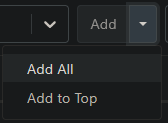
You can just add all from each source...

image

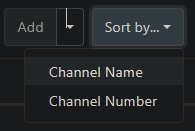
... and then sort alphabetically.

image

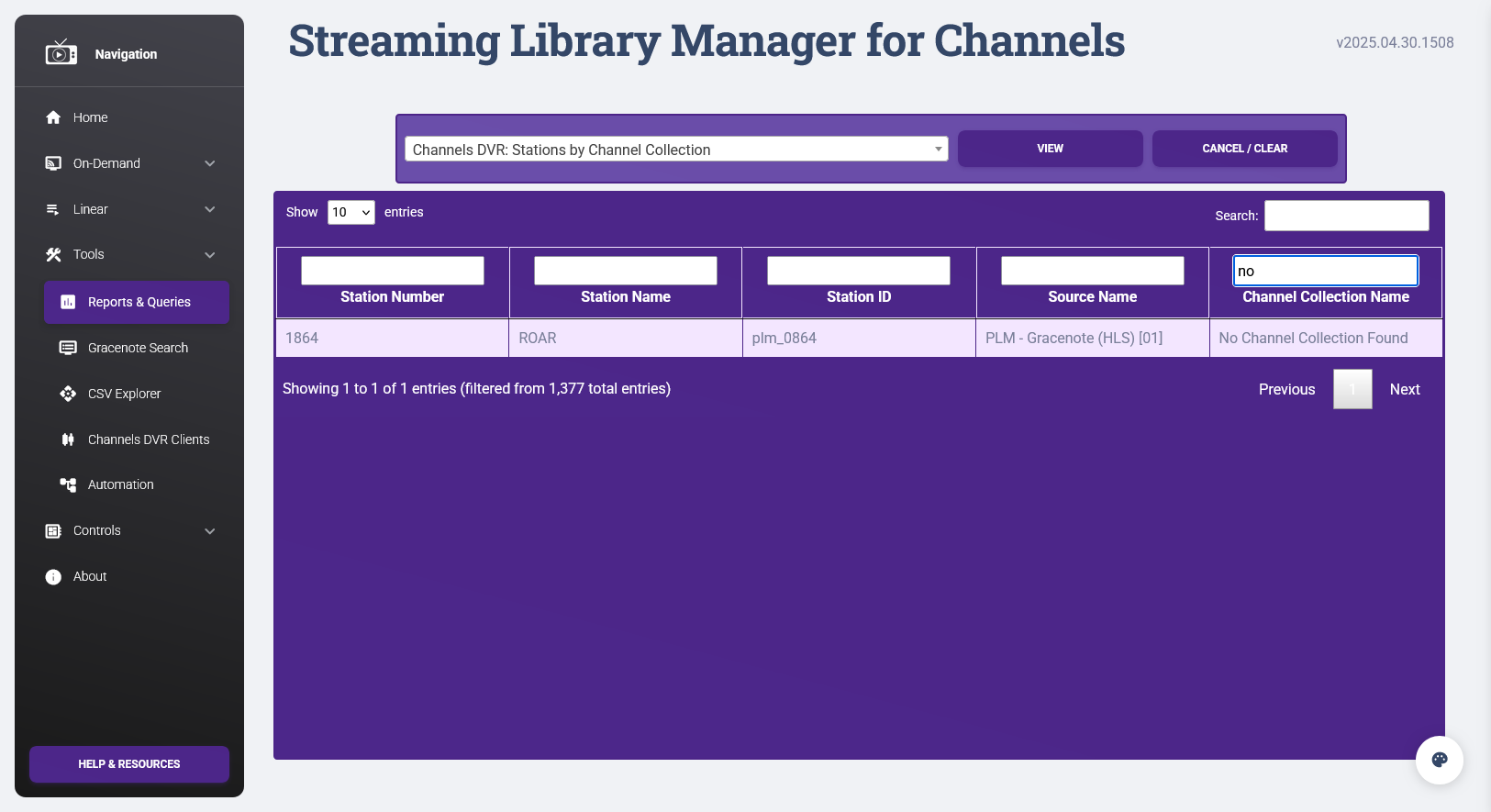
Just remember when you get new stations to also add them to the collection. You can also always check by running the report/query Channels DVR: Stations by Channel Collection and filtering for ones with "No Channel Collection Found":

I see this in my log, is there something I should change?

> * Exception in thread Thread-313 (run_slm_new_recent_releases):
> 
> * Traceback (most recent call last):
> 
> * File "/usr/local/lib/python3.12/threading.py", line 1075, in _bootstrap_inner
> 
> * self.run()
> 
> * File "/usr/local/lib/python3.12/threading.py", line 1012, in run
> 
> * self._target(*self._args, **self._kwargs)
> 
> * File "/app/slm.py", line 10107, in run_slm_new_recent_releases
> 
> * prune_scan_channels()
> 
> * File "/app/slm.py", line 9921, in prune_scan_channels
> 
> * get_slm_channels_info()
> 
> * File "/app/slm.py", line 10067, in get_slm_channels_info
> 
> * if remove_channels_id:
> 
> * ^^^^^^^^^^^^^^^^^^
> 
> * UnboundLocalError: cannot access local variable 'remove_channels_id' where it is not associated with a value

Oh, interesting, I hadn't considered a situation where you'd have bookmarks but not end up with any Stream Links/Files. This is now fixed:

I have been using the STRM option for creating video links to some YouTube material and after an update of either Portainer or SLM itself, when I play a video through channels it only allows me to play it the initial time and if I attempt to play again I get a recording corrupted (-16) error. Any advice? Thanks.

1 Like

This is not a noted or personally experienced behavior. Please provide details from the logs. First, repeat the actions and then get the info from the client logs:

Then, do the same and get details from the SLM logs:

If you aren't comfortable posting your logs here, feel free to PM me. Either way, please remember to put logs inside a Preformatted Text block.

image

This feels most likely like a local issue, either network or Docker, but I'll take a look.

EDIT: In prerelease testing, I have been able to do something like this using Tubi, but YouTube and Twitch don't cause me the error.

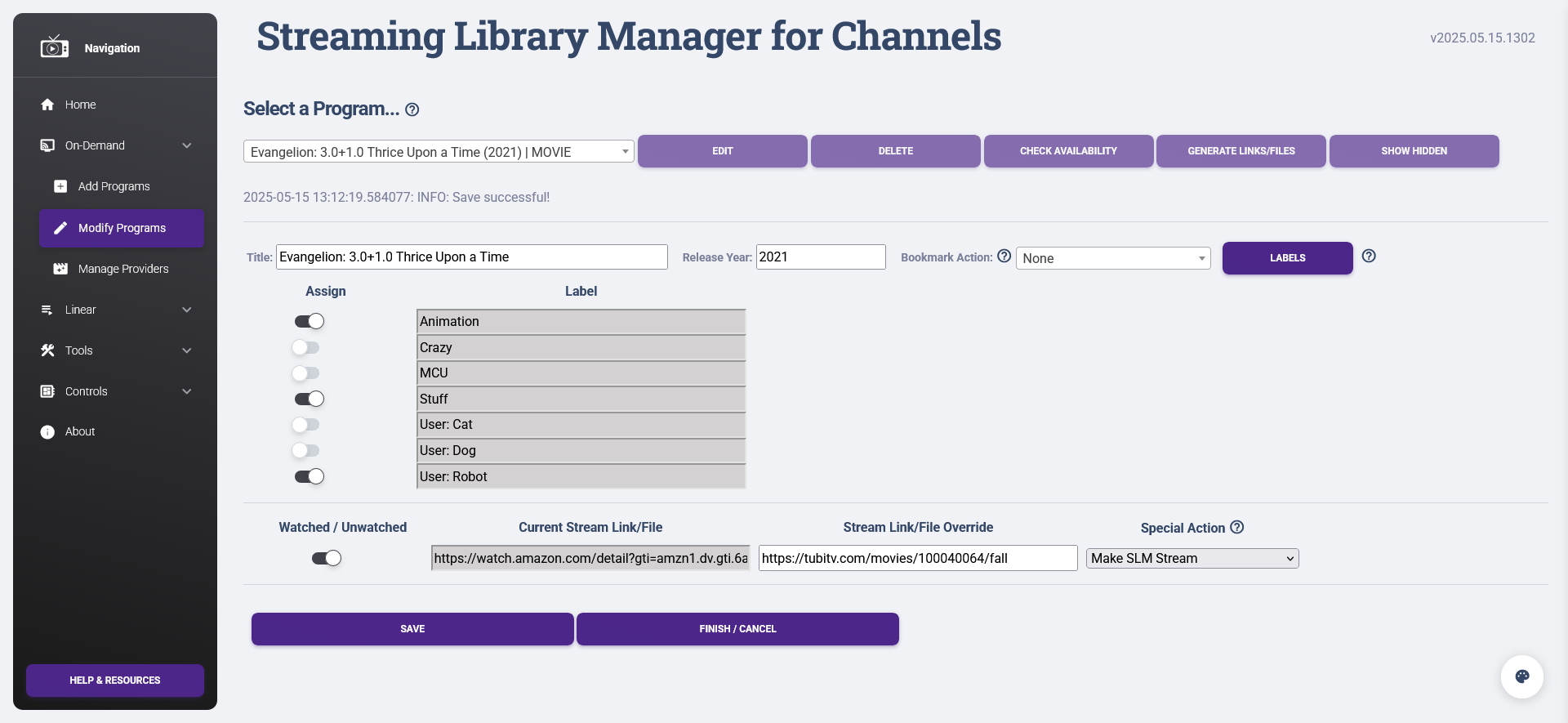
Is anybody else getting 500 errors when adding labels to shows/movies?

@babsonnexus pls assist

logs

    Args: ImmutableMultiDict([])

    Data: No data

    Form Data: ImmutableMultiDict([('title', 'Evangelion: 3.0+1.0 Thrice Upon a Time (2021) | MOVIE'), ('entry_id', 'tm323222'), ('field_title', 'Evangelion: 3.0+1.0 Thrice Upon a Time'), ('field_release_year', '2021'), ('field_bookmark_action', 'None'), ('webpage_label_id_1', 'slmlbl_0003'), ('webpage_label_name_1', 'Action and Adventure'), ('webpage_label_id_2', 'slmlbl_0001'), ('webpage_label_active_2', 'on'), ('webpage_label_name_2', 'Anime'), ('webpage_label_id_3', 'slmlbl_0005'), ('webpage_label_name_3', 'Cartoons'), ('webpage_label_id_4', 'slmlbl_0004'), ('webpage_label_name_4', 'Game Shows'), ('webpage_label_id_5', 'slmlbl_0002'), ('webpage_label_name_5', 'Sports'), ('webpage_label_id_6', 'slmlbl_0006'), ('webpage_label_name_6', 'Westerns'), ('field_object_type', 'MOVIE'), ('field_status_1', 'on'), ('field_stream_link_override_1', ''), ('field_special_action_1', 'None'), ('action', 'program_modify_save')])

2025-05-14 21:24:13.657384:  ERROR: Webpage responded... 404 NOT FOUND

    Client IP: 172.17.0.1

    Method: GET

    URL: http://tailscaleip:5000/favicon.ico

    Headers: 

        Host: tailscaleip:5000

        User-Agent: Mozilla/5.0 (Windows NT 10.0; Win64; x64; rv:137.0) Gecko/20100101 Firefox/137.0

        Accept: image/avif,image/webp,image/png,image/svg+xml,image/*;q=0.8,*/*;q=0.5

        Accept-Language: en-US,en;q=0.5

        Accept-Encoding: gzip, deflate

        Dnt: 1

        Sec-Gpc: 1

        Connection: keep-alive

        Referer: http://tailscaleip:5000/modifyprograms

        Cookie: user_session=bla; agh_session=bla; session=bla; organizrLanguage=en; connect.sid=bla; _gorilla_csrf=bla; organizr_user_uuid=bla; organizr_token_bla; portainer_api_key=bla

        Priority: u=6

    User Agent: Mozilla/5.0 (Windows NT 10.0; Win64; x64; rv:137.0) Gecko/20100101 Firefox/137.0

    Args: ImmutableMultiDict([])

    Data: No data

2025-05-14 21:25:14.458343:  ERROR: Webpage responded... 500 INTERNAL SERVER ERROR

    Client IP: 172.17.0.1

    Method: POST

    URL: http://tailscaleip:5000/modifyprograms

    Headers: 

        Host: tailscaleip:5000

        User-Agent: Mozilla/5.0 (Windows NT 10.0; Win64; x64; rv:137.0) Gecko/20100101 Firefox/137.0

        Accept: text/html,application/xhtml+xml,application/xml;q=0.9,*/*;q=0.8

        Accept-Language: en-US,en;q=0.5

        Accept-Encoding: gzip, deflate

        Content-Type: multipart/form-data; boundary=----geckoformboundarybla

        Content-Length: 3067

        Origin: http://tailscaleip:5000

        Dnt: 1

        Sec-Gpc: 1

        Connection: keep-alive

        Referer: http://tailscaleip:5000/modifyprograms


It seems to error out when I try adding a custom stream link too. Bizarre

I can't seem to replicate, everything is working for me:

Is there something else in the logs from before there, like something that mentions a specific line of code?

Or could Tailscale be pointing somewhere wrong? What happens if you just use localhost or the ip address directly? Or are you using this remotely (haven't really done too much remote testing)?

Same results really with my local ip. Haven't tried localhost (but I doubt it would work). Maybe I need to do some maintenance?

Found this on top of my logs. Maybe something?

2025-05-15 15:22:00.801720:  Scanning for new episodes...

2025-05-15 15:22:01.249764:  Finished 'Refresh Channels DVR m3u Playlists' Automation.

2025-05-15 15:23:19.328684:  INFO: Starting importing labels from Channels DVR...

2025-05-15 15:23:19.328794:  INFO: Importing Channels DVR info...

2025-05-15 15:23:54.751342:  INFO: Finished importing Channels DVR info.

2025-05-15 15:23:56.612634:  ERROR: Writing data... list index out of range

2025-05-15 15:23:56.612724:  INFO: Finished importing labels from Channels DVR.

2025-05-15 15:23:59.357743:  ERROR: Webpage responded... 500 INTERNAL SERVER ERROR

And now this new error with a new installation

`Exception in thread Thread-1 (check_schedule):

Traceback (most recent call last):

  File "/usr/local/lib/python3.12/threading.py", line 1075, in _bootstrap_inner

    self.run()

  File "/usr/local/lib/python3.12/threading.py", line 1012, in run

    self._target(*self._args, **self._kwargs)

  File "/app/slm.py", line 7406, in check_schedule

    gen_backup_schedule = settings[19]["settings"]

                          ~~~~~~~~~~~~^^^^^^^^^^^^

KeyError: 'settings'`

I took a different approach and deleted the stack and was going to re-install to check if I did something wrong, then I saw this on the GitHub site For SLM Streams

WARNING: Currently, this is only working in Android/Google TV Channels DVR Clients and other third-party tools like VLC. There is a bug in the Channels DVR Apple TV client that must be resolved by the Devs there.

So, could this be one of my issues? I am using Apple TV as my client’s. Will re-install soon and also attempt the YouTube videos via a google client I could hookup, but it is strange that it initially worked with make STRM, but also I notice when receiving the error (-16) if I continue to attempt to play it will eventually play the video, then revert back to the error with a later attempt.

It is. Basically, I figured out that if you try to import metadata (and particularly labels) from Channels and you don't have any (or any valid ones), it can corrupt certain data files, resulting in the errors you were seeing. This is now fixed so it won't happen again, but you might have to do a quick manual fix to reverse the damage. Details here:

I'm not getting anything like that in a new installation, but I'm not sure if something was moving too fast for you. That could happen if the Settings file doesn't exist. Even if the thread does start before the file exists for some reason, it will correct itself anyway once the file is created (it's constantly checking).

This is your issue; as the warning says, Apple TV clients are not supported at this time. It's up to the Channels Devs to fix something related to ffmpeg in there, which I know they are hesitant to do because it could impact a lot of other functions. Sorry, there is nothing more I can do to work around it; I beat my head against a wall for weeks trying to find a way.

:+1:
:+1:

Still not working. Although, this time everything else works but setting the label :rofl:

[ERROR | 2025-05-15 22:47:21,108] - Exception on /modifyprograms [POST]
Traceback (most recent call last):
  File "/usr/local/lib/python3.12/site-packages/flask/app.py", line 1511, in wsgi_app
    response = self.full_dispatch_request()
               ^^^^^^^^^^^^^^^^^^^^^^^^^^^^
  File "/usr/local/lib/python3.12/site-packages/flask/app.py", line 919, in full_dispatch_request
    rv = self.handle_user_exception(e)
         ^^^^^^^^^^^^^^^^^^^^^^^^^^^^^
  File "/usr/local/lib/python3.12/site-packages/flask/app.py", line 917, in full_dispatch_request
    rv = self.dispatch_request()
         ^^^^^^^^^^^^^^^^^^^^^^^
  File "/usr/local/lib/python3.12/site-packages/flask/app.py", line 902, in dispatch_request
    return self.ensure_sync(self.view_functions[rule.endpoint])(**view_args)  # type: ignore[no-any-return]
           ^^^^^^^^^^^^^^^^^^^^^^^^^^^^^^^^^^^^^^^^^^^^^^^^^^^^^^^^^^^^^^^^^
  File "/app/slm.py", line 2284, in webpage_modify_programs
    temp_record = create_temp_record(label_maps[0].keys())
                                     ~~~~~~~~~~^^^
IndexError: list index out of range
2025-05-15 22:47:21.113010:  ERROR: Webpage responded... 500 INTERNAL SERVER ERROR

Did you do the manual fix to get the headers back into the label files as shown in the link above?

Yep...and each file has their header rows so yeah :man_shrugging:

1 Like

Okay, I got it now (for real this time!):

1 Like

Finally. It works!! :smiley:

I can start generating streamlinks for my dad and his love affair with western movies :smiley:

SLM deleting episodes it should not. The issue started with v2025.05.16.1232

The first delete in the log is correct. It then goes on to delete episode 11 for other shows even though they exist. See this log info:

2025-05-19 06:15:00.723152: Beginning SLM New & Recent Releases process...
2025-05-19 06:11:03.022976: SLM End-to-end update process complete.
2025-05-19 06:11:03.022976: Total Elapsed Time: 0 hours | 1 minutes | 2 seconds
2025-05-19 06:11:01.022277: Connecting SLM and Channels DVR metadata complete.
2025-05-19 06:11:00.864003: Scan complete.
Deleted: \BEE\dvr\DVR\Imports\TV\slm\Kim's Convenience (2016)\Season 05\S05E11.strmlnk
Deleted: \BEE\dvr\DVR\Imports\TV\slm\Kim's Convenience (2016)\Season 04\S04E11.strmlnk
Deleted: \BEE\dvr\DVR\Imports\TV\slm\Kim's Convenience (2016)\Season 03\S03E11.strmlnk
Deleted: \BEE\dvr\DVR\Imports\TV\slm\Kim's Convenience (2016)\Season 02\S02E11.strmlnk
Deleted: \BEE\dvr\DVR\Imports\TV\slm\Kim's Convenience (2016)\Season 01\S01E11.strmlnk
Deleted: \BEE\dvr\DVR\Imports\TV\slm\The Good Place (2016)\Season 04\S04E11.strmlnk
Deleted: \BEE\dvr\DVR\Imports\TV\slm\The Good Place (2016)\Season 03\S03E11.strmlnk
Deleted: \BEE\dvr\DVR\Imports\TV\slm\The Good Place (2016)\Season 02\S02E11.strmlnk
Deleted: \BEE\dvr\DVR\Imports\TV\slm\Brooklyn Nine-Nine (2013)\Season 06\S06E11.strmlnk
Deleted: \BEE\dvr\DVR\Imports\TV\slm\Brooklyn Nine-Nine (2013)\Season 05\S05E11.strmlnk
Deleted: \BEE\dvr\DVR\Imports\TV\slm\Brooklyn Nine-Nine (2013)\Season 04\S04E11.strmlnk
Deleted: \BEE\dvr\DVR\Imports\TV\slm\Brooklyn Nine-Nine (2013)\Season 03\S03E11.strmlnk
2025-05-19 06:10:00.153985: Beginning SLM end-to-end update process...

Thank you for looking into this

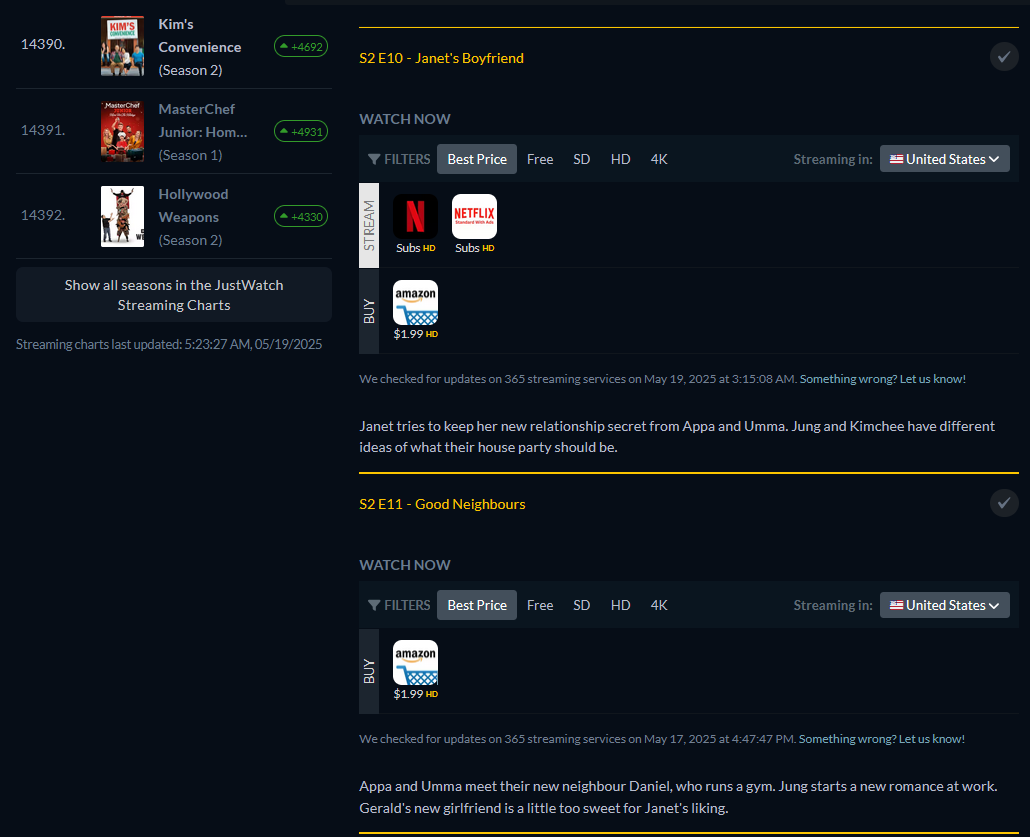
This is not an SLM issue; SLM is working exactly as expected. The problem lies with the metadata on JustWatch, on which SLM is dependent. If you follow the Troubleshooting / FAQ directions, you would see that those episodes are missing links to your streaming services. For instance:

Given the very specific pattern of episode 11 on Netflix, I'm fairly confident this is a temporary issue and they'll have it fixed by tomorrow. But if not, follow the directions from the link above to let them know.

1 Like