Thanks, that's kinda what i figured.
I just checked. Yes all netflix Deep Links are just to the show. The Netflix app does a fine job of tracking what episode you are up to. I delete the episode links as I view things to know what I've seen.
Thanks. The problem is on Apple TV the link is playing what netflix thinks is the next episode with no convient way to get back to the episode list.
I'll give it a go and see what the user experience is like.
Some services like Amazon Prime and Apple TV have a mixture of 'free to subscriber' titles and titles to rent and buy. When a title is found at multiple sources would it be technically feasible for SLM to prioritize sources based on if the title is available to me via a subscription I already have vs to rent?
For example, I'd generally prefer Apple TV over Amazon Prime but if a title is included in my Prime subscription but only available for rental or purchase on Apple I'd prefer Amazon in that case.
You can set the priority of the streaming app to use in settings.
Please read the Wiki; all your questions are answered there. Most notably:
I’ve read that. I understand I can do it manually. The beauty of what you built is you’ve automated the work of maintaining a library of stream links.
I’m suggesting giving SLM the ability to pick the best source to use automatically based on more criteria then just a priority list of sources.
IMO this would be really nice in cases when you first bookmark a movie and it’s only available to rent and then later it gets added to Netflix or Prime for subscribers.
Appreciate the response. I know you can set a priority order based on the service. I’m suggesting the prioritization be more sophisticated so that you can specify prioritizing sources where a given title is free to subscribers vs available to rent/purchase.
While I still believe you could probably handle this with just the selection and order of streaming services, especially because rental vs. subscriber content is often already broken up this way (i.e., "Amazon Video" vs. "Amazon Prime Video"), I'm willing to take a look. Please provide an example of a Movie or Show that matches your description.
That all said, I want to set expectations. From what I do know of the metadata, this would not be easy. Mostly, it would require a very different approach to how subscribe and priority work right now, as well as actually searching for the Stream Links. Given the complexity and ripping out of existing functionality, this will not be accomplished anytime in the near future, if at all.
The streaming service priority works as long as rentals and purchases are considered separate services from the subscription services. I assumed that wasn't the case but it looks like I may be wrong.
I checked a couple of titles on Amazon and Apple and it looks like Just Watch is reporting things for rental / purchase as 'Apple Tv' or 'Amazon Video' and titles that you can subscribe to as 'Apple TV+' and 'Amazon Prime'.
The show 'Reacher' is available on Amazon Prime for free to subscribers but on Just watch shows it as available on Apple TV for Purchase / Rent.
The movie 'Peanut Butter Falcon' shows as available on Netflix but for Rent on Apple TV.
I guess the answer may be as simple as putting all the streaming services you subscribe too above the rental sources.
I'll play around with that and if I find some cases where that doesn't work will open a feature request on github for future consideration.
 Happy Birthday Stream Link Manager!
On this day a year ago, I released the original prototype (which basically could just create empty files and folders for you). It's come a long way since then, and that's thanks to all of you kicking my butt and pushing the boundaries of what I knew or thought were possible! And because of that, my technical skills in the necessary areas have grown exponentially.
Here's to the year ahead, and all the functionality we can add!

2 Likes
You launched on All Fools Day?
No joke!
At some point during the update process my SLM folder had all of its STRMLNK files removed probably due to my incompetence and lack of IT skills however all of these movies still show up in my Channels library and work,I’ve got over 500 movies in my Channels library all of which are STRMLNKs but there’s now only 70 files in my SLM folder which are the new ones I’ve created since the last update,is there a way of me obtaining these previously created files,I want to back them up to my Google Drive incase of a hard drive failure and so I can edit them if needed?
If the files aren't there, then they don't exist, so there is nothing to save. I'm assuming you have prune turned off or you aren't using any automation, otherwise they wouldn't be in Channels anymore. But if your programs are still bookmarked, just regenerate the Stream Links for them and their files will return.

Be sure to run Generate Strem Links/Files stand-alone first. If SLM finds the Stream Link files are missing from where it expected them to be, it will mark them all as watched. If that has already happened, you need to mark them as unwatched first.
Given that it seems you'd want to do this en masse, you might want to look into editing the Bookmarks Statuses file directly.
Unless you somehow lost your core program_files and your bookmarks are no longer in there. If this is the case, lesson learned on needing to back those up!
This plugin is essential. Thank you, thank you, thank you.
One request: Sort By options. Specifically, on Parents, by optional Channel #. This would help when trying to map and clean up your guide.
The funny part is, I actually had some of this in an earlier development phase (especially in Reports/Queries), but it was causing a lot of issues I couldn't get over at the time. That said, I think it's worth a revisit. Request added:
1 Like
A question:
I started out with a couple of playlist sources, and have added some over time.
Originally, all of the channels generated by PLM were in alphabetical order, but added ones are getting assigned channels after the original one, making several, each in alpha, but harder to find a specific channel.
Is there a way to have the saved order cleared out, so that a new pass can have a single alphabetical list?
If not, then consider this a feature request ;-(
I don't understand; all assigned, unassigned, parent, etc... list are displayed in alphabetical order by name to begin with, as are the output m3u's. The parent station numbers are just numerically +1 as each one is added, and that cannot be changed because it is in relation to a unique identifier tied to the parent. However, you can always override the numbers if they bother you. Also, I recommend using the built-in filter functionality for finding things.
If there is something I'm not quite getting, please provide screen shots and detailed explanations.
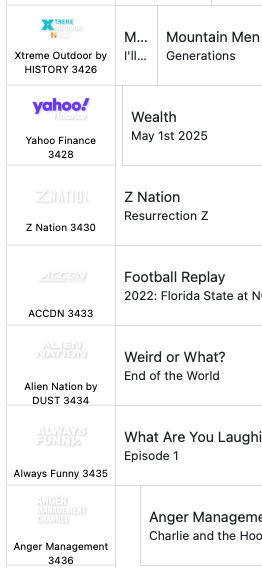
Sure. In the attached screenshot, you can see the channels that are (up to that point) all in alphabetical order, ending in "Z Nation". Then, from the next source, we start again with the A's, and "ACCDN".
I'd like a way to get all of the (now multiple) sources merged with one list of accending stations, that are also in alphabetical order, if possible.